

Introduction
This article describes a simple PHP function that can be used to create a Zip file archive with PHP. The function receives two parameters: an array with the path-name of the files to be added to the archive, and a string with the path-name of the Zip file that will be created. PHP's ZIP class provides all the functionality you need! To make the process a bit easier for you, I've coded a simple create_zip function for you to use in your projects.
- Important: If you work on a Linux system, PHP must have CHMOD write permisions in the directory in which the Zip file archive will be created.

Example
Code to create a Zip file
Let's see one example that shows you how to create a Zip file. Here, I have create a function that creates a Zip file.
<?php
function createZip($files, $zip_file) {
$zip = new ZipArchive;
if($zip->open($zip_file, ZipArchive::CREATE) === TRUE)
{
foreach($files as $file)
{
$zip->addFile($file);
}
$zip->close();
return true;
}
else return false;
}
$files = array('file1.txt', 'image.jpg', 'audio.mp3');
$zip_file = 'final.zip';
if(createZip($files, $zip_file))
echo 'The '. $zip_file. ' successfully created';
else
echo 'Unable to create the '. $zip_file. ' file';
?>
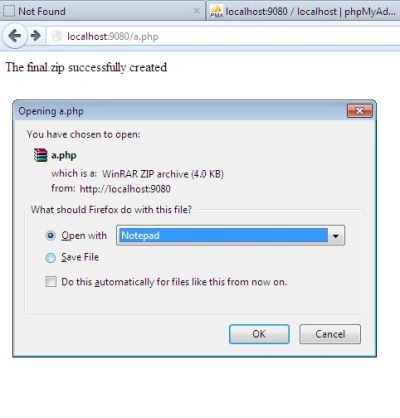
Output

If the $zip_file already exists on the server, the files will be added to that archive, also keeping the existing files in the ZIP.
- To overwrite the Zip archive, replace CREATE with OVERWRITE .
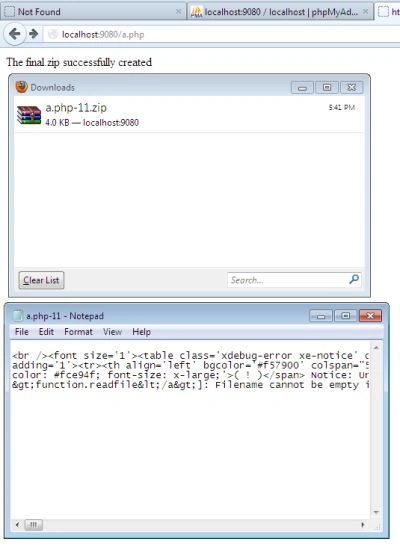
- If you want the Zip archive to be downloaded after it was created, use the following code.
Code to download and open a Zip file
The following is sample code to download and open a Zip file:
<?php
// here the code that adds the files in ZIP archive
header('Content-type: application/zip');
header('Content-disposition: filename="'. $zip_file. '"');
header('Content-length:'. filesize($zip_file));
readfile($zip_file);
exit();
?>
Output
MN RajPosted Feb 16, 2014, 3:04 AM
please can you elaborate bit more "how to add zip to server/make zip in server ...
Vinod KumarPosted Jun 29, 2013, 7:46 AM
Thanks vineet..
Vineet Kumar SainiPosted Jan 24, 2013, 8:46 AM
Nice & very useful Article !!!