

Introduction
The objective of this article is to configure ASP.NET Membership to store user information in an external SQL Server database. We will use SQLMembershipProvider for this task.
ASP.NET Membership
ASP.NET Membership enables us to validate and store user information. It creates all the necessary tables and stored procedures to store and manage user credentials. It provides an API that can be used to manage user's information programmatically.
ASP.NET Membership provides two types of Membership providers:
- SQLMembershipProvider : It is used to store user information in a SQL Server database
- ActiveDirectoryMembershipProvider : It is used to store user information in an Active Directory.
To configure SQLMembershipProvider, first you need to configure your database.
Open Visual Studio Command Prompt (All Programs -> Microsoft Visual Studio 2008 -> Visual Studio Tools -> Visual Studio 2008 Command Prompt)
Type command : aspnet_regsql and press Enter
This will launch ASP.NET SQL Server Setup Wizard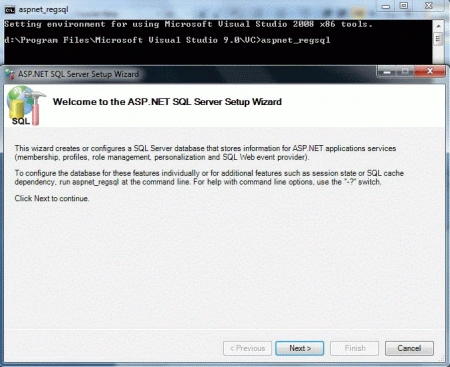
Click Next
Leave the default selection "Configure SQL Server for application services" and click Next again.
Enter the server name, Select SQL Server authentication and enter user id and password as in the following figure. Select the database you want to configure. Here, I am using Employee database.
Click Next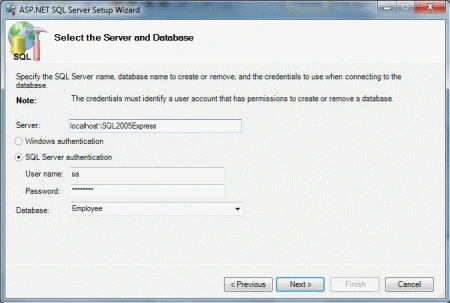
Click Next and then Finish.
Now, you can see the new tables created in the Employee database for storing user credentials. These table names start with "aspnet_". Similarly, you can also see new Stored Procedures created in the database with "aspnet_" prefix.
Now, we have configured our Employee database. Our next task is to enable SQLMembershipProvider in a Web application. Follow these steps to do that:
- Create a new ASP.NET Web Application
- Add <authentication mode="Forms"/> in the Web.Config file. ASP.NET Membership works with only Forms Authentication
- Add the following to enable SQLMembershipProvider:
<membership defaultProvider="MyMembershipProvider" >
<providers>
<add name="MyMembershipProvider"type="System.Web.Security.SqlMembershipProvider"
connectionStringName="ConString" />
</providers>
</membership>
- Add a connection string with the name "ConString" to connect with the Employee database
<connectionStrings>
<add name="SqlConString" connectionString="Data Source=localhost\SQL2005EXPRESS; User ID=youruserid; Password=yourpassword;
Initial Catalog=Employee;" />
</connectionStrings>
Now, we are ready to use ASP.NET Membership to create a new user using CreateUserWizard control and authenticate users using Login control.
Dror SaddanPosted Jul 11, 2024, 8:08 AM
Need to fix <membership defaultProvider="MyMembershipProvider" > <providers> <add name="MyMembershipProvider" type="System.Web.Security.SqlMembershipProvider" connectionStringName="ConString" /> </providers> </membership> to <membership defaultProvider="MyMembershipProvider" > <providers> <add name="MyMembershipProvider" type="System.Web.Security.SqlMembershipProvider" connectionStringName="SqlConString" /> </providers> </membership>
Mahesh PrajapatiPosted Aug 24, 2018, 4:39 AM
Thanks Deepak Raja
Ngon ThanhPosted Mar 26, 2014, 4:39 AM
Hi Deepar Sharma. If connectionStrings was encrypted, how to connectionsname in membership decrypt? Help me. I'm not good English. Thanks
ToBePosted Mar 18, 2013, 8:28 AM
Nice Article Deepak Sharma I followed the steps but I need to know how can I set the users credentials from Active directory I want to give permission on each page based on the Group permission e.g Admin group can access full , Reader Group can access only Reports, Normal Group can access only certain pages .The three groups are located in the AD .thanks
Deepak SharmaPosted Feb 7, 2012, 11:16 PM
Thanks!!!
Akash AhlawatPosted Feb 6, 2012, 10:59 PM
Great stuff.Keep it up!!!
Arjun PanwarPosted Feb 6, 2012, 10:57 PM
Really thanks for this useful article
Alok PandeyPosted Feb 5, 2012, 11:47 PM
Good article. Thanks for sharing.
Daisy KrausePosted Feb 5, 2012, 11:00 PM
Great what an article. I will surely implement this.