

In this article you will see how you can show your current location in Bing Maps in Windows Phone 7.
Objective
The objective of this article is to get the current latitude and longitude of your phone using the Location API and passing it to the Map control to show your exact location on the map. As every Windows 7 phone is equipped with an inbuilt GPS, we can easily obtain its coordinates with high accuracy.
Step 1: Create a new Windows Phone Application.
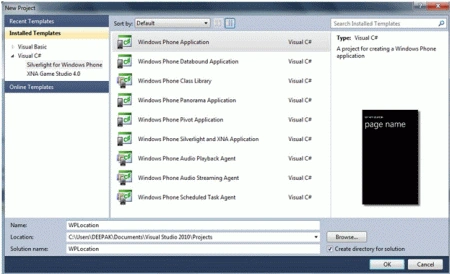
Step 2:
Drag a Map control onto MainPage.xaml and adjust it to fit the Grid. Register for a Bing Maps API key at www.bingmapsportal.com and set the value of CredentialsProvider attribute with your key.
<my:Map Name="map1" CredentialsProvider="Your Map Key" Width="438" Height="595" HorizontalAlignment="Left" VerticalAlignment="Top"/>
Step 3:
To use Location service, we need to add a reference to System.Device dll and include System.Device.Location namespace
MainPage.xaml.cs
using System.Device.Location;
GeoCoordinateWatcher myCoordinateWatcher;
double Latitued, Longitude;
private void PhoneApplicationPage_Loaded(object sender, RoutedEventArgs e)
{
Latitued = 28.3131;
Longitude = 77.1212;
map1.Center = new GeoCoordinate(Latitued, Longitude);
map1.ZoomLevel = 5;
map1.ZoomBarVisibility =Visibility.Visible;
myCoordinateWatcher = new GeoCoordinateWatcher(GeoPositionAccuracy.High);
myCoordinateWatcher.PositionChanged += new EventHandler<GeoPositionChangedEventArgs<GeoCoordinate>>(myCoordinateWatcher_PositionChanged);
}
Note: To add PositionChanged event, just type myCoordinateWatcher.PositionChanged += and press TAB key twice. Visual Studio will create event for you.
void myCoordinateWatcher_PositionChanged(object sender, GeoPositionChangedEventArgs<GeoCoordinate> e)
{
if (!e.Position.Location.IsUnknown)
{
Latitued = e.Position.Location.Latitude;
Longitude = e.Position.Location.Longitude;
map1.Center = new GeoCoordinate(Latitued, Longitude);
}
}
Code Explanation:
The System.Device.Location namespace is added to use the Location API. A GeoCordinateWatcher and two double variables are declared inside the class declaration. In the application load event default values for Latitude and Longitude are set. Map1.Center is used to set the map center to the given coordinates. Map1.ZoomLevel=5 is used to set the zoom level of the map. Map1. ZoomBarVisibility is used to show Zoom In and Zoom Out buttons. GeoCoordinateWatcher is used to get the current Latitude and Longitude of the device. GeoPositionAccuracy.High is used to ensure that we will get the coordinates with high accuracy. The PositionChanged event of GeoCoordinateWatcher is fired when the phone is moved to a different location. In the myCoordinateWatcher_PositionChanged if the Location is known then the current Latitude and Longitude is retrieved and the map is centered at that coordinates.
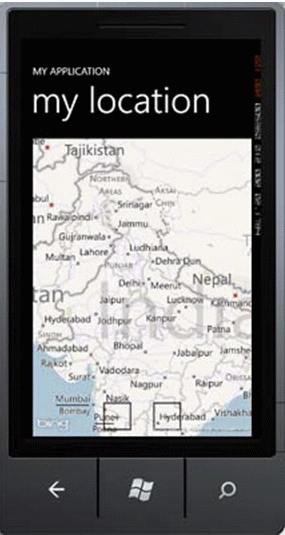
Unfortunately the Location service only works with a live device; it does not give any default value in the Emulator. So, I have used default coordinates to position the map to India when the application loads.
Final Output
Mayuresh ShindePosted Jan 7, 2016, 6:03 AM
ghari ja
sajid rajaPosted Jul 22, 2013, 5:48 AM
hello i tried this but when i add CredentialsProvider="" in XML all the code is broked and shows error screen in designer view. Also Map is not showing in Application.
basu hPosted Apr 16, 2013, 3:19 AM
Thanks , good working code
tek bhattaPosted Oct 7, 2012, 9:30 PM
Nice one. Can we show current location on google map in Windows phone? How? Thank you.
Amit PatelPosted Jun 25, 2012, 9:17 AM
Good One Deepak..
Abhi KumarPosted Feb 12, 2012, 11:09 PM
Nice article, Deepak.
Daisy KrausePosted Feb 12, 2012, 11:09 PM
Great what an article. I will surely implement this.
James LerdorfPosted Feb 12, 2012, 10:51 PM
Really, this article is so valuable.