

Introduction
Want to build a Roguelike game with C# in 5 minutes? The following is a really quick game I built in about 2 hours and shows how easy it is to get a simple game going.
It's a very, very, very simple game - all you do is pick up a sword before the monster gets to you, and you win. Obviously, if the monster gets to you first - well, you can work out the ending.
Implementation of Console Application
C# on Visual Studio 2005/2008 or 2010. Any version should be fine as long as you can create a console application.
Now we are going to add the following into 1 file in Visual Studio; rather than using multiple files, and whilst this is not the best practice for a serious application, we are doing this to keep things really simple and to display the entire application on a few pages of paper.
Start Visual Studio 2010.
File->New Project.
Select the Windows->Console Application.
Name the Project ReallyReallyRealySimpleRogueLike and click OK.
Right-click on References->Add Reference.
Click on Assemblies, then Framework, and select System. Drawing.
At the top of the Program.cs insert the following line using System. Drawing.
Replace the program class with the following.
using System;
class ReallyReallyReallySimpleRogueLike
{
    static void Main(string[] args)
    {
        Dungeon dungeon = new Dungeon(Constants.DungeonWidth, Constants.DungeonHeight);
        string displayText = Constants.IntroductionText;
        while (dungeon.IsGameActive)
        {
            dungeon.DrawToConsole();
            Console.WriteLine(displayText);
            Console.Write(Constants.CursorImage);
            displayText = dungeon.ExecuteCommand(Console.ReadKey());
        }
        Console.WriteLine(ConcludeGame(dungeon));
        Console.ReadLine();
    }
    private static string ConcludeGame(Dungeon dungeon)
    {
        return (dungeon.player.Hits > 0) ? Constants.PlayerWinsText : Constants.MonsterWinsText;
    }
}
Now add the following class.
using System;
using System.Collections.Generic;
using System.Linq;
class Dungeon
{
    Random r;
    public Player player;
    List<Monster> monsters;
    List<Sword> swords;
    List<Wall> walls;
    public Tile[,] Tiles;
    private int xMax;
    private int yMax;
    public enum Direction
    {
        North,
        South,
        East,
        West
    }
    public bool IsGameActive
    {
        get
        {
            return (player.Hits > 0 && monsters.Any(m => m.Hits > 0));
        }
    }
    public Dungeon(int xMax, int yMax)
    {
        monsters = new List<Monster>();
        walls = new List<Wall>();
        swords = new List<Sword>();
        this.xMax = xMax;
        this.yMax = yMax;
        Tiles = new Tile[xMax, yMax];
        BuildRandomDungeon();
        SetDungeonTiles();
    }
    public string ExecuteCommand(ConsoleKeyInfo command)
    {
        string commandResult = ProcessCommand(command);
        ProcessMonsters();
        SetDungeonTiles();
        return commandResult;
    }
    private void ProcessMonsters()
    {
        if (monsters != null && monsters.Count > 0)
        {
            monsters.Where(m => m.Hits >= 0).ToList().ForEach(m =>
            {
                MoveMonsterToPlayer(m);
            });
        }
    }

    private void BuildRandomDungeon()
    {
        r = new Random();
        SetAllDungeonSquaresToTiles();
        for (int i = 0; i < xMax; i++)
        {
            Wall top = new Wall(i, 0);
            walls.Add(top);
            Wall bottom = new Wall(i, yMax - 1);
            walls.Add(bottom);
        }
        for (int i = 0; i < yMax; i++)
        {
            Wall left = new Wall(0, i);
            walls.Add(left);
            Wall right = new Wall(xMax - 1, i);
            walls.Add(right);
        }
        for (int i = 0; i < Constants.NumberOfSwords; i++)
        {
            Sword s = new Sword(GetValidRandomPoint());
            swords.Add(s);
        }
        for (int i = 0; i < Constants.NumberOfMonsters; i++)
        {
            Monster m = new Monster(GetValidRandomPoint());
            monsters.Add(m);
        }
    }
    private void MoveMonsterToPlayer(Monster monster)
    {
        Point move = new Point(monster.X, monster.Y);

        move.X += (monster.X < player.X) ? 1 : (monster.X > player.X) ? -1 : 0;
        move.Y += (monster.Y < player.Y) ? 1 : (monster.Y > player.Y) ? -1 : 0;
        if (!IsInvalidValidMove(move.X, move.Y))
        {
            monster.X = move.X;
            monster.Y = move.Y;
        }
        if (monster.X == player.X && monster.Y == player.Y)
            ResolveCombat(monster);
    }
    private void ResolveCombat(Monster monster)
    {
        if (player.Inventory.Any())
            monster.Die();
        else
            player.Die();
    }
    public string ProcessCommand(ConsoleKeyInfo command)
    {
        string output = string.Empty;
        switch (command.Key)
        {
            case ConsoleKey.UpArrow:
            case ConsoleKey.DownArrow:
            case ConsoleKey.RightArrow:
            case ConsoleKey.LeftArrow:
                output = GetNewLocation(command, new Point(player.X, player.Y));
                break;
            case ConsoleKey.F1:
                output = Constants.NoHelpText;
                break;
        }

        return output;
    }

    private string GetNewLocation(ConsoleKeyInfo command, Point move)
    {
        switch (command.Key)
        {
            case ConsoleKey.UpArrow:
                move.Y -= 1;
                break;
            case ConsoleKey.DownArrow:
                move.Y += 1;
                break;
            case ConsoleKey.RightArrow:
                move.X += 1;
                break;
            case ConsoleKey.LeftArrow:
                move.X -= 1;
                break;
        }
        if (!IsInvalidValidMove(move.X, move.Y))
        {
            player.X = move.X;
            player.Y = move.Y;
            if (Tiles[move.X, move.Y] is Sword && player.Inventory.Count == 0)
            {
                Sword sword = (Sword)Tiles[move.X, move.Y];
                player.Inventory.Add(sword);
                swords.Remove(sword);
            }
            return Constants.OKCommandText;
        }
        else
            return Constants.InvalidMoveText;
    }
    public bool IsInvalidValidMove(int x, int y)
    {
        return (x == 0 || x == Constants.DungeonWidth - 1 || y == Constants.DungeonHeight - 1 || y == 0);
    }
    public void SetDungeonTiles()
    {
        Console.Clear();
        for (int i = 0; i < yMax; i++)
        {
            for (int j = 0; j < xMax; j++)
            {
                Console.ForegroundColor = Tiles[j, i].Color;
                Console.Write(Tiles[j, i].ImageCharacter);
            }
            Console.WriteLine();
        }
    }
    private void SetAllDungeonSquaresToTiles()
    {
        for (int i = 0; i < yMax; i++)
        {
            for (int j = 0; j < xMax; j++)
            {
                Tiles[j, i] = new Tile(i, j);
            }
        }
    }
}
Now underneath, add the following code for the Tile, Wall, and Sword classes.
public class Tile
{
    public string name { get; set; }
    public string ImageCharacter { get; set; }
    public ConsoleColor Color { get; set; }
    public int X { get; set; }
    public int Y { get; set; }
    public Tile() { }
    public Tile(int x, int y)
    {
        this.X = x;
        this.Y = y;
        ImageCharacter = Constants.TileImage;
        Color = Constants.TileColor;
    }
}
public class Wall : Tile
{
    public Wall(int x, int y)
        : base(x, y)
    {
        ImageCharacter = Constants.WallImage;
        this.Color = Constants.WallColor;
    }
}
public class Sword : Tile
{
    public Sword(Point p)
    {
        ImageCharacter = Constants.SwordImage;
        this.Color = Constants.SwordColor;
        X = p.X;
        Y = p.Y;
    }
}
Now add the classes you need for the various creatures.
Public class Creature : Tile
{
    public int Hits { get; set; }

    public void Die()
    {
        Hits = 0;
    }
}
public class Player: Creature
{
    public Player(Point p)
    {
        ImageCharacter = Constants.PlayerImage;
        Color = Constants.PlayerColor;
        Inventory = new List<Sword>();
        X = p.X;
        Y = p.Y;
        Hits = Constants.StartingHitPoints;
    }
    public List<Sword> Inventory { get; set; }
}
public class Monster: Creature
{
    public Monster(Point p)
    {
        ImageCharacter = Constants.MonsterImage;
        Color = Constants.MonsterColor;
        X = p.X;
        Y = p.Y;
        Hits = Constants.StartingHitPoints;
    }
}
Now add the following class for all our constants.
public static class Constants
{
    // Dungeon dimensions
    public readonly static int DungeonHeight = 20;
    public readonly static int DungeonWidth = 20;
    // Game elements
    public readonly static int NumberOfSwords = 5;
    public readonly static int MonsterDamage = 2;
    public readonly static int NumberOfMonsters = 1;
    public readonly static int StartingHitPoints = 10;
    // Tile images
    public readonly static string TileImage = ".";
    public readonly static string WallImage = "#";
    public readonly static string PlayerImage = "@";
    public readonly static string SwordImage = "s";
    public readonly static string StepsImage = "S";
    public readonly static string MonsterImage = "M";
    public readonly static string CursorImage = ">";
    // Colors
    public readonly static ConsoleColor MonsterColor = ConsoleColor.Blue;
    public readonly static ConsoleColor PlayerColor = ConsoleColor.Gray;
    public readonly static ConsoleColor WallColor = ConsoleColor.DarkCyan;
    public readonly static ConsoleColor SwordColor = ConsoleColor.Yellow;
    public readonly static ConsoleColor TileColor = ConsoleColor.White;
    // Game messages
    public readonly static string InvalidCommandText = "That is not a valid command";
    public readonly static string OKCommandText = "OK";
    public readonly static string InvalidMoveText = "That is not a valid move";
    public readonly static string IntroductionText = "Welcome to the dungeon - grab a sword, kill the monster(s), and win the game.";
    public readonly static string PlayerWinsText = "Player kills monster and wins.";
    public readonly static string MonsterWinsText = "Monster kills player and wins.";
    public readonly static string NoHelpText = "No help text.";
}
Compile and Run this, and you should see something like this.
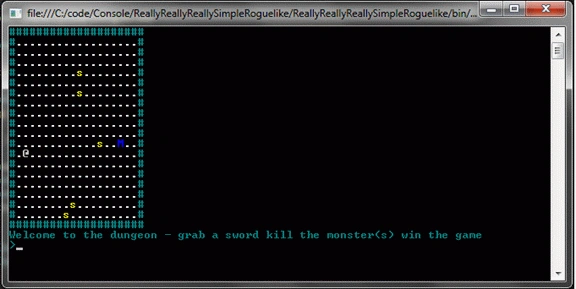
Next time I will present the first iteration of the program, and we'll see some nice improvements.
Koma KazePosted Apr 26, 2013, 12:19 PM
Hi Dom, this simple RogueLike is very cool, I tried this out but my skill with c# is not high enough to fix these code errors yet. I would really like to see v0.2 and an explanation of how you fixed the code.
Christopher WollPosted Nov 23, 2012, 7:32 AM
Hey Dom, Awesome tutorial! Although i have a problem with the way you have made your lists (ex. monsters = new List(); ) as far as I can tell that doesn't work for me and aren't you supposed to make lists like, List<type> variablename = new List<type>(); ?? also this bit gets errors for (int i = 0; i 0 && monster.X player.X) ? -1 : 1; if ((monster.Y > 0 && monster.Y player.Y) ? -1 : 1; if (!IsInvalidValidMove(move.X, move.Y)) { monster.X = move.X; monster.Y = move.Y; } Would be nice with help. Best Regards Christopher Woll [email protected]
Kathryn MontminyeditedPosted Mar 14, 2012, 10:28 PMEdited Mar 14, 2012, 10:31 PM
Hi Dom, I tried posting a comment here, but the editor seems to have a problem with paragraphs... I'll e-mail you the content of the message, instead.
Daisy KrausePosted Feb 2, 2012, 10:53 PM
Hi Dom. Its a unique concept which you have shared through article. Thanks.
Arjun PanwarPosted Feb 2, 2012, 10:58 AM
Thanks Mr. Dom ,Really Very nice work.
Monika AroraPosted Feb 2, 2012, 12:08 AM
Hi Dom. The content of your article is very nice and useful too.