

Before reading this article, I highly recommend reading the previous parts of the series:
- MongoDB - Day 1 (Introduction To MongoDB)
- MongoDB - Day 2 (Install MongoDB in Windows)
- MongoDB - Day 3 (Database Basics)
MongoDB stores data in a document format. A collection is used to store the documents and is just like data tables of the Relational Database Management Systems (RDBMSs). A collection exists within a database and supports dynamic schemas. Documents within a collection can have different fields.
As shown in the preceding image, we have a collection whose name is Test. In this collection, we have 3 documents, but the schema of all the three documents is not the same. A collection may store documents that exist outside the same structure. This is possible because MongoDB is a schema-less database. In a relational database, we must define the schema of the table before inserting any data. However, this is not required in MongoDB to define the schema of collections.
Valid collection Name
Before defining a name for a collection, we should consider the following points:
- Collection names must begin with letters or an underscore. Collection names can't start with a number or special character.
- The "$” symbol can't be used in a collection name because “$” is already reserved.
- The name of a collection can't exceed 128 characters.
Let's see some examples.
| Collection Name | Valid |
| Demo | Yes |
| #Demo | No |
| Demo_Test | Yes |
| 12Demo | No |
| Demo12 | Yes |
createCollection() Method
The MongoDB createCollection() method is used to create a new collection.
Syntax: createCollection(Collection_Name,Option)
Parameters
| Name | Type | Description |
| Collection_Name | String | Name of Collection |
| Option | Document | Provide Option about Collection size and Auto index |
The Collection_Name parameter is essential but the Option parameter is not essential. It is an optional parameter.
Create collection without option parameters
We can create a collection that contains only a Collection_Name parameter.
First, we show the name of all the available collections.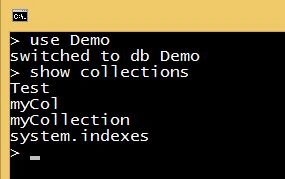
Now we create an “Employee” collection using the createCollection() method.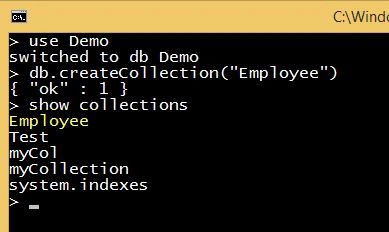
We can see that now the Employee collection has been created and is now present in the preceding list.
Note: In MongoDB, the createCollection() method is not required to create a new collection. MongoDB will create a new collection automatically when we insert data into a collection. Let's see an example.
Now we insert some data into the “Building” collection that hasn't yet been created.
We can see that the “Building” table has been created. So we can create a collection without using the createCollection() method. Unfortunately, this method has some disadvantages, For example, we can't use option parameters in the collection creation.
Create collection with option parameters
When we create a collection with option parameters, then it is known as a Capped Collection. Capped Collections are collections that can store data in the same order it is inserted. Capped Collections are fixed in size, contain a fixed number of documents and use “auto-FIFO age-Out” terminology. In other words, when the allotted space is fully utilized, the new objects (documents) will replace the older ones in the same order it is inserted. Capped Collections work in a way similar to circular buffers. Once a collection fills its allocated space, it makes room for new documents by overwriting the oldest documents in the collection. Capped Collections support high-throughput operations that insert and retrieve documents based on insertion order.
Benefits of Capped Collections:
- MongoDB automatically keeps the objects in the collection in their insertion order. This is great for logging-types of problems where the order should be preserved. It is very helpful when we want to retrieve items in their insertion order.
- Data automatically age out when the collection is full on a least recently inserted basis.
- Prohibits the updates that increase document size that ensures a document does not change its location on disk.
The following are the restriction for Capped Collections:
- We can't delete a specific document from a Capped Collection. To remove all documents from a collection, use the drop() method to drop the collection.
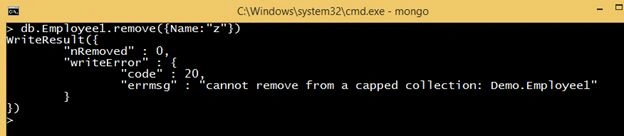
- We cannot shard a Capped Collection.
- If we are performing an update operation on a collection and due to the update operation the collection size increases from its original size then the update operation will fail.
- If we updated a collection and the size of that collection is reduced from its original size and then a secondary resyncs from the primary, this secondary will replicate and the allocated space is based on the current smaller document size. If in the future, the primary receives an update that increases the document back to its original size, then the primary will accept the update but the secondary will fail.
The following is the list of options in a Capped Collection:
| Field Name | Data Type | Description |
| Capped | Boolean | If the value of a Capped field is true then that means the collection is a capped type. The default value is false |
| autoIndexID | Boolean | If the value is true then an index on the _id field is created automatically. The default value is false. |
| Size | Number | The maximum size of the collection is specified in bytes. If we set the Capped field to true then we need to specify this field also. |
| Max | Number | The maximum number of documents allowed in the collection |
Let's see some examples:
Example 1
In this example, we created a simple Capped Collection whose size is 654321 bytes and contains a maximum of 100 documents.
Example 2
In the preceding image, we created a Capped Collection and have set the value of the max field to 3 and inserted 3 records. Now, we will insert a new record and examine the contents of the collection.
We can see that the record of “pankaj” has been replaced with the record for “Sanjeev”. This is the property of the Capped Collection as we discussed above.
Show collections method: This method is used to show the name of all collections present in the current database.
Syntax: show collections.
Example
First, we see the name of all collections of the current database. 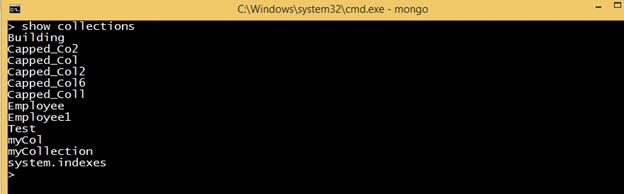
Now we create a Demo3 collection and again execute the show collections command.
Now the Demo3 collection is present in the preceding list.
drop () Method: the drop () method removes a specific collection and will return true if the selected collection is dropped successfully, otherwise, it will return false.
Syntax: db.Collection_Name.drop()
Example
First, we look at the names of all the collections of the current database. 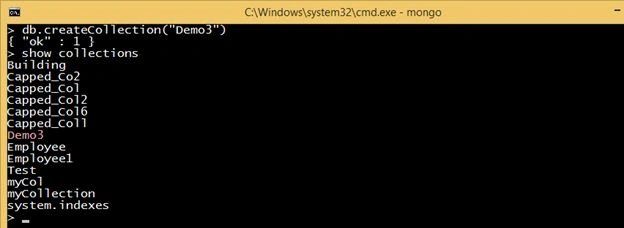
Now, we drop an Employee and then the entire Employee1 collection using the drop() method.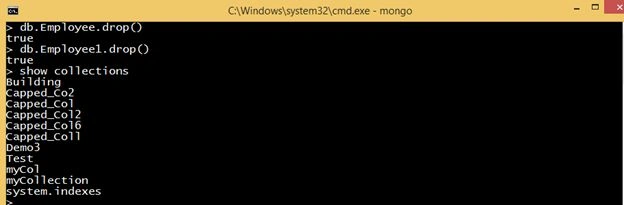
We can see that now the Employee and the Employee1 collections are not present in the list.
All the preceding are some basic commands for creating and dropping a collection. The next article explains a new topic.
Thanks for reading this article!
Sr KarthigaPosted Feb 14, 2016, 7:43 AM
Good one sir
Pankaj Kumar ChoudharyPosted Aug 5, 2015, 8:46 PM
Thanks sreenivasa k .........
sreenivasa kPosted Aug 5, 2015, 6:19 PM
nice one
Pankaj Kumar ChoudharyPosted Aug 5, 2015, 2:11 PM
Thanks Sibeesh Venu Sir..........
Sibeesh VenuPosted Aug 5, 2015, 6:32 AM
Nice Share
Pankaj Kumar ChoudharyPosted Aug 5, 2015, 5:00 AM
Thanks Debasis Saha Sir..........
Debasis SahaPosted Aug 5, 2015, 1:03 AM
Nice one..
Pankaj Kumar ChoudharyPosted Aug 4, 2015, 11:12 PM
THANKS SANTHAKUMARR SIR..........
Santhakumar MunuswamyPosted Aug 4, 2015, 10:04 PM
Good Article. Thanks for sharing :)
Pankaj Kumar ChoudharyPosted Aug 4, 2015, 9:19 PM
Thanks Chervine Bhiwoo Sir.......
Pankaj Kumar ChoudharyPosted Aug 4, 2015, 9:18 PM
Thanks Rakesh Sir........
Pankaj Kumar ChoudharyPosted Aug 4, 2015, 9:18 PM
Thanks Manoj Kulkarni.......
RakeshPosted Aug 4, 2015, 2:00 PM
Good article
Chervine BhiwooPosted Aug 4, 2015, 1:50 PM
Nice!
Manoj KulkarniPosted Aug 4, 2015, 6:42 AM
Nice article. Thank you for sharing.
Pankaj Kumar ChoudharyPosted Aug 4, 2015, 6:28 AM
Thanks Gopi Chand Sir.........
Pankaj Kumar ChoudharyPosted Aug 4, 2015, 6:28 AM
Thanks @Rajeesh Sir
Pankaj Kumar ChoudharyPosted Aug 4, 2015, 6:27 AM
Thanks Mohammed Ibrahim Sir.........
Gopi ChandPosted Aug 4, 2015, 6:19 AM
Good going Pankaj..keep it up :)
Rajeesh MenothPosted Aug 4, 2015, 5:31 AM
Good Pankaj Kumar Choudhary
Mohammed IbrahimPosted Aug 4, 2015, 4:32 AM
nice