

Introduction
In this post, we will see how to inject WCF service dependency in the controller in ASP.NET MVC.
Background
When working with web applications, normally we have persistent storage of data like database, xml, files, NoSQL , and we have data access in place in our controller actions to do operations on that data. Sometimes we fetch it for displaying, saving new data, or updating existing records.
Nowadays service oriented applications are very common and there is trend of making service oriented applications so that we can add or remove features from applications easily or alter implementation without messing the things.
WCF is one of the technology used which acts as a communication bridge between client application and persistent storage or database. We will discuss next with code sample how it is done normally.
Ordinary Approach
Normally, we create a WCF service project, create our Service Contracts in form of interfaces which tells what i take as input and what i would return to called and then others can implement those service contracts to tell how to do that. Here is an example of Service Contract:
- [ServiceContract]
- public interface IUserService
- {
- [OperationContract]
- IList GetUsers();
- [OperationContract]
- User RegisterUser(User user);
- [OperationContract]
- User Login(string id,string password);
- [OperationContract]
- bool UserNameExists(string username, string email);
- }
- public class UserService : IUserService
- {
- private IConnectionFactory connectionFactory;
- public IList GetUsers()
- {
- connectionFactory = ConnectionHelper.GetConnection();
- var context = new DbContext(connectionFactory);
- var userRep = new UserRepository(context);
- return userRep.GetUsers();
- }
- public User RegisterUser(User user)
- {
- connectionFactory = ConnectionHelper.GetConnection();
- var context = new DbContext(connectionFactory);
- var userRep = new UserRepository(context);
- return userRep.CreateUser(user);
- }
- public User Login(string id, string password)
- {
- connectionFactory = ConnectionHelper.GetConnection();
- var context = new DbContext(connectionFactory);
- var userRep = new UserRepository(context);
- return userRep.LoginUser(id,password);
- }
- public bool UserNameExists(string username,string email)
- {
- connectionFactory = ConnectionHelper.GetConnection();
- var context = new DbContext(connectionFactory);
- var userRep = new UserRepository(context);
- var user = userRep.GetUserByUsernameOrEmail(username,email);
- return !(user != null && user.UserID > 0);
- }
- }
- public class AccountController : Controller
- {
- [HttpPost]
- [AllowAnonymous]
- public ActionResult SignUp(RegisterViewModel registerVM)
- {
- if (ModelState.IsValid)
- {
- UserService authenticateService = new UserService(); // this is bad design high coupling of components
- var result = authenticateService.RegisterUser(registerVM);
- RegisterViewModel vm = result;
- return View(vm);
- }
- return View(registerVM);
- }
- [HttpPost]
- [AllowAnonymous]
- [ValidateAntiForgeryToken]
- public ActionResult SignIn(LoginViewModel loginVm)
- {
- if (ModelState.IsValid)
- {
- UserService authenticateService = new UserService(); // this is bad design high coupling of components
- var user = authenticateService.Login(loginVm.UserName, loginVm.Password);
- if (user == null)
- ModelState.AddModelError("", "The user name or password provided is incorrect.");
- Session["User"] = user;
- return RedirectToAction("Index", "Home");
- }
- return View(loginVm);
- }
- }
If you note the above two action methods, they look fine but there is one line which is a bad design approach and void Single Responsibility Principle and it also create high coupling between our controller and Service implementation. In future if we have to use some different implementation of IUserService, let's say new implementation which uses Entity Framework or some other Data Access Technique like MongoDB, Azure or Rest Services with JSON, we will have to change our actions to use different class, which is not very pleasant.
Dependency Injection
Here comes the role of dependency injection that is a technique / design pattern which we will be used here. As IUserService is a dependency of our Controller which is needed for the AccountController to do the job successfully.
As the name reflects it is used for injecting dependencies of an implementation, there can be many dependencies or can be only one depends on the scenario, but in this example we have one dependency of our Controller which is IUserService.
Castle Windsor to Help Here
Castle Windsor is a Inversion of Control container, it can instantiate the dependencies right at the place where we need them. Dependency Injection and Inversion of Control are mostly used together, when we want dependencies to be injected, we have to use Inversion of Control as well.
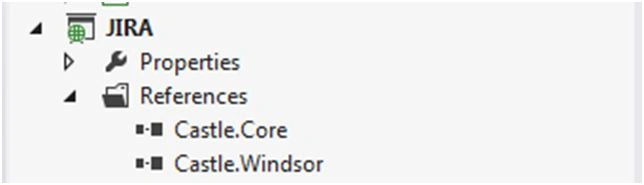
For this, first of all we will have to add the library in our project from Nuget or we can download assemblies and add references to assemblies explicitly. After installing the library we can see reference to Castle.Core and Castle.Windsor in References of project:
Now first step is to implement the installer for CastleWindsor in which we will be telling the dependencies that will be injected by container on runtime when needed.
- public class WindsorInstaller : IWindsorInstaller
- {
- public void Install(IWindsorContainer container, IConfigurationStore store)
- {
- // registering all Controllers of the Assembly
- container.Register(Classes.FromThisAssembly()
- .BasedOn()
- .LifestyleTransient());
- // registeting our WcfInterceptor to intercept all WCF Service calls
- container.Register(Component
- .For()
- .ImplementedBy()
- .Named("wcf"));
- // Registering IUserService
- container.Register(Types
- .FromAssemblyContaining()
- .Where(x => x.IsInterface)
- .LifestyleTransient()
- .Configure(x =>
- { var res = x.Interceptors(InterceptorReference.ForKey("wcf")).Anywhere; }));
- // Registering implementation for IClientFactory which is dependency of WCFInterceptor implementation
- container.Register(Component
- .For()
- .ImplementedBy());
- }
- public class WcfInterceptor : IInterceptor
- {
- public IClientFactory ClientFactory { get; set; }
- public void Intercept(IInvocation invocation)
- {
- var clientProvider = ClientFactory.GetClientProvider(invocation.Method.DeclaringType);
- try
- {
- clientProvider.Open();
- invocation.ReturnValue = CallClientProviderMethod(invocation, clientProvider);
- }
- finally
- {
- clientProvider.Close();
- }
- }
- private object CallClientProviderMethod(IInvocation invocation, IClientProvider clientProvider)
- {
- var proxy = clientProvider.GetProxy();
- return invocation.Method.Invoke(proxy, invocation.Arguments);
- }
- }
Here is the implementation of WcfClientFactory:
- public class WcfClientFactory : IClientFactory
- {
- public IClientProvider GetClientProvider(Type type)
- {
- var closedType = typeof(WcfClientProvider<>).MakeGenericType(type);
- return (IClientProvider)Activator.CreateInstance(closedType);
- }
- }
- public class WcfClientProvider : IClientProvider
- {
- private ChannelFactory factory;
- public WcfClientProvider()
- {
- factory = new ChannelFactory(string.Empty);
- }
- public object GetProxy()
- {
- return factory.CreateChannel();
- }
- public void Open()
- {
- if (this.factory.State != CommunicationState.Opened)
- {
- factory.Open();
- }
- }
- public void Close()
- {
- factory.Close();
- }
- }
Now the last step is to install Castle Windsor on Application start and instantiation of our Controller Factory in Global.asax.
This is how your Global.asax code should look like:
- public class MvcApplication : System.Web.HttpApplication
- {
- private static IWindsorContainer container;
- protected void Application_Start()
- {
- AreaRegistration.RegisterAllAreas();
- WebApiConfig.Register(GlobalConfiguration.Configuration);
- FilterConfig.RegisterGlobalFilters(GlobalFilters.Filters);
- RouteConfig.RegisterRoutes(RouteTable.Routes);
- BootstrapContainer();
- }
- private static void BootstrapContainer()
- {
- container = new WindsorContainer()
- .Install(FromAssembly.This());
- var controllerFactory = new WindsorControllerFactory(container.Kernel);
- ControllerBuilder.Current.SetControllerFactory(controllerFactory);
- }
- }
Now our controller will look like the following:
- public class AccountController : Controller
- {
- private IUserService authenticateService;
- public AccountController(IUserService authenticateService)
- {
- this.authenticateService = authenticateService;
- }
- [HttpPost]
- [AllowAnonymous]
- [ValidateAntiForgeryToken]
- public ActionResult SignIn(LoginViewModel loginVm)
- {
- if (ModelState.IsValid)
- {
- var user = authenticateService.Login(loginVm.UserName, loginVm.Password);
- if (user == null)
- ModelState.AddModelError("", "The user name or password provided is incorrect.");
- Session["User"] = user;
- return RedirectToAction("Index", "Home");
- }
- return View(loginVm);
- }
- [HttpPost]
- [AllowAnonymous]
- public ActionResult SignUp(RegisterViewModel registerVM)
- {
- if (ModelState.IsValid)
- {
- var result = authenticateService.RegisterUser(registerVM);
- RegisterViewModel vm = result;
- return View(vm);
- }
- return View(registerVM);
- }
Ehsan SajjadPosted Sep 26, 2016, 3:49 AM
Thanks @parsanna
Prasanna MuraliPosted Jul 3, 2016, 11:08 AM
Nice one...
Ehsan SajjadPosted Jul 3, 2016, 5:07 AM
Thanks kalu singh rao for liking
kalu singh raoPosted Jul 3, 2016, 4:22 AM
Nice...
Ehsan SajjadPosted Jan 13, 2016, 10:29 AM
Thanks Santhakumar Munuswamy
Santhakumar MunuswamyPosted Jan 13, 2016, 10:20 AM
Thanks for nice article
Humayun Kabir MamunPosted Jan 11, 2016, 11:08 PM
Nice...