

The hash algorithm is allowed to create larger number of data using the small number of data.
Step 1: Create a simple login form as in the following screenshot:
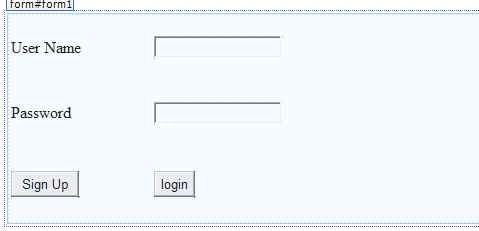
By using the following HTML code:
- <asp:Table ID="Table1" runat="server" Width="418px" Height="209px">
- <asp:TableRow>
- <asp:TableCell>
- User Name
- </asp:TableCell>
- <asp:TableCell>
- <asp:TextBox ID="TextBox1" runat="server"></asp:TextBox>
- </asp:TableCell>
- </asp:TableRow>
- <asp:TableRow>
- <asp:TableCell>
- Password
- </asp:TableCell>
- <asp:TableCell>
- <asp:TextBox ID="TextBox2" runat="server" TextMode="Password"></asp:TextBox>
- </asp:TableCell>
- </asp:TableRow>
- <asp:TableRow>
- <asp:TableCell>
- <asp:Button ID="Button1" runat="server" Text="Sign Up" OnClick="Message_click" />
- </asp:TableCell>
- <asp:TableCell>
- <asp:Button ID="Button2" runat="server" Text="login" OnClick="login_click" />
- </asp:TableCell>
- <asp:TableCell>
- <asp:Label ID="Label1" runat="server" />
- </asp:TableCell>
- </asp:TableRow>
- </asp:Table>
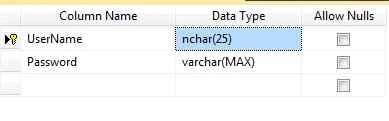
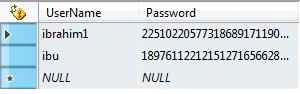
Step 3: After creating the table use the following coding in Sign up button to get user name and password:
- public void Message_click(object sender, EventArgs e)
- {
- string username = TextBox1.Text.ToString();
- String password = TextBox2.Text;
- //Get the encrypt the password by using the class
- string pass = encryption(password);
- Label1.Text = pass;
- //Check whether the UseName and password are Empty
- if (username.Length > 0 && password.Length > 0)
- {
- //creating the connection string
- string connection = ConfigurationManager.ConnectionStrings["DefaultConnection"].ToString();
- SqlConnection con = new SqlConnection(connection);
- String passwords = encryption(password);
- con.Open();
- // Check whether the Username Found in the Existing DB
- String search = "SELECT * FROM UserAccount WHERE (UserName = '" + username + "');";
- SqlCommand cmds = new SqlCommand(search, con);
- SqlDataReader sqldrs = cmds.ExecuteReader();
- if (sqldrs.Read())
- {
- String passed = (string)sqldrs["Password"];
- Label1.Text = "Username Already Taken";
- }
- else
- {
- try
- {
- // if the Username not found create the new user accound
- string sql = "INSERT INTO UserAccount (UserName, Password) VALUES ('" + username + "','" + passwords + "');";
- SqlCommand cmd = new SqlCommand(sql, con);
- cmd.ExecuteNonQuery();
- String Message = "saved Successfully";
- Label1.Text = Message.ToString();
- TextBox1.Text = "";
- TextBox2.Text = "";
- Response.Redirect("Default2.aspx");
- }
- catch (Exception ex)
- {
- Label1.Text = ex.ToString();
- }
- con.Close();
- }
- }
- else
- {
- String Message = "Username or Password is empty";
- Label1.Text = Message.ToString();
- }
- }

Randy ThonPosted Jan 13, 2021, 1:17 PM
Using MySQL - simply query the table properly: string chk_password = @"SELECT* FROM `mobile_logon` WHERE username = '" + textBox1.Text + "' and password = md5('" + textBox2.Text + "');";
Khawar IslamPosted Apr 7, 2016, 2:52 PM
Nice Article
Asfend YarPosted Feb 14, 2016, 11:37 PM
very well
Arul RPosted Jan 11, 2016, 8:20 AM
Nice share
Santhakumar MunuswamyPosted Sep 17, 2015, 10:35 AM
Thanks for nice article:)
Pankaj Kumar ChoudharyPosted Sep 14, 2015, 9:43 PM
Nice One Sir............
Shridhar SharmaPosted Sep 14, 2015, 5:13 PM
good one
Rajeesh MenothPosted Sep 14, 2015, 11:54 AM
Nice One
Harshad PansuriyaPosted Sep 14, 2015, 7:14 AM
Nice one