

Introduction
Here I will explain how to implement the date range filtering in a Kendo grid using ASP.NET Web API and Entity Framework.
Description
The date range filtering in the Kendo grid can be done in one of the following two ways.
- We can create a separate function to perform the Filtering.
- We can use the filtering property of the Kendo Grid.
Step 1
Create a Web API project as in the following:
- Open Visual Studio 2012 and create a new project.
- Select "File" -> "New" -> "Project...".
- Select Web in the installed templates and click ASP.NET Web Application.
- Provide the name for the project and click OK as in Figures 1 and 2.
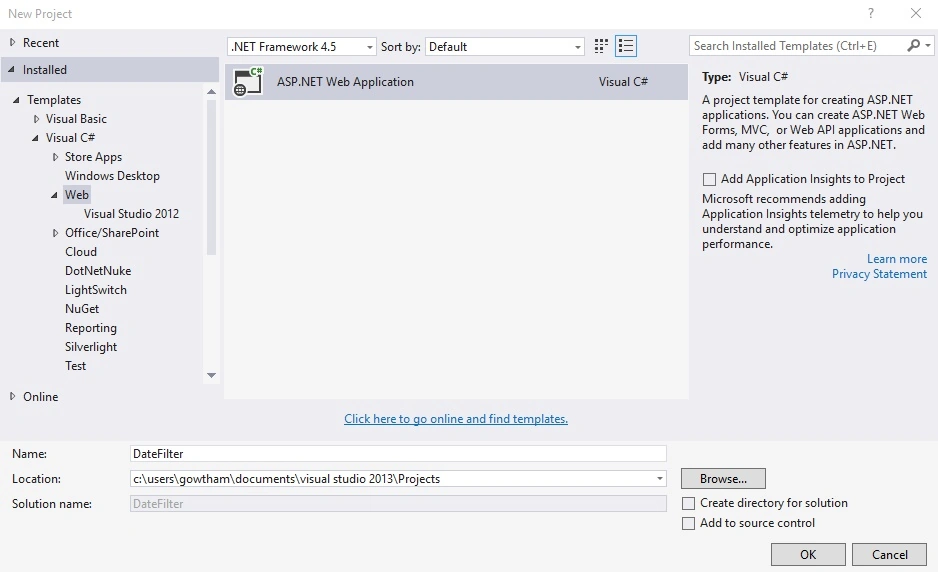
Figure 1: New Project
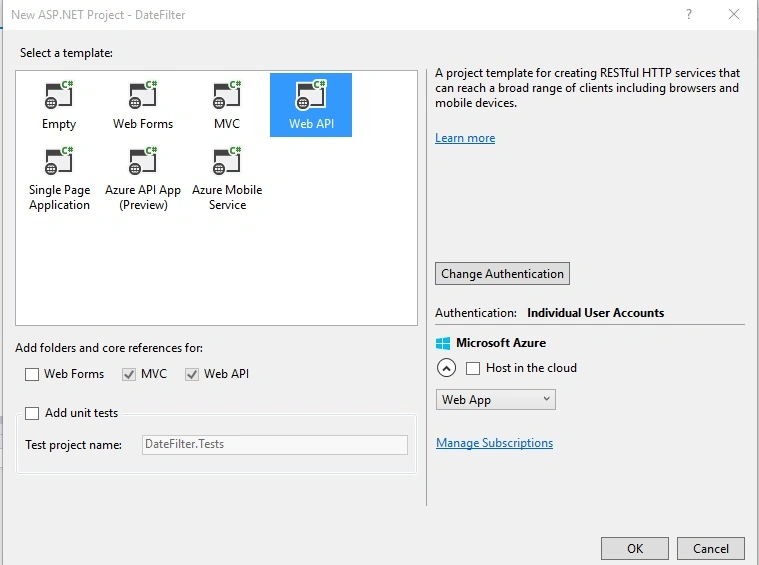
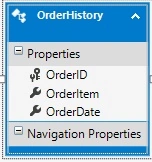
I am using the Entity Framework with Database First approach, so the Entity Framework builds default model classes and context classes.
My database schema is as in Figure 3.
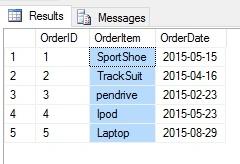
My table structure is as in Figure 4.
Create a Web API 2 Controller class.
It's time to do the scaffolding.
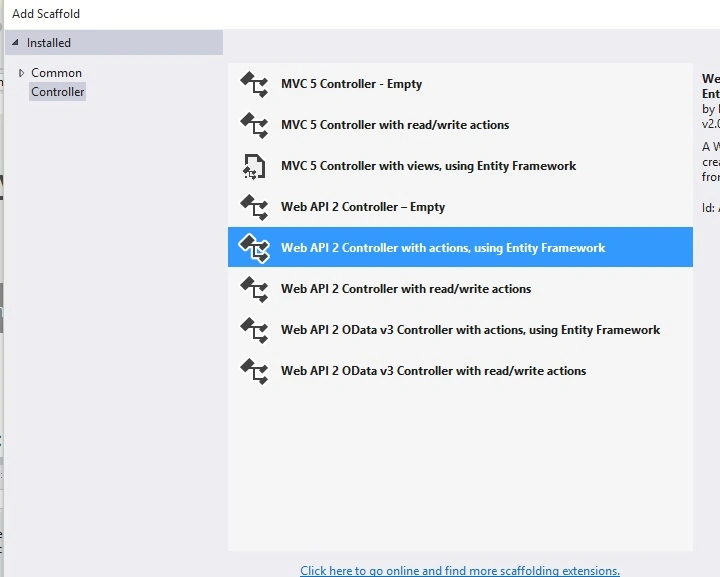 .
. Figure 5: Controller
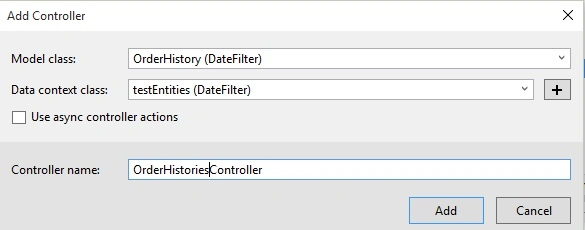
You will get some pre-defined HTTP GET, POST, PUT and DELETE requests/responses in the Order Histories Controller. Modify the code based on your application requirements. For this example I didn't modify the code.
Now the REST services have been created, it's time to consume the services.
Before implementing the service in the design, just cross-check it using Fiddler or Postman as shown in Figure 7.
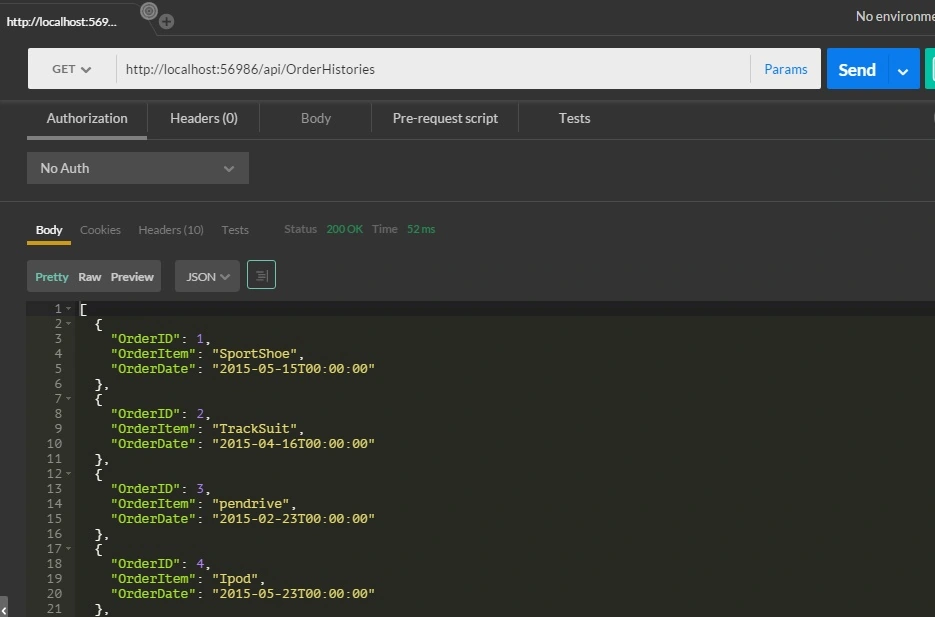
Step 3
Create one HTML page in the project, in my case I named it DateFilter.html.
Here is my code in DateFilter.html.
- <!DOCTYPE html>
- <html xmlns="http://www.w3.org/1999/xhtml">
- <head>
- <title></title>
- <link rel="stylesheet" href="http://kendo.cdn.telerik.com/2015.2.805/styles/kendo.common.min.css">
- <link rel="stylesheet" href="http://kendo.cdn.telerik.com/2015.2.805/styles/kendo.rtl.min.css">
- <link rel="stylesheet" href="http://kendo.cdn.telerik.com/2015.2.805/styles/kendo.default.min.css">
- <link rel="stylesheet" href="http://kendo.cdn.telerik.com/2015.2.805/styles/kendo.mobile.all.min.css">
- <script src="http://code.jquery.com/jquery-1.9.1.min.js"></script>
- <script src="http://kendo.cdn.telerik.com/2015.2.805/js/angular.min.js"></script>
- <script src="http://kendo.cdn.telerik.com/2015.2.805/js/jszip.min.js"></script>
- <script src="http://kendo.cdn.telerik.com/2015.2.805/js/kendo.all.min.js"></script></head>
- <body>
- <div>From: <input id="from" /> To: <input id="to" />
- <br />
- <br />
- <button id="filter" class="k-button">Filter</button></div>
- <br />
- <br />
- <div id="grid"></div>
- <script>
- var grid = $("#grid").kendoGrid({
- dataSource:{
- type: "json",
- transport: {
- read: "api/OrderHistories"
- },
- pageSize: 10,
- schema: {
- model: {
- fields: {
- OrderId: { type: 'number' },
- OrderItem: { type: 'string' },
- OrderDate: { type: 'date' }
- }
- }
- }
- },
- pageable: true,
- columns:
- [
- { field: "OrderID", width: 100, title: "Order ID", filterable: false },
- { field: "OrderItem", width: 100, title: "Order Item", filterable: false },
- { field: "OrderDate", width: 100, format: "{0:d}", title: "Order Date" }
- ]
- }).data("kendoGrid");
- $("#from, #to").kendoDatePicker({
- });
- $("#filter").on("click", function () {
- var from = $("#from").data("kendoDatePicker").value()
- var to = $("#to").data("kendoDatePicker").value()
- alert(from)
- var filter = [
- { field: "OrderDate", operator: "gte", value: from },
- { field: "OrderDate", operator: "lte", value: to }
- ];
- grid.dataSource.filter(filter);
- });
- </script>
- </body>
- </html>
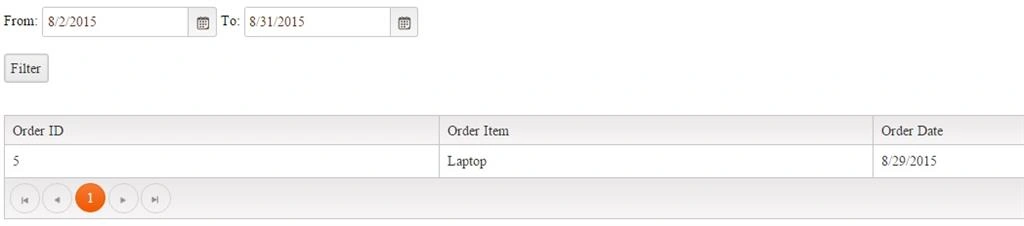
Result in the browser
Before filtering
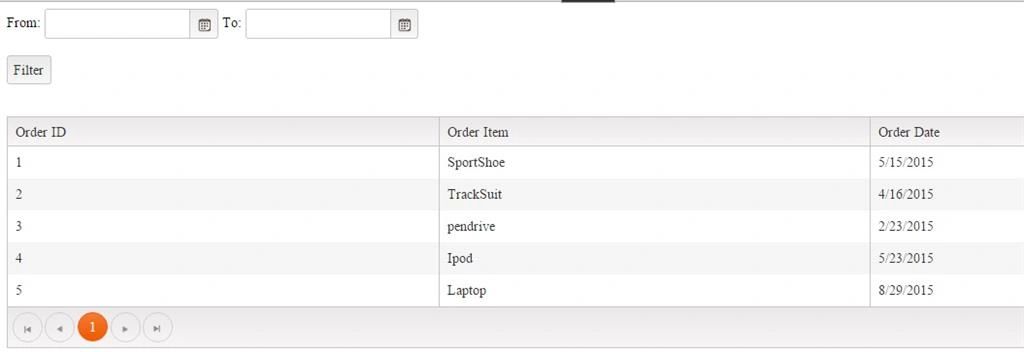
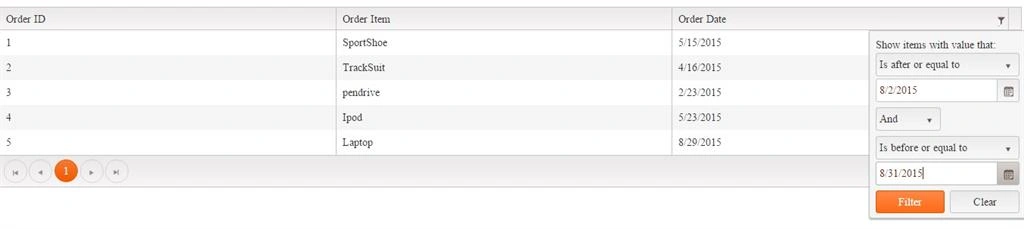
Just by setting the filterable property to true in the Kendo grid we can perform the date range filtering in the Kendo grid.
Here is my code in DateFilter.html:
- <!DOCTYPE html>
- <html xmlns="http://www.w3.org/1999/xhtml">
- <head>
- <title></title>
- <link rel="stylesheet" href="http://kendo.cdn.telerik.com/2015.2.805/styles/kendo.common.min.css">
- <link rel="stylesheet" href="http://kendo.cdn.telerik.com/2015.2.805/styles/kendo.rtl.min.css">
- <link rel="stylesheet" href="http://kendo.cdn.telerik.com/2015.2.805/styles/kendo.default.min.css">
- <link rel="stylesheet" href="http://kendo.cdn.telerik.com/2015.2.805/styles/kendo.mobile.all.min.css">
- <script src="http://code.jquery.com/jquery-1.9.1.min.js"></script>
- <script src="http://kendo.cdn.telerik.com/2015.2.805/js/angular.min.js"></script>
- <script src="http://kendo.cdn.telerik.com/2015.2.805/js/jszip.min.js"></script>
- <script src="http://kendo.cdn.telerik.com/2015.2.805/js/kendo.all.min.js"></script></head>
- <body>
- <div id="grid"></div>
- <script>
- var grid = $("#grid").kendoGrid({
- dataSource:{
- type: "json",
- transport: {
- read: "api/OrderHistories"
- },
- pageSize: 10,
- schema: {
- model: {
- fields: {
- OrderId: { type: 'number' },
- OrderItem: { type: 'string' },
- OrderDate: { type: 'date' }
- }
- }
- }
- },
- pageable: true,
- filterable: true,
- columns:
- [
- { field: "OrderID", width: 100, title: "Order ID", filterable: false },
- { field: "OrderItem", width: 100, title: "Order Item", filterable: false },
- { field: "OrderDate", width: 100, format: "{0:d}", title: "Order Date" }
- ]
- }).data("kendoGrid");
- </script>
- </body>
- </html>
Result in browser
Before Filtering

Arul RPosted Oct 28, 2015, 5:55 AM
Nice share!!!
sreenivasa kPosted Aug 31, 2015, 12:27 PM
nice
Jaipal ReddyPosted Aug 31, 2015, 4:45 AM
nice one
Ankit BansalPosted Aug 31, 2015, 4:25 AM
thanks for share..
Debasis SahaPosted Aug 31, 2015, 1:20 AM
nice one
Hashim ShafiqPosted Aug 30, 2015, 9:47 PM
nice
Gowtham KPosted Aug 30, 2015, 9:15 PM
Thanks a lot guys
Bruno PétersonPosted Aug 30, 2015, 7:50 PM
Good
Karthikeyan KPosted Aug 30, 2015, 5:15 AM
Good one sir...Thanks for share
Sibeesh VenuPosted Aug 30, 2015, 1:12 AM
Nice Share
Santhakumar MunuswamyPosted Aug 30, 2015, 12:01 AM
Good work
Mohammed IbrahimPosted Aug 29, 2015, 11:41 PM
nice
Pankaj Kumar ChoudharyPosted Aug 29, 2015, 8:12 PM
Nice Explain Sir............