

Introduction
There is no control for Report Viewer in MVC, so we cannot view a report using MVC applications. Most business applications have report requirements. In article, I will explain the work around to make it happen. Here I will assume that we already have a report server with some test report.
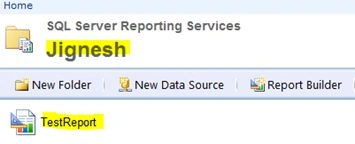
Report server folder structure:
MVC does not provide a Report Viewer control so we need to add a classic web form page to our MVC application. The recommendation is to place this form outside of the view folder so that we don't need to register or ignore the route.
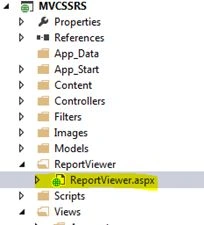
In this classic web form page, we need to add the following two controls:
- Script manger
- Report Viewer control
ReportViewer.aspx code
- <form id="form1" runat="server">
- <asp:ScriptManager ID="ScriptManager1" runat="server"></asp:ScriptManager>
- <div>
- <rsweb:reportviewer id="rptViewer" runat="server" height="503px" width="663px">
- </rsweb:reportviewer>
- </div>
- </form>
- Set processing mode to remote.
- Pass report server URL and report path.
- Pass the parameters if any.
- Pass Credential of Report Server if required.
- Refresh the report.
The following is the show report function:
- private void ShowReport()
- {
- try
- {
- //report url
- string urlReportServer = "http://Servername/Reportserver";
- // ProcessingMode will be Either Remote or Local
- rptViewer.ProcessingMode = ProcessingMode.Remote;
- //Set the ReportServer Url
- rptViewer.ServerReport.ReportServerUrl = new Uri(urlReportServer);
- // setting report path
- //Passing the Report Path with report name no need to add report extension
- rptViewer.ServerReport.ReportPath = "/Jignesh/TestReport";
- //Set report Parameter
- //Creating an ArrayList for combine the Parameters which will be passed into SSRS Report
- //ArrayList reportParam = new ArrayList();
- //reportParam = ReportDefaultPatam();
- //ReportParameter[] param = new ReportParameter[reportParam.Count];
- //for (int k = 0; k < reportParam.Count; k++)
- //{
- // param[k] = (ReportParameter)reportParam[k];
- //}
- // pass credential as if any... no need to pass anything if we use windows authentication
- //rptViewer.ServerReport.ReportServerCredentials =
- // new ReportServerCredentials("UserName", "Password", "domainname");
- //pass parameters to report
- //rptViewer.ServerReport.SetParameters(param);
- rptViewer.ServerReport.Refresh();
- }
- catch (Exception ex)
- {
- throw ex;
- }
- }
Report Viewer page Code:
- public partial class ReportViewer : System.Web.UI.Page
- {
- protected void Page_Load(object sender, EventArgs e)
- {
- ShowReport();
- }
- }
Controller Code:
- public ActionResult ShowReport()
- {
- return Redirect("../ReportViewer/ReportViewer.aspx");
- }
Summary
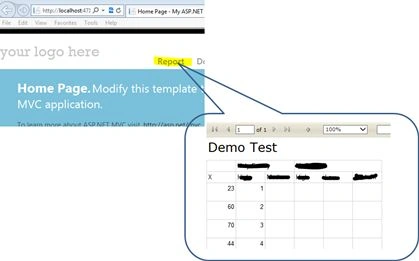
Using this work around, we are able to view a SSRS report in a MVC application. I hope you enjoy the article.
Hariom PalPosted Apr 8, 2019, 3:18 AM
I still getting same error : SQL Server Reporting Services Getting error below "The attempt to connect to the report server failed. Check your connection information and that the report server is a compatible version.The request failed with HTTP status 404: Not Found." Please help.
Vinay Kumar GuptaPosted Apr 30, 2017, 1:20 AM
Hi Jignesh When Combining ASP.Net With SQL Server Reporting Services Getting error below "The attempt to connect to the report server failed. Check your connection information and that the report server is a compatible version.The request failed with HTTP status 404: Not Found." Please help thanks