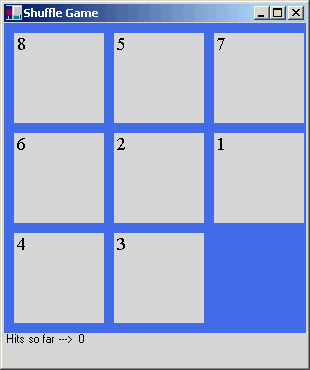
This code sample is a GDI+ shuffle game aimed for beginners. Attached zip file includes the exe and the Shuffle.cs file.
using
System;
using System.Drawing;
using System.WinForms;
using System.Collections;
namespace ShuffleGame
{
public class Shuffle:Form
{
private Label lbl1= new Label();
private Label lbl2= new Label();
private Label lbl3= new Label();
private Label lbl4= new Label();
private Label lbl5= new Label();
private Label lbl6= new Label();
private Label lbl7= new Label();
private Label lbl8= new Label();
private Label lblBlank= new Label();
private int[,] pos= {{0,0,0},{0,0,0},{0,0,0}};
private int ar,ac;
private int Hits;
private Label lblHits = new Label();
private Hashtable value = new Hashtable();
public static int Main(string [] args)
{
Application.Run(new Shuffle());
return 0;
}
public Shuffle()
{
ar=2;
ac=2;
Hits=0;
this.Text="Shuffle Game";
this.BackColor=Color.RoyalBlue;
this.Size=new Size(310,370);
lbl1.Text="1";
//lbl1.Location=new Point(0,0);
lbl1.BackColor=Color.LightGray;
lbl1.Size= new Size(90,90);
lbl1.Font=new Font("Times New Roman",14);
lbl2.Text="2";
//lbl2.Location=new Point(100,0);
lbl2.BackColor=Color.LightGray;
lbl2.Size= new Size(90,90);
lbl2.Font=new Font("Times New Roman",14);
lbl3.Text="3";
//lbl3.Location=new Point(200,0);
lbl3.BackColor=Color.LightGray;
lbl3.Size= new Size(90,90);
lbl3.Font=new Font("Times New Roman",14);
lbl4.Text="4";
//lbl4.Location=new Point(0,100);
lbl4.BackColor=Color.LightGray;
lbl4.Size= new Size(90,90);
lbl4.Font=new Font("Times New Roman",14);
lbl5.Text="5";
//lbl5.Location=new Point(100,100);
lbl5.BackColor=Color.LightGray;
lbl5.Size= new Size(90,90);
lbl5.Font=new Font("Times New Roman",14);
lbl6.Text="6";
//lbl6.Location=new Point(200,100);
lbl6.BackColor=Color.LightGray;
lbl6.Size= new Size(90,90);
lbl6.Font=new Font("Times New Roman",14);
lbl7.Text="7";
//lbl7.Location=new Point(0,200);
lbl7.BackColor=Color.LightGray;
lbl7.Size= new Size(90,90);
lbl7.Font=new Font("Times New Roman",14);
lbl8.Text="8";
//lbl8.Location=new Point(100,200);
lbl8.BackColor=Color.LightGray;
lbl8.Size= new Size(90,90);
lbl8.Font=new Font("Times New Roman",14);
lblBlank.Location=new Point(200,200);
lblBlank.Size=new Size(90,90);
PlaceRandom();
lblHits.Location=new Point(0,310);
lblHits.Text="Hits so far ---> " +Hits.ToString();
lblHits.BackColor=Color.LightGray;
lblHits.Size=new Size(350,40);
this.Controls.Add(lbl1);
this.Controls.Add(lbl2);
this.Controls.Add(lbl3);
this.Controls.Add(lbl4);
this.Controls.Add(lbl5);
this.Controls.Add(lbl6);
this.Controls.Add(lbl7);
this.Controls.Add(lbl8);
this.Controls.Add(lblHits);
this.Controls.Add(lblBlank);
this.MouseDown += new MouseEventHandler(Win_Click);
this.KeyDown+=new KeyEventHandler(Win_KeyDown);
}
private void Win_Click(Object sender, MouseEventArgs e)
{
Random rnd=new Random();
MessageBox.Show(rnd.Next(8).ToString());
MessageBox.Show("Hello");
}
private void Win_KeyDown(Object sender, KeyEventArgs k)
{
int temp;
switch(k.KeyCode.ToInt32())
{
case 38:
//"Up"
if(ar<2)
{
temp=pos[ar,ac];
pos[ar,ac]=pos[ar+1,ac];
pos[ar+1,ac]=temp;
Swap(pos[ar,ac],temp);
ar++;
Hits++;
}
break;
case 37:
//"Left"
if(ac<2)
{
temp=pos[ar,ac];
pos[ar,ac]=pos[ar,ac+1];
pos[ar,ac+1]=temp;
Swap(pos[ar,ac],temp);
ac++;
Hits++;
}
break;
case 39:
//"Right"
if(ac>0)
{
temp=pos[ar,ac];
pos[ar,ac]=pos[ar,ac-1];
pos[ar,ac-1]=temp;
Swap(pos[ar,ac],temp);
ac--;
Hits++;
}
break;
case 40:
//"Down"
if(ar>0)
{
temp=pos[ar,ac];
pos[ar,ac]=pos[ar-1,ac];
pos[ar-1,ac]=temp;
Swap(pos[ar,ac],temp);
ar--;
Hits++;
}
break;
}
lblHits.Text="Hits so far ---> " +Hits.ToString();
Boolean same=true;
String arrEle="";
for(int ctr=1,i=0;i<3;i++)
{
for(int j=0;j<3;j++,ctr++)
{
/*if(j==2 && i==2)
{
if(pos[i,j]==0)
same=true;
break;
}
else if(pos[i,j]!=ctr)
{
same=false;
break;
}*/
if(pos[i,j]!=ctr)
{
same=false;
break;
}
arrEle=arrEle+"\t"+pos[i,j];
}
arrEle=arrEle+"\n";
}
if(same)
{
MessageBox.Show("You have finished the game in " + Hits.ToString() + " hits","End of Game",2);
}
}
private void Swap(int vNum, int blank)
{
Point temp;
switch(vNum)
{
case 1:
temp=lbl1.Location;
lbl1.Location=lblBlank.Location;
lblBlank.Location=temp;
break;
case 2:
temp=lbl2.Location;
lbl2.Location=lblBlank.Location;
lblBlank.Location=temp;
break;
case 3:
temp=lbl3.Location;
lbl3.Location=lblBlank.Location;
lblBlank.Location=temp;
break;
case 4:
temp=lbl4.Location;
lbl4.Location=lblBlank.Location;
lblBlank.Location=temp;
break;
case 5:
temp=lbl5.Location;
lbl5.Location=lblBlank.Location;
lblBlank.Location=temp;
break;
case 6:
temp=lbl6.Location;
lbl6.Location=lblBlank.Location;
lblBlank.Location=temp;
break;
case 7:
temp=lbl7.Location;
lbl7.Location=lblBlank.Location;
lblBlank.Location=temp;
break;
case 8:
temp=lbl8.Location;
lbl8.Location=lblBlank.Location;
lblBlank.Location=temp;
break;
}
}
private void PlaceRandom()
{
int r,c;
r=10;c=10;
int i=0;
ar=0;
ac=0;
Random rnd= new Random();
int val;
while(i<8)
{
val=rnd.Next(9).ToInt32();
if(numNotExists(val)==true && val>0)
{
pos[ar,ac]=val;
switch(val)
{
case 1:
lbl1.Location=new Point(c,r);
break;
case 2:
lbl2.Location=new Point(c,r);
break;
case 3:
lbl3.Location=new Point(c,r);
break;
case 4:
lbl4.Location=new Point(c,r);
break;
case 5:
lbl5.Location=new Point(c,r);
break;
case 6:
lbl6.Location=new Point(c,r);
break;
case 7:
lbl7.Location=new Point(c,r);
break;
case 8:
lbl8.Location=new Point(c,r);
break;
default:
}
c+=100;
ac++;
if(ac>2)
{
ac=0;
ar++;
}
if(c>300)
{
c=10;
r+=100;
}
i++;
}
else
continue;
}
lblBlank.Location=new Point(c,r);
pos[2,2]=9;
}
private Boolean numNotExists(int num)
{
for(int i=0;i<3;i++)
for(int j=0;j<3;j++)
{
if(pos[i,j]==num)
return false;
}
return true;
}
}
}