

Updated 8/29/2018 - Formatted
Resources provide a simple way to reuse commonly defined objects and values. If we are defining the resource then we can use that resource a number of times. (Just like applying themes and css to web pages).
Resources are two types:
- Static Resource
- Dynamic Resource.
Static Resource - StaticResources are resolved at compile time. Use StaticResources when it's clear that you don't need your resource re-evaluated when fetching it static resources perform better than dynamic resources.
Dynamic Resource - DynamicResources are resolved at runtime. Use DynamicResources when the value of the resource could change during the lifetime of the Application.
I will show you an example of a Static Resource.
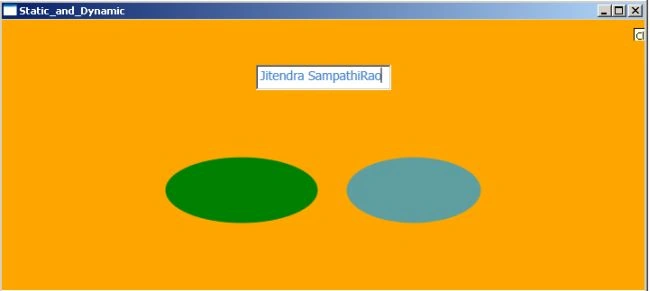
In my WPF application page I have one textbox and two ellipses. In Window.Resources I defined the SolidColorBrush and the Style properties
- <Window.Resources>
- <SolidColorBrush x:Key="brush" Color="Green"></SolidColorBrush>
- <SolidColorBrush x:Key="forbuttoncolor" Color="CadetBlue"></SolidColorBrush>
- <Style TargetType="Border" x:Key="background">
- <Setter Property="Background" Value="Orange"></Setter>
- </Style>
- <Style TargetType="TextBox" x:Key="TitleText">
- <Setter Property="Background" Value="White"/>
- <Setter Property="DockPanel.Dock" Value="Top"/>
- <Setter Property="FontSize" Value="14"/>
- <Setter Property="Foreground" Value="#4E87D4"/>
- <Setter Property="FontFamily" Value="Tahoma"/>
- <Setter Property="Margin" Value="50,50,50,0"/>
- <Setter Property="Width" Value="300"></Setter>
- </Style>
- </Window.Resources>
In above code you can observe x: Key attribute. x: Key uniquely identifies elements that are created and referenced in a XAML-defined dictionary.
Here I'm using above resources. Have a look at below code.
Syntax is :{ StaticResource x:keyName}
- <Grid>
- <StackPanel>
- <Border Style="{StaticResource background}">
- <DockPanel Height="300" Width="500">
- <TextBox Style="{StaticResource TitleText}" Height="28" Width="150"> </TextBox>
- <Ellipse DockPanel.Dock="Left" HorizontalAlignment="Left" Height="73" Fill="{StaticResource brush}" Width="169"></Ellipse>
- <Ellipse DockPanel.Dock="Right" HorizontalAlignment="Right" Width="149" Height="73" Fill="{StaticResource forbuttoncolor}"></Ellipse>
- </DockPanel>
- </Border>
- </StackPanel>
- </Grid>
Result window looks like this.
In my very next article, I will explain you about Dynamic Resource.
Hope you like this article, let me know if you have any queries.
Vipan SharmaPosted Sep 28, 2015, 2:21 AM
thanks
Kieran CallaghanPosted Oct 31, 2011, 7:56 AM
I am a software student and found your article very useful.
Sachin KaliaPosted Feb 2, 2011, 2:21 AM
Really good article to understand Static Resources. Keep it up buddy :)
nesrine melienePosted Dec 2, 2010, 5:34 AM
simple,claire et très intéressant
Sivaraman DhamodaranPosted Nov 24, 2010, 9:56 PM
Thanks for sharing man. Keep going.. :)
Destin JoyPosted Oct 28, 2010, 4:18 AM
Good work