I'm writing this article in response to a question on discussion forums, How do I view multiple images on top of each other? Basically the guy has two images. One is a large image and second image is a small image and he wants to view small image on top of the large one. Even though I answered it on the forums and I knew that this is the answer, but I thought to test it by myself.
I also thought, It would be nice if I've some kind of counter so I can set the transparency of the small image to see through it. In case some body ask this question again ;).
Any way, this is what application looks like. As you can see from Figure 1, I've one track bar control, which sets the transparency of small image.
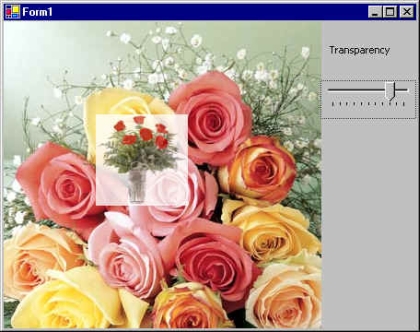
Figure 1.
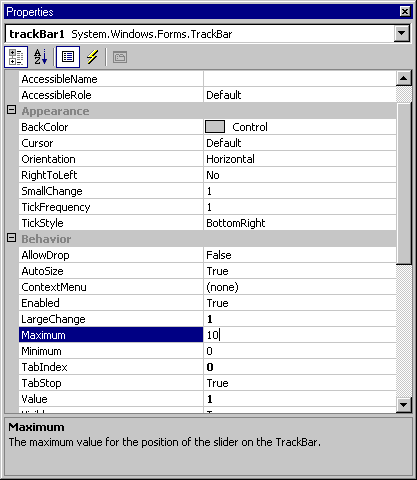
I add a trackBar control to the form. Make sure its Maximum and minimum properties are 10 and 0 respectively. See Figure 2.
Now I write the trackBar control scroll event so when you scroll the track bar, it should manage the transparency of the image. I forgot to tell you that I defined a float type variable in the biggining of the project.
float
tpVal = 1.0f;
Now I convert the value of trackbar control to a floating value so I can use in the ColorMatrix to set the color of the image. See Drawing Transparent Images and Shapes Using Alpha Blending for more on how to draw transparent graphics objects in GDI+.
private void trackBar1_Scroll(object sender, System.EventArgs e)
{
tpVal = (float)trackBar1.Value/10;
this.Invalidate();
}
In the end, I view both images on the form's paint event as you can see from the following code.
private void Form1_Paint(object sender, System.Windows.Forms.PaintEventArgs e)
{
Image curImage = Image.FromFile("roses.jpg");
e.Graphics.DrawImage(curImage, AutoScrollPosition.X, AutoScrollPosition.Y,
curImage.Width, curImage.Height );
float[][] ptsArray ={
new float[] {1, 0, 0, 0, 0},
new float[] {0, 1, 0, 0, 0},
new float[] {0, 0, 1, 0, 0},
new float[] {0, 0, 0, tpVal, 0},
new float[] {0, 0, 0, 0, 1}};
ColorMatrix clrMatrix = new ColorMatrix(ptsArray);
ImageAttributes imgAttributes = new ImageAttributes();
imgAttributes.SetColorMatrix(clrMatrix,
ColorMatrixFlag.Default,
ColorAdjustType.Bitmap);
Image smallImage = Image.FromFile("smallRoses.gif");
e.Graphics.DrawImage(smallImage, new Rectangle(100, 100, 100, 100),
0, 0, smallImage.Width, smallImage.Height,
GraphicsUnit.Pixel, imgAttributes );
}
Wonder where ColorMatrix, ImageAttributes and other code came from? See Drawing Transparent Images and Shapes Using Alpha Blending for the answer.