

Introduction
C# String.Compare method compares two strings in C#. You can also use C# String.Equals method and StringComparer class and its method. This article and code examples demonstrate how to compare strings in C# using these different methods.
If you're new to strings in C#, I recommend reading Strings In C# Tutorial. You may also want to check out Substrings in C# to learn more about substrings.
Using String.Equals
The simplest form of comparing two strings for the same value is using String.Equals method. If both strings are equal, the method returns true; else returns false.
The code sample in Listing 1 is an example of comparing two strings using String.Equals method.
string author1 = "Mahesh Chand";
string author2 = "Praveen Kumar";
string author3 = "Mahesh Chand";

// Compare strings using String.Equals
if (String.Equals(author1, author2))
    Console.WriteLine($"{author1} and {author2} have same value.");
else
    Console.WriteLine($"{author1} and {author2} are different.");

if (String.Equals(author1, author3))
    Console.WriteLine($"{author1} and {author3} have same value.");
else
    Console.WriteLine($"{author1} and {author3} are different.");
The output of above code looks like Figure 1.
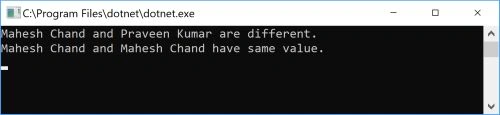
Figure 1.
Using String.Compare
String.Compare method compares two strings and returns an integer value. The return value of the Compare method can be less than zero, greater than zero, or equals to zero.
| Return value | Meaning |
| Less than 0 | The first string precedes the second string in the sort order. |
| 0 | Both strings are equal in value. |
| Greater than 0 | The first string follows the second string in the sort order. |
The code sample below is an example of comparing two strings using String.Compare method.
string author1 = "Mahesh Chand";
string author2 = "Praveen Kumar";

// Use String.Compare method
if (String.Compare(author1, author2) == 0)
Console.WriteLine($"Both strings have same value.");
else if (String.Compare(author1, author2) < 0)
Console.WriteLine($"{author1} precedes {author2}.");
else if (String.Compare(author1, author2) > 0)
Console.WriteLine($"{author1} follows {author2}.");
Using CompareTo Method
The CompareTo method is an instance method of a string class. It compares a value (either a string or an object) with a string instance. The return values of this method are the same as the Compare method.
The code sample below is an example of comparing two strings using the CompareTo method.
// Use CompareTo method
if (author1.CompareTo(author2) == 0)
    Console.WriteLine($"Both strings have same value.");
else if (author1.CompareTo(author2) < 0)
    Console.WriteLine($"{author1} precedes {author2}.");
else if (author1.CompareTo(author2) > 0)
    Console.WriteLine($"{author1} follows {author2}.");
Using StringComparer
You can also use the StringComparer class to compare two strings. The code sample in Listing 4 is an example of comparing two strings using the StringComparer.Compare method.
//Use StringComparer
StringComparer comparer = StringComparer.OrdinalIgnoreCase;
if (comparer.Compare(author1, author2) == 0)
    Console.WriteLine($"Both strings have same value.");
else if (comparer.Compare(author1, author2) < 0)
    Console.WriteLine($"{author1} precedes {author2}.");
else if (comparer.Compare(author1, author2) > 0)
    Console.WriteLine($"{author1} follows {author2}.");
Complete Code Example
using System;

namespace StringComapreSample
{
    class Program
    {
        static void Main(string[] args)
        {
                string author1 = "Mahesh Chand";
                string author2 = "Praveen Kumar";
                string author3 = "Mahesh Chand";

                // Compare strings using String.Equals
                if (String.Equals(author1, author2))
                    Console.WriteLine($"{author1} and {author2} have same value.");
                else
                    Console.WriteLine($"{author1} and {author2} are different.");

                if (String.Equals(author1, author3))
                    Console.WriteLine($"{author1} and {author3} have same value.");
                else
                    Console.WriteLine($"{author1} and {author3} are different.");


            // Use String.Compare method
            if (String.Compare(author1, author2) == 0)
                Console.WriteLine($"Both strings have same value.");
            else if (String.Compare(author1, author2) < 0)
                Console.WriteLine($"{author1} precedes {author2}.");
            else if (String.Compare(author1, author2) > 0)
                Console.WriteLine($"{author1} follows {author2}.");

            // Use CompareTo method
            if (author1.CompareTo(author2) == 0)
                Console.WriteLine($"Both strings have same value.");
            else if (author1.CompareTo(author2) < 0)
                Console.WriteLine($"{author1} precedes {author2}.");
            else if (author1.CompareTo(author2) > 0)
                Console.WriteLine($"{author1} follows {author2}.");

            //Use StringComparer
            StringComparer comparer = StringComparer.OrdinalIgnoreCase;
            if (comparer.Compare(author1, author2) == 0)
                Console.WriteLine($"Both strings have same value.");
            else if (comparer.Compare(author1, author2) < 0)
                Console.WriteLine($"{author1} precedes {author2}.");
            else if (comparer.Compare(author1, author2) > 0)
                Console.WriteLine($"{author1} follows {author2}.");
            Console.ReadKey();
        }
    }
}
Summary
This article and code sample demonstrated how to compare two strings in C# and .NET Core using different methods.
Yusuf AksoyPosted Jan 16, 2021, 8:39 PM
Thanks a lot.
Pankajkumar PatelPosted Sep 27, 2019, 12:39 AM
Nice article
Sourav Kumar DasPosted Sep 26, 2019, 12:54 AM
Nice article
Logesh PalaniPosted Jul 19, 2019, 10:57 PM
Write some output in command of code end, its more good understand
Cris GomezPosted Jun 5, 2019, 1:23 PM
Thanks, nice tutorial!
Hamid KhanPosted Feb 22, 2019, 4:08 AM
Thanks...............
Rushi MehtaPosted Sep 25, 2018, 1:53 AM
Great Article wrttien
Abhishek YadavPosted Aug 27, 2014, 2:47 PM
Oh !! Thanks Mahesh, now i understand where i made mistake, I thought it works on ASCII value and that's why there was some confusion, but now i understood that it works on alphabetic order like from a,b,c.....X,Y,Z and it compares the position of these letters right ??.
Abhishek YadavPosted Aug 25, 2014, 7:34 PM
Hello Mahesh, I have some doubt with Compare(), this method works by taking each characters of a string with their ASCII values right??? If yes then let's take an example of a and A. ACSII value of a = 97 and A = 65, when it compares these 2 string i.e. Compare("a","A"), it returns -1. in other way, Compare(97,65), value of a > value of A i.e. (97 > 65), which means first string is greater than second, As per the above table it supposed to return 1, then why it returns -1 ?? Please help.....
Anders AxiPosted Oct 22, 2010, 6:39 PM
string.Compare("W", "V") give the result 1, but string.Compare("WA", "VB") give the result -1 I'm at a computer with Swedish version of Windows, could that impact? Culture Info? The first case seems resonable (W is > V, as we speak strings), but what about case 2? Regards, Anders Axi