

WPF DecimalUpDown Control
I am sure you have used a NumericUpDown control in your
application in which the current value of the control increases or decreases by
using an up and down keys. WPF team has done a great job by extending this
feature in WPF Toolkit and now up and down keys can be used on DateTime,
decimal, double, and integer data types.
A DecimalUpDown control allows us to display, increment or
decrement decimal values including a number, currency, floating point, and even
a percentage.
This article demonstrates how to use the DecimalUpDown control
in a WPF application
using C#
and XAML.
Adding Reference to WPF Toolkit
Extended Assembly
The DecimalUpDown control
is a part of the WPF Toolkit Extended and does not come with Visual Studio
2010. To use the Calculator control in your application, you must add reference
to the WPFToolkit.Extended.dll assembly. You can download Extended WPF Tookit
from the CodePlex or you can use the WPFToolkit.Extended.dll available with
this download. All you need is the DLL. See Downloads section of this article.
You can find more details in my blog Adding
Reference to WPF Toolkit Extended.
Creating a DecimalUpDown
The DecimalUpDown element represents a WPF DecimalUpDown control in XAML. The DecimalUpDown control is defined in the System.Windows.Controls namespace. Listing 1 creates a simple DecimalUpDown control. The Value property is a numeric value. The FormatString property is used to format a value.
<wpfx:DecimalUpDown Height="30" Value="34.0909" FormatString="F" />
Listing 1
The default output of
Listing 1 generates Figure 1.
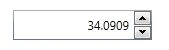
Figure 1
Format Types
To format a value, the
DecimalUpDown control provides C, F, G, N, and P for Currency, Floating Point,
General, Number, and Percent respectively.
The code Listing 2 creates three DecimalUpDown controls and
displays three different formats.
<wpfx:DecimalUpDown Height="30" Value="34.0909" FormatString="F" Margin="22,27,342,254"
/>
<wpfx:DecimalUpDown FormatString="F3" Height="30" Margin="22,74,342,207" Value="34.0909"
Increment="0.01" Maximum="1000"/>
<wpfx:DecimalUpDown FormatString="C" Height="30" Increment="0.01" Margin="22,129,342,152"
Maximum="1000" Value="34.0909" />
Listing 2
Figure 2 is an example of a number, floating point and
currency respectively.
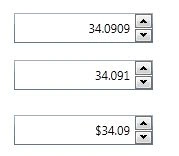
Figure 2
Summary
In this article, we discussed how to use the DecimalUpDown
control in a WPF
application using C# and XAML.
Join the conversation! Your thoughts help the community grow.