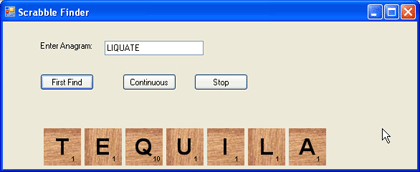
Figure 1 - GA Spell Check Anagram Solver
Introduction
My wife really loves to play scrabble and I think the reason she loves it so much is that she usually kicks my butt. I guess she's more of a wordsmith and I'm more of a numbers guy. To see the joy on her face after beating me by a margin of 100 points does my heart good, but I need an advantage. I decided to put my number skills to some use and write an AI program that can be used to take a set of letters and attempt to find a word. Might as well let the computer do my thinking for me and then I'll have a prayer of overtaking my wife in a scrabble battle.
Now the question is, "How do I go about finding a way to generate words from a set of letters and have the computer recognize them as words?". After pounding my head against the wall for a couple of cycles, it dawned on me that you can use a spellchecker as a word filter. If the word exists, a spell checker won't complain. If the word doesn't exist, a spell checker will fail on the check. Now the trick is finding a spell checker to use in .NET. Sure enough, there is NetSpell, an open source solution for checking spelling in .NET. NetSpell has the ability to not only check spelling, but to suggest alternative words which are similar. We will use the NetSpell.SpellChecker.Spelling class to test the word contained in each of our genomes. The UML representation of the Spelling Class and the methods used to Test the genome are shown in figure 2. The TestWord method can be used to test if the word exists and the Suggest method can be used to create a list of suggestions that are close to the tested word.
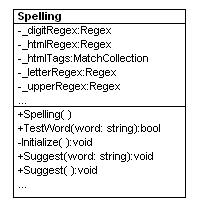
Figure 2 - Spelling Class Reverse Engineered using WithClass
We will take advantage of the TestWord method in our fitness function of the genetic algorithm to see if the word contained in an individual Genome exists or not.
Design
The design of our anagram finder will be borrowed from a previous article on genetic algorithms called Mastermind Computer Player using a Genetic Algorithm. The mastermind program uses a genetic algorithm to find the best guess for a mastermind row, given the previous guessed rows. Each row has a genome represented by several color peg genes. The anagram genome simply consists of a set of letters instead of a set of colors. The similar design for our anagram solver is shown in figure 3. The algorithm consists of a population of a set of scrabble genomes. The genomes are mutated and crossed over in each generation until the program solves the anagram and the genome has a perfect fitness. Because we know all the possible letters in the genome to start, we don't need to mutate the word by generating new letters. We simply need to mutate the positions of the letters in each individual genome. Crossover will also change the position of the letters, but will only crossover within the same genome, so as not to lose or duplicate any of the letters.
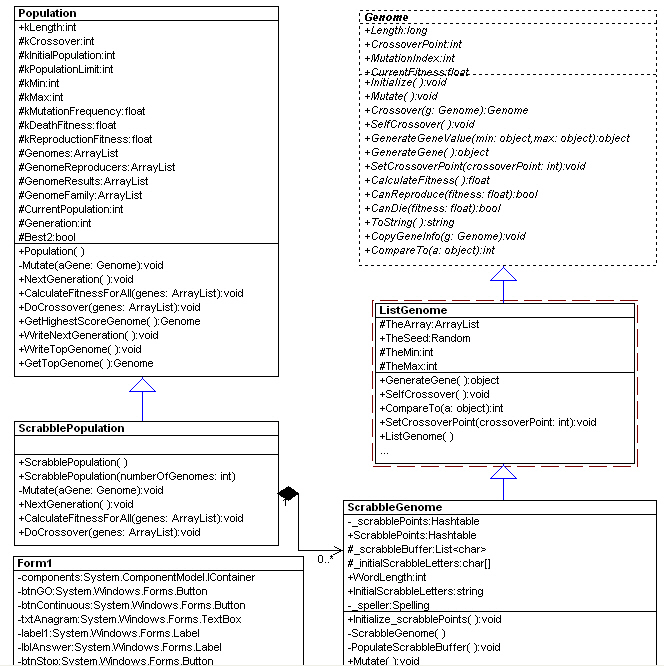
Figure 4 - Anagram Solver Genetic Algorithm Design reverse engineered in WithClass
The Code
The code for the genetic algorithm solver is very similar to the mastermind program. The only significan difference (as with all GA programs) is the fitness function. The fitness function turns out to be simple in this case because we can only accept a perfect fitness. Note that in some ways this program does not really behave like a genetic algorithm—it does not approach an elite population since the fitness does not gradually change. The program is more of a generator of random combinations of genomes. If we were to change the fitness function to score words based on the scrabble score, then we could utilize the program more as a genetic algorithm so that the population approaches the highest scrabble score.
Listing 1 - Calculate the fitness of a word based on whether or not it is spelled correctly
private float CalculateFromGAScrabbleBoard()
{
float fFitnessScore = 0.0f;
string word = ToString();
if (_speller.TestWord(word))
{
fFitnessScore = TheArray.Count;
}
else
{
fFitnessScore = .01f;
}
return fFitnessScore;
} |
Continuous Mode
The program runs the algorithm in two possible modes: first find and continuous. First find stops the algorithm after it finds the first anagram. Continuous mode continues to search for anagrams until the user hits the stop button. Both algorithm modes are run in separate threads from the GUI. The continous mode thread is shown in listing 2.
Listing 2 - Continously look for anagrams until the user hits the stop button
private void btnContinuous_Click(object sender, EventArgs e)
{
// get the scrambled letters to solve
ScrabbleGenome.InitialScrabbleLetters = txtAnagram.Text;
_stop = false;
// start the algorithm in a new thread
Thread oThread = new Thread(new ThreadStart(GeneticAlgorithThreadContinuous));
oThread.Start();
}
private void GeneticAlgorithThreadContinuous()
{
// create a new random scrabble genome population
ScrabblePopulation population = new ScrabblePopulation();
// continue through 100,000 generations or when the user hits stop
for (int i = 0; i < 100000; i++)
{
// get the next generation of genomes that are closer to the desired word fitness
population.NextGeneration();
// display the top word genome every 50 generations
if (i % 50 == 0)
{
population.WriteNextGeneration();
_answerText = population.GetTopGenome().ToString();
_solved = true;
// Let the GUI thread know we want to paint the tiles
this.BeginInvoke(new SetScrabbleDisplayDelegate(SetScrabbleDisplay), new object[] { _answerText });
}
}
// escape if the user hits the stop button
if (_stop == true)
{
_stop = false;
break;
}
}
} |
What if we want to find all the anagrams for the word rose? We can run the algorithm in continuous mode and pick off the top gene fitnesses generated. The results written to the console of the word rose running in continuous mode is shown in listing 3:
Listing 3 - Output of the console showing all anagrams for the word rose:
|
Genome 0: ores --> 4
Genome 1: rose --> 4
Genome 2: rose --> 4
Genome 3: sore --> 4
Genome 4: ores --> 4
Genome 5: ores --> 4
Genome 6: sore --> 4
Genome 7: roes --> 4
Genome 8: rose --> 4
Genome 9: rose --> 4 |
Drawing the Letters
Drawing the scrabble letters is performed in the paint event handler of the GUI thread. The code goes through each letter of the top word genome and paints a tile representing the letter using GDI+. Each tile is placed according to the position of the previous tile. The tiles consist of three GDI+ methods: DrawImage to draw the wood tile, DrawString to draw the scrabble letter, and DrawString to draw the scrabble letter value.
private void Form1_Paint(object sender, PaintEventArgs e)
{
// This will paint the answer
if (_solved)
{
int position = 0;
// Loop through each letter in the top genome and paint the tile
foreach (char c in lblAnswer.Text)
{
position += _tileImage.Width + 5;
DrawLetterTile(e.Graphics, position, c.ToString().ToUpper()[0]);
}
}
}
Font _scrabbleFont = new Font(new FontFamily("Arial"), 24, FontStyle.Bold);
Font _numberFont = new Font(new FontFamily("Arial"), 7, FontStyle.Bold);
void DrawLetterTile(Graphics g, int position, char c)
{
// get the scrabble value for the letter we are painting
int num = (int)ScrabbleGenome.ScrabblePoints[c];
// determine the position of the wooden tile bitmap
int xPosition = position;
int yPosition = ClientRectangle.Height - (_tileImage.Height + 5);
// flip the image 90 degrees each time to show different wood grains
_tileImage.RotateFlip(RotateFlipType.Rotate90FlipX);
// draw the blank tile
g.DrawImage(_tileImage, xPosition , yPosition);
// draw the scrabble letter in the center of the tile
g.DrawString(c.ToString(), _scrabbleFont, Brushes.Black, new Point(xPosition + (_tileImage.Width - (int)g.MeasureString(c.ToString(), _scrabbleFont).Width) / 2,
yPosition + (_tileImage.Height - _scrabbleFont.Height) / 2));
// draw the scrabble point value in the lower right hand corner of the tile
g.DrawString(num.ToString(), _numberFont, Brushes.Black, new Point(xPosition + _tileImage.Width - 15, yPosition + _tileImage.Height - 15));
} |
Conclusion
Once again genetic algorithms are shown to think for us in a task that could take the average person a hundred times longer to solve. In a future article we hope to show you how to write a fitness function that will pick the highest scoring letter combination on your scrabble letter block. In the meantime, boost your scrabble score with C# and . .
.