|
|
|
|
|
|
Author Rank:
|
|
Total page views :
49259
|
|
Total downloads :
1866
|
|
|
|
|
Download
Files:
|
|
|
|
|
|
|
|
|
|
Similar ArticlesMost ReadTop RatedLatest
|
|
|
|
|

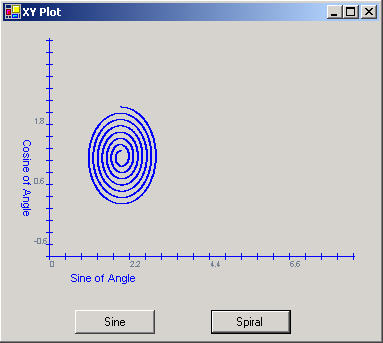
Figure 1 - The XYPlot Control used in a Form
This is a follow up of the article written originally for the beta version of .NET called, A Graphics Component in C#. There are some slight modifications to this control to use an ArrayList rather than a one-dimensional array. By using an ArrayList, the list of points can grow dynamically rather than having to predetermine the number of points. The controls interface remains the same, so you can use it the same way as the previous article describes.
Utilizing the ArrayList
The ArrayList is like an array, except it stores generic objects. For the purpose of plotting, I created a generic Point class, called PointI. Originally I tried to store the System.Drawing.Point struct in the ArrayList, but I had trouble pulling the point out of the list without getting a copy of it, so I couldn't assign anything to the X and Y values. This may have been something I was doing wrong, but a class reference worked better. The PointI class is a subset of the Point struct and is used the same way throughout the code as a Point. It can even be converted to a Point struct with the ToPoint() method. Below is the code used to add a point to the list of points to be plotted in the user control
public void AddPoint(float x, float y) { // Add a new point to the ArrayList m_points.Add(new PointI()); XValue = x; YValue = y; CurrentIndex ++; NumberOfPoints ++; }
Listing 1 - Adding a Point to the PointI ArrayList
As you may have guessed, m_points is the ArrayList and accepts the PointI instance into its collection via the Add method. XValue and YValue are actually properties and do a bit more than get assigned x and y values. The XValue and YValue properties also assign the current values to the newly created point in the m_points ArrayList. In addition, the XValue and YValue properties translate the coordinate system on the graph into the coordinate system on the user control. When the x and y values are read from these properties with a get, they translate the coordinates from the screen back to the graph coordinates. Below is the XValue property code:
public float XValue { get { // get the actual point that is sitting on the graph return (float)(UntranslateX(((PointI)m_points[m_nCurrentIndex]).X) * m_fXTickValue + XOrigin); } set { // set the point to translated screen coordinates PointI p = ((PointI)m_points[m_nCurrentIndex]); p.X = TranslateX((int)((value- XOrigin)/m_fXTickValue)); } }
Listing 2 - XValue Property for translating between screen and graph coordinates
Notice that the indexed elements in the ArrayList must be unboxed each time you want to access properties or methods of the PointI class.
To use the control, you just set up the origin and tick values as was done in the previous article. You can also set Axis Labels in this version. Below is the code for creating a graph of the spiral shown in Figure 1.
private void SpiralButton_Click(object sender, System.EventArgs e) { xyGraphControl1.Reset(); xyGraphControl1.XTickValue = 6.28f/225f; xyGraphControl1.YTickValue = 0.02f; xyGraphControl1.XOrigin = 0; xyGraphControl1.YOrigin = -1; // Create a spiral by plotting a circle with sine and cosine of the angle and reducing the radius slightly each time // through the loop for (float i = 0; i < 6.28 * 7; i += 6.28f/500f) { xyGraphControl1.AddPoint((float)Math.Sin((double)i) *(1- i/50.0f) + 2.0f, (float)Math.Cos((double)i)* (1 - i/50.0f) + 1.0f); } xyGraphControl1.Invalidate(); }
Listing 3 - Plotting a Spiral on the XY Plot user control
|
|
|
Login
to add your contents and source code to this article
|
|
|
|
|
|
|
|
|
|
Mike Gold
Michael Gold is President of Microgold Software Inc., makers of the WithClass UML Tool. His company is a Microsoft VBA Partner and Borland Partner. Mike is a Microsoft MVP and founding member of C# Corner. He has a BSEE and MEng EE from Cornell University and has consulted for Chase Manhattan Bank, JP Morgan, Merrill Lynch, and Charles Schwab. Currently he is a senior developer at Finisar Corp. He has been involved in several .NET book projects, and is currently working on a book for using .NET with embedded systems. He can be reached at mike@c-sharpcorner.com
|
|
|
|
|
|
|
|
|
C# Consulting is founded in 2002 by the founders of C# Corner. Unlike a traditional
consulting company, our consultants are well-known experts in .NET and many of them
are MVPs, authors, and trainers. We specialize in Microsoft .NET development and
utilize Agile Development and Extreme Programming practices to provide fast pace
quick turnaround results. Our software development model is a mix of Agile Development,
traditional SDLC, and Waterfall models.
|
|
Click here to learn more about C# Consulting. |
|
|
|
|
|
|
|
Introducing MaxV - one click. infinite control. Hyper-V Hosting from MaximumASP.
Finally – a virtual platform that delivers next-generation Windows Server 2008 Hyper-V virtualization technology from a managed hosting partner you can truly depend on. Visit www.maximumasp.com/max for a FREE 30 day trial. Hurry offer ends soon.
Climb aboard the MaxV platform and take advantage of High Availability, Intelligent Monitoring, Recurrent Backups, and Scalability – with no hassle or hidden fees.
As a managed hosting partner focused solely on Microsoft technologies since 2000, MaximumASP is uniquely qualified to provide the superior support that our business is built on. Unparalleled expertise with Microsoft technologies lead to working directly with Microsoft as first to offer IIS 7 and SQL 2008 betas in a hosted environment; partnering in the Go Live Program for Hyper-V; and product co-launches built on WS 2008 with Hyper-V technology.
|
Dynamic PDF
ceTE software specializes in components for dynamic PDF generation and manipulation. The DynamicPDF™ product line allows you to dynamically generate PDF documents, merge PDF documents and new content to existing PDF documents from within your applications.
|
Go.NET
Build custom interactive diagrams, network, workflow editors, flowcharts, or software design tools. Includes many predefined kinds of nodes, links, and basic shapes. Supports layers, scrolling, zooming, selection, drag-and-drop, clipboard, in-place editing, tooltips, grids, printing, overview window, palette. 100% implemented in C# as a managed .NET Control. Document/View/Tool architecture with many properties&events. Optional automatic layout.
|
Dundas Software
Dundas Chart for .NET is the most advanced .NET charting package available today. With an extremely complete feature set, elegant architecture and easy implementation, Dundas Chart can quickly add advanced Charting functionality to enhance and transform ASP.NET and Windows Forms applications. Whether you are implementing charting into internal projects, or building applications for clients, Dundas Chart offers advanced technology and advanced results to get the most out of data.
|
Clickatell's SMS Gateway
Clickatell's Developer Solutions allow you to SMS enable any website or
application via a range of API's. Learn More about our API connections.
|
Nevron Chart for .NET 2010.1 Now Available
The leading .NET charting control now features PDF, Flash and Silverlight export, visualization of large datasets and more. Deliver true charting functionality to your BI, Scorecard, Presentation or Scientific apps. Download evaluation now.
|
|
|
|
|
|
|
|
|
Download
Files:
|
|
|
|
|
|
|
|
|
|
|
|
|
|
|
|
|
|