

In this article I will explain how to make a resizable Grid View in ASP.NET using jQuery.
The following is my aspx code.
- <%@ Page Language="C#" AutoEventWireup="true" CodeFile="Default.aspx.cs" Inherits="_Default" %>
- <!DOCTYPE html PUBLIC "-//W3C//DTD XHTML 1.0 Transitional//EN" "http://www.w3.org/TR/xhtml1/DTD/xhtml1-transitional.dtd">
- <html xmlns="http://www.w3.org/1999/xhtml">
- <head runat="server">
- <title>Resizable Gridview in ASP.NET using jQuery</title>
- <script src="jquery-1.8.2.js" type="text/javascript"></script>
- <link href="jquery-ui.css" rel="stylesheet" type="text/css" />
- <script src="jquery-ui.js" type="text/javascript"></script>
- <script type="text/javascript">
- $(function() {
- $("#gridDivResize").resizable();
- })
- </script>
- </head>
- <body>
- <form id="form1" runat="server">
- <div id="gridDivResize" class="ui-widget-content" style="width: 550px; padding: 2px">
- <asp:GridView ID="GridView1" CellPadding="4" runat="server" Width="100%" ForeColor="#333333"
- GridLines="None">
- <RowStyle BackColor="#F7F6F3" ForeColor="#333333" />
- <FooterStyle BackColor="#5D7B9D" Font-Bold="True" ForeColor="White" />
- <PagerStyle BackColor="#284775" ForeColor="White" HorizontalAlign="Center" />
- <SelectedRowStyle BackColor="#E2DED6" Font-Bold="True" ForeColor="#333333" />
- <HeaderStyle BackColor="#5D7B9D" Font-Bold="True" ForeColor="White" />
- <EditRowStyle BackColor="#999999" />
- <AlternatingRowStyle BackColor="White" ForeColor="#284775" />
- </asp:GridView>
- </div>
- </form>
- </body>
- </html>
The following is my Data Table design.

Image 1
The data in my data table is: I am showing only CompanyName, Employee Name, Joining Date and Experience columns in GridView.

Image 2
My aspx.cs code is:
- using System;
- using System.Configuration;
- using System.Data;
- using System.Linq;
- using System.Web;
- using System.Web.Security;
- using System.Web.UI;
- using System.Web.UI.HtmlControls;
- using System.Web.UI.WebControls;
- using System.Web.UI.WebControls.WebParts;
- using System.Xml.Linq;
- using System.Data.SqlClient;
- public partial class _Default : System.Web.UI.Page
- {
- SqlDataAdapter da;
- DataSet ds = new DataSet();
- protected void Page_Load(object sender, EventArgs e)
- {
- if (!IsPostBack)
- {
- BindGridviewData();
- }
- }
- protected void BindGridviewData()
- {
- SqlConnection con = new SqlConnection();
- con.ConnectionString = @"Data Source=MyPC\SqlServer2k8;Integrated Security=true;Initial Catalog=Test";
- SqlCommand cmd = new SqlCommand("SELECT CompanyName,EmployeeName,JoiningDate,Experience FROM EMPLOYEE", con);
- da = new SqlDataAdapter(cmd);
- da.Fill(ds);
- con.Open();
- cmd.ExecuteNonQuery();
- con.Close();
- if (!object.Equals(ds.Tables[0], null))
- {
- if (ds.Tables[0].Rows.Count > 0)
- {
- GridView1.DataSource = ds;
- GridView1.DataBind();
- }
- else
- {
- GridView1.DataSource = null;
- GridView1.DataBind();
- }
- }
- }
- }
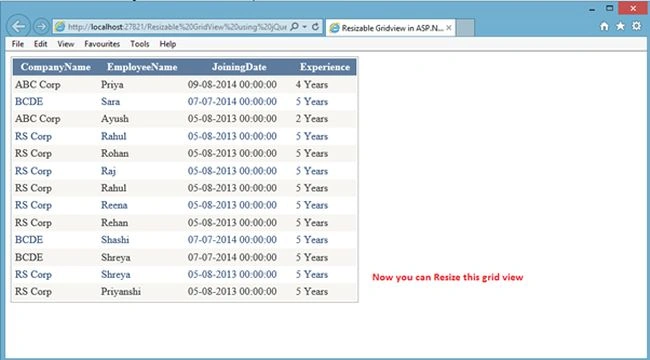
Image 3
Now resize the Grid View.
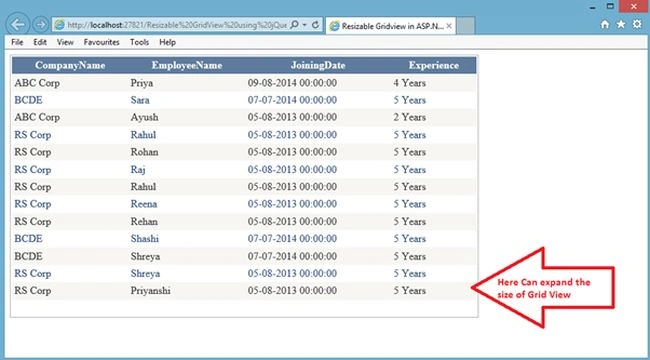
Image 4
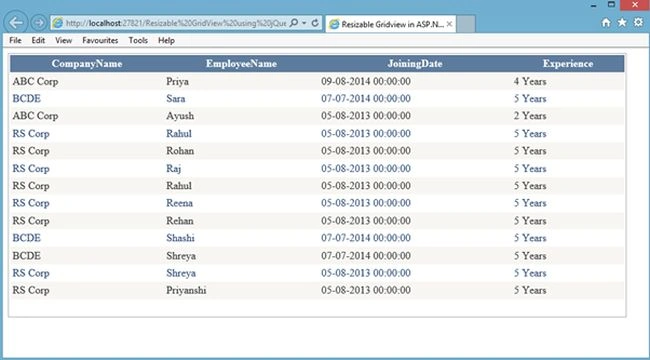
Image 5
Rahul Kumar SaxenaPosted Apr 25, 2015, 11:44 PM
Thanks Gowtham Rajamanickam...
Gowtham RajamanickamPosted Apr 25, 2015, 6:14 AM
good