

This article explains how to use the Model View ViewModel (MVVM) pattern with Knockout using Entity Framework in ASP.Net web applications.
MVVM: The MVVM pattern solves the problem of de-coupling the View from the Model, so that Views can be implemented by the designers instead of software developers.
- VIEW: Binds to the ViewModel using only data binding.
- MODEL: A Model is responsible for exposing data in a way that is easily consumable by WPF. It must implement INotifyPropertyChanged and/or INotifyCollectionChanged as appropriate.
- ViewModel: A ViewModel is a model for a view in the application or we can say as an abstraction of the view. It exposes data relevant to the view and exposes the behaviors for the views, usually with Commands.
Knockout: KnockoutJS is a pure JavaScript framework to implement the MVVM design pattern in the web application development. The main key concepts of KO is:
- Declarative Bindings
- Automatic UI Refresh
- Dependency Tracking
- Templating
Getting Started
- Start Visual Studio
- Create a new website
- Provide the name and location of the website
- Click "Next"
This is the employee table entity data diagram:
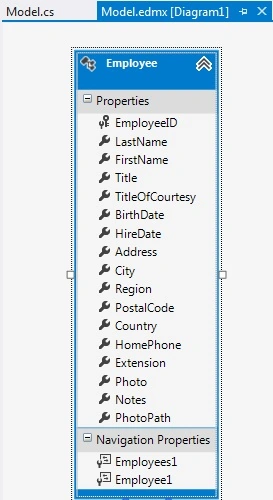
This is model class:
- public partial class Employee
- {
- public Employee()
- {
- this.Employees1 = new HashSet<Employee>();
- }
- public int EmployeeID { get; set; }
- public string LastName { get; set; }
- public string FirstName { get; set; }
- public string Title { get; set; }
- public string TitleOfCourtesy { get; set; }
- public Nullable<System.DateTime> BirthDate { get; set; }
- public Nullable<System.DateTime> HireDate { get; set; }
- public string Address { get; set; }
- public string City { get; set; }
- public string Region { get; set; }
- public string PostalCode { get; set; }
- public string Country { get; set; }
- public string HomePhone { get; set; }
- public string Extension { get; set; }
- public byte[] Photo { get; set; }
- public string Notes { get; set; }
- public string PhotoPath { get; set; }
- public virtual ICollection<Employee> Employees1 { get; set; }
- public virtual Employee Employee1 { get; set; }
- }
This is the context class:
- public partial class NorthwindEntities2 : DbContext
- {
- public NorthwindEntities2() : base("name=NorthwindEntities2")
- {
- }
- protected override void OnModelCreating(DbModelBuilder modelBuilder)
- {
- throw new UnintentionalCodeFirstException();
- }
- public DbSet<Employee> Employees { get; set; }
- }
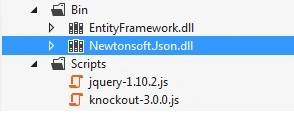
Add these js, assembly references.
Now for the ViewModel.
- <script src="Scripts/jquery-1.10.2.js"></script>
- <script src="Scripts/knockout-3.0.0.js"></script>
- <script type="text/javascript">
- function Employee(data) {
- this.EmployeeID = ko.observable(data.EmployeeID);
- this.LastName = ko.observable(data.LastName);
- this.FirstName = ko.observable(data.FirstName);
- this.Address = ko.observable(data.Address);
- this.City = ko.observable(data.City);
- this.Region = ko.observable(data.Region);
- this.PostalCode = ko.observable(data.PostalCode);
- this.Country = ko.observable(data.Country);
- this.PhotoPath = ko.observable(data.PhotoPath);
- }
- // View Model
- function EmployeeViewModel() {
- var self = this;
- self.Countries = ko.observableArray(['USA', 'UK', 'India']);
- self.Employees = ko.observableArray([]);
- self.EmployeeID = ko.observable();
- self.LastName = ko.observable();
- self.FirstName = ko.observable();
- self.Address = ko.observable();
- self.City = ko.observable();
- self.Region = ko.observable();
- self.PostalCode = ko.observable();
- self.Country = ko.observable();
- self.PhotoPath = ko.observable();
- self.AddEmployee = function () {
- self.Employees.push(new Employee({
- EmployeeID: self.EmployeeID(),
- LastName: self.LastName(),
- FirstName: self.FirstName(),
- Address: self.Address(),
- City: self.City(),
- Region: self.Region(),
- PostalCode: self.PostalCode(),
- Country: self.Country(),
- PhotoPath: self.PhotoPath()
- }));
- self.EmployeeID("");
- self.LastName("");
- self.FirstName("");
- self.Address("");
- self.City("");
- self.Region("");
- self.PostalCode("");
- self.Country("");
- self.PhotoPath("");
- };
- //Remove from list
- self.RemoveEmployee = function (employee) {
- self.Employees.remove(employee)
- };
- // Save data in database
- self.SaveToDb = function () {
- jQuery.ajax({
- type: "POST",
- url: "http://localhost:16072/Default.aspx/SaveEmployees",
- data: ko.toJSON({ data: self.Employees }),
- contentType: "application/json",
- success: function (result) {
- alert(result.d);
- }
- });
- };
- //Delete Employee
- self.DeleteEmployee = function () {
- jQuery.ajax({
- type: "POST",
- url: "http://localhost:16072/Default.aspx/DeleteEmployee",
- data: ko.toJSON({ data: self.Employees }),
- contentType: "application/json",
- success: function (result) {
- alert(result.d);
- self.Students.remove(student)
- },
- error: function (err) {
- alert(err.status + " - " + err.statusText);
- }
- });
- };
- //get EMployee
- $.ajax({
- type: "POST",
- url: 'http://localhost:16072/Default.aspx/GetEmployees',
- contentType: "application/json; charset=utf-8",
- dataType: "json",
- success: function (results) {
- var employees = $.map(results.d, function (item) {
- return new Employee(item)
- });
- self.Employees(employees);
- },
- error: function (err) {
- alert(err.status + " - " + err.statusText);
- }
- });
- }
- //KO binding
- $(document).ready(function () {
- ko.applyBindings(new EmployeeViewModel());
- });
- </script>
Hemant MahajanPosted Aug 3, 2015, 4:56 AM
Good article Raj!