
VB .NET does not have an AutoRedraw property for forms
This is a problem if you wish to display text and graphics directly on a form. This brief project should help to provide you with AutoRedraw capability.
The theory is as follows
- Create a bitmap from your form at startup.
- Write your graphics and text to the bitmap (not the form).
- Copy the bitmap to the form to show the graphics.
- Copy the bitmap to the form to repaint.
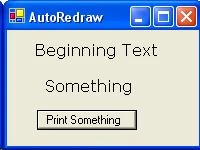
Some explanation
If you try to print directly to the form first and then save each printing from the form to the bitmap you will run into problems since the system may not display your graphics in time to be copied. You could try the 'System.Windows.Forms.Application.DoEvents()' statement, but an intervening Paint event might spoil everything.
Here is the code
- '=======================================================
- ' AutoRedraw in VB .NET
- ' by: Rick Meyer December 2002
- ' http://trixar.com/~makai/index.htm
- '=======================================================
- ' Purpose and Explanation:
- '
- ' This very brief project provides a replacement for
- ' the VB6 Form.AutoRedraw missing in VB .NET
- '=======================================================
- ' Instructions and Operation:
- '
- ' 1. Start a new VB.NET Windows Application
- ' 2. On Form1 put a Button named Button1
- ' 3. Copy the following code into Form1 class
- ' 4. Press F5 to run
- ' 5. Minimize and restore to verify the repaint
- ' 6. Click Button1
- ' 7. Minimize and restore to verify the repaint
- '=======================================================
- 'Bitmap holds picture of the form
- Private b1 As Bitmap
- 'Graphics object (printing buffer)
- Private g1 As Graphics
- Private Sub Form1_Activated(ByVal sender As Object, _ByVal e As System.EventArgs) Handles MyBase.Activated
- Static done As Boolean = False
- If Not done Then
- 'Size and describe the form
- Size = New Size(200, 150)
- Text = "AutoRedraw"
- 'Size, Locate, & Describe the button
- With Button1
- .Text = "Print Something"
- .Size = New Size(100, 20)
- .Location = New Point(30, 80)
- End With
- 'AUTOREDRAW INITIALIZATION
- 'Create the initial bitmap from Form
- b1 = New Bitmap(Width, Height, Me.CreateGraphics())
- 'Create the Graphics Object buffer
- ' which ties the bitmap to it so that
- ' when you draw something on the object
- ' the bitmap is updated
- g1 = Graphics.FromImage(b1)
- 'Prevent reentry to initialization
- done = True
- 'END AUTOREDRAW INITIALIZATION
- 'Print beginning text
- FormPrint("Beginning Text", 25, 10)
- End If
- End Sub
- 'Print something
- Private Sub Button1_Click(ByVal sender As System.Object, _ByVal e As System.EventArgs) Handles Button1.Click
- FormPrint("Something", 35, 46)
- End Sub
- Private Sub FormPrint(ByVal t$, ByVal x1%, ByVal y1%)
- 'Printing to the graphics buffer (not form)
- ' updates the associated bitmap b1
- g1.DrawString(t, New Font("Verdana", 12), _Brushes.Black, x1, y1)
- 'Copy the bitmap to the form
- Me.CreateGraphics.DrawImage(b1, 0, 0)
- End Sub
- Private Sub Form1_Paint( _ByVal sender As Object, _ByVal e As System.Windows.Forms.PaintEventArgs) _Handles MyBase.Paint
- 'Copy the bitmap to the form
- e.Graphics.DrawImage(b1, 0, 0)
- End Sub
Join the conversation! Your thoughts help the community grow.