

Introduction
Today, I have provided an article showing you how to insert, delete and update data in a GridView using a WCF service from C# code. To insert, delete and update data in a GridView using a WCF service, we must do the following 3 things:
- Create Database Table
- Create WCF Service
- Create web Application
In the first step we will create a table in SQL Server; after that we create a simple function to insert, delete and update data in a GridView control using a WCF service. In a web application, add a reference of the service to insert, update and delete data in the GridView control. Let's take a look at a practical example. The example application is developed in Visual Studio 2010 and SQL Server 2008.
Step 1: Creating Database Table
- Database name: Registration
- Database table name: RegistrationTable
RegistrationTable Table
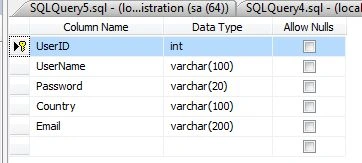
Step 2: Creating WCF Service
Now you have to create a WCF Service:
- Go to Visual Studio 2010
- New-> Select a project
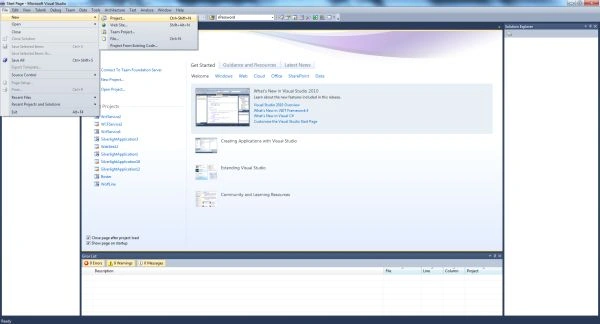
Now click on the project and select WCF Service Application and provide a name for the service:
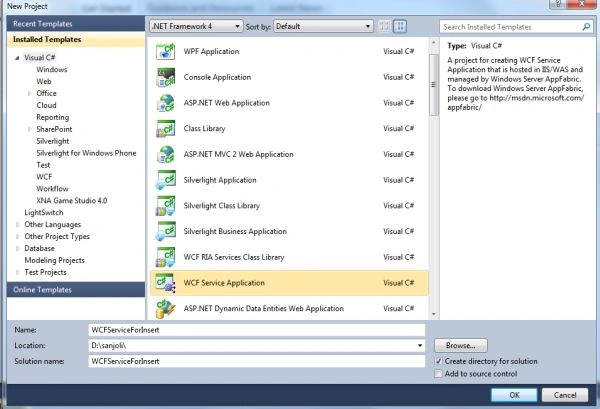
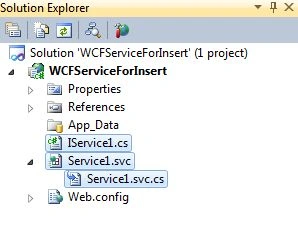
Now click on the Ok Button. Then you will get 3 files in Solution Explorer.
- IService.cs
- Service.svc
- Service.svc.cs
The following image shows the following files:
For inserting data into the database you need to write the following code in the IService1.cs file which contains the two sections:
- OperationContract
- DataContract
The OperationContract section is used to add service operations and a DataContract is used to add types to the service operations.
Iservice1.cs File
Now we create a function in the OperationContract section of the Iservice1.cs file:
- using System;
- using System.Collections.Generic;
- using System.Linq;
- using System.Runtime.Serialization;
- using System.ServiceModel;
- using System.ServiceModel.Web;
- using System.Text;
- using System.Data.SqlClient;
- using System.Data;
- namespace WCFServiceForInsert
- {
- // NOTE: You can use the "Rename" command on the "Refactor" menu to change the interface name "IService1" in both code and config file together.
- [ServiceContract]
- public interface IService1
- {
- [OperationContract]
- string InsertUserDetails(UserDetails userInfo);
- [OperationContract]
- DataSet SelectUserDetails();
- [OperationContract]
- bool DeleteUserDetails(UserDetails userInfo);
- [OperationContract]
- DataSet UpdateUserDetails(UserDetails userInfo);
- [OperationContract]
- void UpdateRegistrationTable(UserDetails userInfo);
- }
- // Use a data contract as illustrated in the sample below to add composite types to service operations.
- [DataContract]
- public class UserDetails
- {
- int userid;
- string username;
- string password;
- string country;
- string email;
- [DataMember]
- public int UserID
- {
- get { return userid; }
- set { userid = value; }
- }
- [DataMember]
- public string UserName
- {
- get { return username; }
- set { username = value; }
- }
- [DataMember]
- public string Password
- {
- get { return password; }
- set { password = value; }
- }
- [DataMember]
- public string Country
- {
- get { return country; }
- set { country = value; }
- }
- [DataMember]
- public string Email
- {
- get { return email; }
- set { email = value; }
- }
- }
- }
In this file we define the definition of the function InsertUserDetails(UserDetails userInfo).
And replace the code with the following:
- using System;
- using System.Collections.Generic;
- using System.Linq;
- using System.Runtime.Serialization;
- using System.ServiceModel;
- using System.ServiceModel.Web;
- using System.Text;
- using System.Data.SqlClient;
- using System.Data;
- namespace WCFServiceForInsert
- {
- // NOTE: You can use the "Rename" command on the "Refactor" menu to change the class name "Service1" in code, svc and config file together.
- public class Service1 : IService1
- {
- public DataSet SelectUserDetails()
- {
- SqlConnection con = new SqlConnection("Data Source=.;Initial Catalog=registration;User ID=sa;Password=wintellect");
- con.Open();
- SqlCommand cmd = new SqlCommand("Select * from RegistrationTable", con);
- SqlDataAdapter sda = new SqlDataAdapter(cmd);
- DataSet ds = new DataSet();
- sda.Fill(ds);
- cmd.ExecuteNonQuery();
- con.Close();
- return ds;
- }
- public bool DeleteUserDetails(UserDetails userInfo)
- {
- SqlConnection con = new SqlConnection("Data Source=.;Initial Catalog=registration;User ID=sa;Password=wintellect");
- con.Open();
- SqlCommand cmd = new SqlCommand("delete from RegistrationTable where UserID=@UserID", con);
- cmd.Parameters.AddWithValue("@UserID", userInfo.UserID);
- cmd.ExecuteNonQuery();
- con.Close();
- return true;
- }
- public DataSet UpdateUserDetails(UserDetails userInfo)
- {
- SqlConnection con = new SqlConnection("Data Source=.;Initial Catalog=registration;User ID=sa;Password=wintellect");
- con.Open();
- SqlCommand cmd = new SqlCommand("select * from RegistrationTable where UserID=@UserID", con);
- cmd.Parameters.AddWithValue("@UserID", userInfo.UserID);
- SqlDataAdapter sda = new SqlDataAdapter(cmd);
- DataSet ds = new DataSet();
- sda.Fill(ds);
- cmd.ExecuteNonQuery();
- con.Close();
- return ds;
- }
- public void UpdateRegistrationTable(UserDetails userInfo)
- {
- SqlConnection con = new SqlConnection("Data Source=.;Initial Catalog=registration;User ID=sa;Password=wintellect");
- con.Open();
- SqlCommand cmd = new SqlCommand("update RegistrationTable set UserName=@UserName,Password=@Password,Country=@Country, Email=@Email where UserID=@UserID", con);
- cmd.Parameters.AddWithValue("@UserID", userInfo.UserID);
- cmd.Parameters.AddWithValue("@UserName", userInfo.UserName);
- cmd.Parameters.AddWithValue("@Password", userInfo.Password);
- cmd.Parameters.AddWithValue("@Country", userInfo.Country);
- cmd.Parameters.AddWithValue("@Email", userInfo.Email);
- cmd.ExecuteNonQuery();
- con.Close();
- }
- public string InsertUserDetails(UserDetails userInfo)
- {
- string Message;
- SqlConnection con = new SqlConnection("Data Source=.;Initial Catalog=registration;User ID=sa;Password=wintellect");
- con.Open();
- SqlCommand cmd = new SqlCommand("insert into RegistrationTable(UserName,Password,Country,Email) values(@UserName,@Password,@Country,@Email)", con);
- cmd.Parameters.AddWithValue("@UserName", userInfo.UserName);
- cmd.Parameters.AddWithValue("@Password", userInfo.Password);
- cmd.Parameters.AddWithValue("@Country", userInfo.Country);
- cmd.Parameters.AddWithValue("@Email", userInfo.Email);
- int result = cmd.ExecuteNonQuery();
- if (result == 1)
- {
- Message = userInfo.UserName + " Details inserted successfully";
- }
- else
- {
- Message = userInfo.UserName + " Details not inserted successfully";
- }
- con.Close();
- return Message;
- }
- }
- }
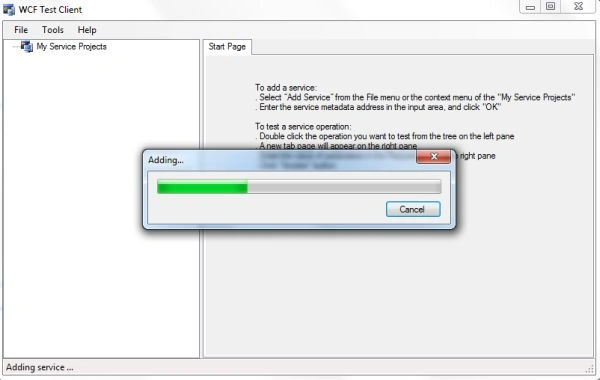
Press F5 to run the service. A WCF Test Client form will be displayed and it will load the service.
Now double-click the InserUserDetails() method under IService1. The InserUserDetails tab will be displayed.
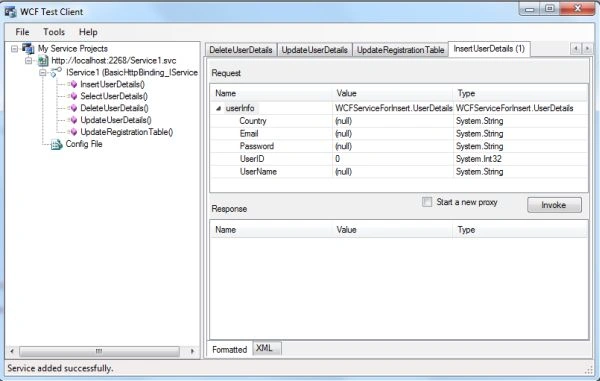
The service was added successfully.
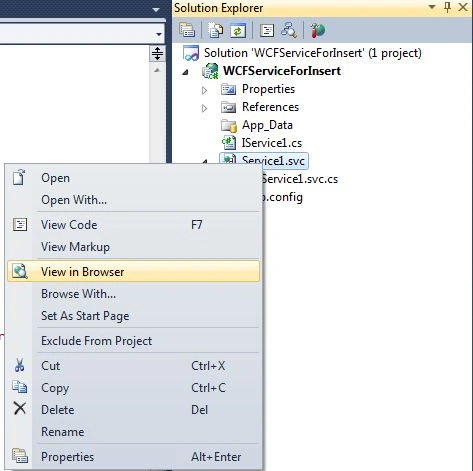
Now open the service in the browser.
Now right-click on the service1.vcs -> open in browser:
Now copy the URL.
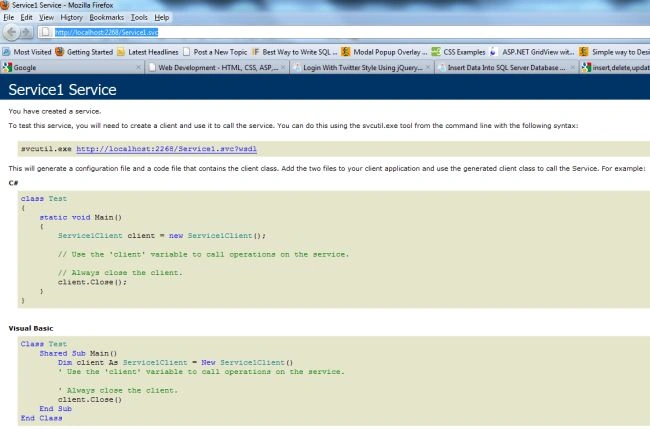
URL
http://localhost:2268/Service1.svc
Step 3: Create web Application (Accessing the Service)
Now, you have to create a web site.
- Go to Visual Studio 2010
- New-> Select a website application
- Click OK
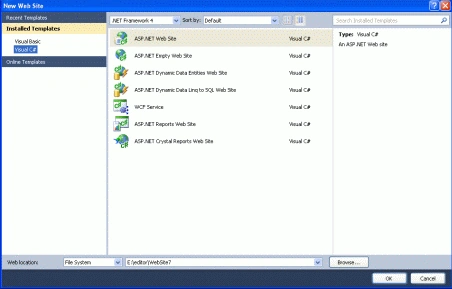
Now add a new page to the website:
- Go to the Solution Explorer
- Right-click on the Project name
- Select add new item
- Add new web page and give it a name
- Click OK
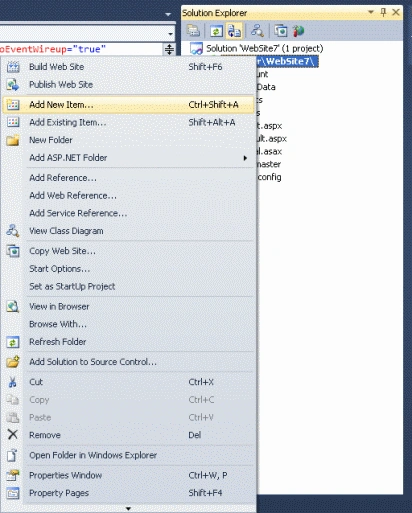
When we click on the add the service reference the following window will be opened:
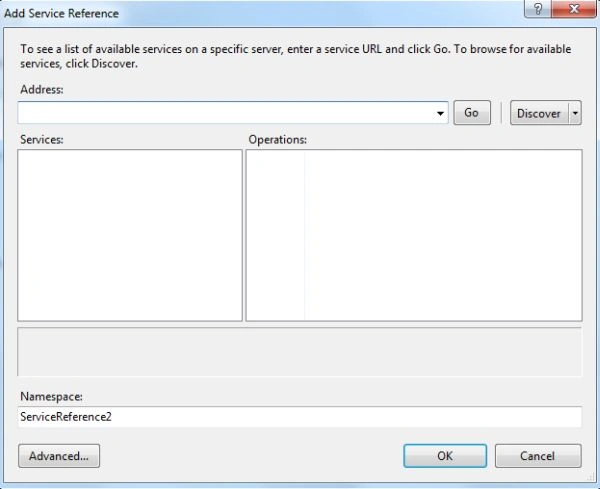
Now paste the above URL in the address and click on the go button.
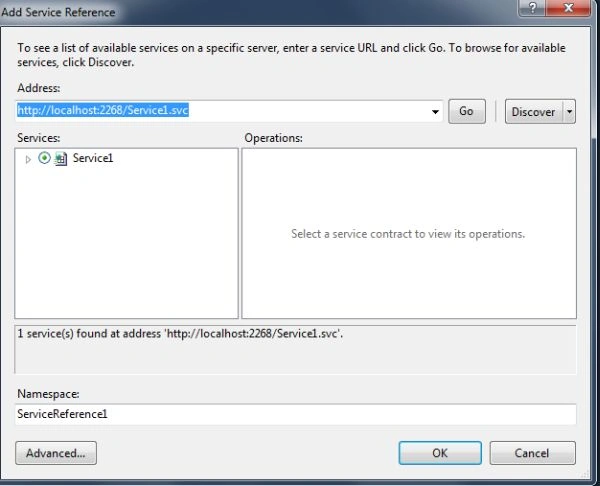
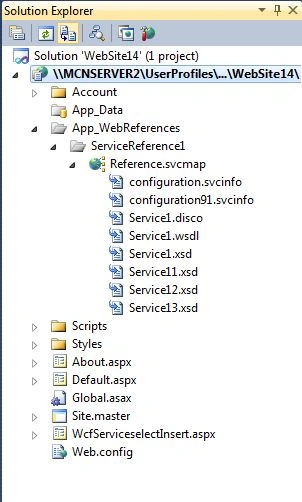
Click on the Ok Button. Now the reference has been added in the Solution Explorer.
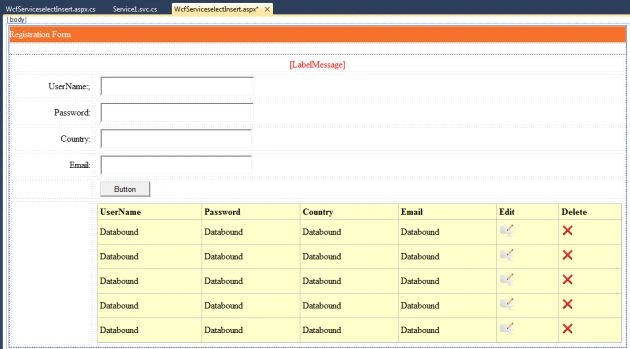
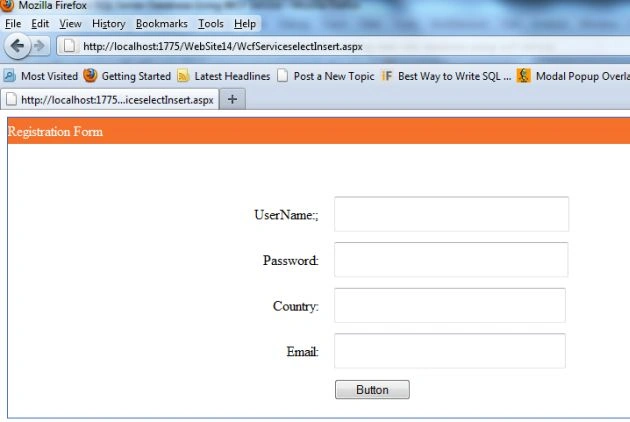
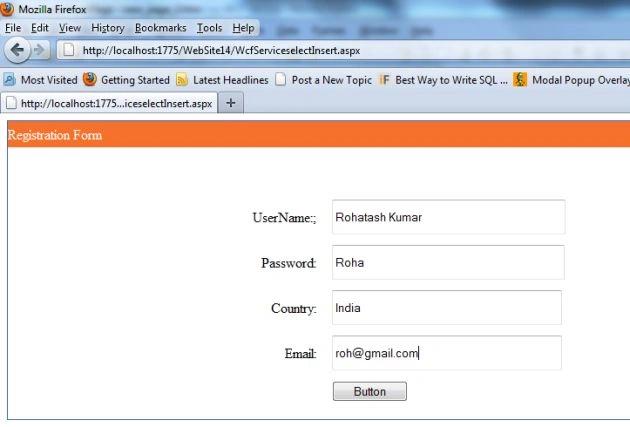
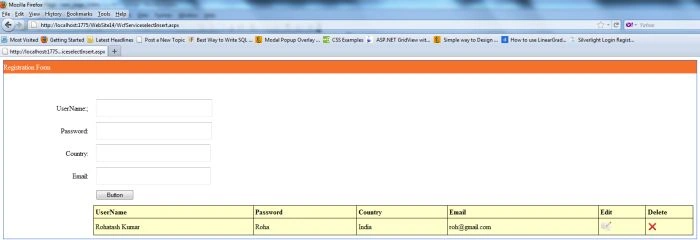
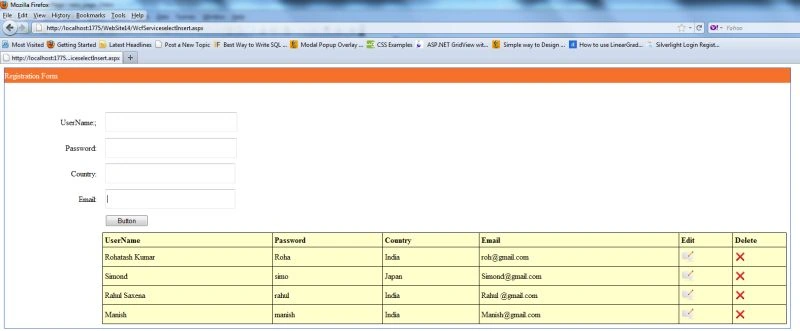
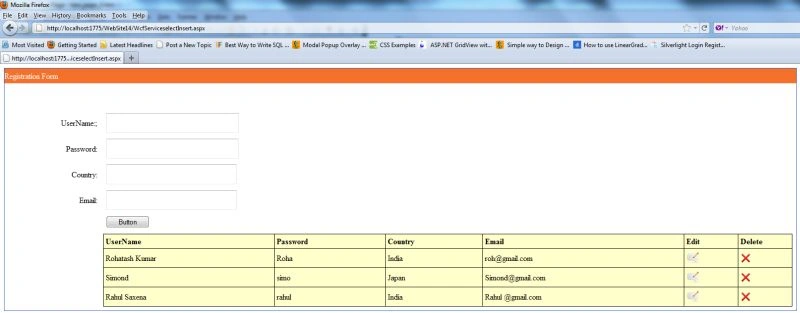
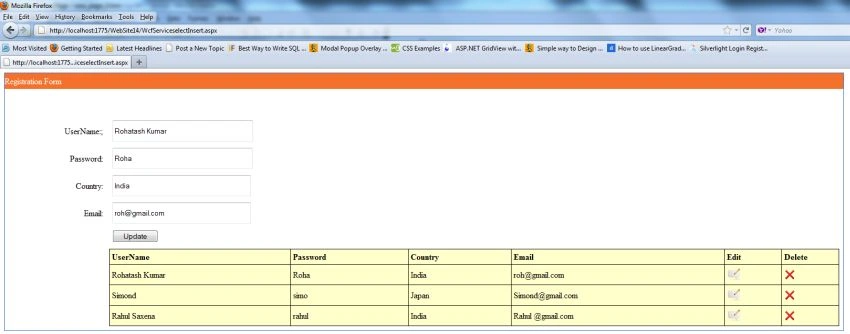
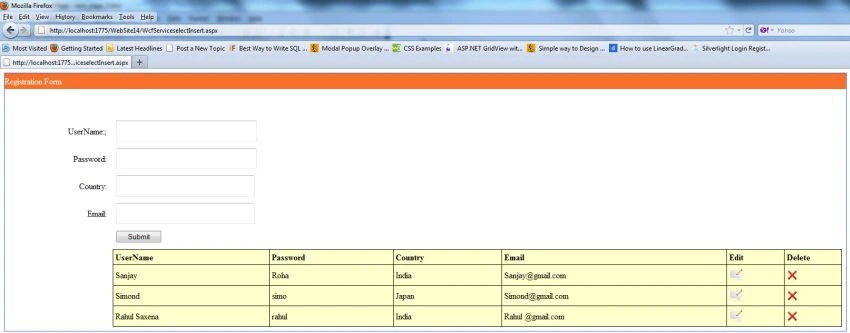
Now create a new website and drag and drop controls onto the aspx page. The aspx code is the following:
Ramendra kumar vermaPosted Jan 15, 2018, 7:54 AM
It should be jquery code save data with jquery in webservice better way
chetan dudhatPosted Dec 20, 2015, 1:30 PM
You can find solution here : http://www.dotnetcode2u.com/2015/08/wcf-insert-update-delete-edit-select.html
satish GPosted Nov 8, 2014, 12:42 PM
HI, I have to enter the data in to text boxes then add button, when we click the add button data should be added to the grid. below the grid we should have Save button to save the data in to Database. How can we achive this? Can u please explain. I have tried but getting strucked at add button. i have taken the List<products>. i have collected the textbox inserted data in to List and in the Service method also m returning the List parameter but sttill m getting the error while binding the data to Grid.
click ryanPosted Sep 10, 2014, 5:35 AM
Hi, How can we use the service for android app? please help :)
megha jainPosted Apr 22, 2014, 10:10 AM
I am following your article exactly as mentioned. but in the line of code: var reviewList = await objServiceClientobjService.GetInWorkReviewAsync();The 'reviewList' variable gets a whole string of database contents means into a serialised form but I would like it as deserialised form or into a list to display into rows. I have been trying to follow the code lines below but none works and System.Data is not supported in windows 8 and I am using visual studio 2012 express for windows 8. IEnumerable sequence = dt.AsEnumerable(); OR List list = dt.AsEnumerable().ToList(); OR List newList = new List(); So could someone explains where am I doing things wrong? Do I need to make any changes to web.config on wcf service side? It would be great help if you can guide me. thanks
darsh antanieditedPosted Apr 17, 2013, 6:45 AMEdited Apr 17, 2013, 6:46 AM
I can bind this data in simple way as well.if I do it simply and I use WCF what is the core difference?? I don't know much about WCF so asking this question.
Rajendran MPosted Jan 2, 2013, 9:54 AM
Nice article. Thank you.
amarnath reddy ambatiPosted Dec 21, 2012, 2:30 AM
Thank u
Nitesh SuvarePosted Nov 26, 2012, 9:31 AM
WHAT IS BUTTON1.TEXT=="UPDATE" IN ABOVE CODE??
himesh pandiyaeditedPosted Oct 24, 2012, 5:26 AMEdited Oct 24, 2012, 5:27 AM
brother i need it in silverlight not in asp.net please help me
Rohatash KumarPosted Oct 16, 2012, 11:01 PM
Table script: create table RegistrationTable ( UserID int primary key, UserName varchar(50), Password varchar(20), Country varchar(30), Email varchar(20) )
anil babuPosted Oct 16, 2012, 7:02 AM
plz give me table script, I am creating But getting an error create table RegistrationTable( UserID int primary key, UserName varchar(50), Password varchar(20), Country varchar(30), Email varchar(20))
Rohatash KumarPosted Oct 16, 2012, 7:00 AM
You can try it without zip file. I have define it step by step. after that if you have any problem at any point. you can ask me. Anil
anil babuPosted Oct 16, 2012, 6:44 AM
can you give me zip file
Rohatash KumarPosted Oct 3, 2012, 2:22 AM
Thanks Kunal
Kunal VaishyaPosted Oct 1, 2012, 4:13 AM
nice one dear
Rohatash KumarPosted Aug 22, 2012, 6:18 AM
Thanks Shreeniwas.
shreeniwas kushwahPosted Aug 21, 2012, 8:46 AM
Lots thanks mr Rohtash Ji
Rohatash KumarPosted Aug 20, 2012, 11:22 PM
Thanks Suci M
Suci MPosted Jul 29, 2012, 3:36 AM
Nice Article