

This article shows you how to implement nested repeaters and also display category and subcategory using a nested repeater. You create two tables, one for category and another for subcategory and also create a stored procedure for selecting category and sub category from both tables in SQL Server. You have to create a web site and add a new page to the website. Drag and drop two Repeater controls on the form; one is to bind category and the other is for subcategory. Let's take a look at a practical example. We create tables for category and subcategory.
Creating Table in SQL Server Database
Now create two tables named MajorCategory and MinorCategory. We create CategoryID in MajorCategory table that is the foreign key for the MinorCategory also set the identity property of the CategoryID. The table looks as below.
MajorCategory Table
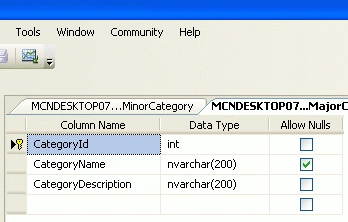
Now insert data into the table.

MinorCategory Table
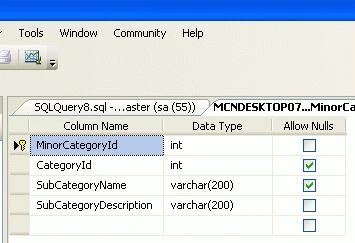
Now insert data into the table.
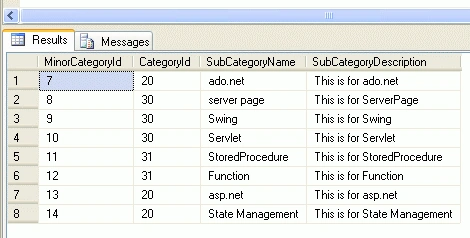
Creating a Stored Procedure
Now create a stored procedure to select data from both tables.
using System;
using System.Collections.Generic;
using System.Linq;
using System.Web;
using System.Web.UI;
using System.Web.UI.WebControls;
ALTER PROCEDURE [dbo].[usp_GetProductsForCategories]
AS
SELECT * FROM MajorCategory WHERE CategoryID IN
( SELECT CategoryID FROM MinorCategory )
SELECT p.MinorCategoryId , p.SubCategoryName ,p.CategoryID FROM MinorCategory p
First you have to create a web site.
- Go to Visual Studio 2010
- New-> Select a website application
- Click OK
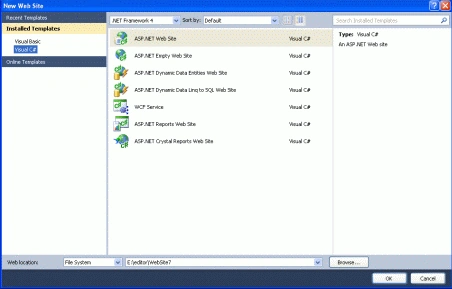
Now add a new page to the website.
- Go to the Solution Explorer
- Right Click on the Project name
- Select add new item
- Add new web page and give it a name
- Click OK
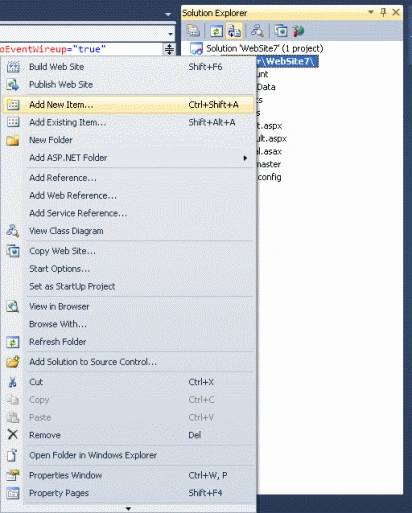
Now create a new website and drag and drop two repeater controls onto the aspx page. The repeater code looks like this.
<%@ Page Language="C#" AutoEventWireup="true" CodeFile="categorySubcategory.aspx.cs"
Inherits="categorySubcategory" %>
<!DOCTYPE html PUBLIC "-//W3C//DTD XHTML 1.0 Transitional//EN" "http://www.w3.org/TR/xhtml1/DTD/xhtml1-transitional.dtd">
<html xmlns="http://www.w3.org/1999/xhtml">
<head runat="server">
<title></title>
</head>
<body>
<form id="form1" runat="server">
<div>
<ul>
<asp:Repeater ID="outerRep" runat="server" OnItemDataBound="outerRep_ItemDataBound">
<ItemTemplate>
<li>
<asp:Label Font-Size="Large" Font-Bold="true" ID="lblCategoryName" runat="server"
Text='<%# Eval("CategoryName") %>' />
</li>
<ul>
<asp:Repeater ID="innerRep" runat="server">
<ItemTemplate>
<li style="background-color: AliceBlue">
<asp:HyperLink ID="hlProductName" runat="server" Text='<%# Eval("SubCategoryName")%>' />
</li>
</ItemTemplate>
</asp:Repeater>
</ul>
</ItemTemplate>
</asp:Repeater>
</ul>
</div> </form>
</body>
</html>
Now add the following namespaces.
using System.Data.SqlClient;
using System.Data;
Now write the connection string to connect to the database.
string strConnection = "Data Source=.; uid=sa; pwd=wintellect;database=registration;";
Now double-click on the page and write the following code for binding the data with the Repeater.
private void BindData()
{
SqlConnection myConnection = new SqlConnection("Data Source=.; uid=sa; pwd=wintellect;database=registration;");
SqlCommand myCommand = new SqlCommand("usp_GetProductsForCategories", myConnection);
myCommand.CommandType = CommandType.StoredProcedure;
SqlDataAdapter ad = new SqlDataAdapter(myCommand);
DataSet ds = new DataSet();
ad.Fill(ds);
// Attach the relationship to the dataSet
ds.Relations.Add(new DataRelation("CategoriesRelation", ds.Tables[0].Columns["CategoryID"],
ds.Tables[1].Columns["CategoryID"]));
outerRep.DataSource = ds.Tables[0];
outerRep.DataBind();
}
Now write the below code on the OnItemDataBound event of the repeater.
protected void outerRep_ItemDataBound(object sender, RepeaterItemEventArgs e)
{
if (e.Item.ItemType == ListItemType.Item ||
e.Item.ItemType == ListItemType.AlternatingItem)
{
DataRowView drv = e.Item.DataItem as DataRowView;
Repeater innerRep = e.Item.FindControl("innerRep") as Repeater;
innerRep.DataSource = drv.CreateChildView("CategoriesRelation");
innerRep.DataBind();
}
}
In Codebehind write the following code like this.
Codebehind
using System;
using System.Collections.Generic;
using System.Linq;
using System.Web;
using System.Web.UI;
using System.Web.UI.WebControls;
using System.Data;
using System.Data.SqlClient;
public partial class categorySubcategory : System.Web.UI.Page
{
protected void Page_Load(object sender, EventArgs e)
{
BindData();
}
private void BindData()
{
SqlConnection myConnection = new SqlConnection("Data Source=.; uid=sa; pwd=wintellect;database=registration;");
SqlCommand myCommand = new SqlCommand("usp_GetProductsForCategories", myConnection);
myCommand.CommandType = CommandType.StoredProcedure;
SqlDataAdapter ad = new SqlDataAdapter(myCommand);
DataSet ds = new DataSet();
ad.Fill(ds);
// Attach the relationship to the dataSet
ds.Relations.Add(new DataRelation("CategoriesRelation", ds.Tables[0].Columns["CategoryID"],
ds.Tables[1].Columns["CategoryID"]));
outerRep.DataSource = ds.Tables[0];
outerRep.DataBind();
}
protected void outerRep_ItemDataBound(object sender, RepeaterItemEventArgs e)
{
if (e.Item.ItemType == ListItemType.Item ||
e.Item.ItemType == ListItemType.AlternatingItem)
{
DataRowView drv = e.Item.DataItem as DataRowView;
Repeater innerRep = e.Item.FindControl("innerRep") as Repeater;
innerRep.DataSource = drv.CreateChildView("CategoriesRelation");
innerRep.DataBind();
}
}
}
Now run the application and test it.
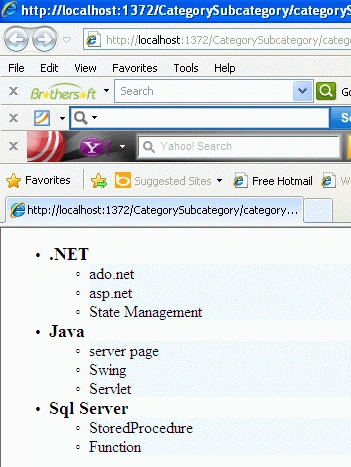
The above output displays subcategory according to the category.
Some Helpful Resources
Amarkant SemwalPosted Mar 7, 2017, 3:08 AM
What is means by CategoriesRelation
Abhishek KumarPosted Feb 29, 2016, 9:18 AM
Thanks for this.. sr
Nguyen NhaPosted Feb 26, 2013, 2:17 AM
No, I not effort,reviews me is, you have covert Articles "Showing Category and Subcategory Using Nested Repeater in ASP.NET" to technology mvc 3 or mvc 4 is not.?
Rohatash KumareditedPosted Feb 26, 2013, 1:23 AMEdited Feb 26, 2013, 1:24 AM
Really good effort. Nguyen
Nguyen NhaPosted Feb 26, 2013, 12:41 AM
I want convert article up to technology mvc 3 or mvc 4 Thank so much...
Prashant KumarPosted Feb 7, 2013, 3:47 AM
Thank you so much for this detailed tutorial :)
Bindu MadhaviPosted Aug 2, 2012, 6:18 AM
Hi Rohatash, what if the hirarchial data is present in same table and the stored procedure will take the parentID and return the corresponding child rows? Can you please provide some idea on how to handle this situation? Thanks in advance
Bindu MadhaviPosted Jul 31, 2012, 9:39 AM
Hi Rohatash Kumar, Thanks for the cool article. Can you please provide the vb.net equivalent code here.I have tried using this but got stuck at a line with an error. "Dim drv As DataRowView = DirectCast(e.Item.GetDataItem, DataRowView)" and getting error: "'GetDataItem' is not a member of 'System.Web.UI.WebControls.RepeaterItem'. " Can you please help me out in fixing this? Thanks in advance
GeorgePosted Jul 25, 2012, 9:56 AM
Thank you! How about the insert/update form for this category/subcategory many-to-many relationship? is there a way to have checkbox for Categories and say a multiselect listbox for subcategories for each Category?
Serno TotemPosted May 18, 2012, 2:12 AM
Thanks a lot for your clear and easy to understand article.
Deepak DwijPosted Apr 8, 2012, 3:14 PM
Gud way to represent the concept !! keep posting more ! Thanks for your contribution !