
Introduction: In this article we will discuss to write Regular Expressions to validate an ASP.NET form using Jquery. To validate a form means whatever the text box we have in the form it will have a value if it is not then it will give a error. validation may be at client side or it may be at server side so by using J Query we are going to validate a form by writing Regular Expression for them. If it has a valid value such that email id is not in it's format then it will give the error that the format of the email id text box does not match with the given format. So let's see how it is created further information is given below.
Step 1: Now firstly I would like to say to open Visual Studio 2010.
-
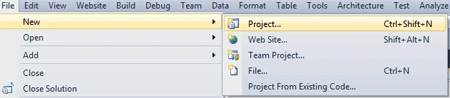
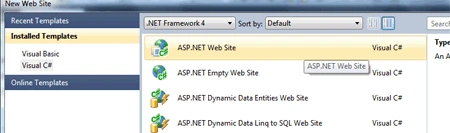
Go to File and create a new website.
-
Give it any name.
-
Click OK.
Step 2: Secondly You have to add a .js file to the website folder name as Script.
-
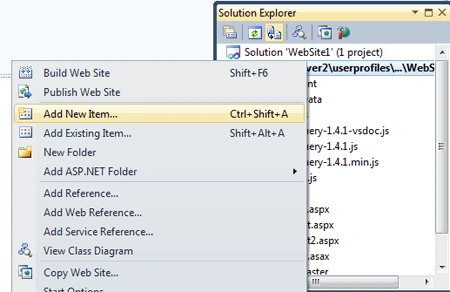
Go to Solution Explorer.
-
Right Click and add new item.
-
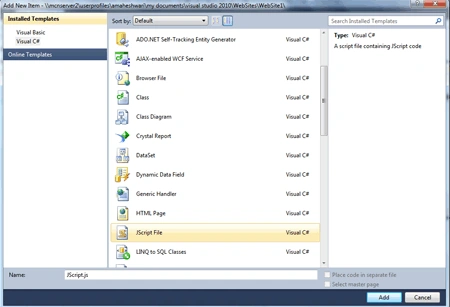
Select the JScript file.
-
Give it a name as val.js and click OK.
Step 3: Now we have to add a new page to the website.
-
Go to Solution Explorer.
-
Add new item
-
Select Web page and give it any name
-
Click OK.
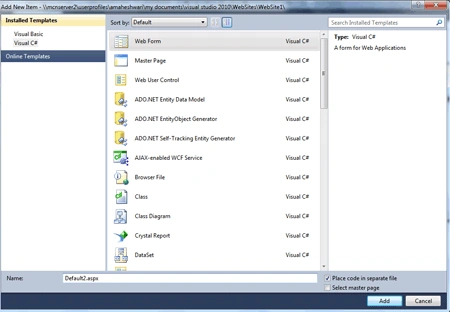
Step 3: Now we have to write the code for the .js file which will be added later to the source file of default2.aspx page.
Code :
function VForm(e)
{
var isvalid =
true;
// check that a valid email address has been
entered
var eidrex =
/[A-Z0-9._%+-]+@[A-Z0-9.-]+\.[A-Z]{2,4}/;
if (!eidrex.test(String($("#eid").val()).toUpperCase()))
{
errmsg("eid",
"You would have to enter a valid email address.");
isvalid = false;
} else {
errrmv("eid");
}
// check that first name has one or more
characters
var fn=/^[a-zA-z]/;
if ($("#fntxt").val()
== '') {
errmsg("fntxt",
"Text Box is Empty Field Required.");
isvalid = false;
else if(!fn.test(String($("#fntxt").val())))
{
errmsg("fntxt","Please
Enter the only alphabetic value.");
isvalid=false;
}
else {
removeError("fntxt");
}
var ln=/^[a-zA-z]/;
if ($("#lntxt").val()
== '') {
errmsg("lntxt",
"Text Box is Empty Field Required.");
isvalid = false;
else if(!ln.test(String($("#lntxt").val())))
{
errmsg("lntxt","Please
Enter the only alphabetic value.");
isvalid=false;
}
}
else {
errrmv("lntxt");
}
if (!isvalid) {
e.preventDefault();
}
var pwd = /^[A-Za-z]\w{6,}[A-Za-z]$/;
if (!pwd.test(String($("pdtxt").val())))
{
errmsg("pdtxt",
"password must be at least 8 characters long and
start and end with a letter.");
isvalid = false;
} else {
errrmv("pdtxt");
}
}
function
errmsg(id, msg) {
if ($("#"
+ id).parent().find("label[class=error]").attr("generated")
== "true") {
$("#" + id).parent().find("label[class=error]").css("display",
"block");
} else {
$("#" + id).parent().append(<label
for="' + id + '"
generated ="true" class="error">'
+ msg + ' </label>').css("display", "block");
}
}
function
errrmv(id) {
$("#" + id).parent().find("label[class=error]").css("display",
"none");
}
Step 5: Further we have to add the reference of the JQuery and JScript file to the source file of .aspx file.
<script
type="text/javascript"
src="../Scripts/jquery-1.4.1.min.js"></script>
<script type="text/javascript"
src="../Scripts/val.js"></script>
Step 6: In this
step we have to write the code for the source file of default2.aspx page.
Code:
<%@
Page Language="C#"
AutoEventWireup="true"
CodeFile="Default2.aspx.cs"
Inherits="Default2"
%>
<!DOCTYPE
html PUBLIC
"-//W3C//DTD XHTML 1.0 Transitional//EN"
"http://www.w3.org/TR/xhtml1/DTD/xhtml1-transitional.dtd">
<html
xmlns="http://www.w3.org/1999/xhtml">
<head
id="Head1"
runat="server">
<script
type="text/javascript"
src="../Scripts/jquery-1.4.1.min.js"></script>
<script
type="text/javascript"
src="../Scripts/val.js"></script>
<title></title>
<script
type="text/javascript">
$(document).ready(function () {
$(".fs").click(function
(e) {
VForm(e);
});
});
</script>
<style
type="text/css">
.error{color:Red;}
</style>
</head>
<body>
<form
id="form1"
runat="server">
<div>
Email-ID
:-
<asp:TextBox
ID="eid"
runat="server"></asp:TextBox>
<br
/>
First Name :-
<asp:TextBox
ID="fntxt"
runat="server"></asp:TextBox>
<br
/>
Last Name :-
<asp:TextBox
ID="lntxt"
runat="server"></asp:TextBox>
<br
/>
Password :-
<asp:TextBox
ID="pdtxt"
runat="server"
TextMode="Password"></asp:TextBox>
<br
/>
<br
/>
<input
type="button"
id="btn"
class="fs"
value="Submit"
/>
<br
/>
</div>
</form>
</body>
</html>
Code Description: In this code we are going to make a click event function which will invoke a JScript file function name as VForm whenever you will click on the button it will check all the validation related to the form. $(".fs").click(function (e) {VForm(e); this method will fire the event on click of the button and will check all the validation according to the requirement or defined regular expression.
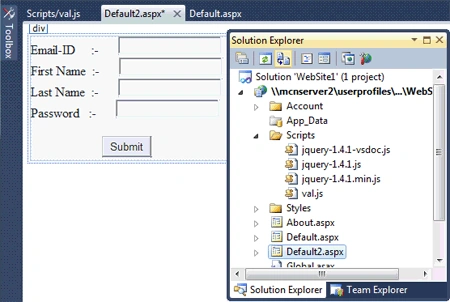
Step 7: Further we are going to see the design page of the default .aspx page file.
Before Output:
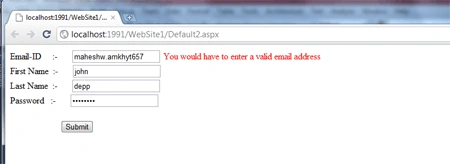
Step 8: Now we have to run the application by pressing F5.
Output:
Vishal JadhavPosted Sep 24, 2012, 5:27 AM
I got a error on following fuction $(".fs").click(function (e) { VForm(e); }); That "Microsoft JScript runtime error: 'VForm' is undefined"