
Introduction: In this article we are going to see that to use a jQuery datepicker in ASP.NET. A datepicker is made in jQuery which will show you that on click of the textbox there is a datepicker which will popout Further we are using a DatePicker plug-in which has a lot of features that can be easily extended. Inside the datpicker there is one javascript jquery.datepick.js which is the plug-in itself, and there are some default javascript which will be inside the Script file. Also, there are CSS files, jquery.datepick.css - which comes together with the plug-in and we can place it inside the Style folder. To see it you should have to follow the steps given below:
Step 1: Firstly we have to create a web Application
- Go to Visual Studio 2010
- Create the web Application
- Click OK
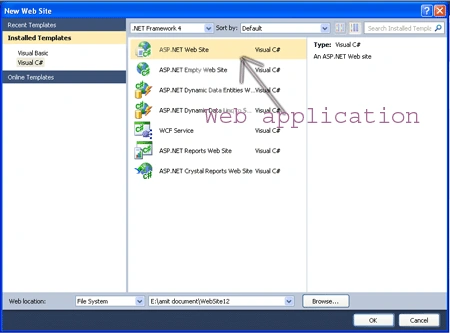
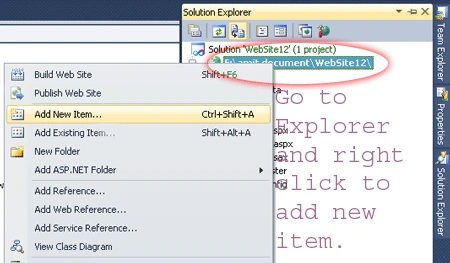
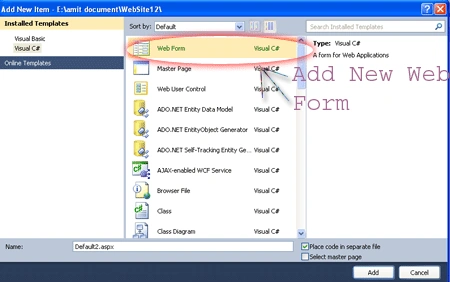
Step 2: Secondly you have to add a new page to the website
- Go to the Solution Explorer
- Right Click on the Project name
- Select add new item
- Add new web page and give it a name
- Click OK
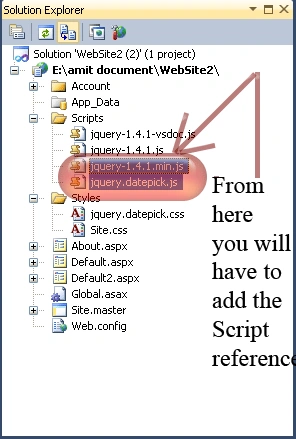
Step 3: In this step we are going to see that see from where the js reference will be added to the source page of the default2.aspx page.
Step 4: Now we are going to write the script code which will be inside either on the head section or in the body section it will depend upon you which way you like most to placed it.

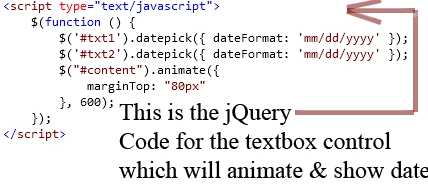
Step 5: In this step we are going to write the jQuery code for the textbox control let see the figure given below:
Step 6: In this step we are going to see the body part of the Default2.aspx page which is given below:
Body Code:
<body>
<form
id="form1"
runat="server">
<div
id="div1"
style="font-family:
'Comic Sans MS'; font-size:
xx-large; color:
#800000; height:
85px;">Hiiiii It will shows that whenever you click on the textbox to
enter the date it will open a calendar</div>
<div
id="content"
style="background-color:
#C8F986; height:
262px;">
<h1
style="background-color:
#008080; font-family:
'Comic Sans MS'; font-size:
xx-large; color:
#800000;">Check in Date</h1>
<asp:TextBox
ID="txt1"
class="field"
runat="server"
BackColor="#FF9999"
BorderColor="#CCFF99"
Font-Names="Comic Sans
MS" Font-Size="Large"
ForeColor="#99FF33"
Height="31px"
Width="149px"></asp:TextBox>
<br
/>
<br
/>
<br
/>
<h1
style="font-family:
'Comic Sans MS'; font-size:
xx-large; color:
#800000; background-color:
#00FFFF;">Check out Date</h1>
<asp:TextBox
ID="txt2"
class="field"
runat="server"
BackColor="#FF9966"
BorderColor="#FFFF66"
BorderStyle="Groove"
Font-Names="Comic Sans
MS"
Font-Size="Large"
Height="30px"
Width="147px"></asp:TextBox>
</div>
</form>
</body>
Step 7: In this step we will see the complete code for the Default2.aspx page let see the code given below:
Code:
<%@
Page Language="C#"
AutoEventWireup="true"
CodeFile="Default2.aspx.cs"
Inherits="Default2"
%>
<!DOCTYPE
html PUBLIC
"-//W3C//DTD XHTML 1.0 Transitional//EN"
"http://www.w3.org/TR/xhtml1/DTD/xhtml1-transitional.dtd">
<html
xmlns="http://www.w3.org/1999/xhtml">
<head
id="Head1" runat="server">
<title>jQuery
datepicker</title>
<link
rel="Stylesheet"
type="text/css"
href="Styles/jquery.datepick.css"/>
<script
type="text/javascript"
src="Scripts/jquery-1.4.1.min.js"></script>
<script
type="text/javascript"
src="Scripts/jquery.datepick.js"></script>
<script
type="text/javascript">
$(function () {
$('#txt1').datepick({ dateFormat:
'mm/dd/yyyy' });
$('#txt2').datepick({ dateFormat:
'mm/dd/yyyy' });
$("#content").animate({
marginTop: "80px"
}, 600);
});
</script>
</head>
<body>
<form
id="form1"
runat="server">
<div
id="div1"
style="font-family:
'Comic Sans MS'; font-size:
xx-large; color:
#800000; height:
85px;">Hiiiii It will shows that whenever you click on the textbox to
enter the date it will open a calendar</div>
<div
id="content"
style="background-color:
#C8F986; height:
262px;">
<h1
style="background-color:
#008080; font-family:
'Comic Sans MS'; font-size:
xx-large; color:
#800000;">Check in Date</h1>
<asp:TextBox
ID="txt1"
class="field"
runat="server"
BackColor="#FF9999"
BorderColor="#CCFF99"
Font-Names="Comic Sans
MS" Font-Size="Large"
ForeColor="#99FF33"
Height="31px"
Width="149px"></asp:TextBox>
<br
/>
<br
/>
<br
/>
<h1
style="font-family:
'Comic Sans MS'; font-size:
xx-large; color:
#800000; background-color:
#00FFFF;">Check out Date</h1>
<asp:TextBox
ID="txt2"
class="field"
runat="server"
BackColor="#FF9966"
BorderColor="#FFFF66"
BorderStyle="Groove"
Font-Names="Comic Sans
MS"
Font-Size="Large"
Height="30px"
Width="147px"></asp:TextBox>
</div>
</form>
</body>
</html>
Code Description: In this code we will see that how the datepicker UI will popout whenever we click inside the textbox. The first one is the $('#txt1').datepick({ dateFormat: 'mm/dd/yyyy' }); which will pick the date inside the textbox the second one as well. the third one code $("#content").animate({marginTop: "80px"}, 600); is used to animate the div in which we have the textboxes and header also so that is the explaanation of the jQuery code and inside the <head></head> section we will add the script code and a style sheet reference as well. Further inside the body tag we have add some div and header and two textboxes which you have seen the code given above.
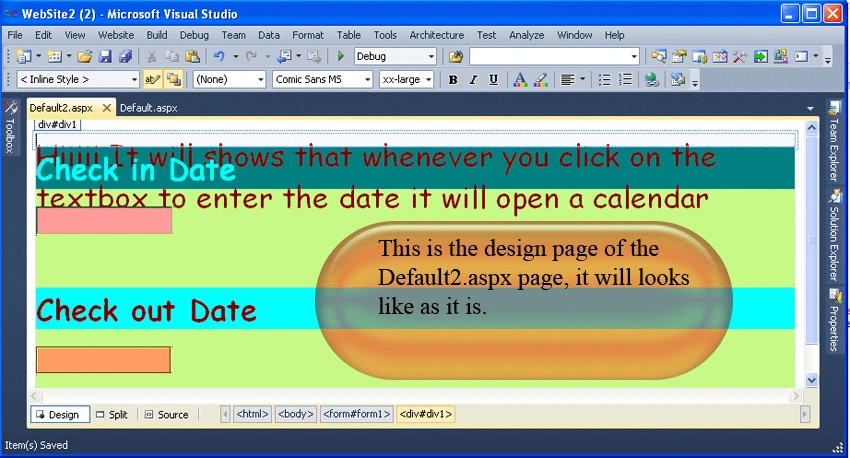
Step 8: Now we are going to see that how the design page of the Default2.aspx page looks like which is given below:
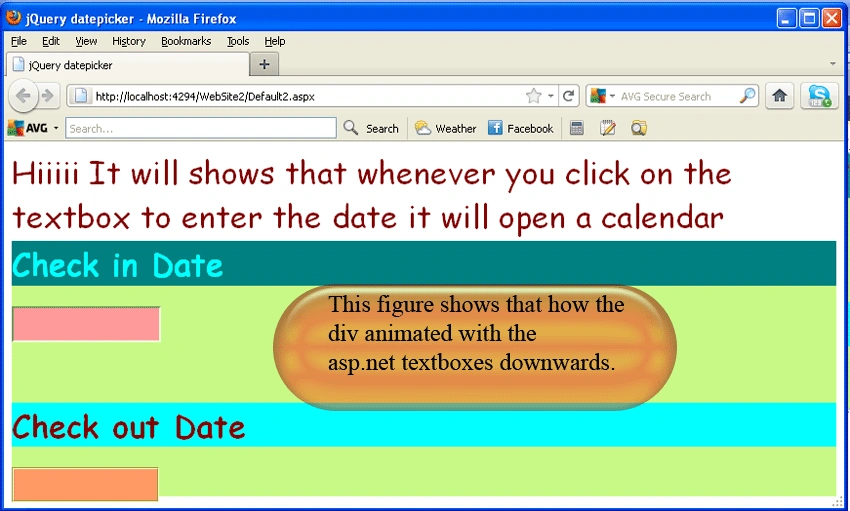
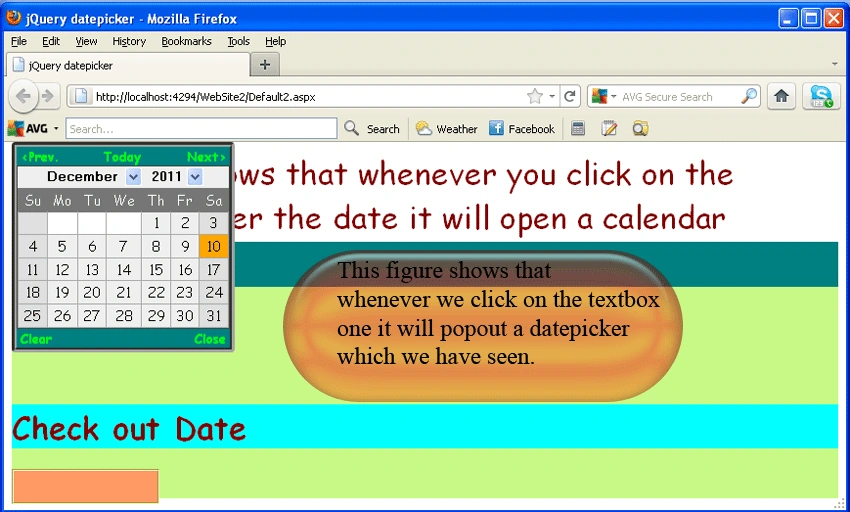
Step 9: Further we have to run the Default2.aspx page by pressing F5, and the output is given below:
Output1:
Output2:
Output3:
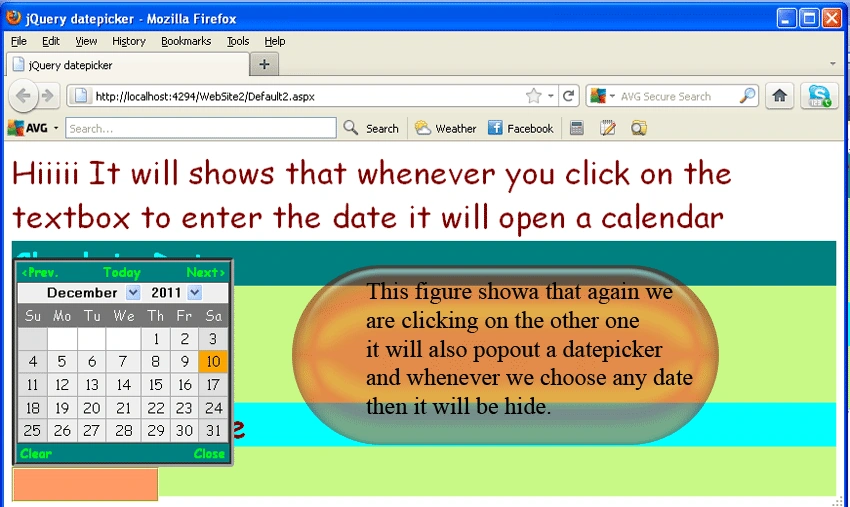
Output4:
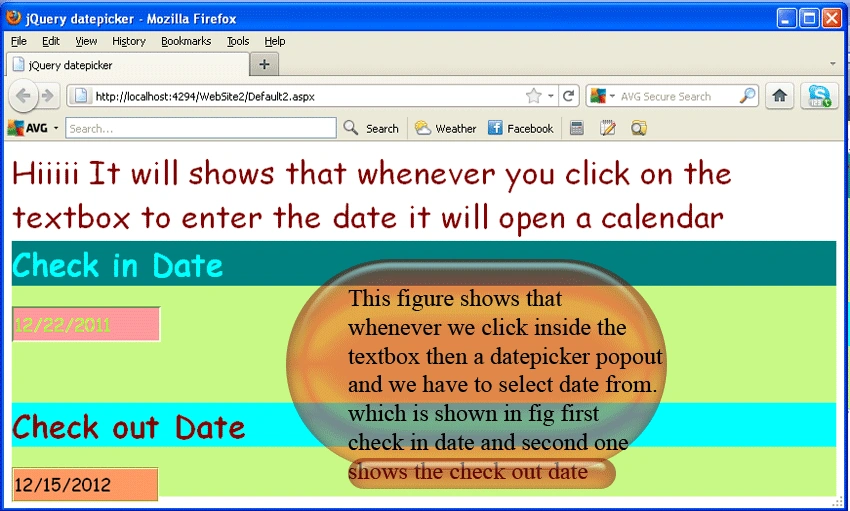
kalu singh raoPosted Jul 8, 2016, 1:26 AM
Nice...
Humayun Kabir MamunPosted Mar 29, 2016, 5:52 AM
Nice...
Dinesh RainaPosted Mar 2, 2015, 7:49 AM
hai..how to selected the picker in upside pls help me.
Sandeep ChaurasiaPosted Aug 4, 2013, 2:53 AM
good working
ram sharmaPosted May 22, 2013, 9:58 AM
it is not working with master page if the master page inherit in another aspx page??? plz help..
Moisey OysfeltPosted Mar 4, 2013, 8:50 AM
Hello , I new with that staff. Your sample works good, and I found a problem with Firefox 19 Every time i run it, I see 3 new Errors : Timestamp: 3/4/2013 8:45:16 AM Error: Component returned failure code: 0x80004005 (NS_ERROR_FAILURE) [nsIDOMWindow.content] May you can update you sample with latest J query. Thank you for a nice sample. Moisey o
manoj jayabalanPosted Dec 19, 2012, 3:51 AM
Its works with my Master page but the popup calendar as no styles. Please assist.
Borj AnoPosted Sep 21, 2012, 8:58 AM
works! but style sucks! do you have better styles for the calendar?