Introduction
This Article describes features of windows SharePoint services (WSS 3.0) and MOSS 2007. It describes basic difference between WSS 3.0 and Moss 2007.
Features of WSS 3.0
WSS 3.0 is built on top of ASP.NET, and supports Master Page and Site navigation. It is an application framework. WSS improves team productivity.
Team site
Primarily designed to facilitate collaboration among teams through web sites Secure, Document centric site, tracking process, sharing document, communicating with colleagues, task list, contact list, discussion forums.
Administration model enhancements
Windows SharePoint Services 3.0 includes several enhancements to the administration model that helps IT organizations implement management plans and performs administrative tasks more effectively and efficiently.
Collaborate Easily and Effectively
Windows SharePoint Services 3.0 provide a single workspace for teams to coordinate schedules, organize documents, and participate in discussions-within the organization and over the extranet.
Windows SharePoint Services are used as a platform to build rich, flexible, and scalable Web-based applications and Internet sites specific to the needs of your organize.
Additional Features come with MOSS 2007
Take advantage of its integration with Microsoft Office SharePoint Server 2007 that expands platform services and common framework for document management exposed by Windows SharePoint Services to offer enterprise-wide functionality for records management, search, workflows, portals, personalized sites, and more.
Use Microsoft Office SharePoint Designer 2007 to quickly and easily customize SharePoint sites and build reporting tools and applications tailored to specific tasks without writing or deploying new code.
My site personal site
The My Site personal site gives users an opportunity to aggregate information into "for me," "by me," and "about me."
User profiles and profile store
Allows each user to store profile information.
Audience targeting
Enables use of Web Part pages, Web Parts, and content to target distribution lists and groups in addition to SharePoint audiences.
InfoPath forms services
Available in Microsoft Office SharePoint Server 2007 and Microsoft Office Forms Server 2007 InfoPath forms services make it possible to design Web-capable forms in Microsoft Office InfoPath 2007 and distribute them on corporate intranets, extranets, or the Internet. Users can fill out forms in a browser or HTML enabled Mobile device with no download or client components needed.
Business Data Catalog (BDC)
Business Data Catalog tightly integrates external data into the Office SharePoint Server 2007 user experience, providing access to external data residing within backed LOB applications, and enabling the display of and interaction with external data through a set of Business Data Web Parts.
Difference between WSS 3.0 and MOSS 2007
| WSS 3.0 |
MOSS 2007 |
| Windows SharePoint Services (WSS3.0) comes free with Windows Server 2003. |
MOSS is not free and it is installed on top of WSS 3.0.MOSS has both a server cost and a client access license (CAL) cost. |
| WSS 3.0 offers all the standard site templates to build team sites, document workspaces, blank sites, blogs, wikis, and meeting workspaces. |
MOSS 2007 offers business intelligence features that allow you to track key performance indicators and build BI dashboards into your team site. |
| WSS 3.0 can be used to create people and group lists. |
Moss is used as a super powerful content management system, which aims to provide content management, enterprise content services and enterprise search. |
| You can integrate WSS 3.0 sites with Access 2007, Excel 2007, Outlook 2007, Word 2007 and PowerPoint 2007. |
Workflow can also be integrated into MOSS 2007. |
| It also serves as a platform for application development. Including such IT resources as portals, team workspaces, e-mail, presence awareness, and Web based conferencing, Windows SharePoint Services enables users to locate distributed information quickly and efficiently, as well as connect to and work with others more productively. |
Moss also offers My Sites, which are individual mini-sites that can be set up to show who in your company you're connected to, what your tasks and skills are, your contact information, and more.MOSS 2007 is the portal system, comparable to SharePoint Portal Server 2003. It brings a wealth of built-in functionality and interoperability to a company's intranet over and above the functions of WSS 3.0. |
| Create Site Collection: Select template will give minimum options it's like Collaboration and Meetings. |
Create Site Collection:Select template will give more options it's like Collaboration, Meetings, Enterprise, Custom and Publishing Only WSS 3.0 |
|
Navigation
By default both WSS and MOSS have a simple navigation system that uses tabs across the top to access sites along with the quick launch area on the left hand side to access content element within a site.This information presented in site collection.
Windows SharePoint Services 3.0 provides the following new features to improve site
- Navigation through User-aware links; for example, removing the Settings links for users who cannot make particular changes, a capability that is provided through "link trimming".
- Breadcrumbs to provide users with additional information about their location within a site collection.
- Customization of the top navigation bar, ranging from adding and removing links to adding Microsoft JScript drop-down menus and fly-outs, which is provided by new shared navigation and master pages. Such menus can only be enabled by modifying a master page; there is no built-in support for enabling these menus.
- Customization of the left navigation bar, which includes adding and removing links to adding JScript drop-down menus and fly-outs, which is provided through ASP.NET master pages and navigational controls such as the SiteMapPath, Menu and TreeView controls. Such menus can only be enabled by modifying a master page; there is no out-of-box support for enabling these menus.
- Common navigation bars provided through master pages.
Content Management with work flow
Content Characteristics
Microsoft Windows SharePoint Services 3.0 is designed to host content and applications that support such business needs as communication, collaboration, analysis, process, and knowledge management. Across those diverse functions, not all content is created equal. Imagining a spectrum of content characteristics.
Content Database is a SQL server 2005 database that maintain all of the webpage definitions, documents, lists and security information.
| Structured content |
Unstructured content |
| Made available for long-term consumption |
Shorter-term lifecycle |
| Little-to-no support for collaboration |
Support for collaboration |
| Process-driven |
Process-driven |
Work Flow
Work flow is nothing but automated process.The workflow functionality in Windows SharePoint Services 3.0 is built on the Windows Workflow Foundation (WF), a Microsoft Windows platform component that provides a programming frastructure and tools for development and execution of workflow-based applications.
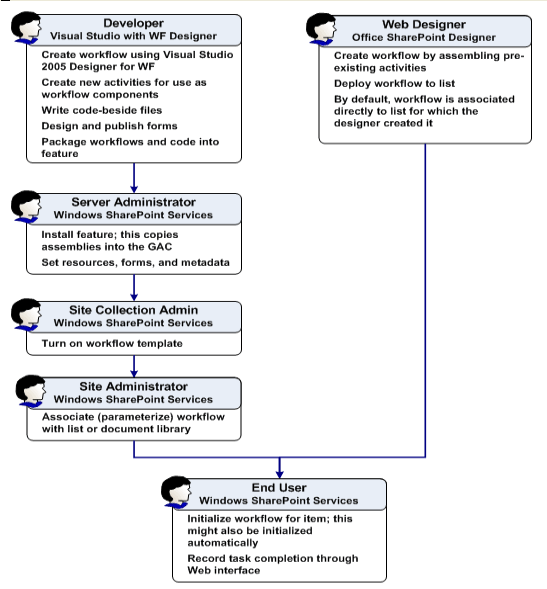
The WF run-time engine provides the services that every workflow application needs, such as sequencing, state management, tracking capabilities, and transaction support.
Document libraries also support an event system that you can tap in to programmatically.These events can call into .net assemblies when new document are placed in a library, modified, or deleted.The version of WSS also comes with its own work flow engine based on WWF (Windows workflow foundation), the engine provides simple work flow process such as document approval out of box.
User can develop more sophisticated workflows using the SharePoint designer (Microsoft front page). We can create custom workflows with visual studio 2005 and harness all the power of .NET Framework
List
Task list, list of contacts .Previous version of WSS, list used a different underlying infrastructure than document libraries.
In the WSS 3.0 version both are same.List also capable of raising events that you can trap in code. List also can participate workflow process.
All the files are uploading in respective share point custom list.