
In this article we will learn how to insert, edit, update and delete records from the database using PHP. Here we have to create five pages such as config.php (to provide the connection), view.php (to display the records from the database), insert.php (to insert records into the database), edit.php (to edit records), and delete.php (to delete records).
Table Structure
-- phpMyAdmin SQL Dump
-- version 2.10.1
-- http://www.phpmyadmin.net
--
-- Host: localhost
-- Generation Time: May 21, 2012 at 10:42 AM
-- Server version: 5.0.45
-- PHP Version: 5.2.5
SET SQL_MODE="NO_AUTO_VALUE_ON_ZERO";
--
-- Database: `Work`
--
-- --------------------------------------------------------
--
-- Table structure for table `employee`
--
CREATE TABLE `employee` (
`id` int(12) NOT NULL auto_increment,
`name` varchar(255) NOT NULL,
`address` varchar(255) NOT NULL,
`city` varchar(255) NOT NULL,
PRIMARY KEY (`id`)
) ENGINE=MyISAM DEFAULT CHARSET=latin1 AUTO_INCREMENT=7 ;
--
-- Dumping data for table `employee`
--
INSERT INTO `employee` (`id`, `name`, `address`, `city`) VALUES
(1, 'Raj', '10 street dane', 'Pune'),
(2, 'Ravi', '12907A 53 St NW', 'Mumbai'),
(3, 'Rahul', '3rd Floor, 888 Fort Street', 'Noida'),
(4, 'Harry', 'Sir Frederick W Haultain Building 9811 109 ST NW', 'London'),
(5, 'Ian', 'Suite 303, 13220 St. Albert Trail', 'Sydney'),
(6, 'Shaun', '9700 Jasper Avenue', 'Perth');
Code part
config.php
<?php
/* Database Connection */
$sDbHost = 'localhost';
$sDbName = 'work';
$sDbUser = 'root';
$sDbPwd = '';
$dbConn = mysql_connect ($sDbHost, $sDbUser, $sDbPwd) or die ('MySQL connect failed. ' . mysql_error());
mysql_select_db($sDbName,$dbConn) or die('Cannot select database. ' . mysql_error());
?>
view.php
<!DOCTYPE HTML PUBLIC "-//W3C//DTD HTML 4.01//EN" "http://www.w3.org/TR/html4/strict.dtd">
<html>
<head>
<title>View Records</title>
</head>
<body>
<?php
include('config.php');
$result = mysql_query("SELECT * FROM employee")
or die(mysql_error());
echo "<table border='1' cellpadding='10'>";
echo "<tr>
<th><font color='Red'>Id</font></th>
<th><font color='Red'>Name</font></th>
<th><font color='Red'>Address</font></th>
<th><font color='Red'>City</font></th>
<th><font color='Red'>Edit</font></th>
<th><font color='Red'>Delete</font></th>
</tr>";
while($row = mysql_fetch_array( $result ))
{
echo "<tr>";
echo '<td><b><font color="#663300">' . $row['id'] . '</font></b></td>';
echo '<td><b><font color="#663300">' . $row['name'] . '</font></b></td>';
echo '<td><b><font color="#663300">' . $row['address'] . '</font></b></td>';
echo '<td><b><font color="#663300">' . $row['city'] . '</font></b></td>';
echo '<td><b><font color="#663300"><a href="edit.php?id=' . $row['id'] . '">Edit</a></font></b></td>';
echo '<td><b><font color="#663300"><a href="delete.php?id=' . $row['id'] . '">Delete</a></font></b></td>';
echo "</tr>";
}
echo "</table>";
?>
<p><a href="insert.php">Insert new record</a></p>
</body>
</html>
insert.php
<?php
function valid($name, $address,$city, $error)
{
?>
<!DOCTYPE HTML PUBLIC "-//W3C//DTD HTML 4.01//EN" "http://www.w3.org/TR/html4/strict.dtd">
<html>
<head>
<title>Insert Records</title>
</head>
<body>
<?php
if ($error != '')
{
echo '<div style="padding:4px; border:1px solid red; color:red;">'.$error.'</div>';
}
?>
<form action="" method="post">
<table border="1">
<tr>
<td colspan="2"><b><font color='Red'>Insert Records </font></b></td>
</tr>
<tr>
<td width="179"><b><font color='#663300'>Name<em>*</em></font></b></td>
<td><label>
<input type="text" name="name" value="<?php echo $name; ?>" />
</label></td>
</tr>
<tr>
<td width="179"><b><font color='#663300'>Address<em>*</em></font></b></td>
<td><label>
<input type="text" name="address" value="<?php echo $address; ?>" />
</label></td>
</tr>
<tr>
<td width="179"><b><font color='#663300'>City<em>*</em></font></b></td>
<td><label>
<input type="text" name="city" value="<?php echo $city; ?>" />
</label></td>
</tr>
<tr align="Right">
<td colspan="2"><label>
<input type="submit" name="submit" value="Insert Records">
</label></td>
</tr>
</table>
</form>
</body>
</html>
<?php
}
include('config.php');
if (isset($_POST['submit']))
{
$name = mysql_real_escape_string(htmlspecialchars($_POST['name']));
$address = mysql_real_escape_string(htmlspecialchars($_POST['address']));
$city = mysql_real_escape_string(htmlspecialchars($_POST['city']));
if ($name == '' || $address == '' || $city == '')
{
$error = 'Please enter the details!';
valid($name, $address, $city,$error);
}
else
{
mysql_query("INSERT employee SET name='$name', address='$address', city='$city'")
or die(mysql_error());
header("Location: view.php");
}
}
else
{
valid('','','','');
}
?>
edit.php
<?php
function valid($id, $name, $address,$city, $error)
{
?>
<!DOCTYPE HTML PUBLIC "-//W3C//DTD HTML 4.01//EN" "http://www.w3.org/TR/html4/strict.dtd">
<html>
<head>
<title>Edit Records</title>
</head>
<body>
<?php
if ($error != '')
{
echo '<div style="padding:4px; border:1px solid red; color:red;">'.$error.'</div>';
}
?>
<form action="" method="post">
<input type="hidden" name="id" value="<?php echo $id; ?>"/>
<table border="1">
<tr>
<td colspan="2"><b><font color='Red'>Edit Records </font></b></td>
</tr>
<tr>
<td width="179"><b><font color='#663300'>Name<em>*</em></font></b></td>
<td><label>
<input type="text" name="name" value="<?php echo $name; ?>" />
</label></td>
</tr>
<tr>
<td width="179"><b><font color='#663300'>Address<em>*</em></font></b></td>
<td><label>
<input type="text" name="address" value="<?php echo $address; ?>" />
</label></td>
</tr>
<tr>
<td width="179"><b><font color='#663300'>City<em>*</em></font></b></td>
<td><label>
<input type="text" name="city" value="<?php echo $city; ?>" />
</label></td>
</tr>
<tr align="Right">
<td colspan="2"><label>
<input type="submit" name="submit" value="Edit Records">
</label></td>
</tr>
</table>
</form>
</body>
</html>
<?php
}
include('config.php');
if (isset($_POST['submit']))
{
if (is_numeric($_POST['id']))
{
$id = $_POST['id'];
$name = mysql_real_escape_string(htmlspecialchars($_POST['name']));
$address = mysql_real_escape_string(htmlspecialchars($_POST['address']));
$city = mysql_real_escape_string(htmlspecialchars($_POST['city']));
if ($name == '' || $address == '' || $city == '')
{
$error = 'ERROR: Please fill in all required fields!';
valid($id, $name, $address,$city, $error);
}
else
{
mysql_query("UPDATE employee SET name='$name', address='$address' ,city='$city' WHERE id='$id'")
or die(mysql_error());
header("Location: view.php");
}
}
else
{
echo 'Error!';
}
}
else
{
if (isset($_GET['id']) && is_numeric($_GET['id']) && $_GET['id'] > 0)
{
$id = $_GET['id'];
$result = mysql_query("SELECT * FROM employee WHERE id=$id")
or die(mysql_error());
$row = mysql_fetch_array($result);
if($row)
{
$name = $row['name'];
$address = $row['address'];
$city = $row['city'];
valid($id, $name, $address,$city,'');
}
else
{
echo "No results!";
}
}
else
{
echo 'Error!';
}
}
?>
delete.php
<?php
include('config.php');
if (isset($_GET['id']) && is_numeric($_GET['id']))
{
$id = $_GET['id'];
$result = mysql_query("DELETE FROM employee WHERE id=$id")
or die(mysql_error());
header("Location: view.php");
}
else
{
header("Location: view.php");
}
?>
Output

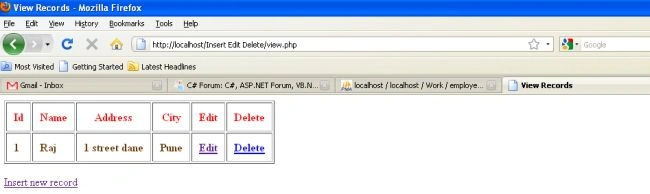
After inserting 6 records

After editing the address of Name (Raj)

How to Insert Edit and Delete in PHP
Join the conversation! Your thoughts help the community grow.
Sign in to leave a comment
It is the same account you read, post and publish with — and you will come straight back to this page.
Keith AdornaPosted May 21, 2018, 9:21 PM
How to convert in mysqli?
Amal SalahPosted Jun 7, 2015, 6:56 PM
i don,t know how to thank u that is really amazing i am newbie to php and this saving me so god bless your days man
Nikhil AlexanderPosted Jun 26, 2014, 4:48 AM
it no work
ashutosh makwanaPosted May 22, 2014, 2:18 AM
nice and properly work....thnkss
bikash bholPosted Sep 24, 2013, 2:09 AM
really nice post
pramod sainiPosted Jul 19, 2013, 6:11 AM
Hello Friends....
michael quietaPosted Feb 10, 2013, 12:32 PM
nice post... you help me a lot.. thank you.. (",) full starts for you
Jaimie PerkinsPosted Nov 26, 2012, 11:36 PM
I am having trouble with the edit part, I love the coding but something is not working on the edit part. If you can help let me know, I used my own data, but only part of it works. Not sure what I am doing. If you can help email me at [email protected]
osman arooeditedPosted Nov 13, 2012, 1:05 PMEdited Nov 13, 2012, 1:05 PM
thanks good post in php code
Satyapriya NayakPosted May 24, 2012, 1:21 AM
Thanks
Vineet Kumar SainiPosted May 24, 2012, 1:08 AM
Very Good Post !!