

Introduction
There are many ways to display data. When we have the data then we need some control that can display it, but choosing the right control will give better performance. Let's discuss displaying an RSS feed using XSLT
Basics of XSLT
The extended style sheet language transformation is a language that has statements like in other languages which helps the developers to display in a convenient format. XSLT is used to convert the XML data into a graphical format. This can use CSS, HTML, and Javascript.
Display RSS Feed content
The RSS feeder gives the data in the XML format that needs to be converted in the graphical output. Which is lightweight and can be designed table or table-less (CSS) layout.
Most of the RSS feed output gives the standard format and can be frequently updated and it will returns the top update to their followers. The data has to be read from the link and the XML data will be converted to XSLT.
<xsl:for-each select="rss/channel/item">
    <tr style="color:#0080FF;">
        <td style="text-align:left;font-weight:bold;">
            <xsl:value-of select="title"></xsl:value-of>
        </td>
        <td style="text-align:right;font-weight:bold;">
            <i>
                <xsl:value-of select="author"></xsl:value-of>
            </i>,
            <xsl:value-of select="pubDate" />
        </td>
    </tr>
    <tr>
        <td colspan="2" style="text-align:left;padding-top:10px;">
            <xsl:value-of select="description" />
        </td>
    </tr>
    <tr>
        <td colspan="2" style="text-align:right;">
            <a href="{link}" rel="bookmark">
                More...
            </a>
        </td>
    </tr>
    <tr>
        <td colspan="2" style="height:20px;">
            <hr />
        </td>
    </tr>
</xsl:for-each>
XSLT has the for loop statement which can be used like in other languages.
<rss version="2.0">
  <channel>
    <title>C-Sharpcorner Latest Articles</title>
    <link>http://www.c-sharpcorner.com/</link>
    <description>Watch articles from C# Corner</description>
    <copyright>© 1999 - 2011  Mindcracker LLC. All Rights Reserved</copyright>
    <item>
      <title>Joins Using LINQ in C#</title>
      <description>Today, in this article we will see how to perform join operation using LINQ queries. I have created two tables in database named 'Candidate'. The first table name is Employee. the second table name is Student.  I have used LINQ to SQL to communicate with database.</description>
      <link>http://www.c-sharpcorner.com/UploadFile/54db21/joins-using-linq-in-C-Sharp/</link>
      <pubDate>12/13/2011 3:08:33 AM</pubDate>
      <author>Vijay Prativadi</author>
    </item>
    <item>
      <title>Simple Arithmetic Operation using WCF Service Hosted on WebApp</title>
      <description>Today, in this article we will try to perform simple arithmetic operation importing some created service into our web application. Once the application is fully developed we can request values from our web form which retrieve the output by performing an expected operation to the values specified by the service.</description>
      <link>http://www.c-sharpcorner.com/UploadFile/54db21/simple-arithmetic-operation-using-wcf-service-hosted-on-weba/</link>
      <pubDate>12/13/2011 2:41:30 AM</pubDate>
      <author>Vijay Prativadi</author>
    </item>
    <item>
      <title>Print in C#</title>
      <description>Here is a good list of resource related to printing in C# using GDI+.</description>
      <link>http://www.c-sharpcorner.com/UploadFile/mahesh/print-in-C-Sharp/</link>
      <pubDate>12/12/2011 3:19:54 PM</pubDate>
      <author>Mahesh Chand</author>
    </item>
  </channel>
</rss>
It will keep on iterating the XML data and traverse through all the specified nodes. The value-of statement is used to read the text in the specified node. The format of the display can be designed through HTML.
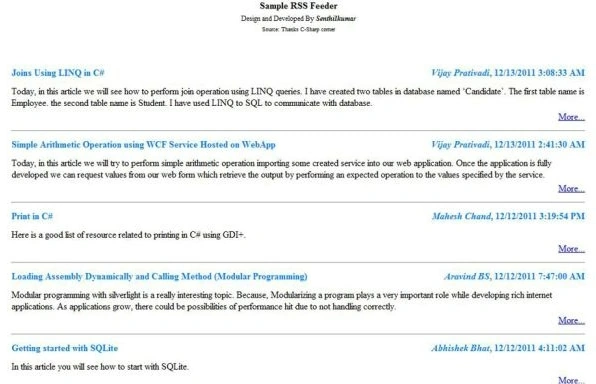
Sample Screen
Conclusion
The XML data can be directly used to display graphical data. It can be designed like Grid, List, etc., It does not have the bubbled event or any other event. It will render quickly and improve performance.
Kuntal MehtaPosted Sep 15, 2015, 6:36 AM
Can you please describe how to imply this XSLT over the generated Rss20FeedFormatter type of object. I am using SyndicationFeed class of the .net framework.