

Wizard control eliminates the need to design forms to execute a step-by-step process in the actual business flow. This simplifies the work of developers to design and write the code.
The control provides a mechanism that allows you to easily build the desired wizard as a collection of steps, add a new step, or reorder the steps. You don't have to write any infrastructure whatsoever for navigation or to persist user data between steps.
The asp, wizard is a control name and wizard steps is the parent element for the asp:wizardstep element.
<asp:wizard id="wizard1" runat="server">
  <wizardsteps>
    <asp:WizardStep runat="server" Title="Personal Information" StepType="Auto">
      <!-- Place the control here. -->
    </asp:WizardStep>
  </wizardsteps>
</asp:wizard>
There can be multiple wizard step that iterates from by form. The control can be placed in the wizard step tag.
The step is the enum type which has the attributes Auto, Complete, Finish, Start, and Step.
The first form will have the next button and all the subsequent forms will have the previous and next button.
The last wizard step tag should be defined as the complete step type.
There are events that are used to write the events on the controls in the wizard control.
- OnActiveStepChanged
- OnCancelButtonClick
- OnPreviousButtonClick
- OnNextButtonClick
- OnFinishButtonClick
- OnSideBarButtonClick
For example, the Finish button click event can be written on the server side like the following.
protected void OnFinish(object sender, WizardNavigationEventArgs e)
{
    WizardStepType t = Wizard1.WizardSteps[e.NextStepIndex].StepType;
    if (t == WizardStepType.Finish)
    {
        // code here...
    }
}
Wizard control properties
| Template | Description |
| FinishNavigationTemplate | Specifies the navigation bar shown before the last page of the wizard; by default, the navigation bar contains the Previous and Finish buttons |
| HeaderTemplate | Specifies the title bar of the wizard |
| SideBarTemplate | Used to display content on the left side of the wizard control |
| StartNavigationTemplate | Specifies the navigation bar for the first view in the wizard; by default, it contains only the Next button |
| StepNavigationTemplate | Specifies the navigation bar for steps other than first, finish, or complete; by default, contains Previous and Next buttons |
Wizard Style Properties
| CancelButtonStyle | Wizard Cancel button |
| FinishStepButtonStyle | Wizard Finish button |
| FinishStepPreviousButtonStyle | Wizard Previous button at the finishing step |
| HeaderStyle | Wizard header |
| NavigationButtonStyle | Navigation buttons |
| NavigationStyle | Navigation area |
| NextStepButtonStyle | Wizard Next button |
| PreviousStepButtonStyle | Wizard Previous button |
| SideBarButtonStyle | Buttons on the sidebar |
| StartStepNextButtonStyle | Wizard Next button at the start step |
| StepStyle | The Area where steps are displayed |
Wizard Control Properties
| Property | Description |
| ActiveStep | Returns the current wizard step object; the object is an instance of the WizardStep class |
| ActiveStepIndex | Gets and sets the zero-based index of the current wizard step |
| DisplaySideBar | Toggles the visibility of the sidebar; the default value is True |
| FinishStepButtonText | Gets and sets the text for the Finish button |
| HeaderText | Gets and sets the title of the wizard |
| NextStepButtonText | Gets and sets the text for the Next button |
| PreviousStepButtonText | Gets and sets the text for the Previous button |
I have designed an example application for the Wizard control.
The wizard ActiveStep property can be set by the ActiveStepIndex="0" of the wizard control. The first form will have the next navigation control.
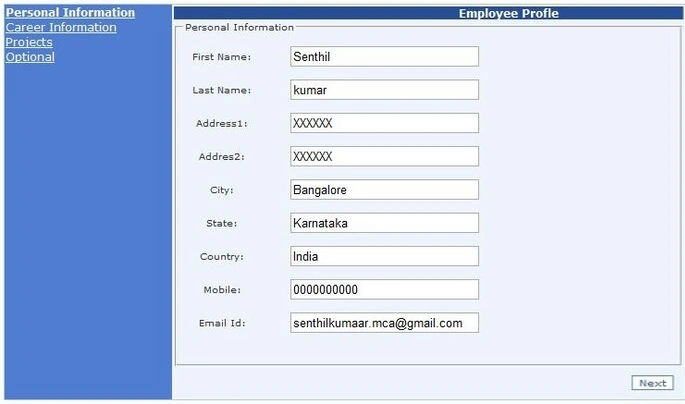
The next form can be navigated through the "Next" button or the user can jump into any wizard by clicking sidebar navigation control.

The Last form in the wizard will have the finish button. The user can identify the step by ActiveStepType in the finish button.

Note. The properties, styles properties, and template table have been taken from the MSDN.
Piyush UpadhyayPosted May 12, 2022, 6:36 AM
I have one problem I am not able to read control values of Wizard step 1 from wizard step 2 by javascript , I tried with document.getElementById("xtPrice").value but not able to read because the control exist in wizard step 1 and I am reading in wizard step 2. Is there any way ?
bishan dassPosted Jun 9, 2015, 5:26 AM
Thanx dear
Sharma RamashankarPosted Dec 21, 2013, 2:43 AM
Nice Frnd ! Best support done by you ...
Hareesh MGPosted Sep 9, 2013, 1:29 PM
Thanks Senthil..good information
Yogesh ChavanPosted Apr 23, 2013, 2:25 AM
You have shared a very useful information..Thanks
SenthilkumarPosted Mar 15, 2012, 4:07 AM
Welcome Mr. arjun and Akash :-)
Akash AhlawatPosted Mar 15, 2012, 1:10 AM
You have shared a very useful information..Thanks
Arjun PanwarPosted Mar 14, 2012, 11:53 PM
Thanks Mr.senthil for sharing this article.