
Introduction
Vb.net has a PrintForm method but C# does not have inbuilt method for printing a Windows Form.
The following procedure enables us to print a windows form at runtime in C#.net. The base concept involves the capture of the screen image of a Form in jpeg format during runtime and printing the same on a event like Print button click.
Let's get started.
Create a new Windows Forms project in Visual Studio.
Add some simple controls such as a Label, TextBox, and Button control to the Form.
Now add a PrintDialog and a PrintDocument components in the Form by dragging and dropping them from Toolbox.
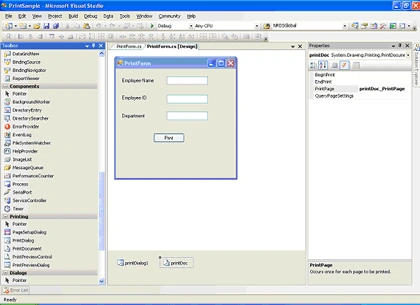
In the code behind
Printing functionality is defined in the System.Drawing.Printing namespace.
Include the following namespaces to your class:
- using System.Drawing.Imaging;
- using System.Drawing.Printing;
- [System.Runtime.InteropServices.DllImportAttribute("gdi32.dll")]
- private System.IO.Stream streamToPrint;
- string streamType;
- private static extern bool BitBlt
- (
- IntPtr hdcDest, // handle to destination DC
- int nXDest, // x-coord of destination upper-left corner
- int nYDest, // y-coord of destination upper-left corner
- int nWidth, // width of destination rectangle
- int nHeight, // height of destination rectangle
- IntPtr hdcSrc, // handle to source DC
- int nXSrc, // x-coordinate of source upper-left corner
- int nYSrc, // y-coordinate of source upper-left corner
- System.Int32 dwRop // raster operation code
- );
Select the PrintPage event of the PrintDocument component and include the following code in the event
- private void printDoc_PrintPage(object sender, System.Drawing.Printing.PrintPageEventArgs e)
- {
- System.Drawing.Image image = System.Drawing.Image.FromStream
- this.streamToPrint;
- int x = e.MarginBounds.X;
- int y = e.MarginBounds.Y;
- int width = image.Width;
- int height = image.Height;
- if ((width / e.MarginBounds.Width) > (height / e.MarginBounds.Height))
- {
- width = e.MarginBounds.Width;
- height = image.Height * e.MarginBounds.Width / image.Width;
- }
- else
- {
- height = e.MarginBounds.Height;
- width = image.Width * e.MarginBounds.Height / image.Height;
- }
- System.Drawing.Rectangle destRect = new System.Drawing.Rectangle(x, y, width, height);
- e.Graphics.DrawImage(image, destRect, 0, 0, image.Width, image.Height, System.Drawing.GraphicsUnit.Pixel);
- }
Include the following code in the Print Click event handler
- private void btnPrint_Click(object sender, EventArgs e)
- {
- Graphics g1 = this.CreateGraphics();
- Image MyImage = new Bitmap(this.ClientRectangle.Width, this.ClientRectangle.Height, g1);
- Graphics g2 = Graphics.FromImage(MyImage);
- IntPtr dc1 = g1.GetHdc();
- IntPtr dc2 = g2.GetHdc();
- BitBlt(dc2, 0, 0, this.ClientRectangle.Width, this.ClientRectangle.Height, dc1, 0, 0, 13369376);
- g1.ReleaseHdc(dc1);
- g2.ReleaseHdc(dc2);
- MyImage.Save(@"c:\PrintPage.jpg", ImageFormat.Jpeg);
- FileStream fileStream = new FileStream(@"c:\PrintPage.jpg", FileMode.Open, FileAccess.Read);
- StartPrint(fileStream, "Image");
- fileStream.Close();
- if (System.IO.File.Exists(@"c:\PrintPage.jpg"))
- {
- System.IO.File.Delete(@"c:\PrintPage.jpg");
- }
- }
And the StatrtPrint method to customize the PrintDialog and print the stored image
- public void StartPrint(Stream streamToPrint, string streamType)
- {
- this.printDoc.PrintPage += new PrintPageEventHandler(printDoc_PrintPage);
- this.streamToPrint = streamToPrint;
- this.streamType = streamType;
- System.Windows.Forms.PrintDialog PrintDialog1 = new PrintDialog();
- PrintDialog1.AllowSomePages = true;
- PrintDialog1.ShowHelp = true;
- PrintDialog1.Document = printDoc;
- DialogResult result = PrintDialog1.ShowDialog();
- if (result == DialogResult.OK)
- {
- printDoc.Print();
- //docToPrint.Print();
- }
- }
The captured image is saved in jpeg format in the defined location.When the print functionality is used throughout an application and the image is not required to be stored, the existing image file is deleted and the new one created is streamed to print.If the image is required to be stored, the filename can be specified at runtime and stored in the given path.
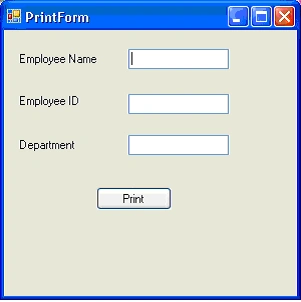
On running the application,the form is displayed as in the image below
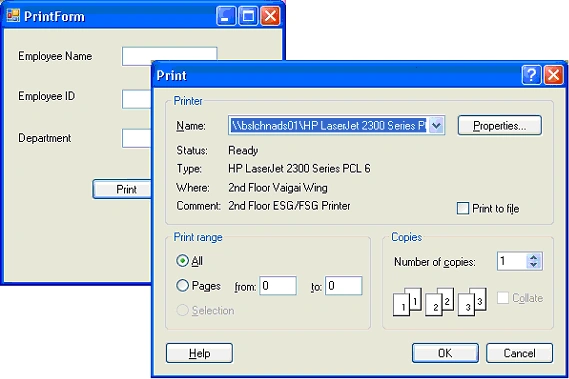
On click of the Print button, the Print dialog is displayed.
Summary
In this article, I demonstrated how to print a Windows Forms in C# using GDI+.
lynn lahmanPosted Feb 20, 2024, 12:53 AM
This sample code does not work on my system. Getting "a generic error occurred in GDI+."
R sowmyaPosted Dec 28, 2018, 6:35 AM
It didnt work for me please tell me how to make it work
beni katiPosted Oct 15, 2014, 7:27 AM
thanks,that was very helful,but in landscape state did'nt work.how can i fix it.thanks in advance.
etienne JacquesPosted Aug 5, 2014, 4:34 PM
Plz how to install gdi32.dll. Help us
Basim KamalPosted Dec 10, 2013, 3:52 PM
it print only a part of the form
Jo BPosted Mar 3, 2013, 4:25 AM
How can i import that .dll file u stated here in your codeThe type or namespace name 'Stream' could not be found (are you missing a using directive or an assembly reference?)i am recieving this error .. My Email:[email protected]
Dumindu DharshanaPosted Jan 18, 2013, 3:41 AM
when I run the program in MyImage.Save(@"c:\PrintPage.jpg", ImageFormat.Jpeg); line i get this error msg. A generic error occurred in GDI+. please tell me why this happen.. my mail [email protected]
Kalpesh VaghelaPosted Jan 6, 2013, 1:04 PM
Thanks for the post...
abhishek kumarPosted Jan 2, 2013, 7:54 AM
i am follow the same code but i have an error" A generic error occurred in GDI+." please tell me.. [email protected]
BrendaneditedPosted Dec 21, 2012, 8:47 AMEdited Dec 21, 2012, 11:39 AM
Thanks for the post, It worked!
Anshul ModiPosted Sep 24, 2012, 5:14 AM
How can i import that .dll file u stated here in your code The type or namespace name 'Stream' could not be found (are you missing a using directive or an assembly reference?) i am recieving this error .. Please help asap Email : [email protected]
Amit RaiPosted Mar 22, 2012, 7:20 AM
This exception occure A generic error occurred in GDI+ in code line MyImage.Save(@"c:\PrintPage.jpg", ImageFormat.Jpeg); please help me [email protected]
bheeshma thapaPosted Mar 2, 2012, 12:26 AM
i downloaded the sourcecode that you have provided. when i run it then it shows no errors .but when i click on print button then it gives no response about printdialogbox.when i checked in c drive i had seen the image of printform but why i dont get printdialog.can u plz help me with it asap?
Asmit PathadeeditedPosted Feb 6, 2012, 1:48 AMEdited Feb 6, 2012, 2:09 AM
Ma'am I am designing Payment module for College Administration System in c#.net. I am stuck In generating Receipt on Print Button click event. Receipt should contains different particulars(Admission Fee, Tuition Fee etc.) with their respective amount. and these field are in datagrid of form. so Please Can you helped me out. [email protected]
Irfan KhanPosted Sep 22, 2011, 7:18 AM
the code you provided works well,but it out of bounds of the paper. kindly help
Vicky KanojiyaPosted May 16, 2011, 3:05 AM
thanks a lot
Boyapati saiPosted Feb 12, 2011, 1:08 AM
reply me fast sir
shawn hurleyPosted Sep 22, 2010, 12:45 PM
When I click print, I get an unhandled exception error saying the handle is invalid ************** Exception Text ************** System.ComponentModel.Win32Exception: The handle is invalid at System.Drawing.Printing.StandardPrintController.OnStartPrint(PrintDocument document, PrintEventArgs e) at System.Windows.Forms.PrintControllerWithStatusDialog.OnStartPrint(PrintDocument document, PrintEventArgs e) at System.Drawing.Printing.PrintController.Print(PrintDocument document) at System.Drawing.Printing.PrintDocument.Print() at PrintSample.PrintForm.StartPrint(Stream streamToPrint, String streamType) in C:\Documents and Settings\Shawn\Desktop\PrintSample\PrintSample\PrintSample\PrintSample\PrintForm.cs:line 75 at PrintSample.PrintForm.btnPrint_Click(Object sender, EventArgs e) in C:\Documents and Settings\Shawn\Desktop\PrintSample\PrintSample\PrintSample\PrintSample\PrintForm.cs:line 98 at System.Windows.Forms.Control.OnClick(EventArgs e) at System.Windows.Forms.Button.OnClick(EventArgs e) at System.Windows.Forms.Button.OnMouseUp(MouseEventArgs mevent) at System.Windows.Forms.Control.WmMouseUp(Message& m, MouseButtons button, Int32 clicks) at System.Windows.Forms.Control.WndProc(Message& m) at System.Windows.Forms.ButtonBase.WndProc(Message& m) at System.Windows.Forms.Button.WndProc(Message& m) at System.Windows.Forms.Control.ControlNativeWindow.OnMessage(Message& m) at System.Windows.Forms.Control.ControlNativeWindow.WndProc(Message& m) at System.Windows.Forms.NativeWindow.Callback(IntPtr hWnd, Int32 msg, IntPtr wparam, IntPtr lparam) ************** Loaded Assemblies ************** mscorlib Assembly Version: 2.0.0.0 Win32 Version: 2.0.50727.3615 (GDR.050727-3600) CodeBase: file:///c:/WINDOWS/Microsoft.NET/Framework/v2.0.50727/mscorlib.dll ---------------------------------------- PrintSample Assembly Version: 1.0.0.0 Win32 Version: 1.0.0.0 CodeBase: file:///C:/Documents%20and%20Settings/Shawn/Desktop/PrintSample/PrintSample/PrintSample/PrintSample/bin/Debug/PrintSample.exe ---------------------------------------- System.Windows.Forms Assembly Version: 2.0.0.0 Win32 Version: 2.0.50727.3053 (netfxsp.050727-3000) CodeBase: file:///C:/WINDOWS/assembly/GAC_MSIL/System.Windows.Forms/2.0.0.0__b77a5c561934e089/System.Windows.Forms.dll ---------------------------------------- System Assembly Version: 2.0.0.0 Win32 Version: 2.0.50727.3614 (GDR.050727-3600) CodeBase: file:///C:/WINDOWS/assembly/GAC_MSIL/System/2.0.0.0__b77a5c561934e089/System.dll ---------------------------------------- System.Drawing Assembly Version: 2.0.0.0 Win32 Version: 2.0.50727.3053 (netfxsp.050727-3000) CodeBase: file:///C:/WINDOWS/assembly/GAC_MSIL/System.Drawing/2.0.0.0__b03f5f7f11d50a3a/System.Drawing.dll ---------------------------------------- System.Configuration Assembly Version: 2.0.0.0 Win32 Version: 2.0.50727.3053 (netfxsp.050727-3000) CodeBase: file:///C:/WINDOWS/assembly/GAC_MSIL/System.Configuration/2.0.0.0__b03f5f7f11d50a3a/System.Configuration.dll ---------------------------------------- System.Xml Assembly Version: 2.0.0.0 Win32 Version: 2.0.50727.3082 (QFE.050727-3000) CodeBase: file:///C:/WINDOWS/assembly/GAC_MSIL/System.Xml/2.0.0.0__b77a5c561934e089/System.Xml.dll ---------------------------------------- However the image is being stored at the location specified on C:, any ideas how to remedy this so the image will actually print?
James QuinnPosted Sep 15, 2010, 9:35 PM
An unhandled exception of type 'System.Runtime.InteropServices.ExternalException' occurred in system.drawing.dll Additional information: A generic error occurred in GDI+ line MyImage.Save(@"c:\PrintPage.jpg", ImageFormat.Jpeg), method btnPrint_Click
Hossein AbtahiPosted Aug 11, 2010, 4:47 AM
Hi man thank you for great article. It solved my problem
Hossein AbtahiPosted Aug 4, 2010, 1:15 AM
<meta http-equiv="Content-Type" content="text/html; charset=utf-8"><meta name="ProgId" content="Word.Document"><meta name="Generator" content="Microsoft Word 12"><meta name="Originator" content="Microsoft Word 12"><link rel="File-List" href="file:///C:%5CUsers%5CADMINI%7E1.SER%5CAppData%5CLocal%5CTemp%5C1%5Cmsohtmlclip1%5C01%5Cclip_filelist.xml"><link rel="themeData" href="file:///C:%5CUsers%5CADMINI%7E1.SER%5CAppData%5CLocal%5CTemp%5C1%5Cmsohtmlclip1%5C01%5Cclip_themedata.thmx"><link rel="colorSchemeMapping" href="file:///C:%5CUsers%5CADMINI%7E1.SER%5CAppData%5CLocal%5CTemp%5C1%5Cmsohtmlclip1%5C01%5Cclip_colorschememapping.xml"><!--[if gte mso 9]><xml> <w:WordDocument> <w:View>Normal</w:View> <w:Zoom>0</w:Zoom> <w:TrackMoves/> <w:TrackFormatting/> <w:PunctuationKerning/> <w:ValidateAgainstSchemas/> <w:SaveIfXMLInvalid>false</w:SaveIfXMLInvalid> <w:IgnoreMixedContent>false</w:IgnoreMixedContent> <w:AlwaysShowPlaceholderText>false</w:AlwaysShowPlaceholderText> <w:DoNotPromoteQF/> <w:LidThemeOther>EN-US</w:LidThemeOther> <w:LidThemeAsian>X-NONE</w:LidThemeAsian> <w:LidThemeComplexScript>AR-SA</w:LidThemeComplexScript> <w:Compatibility> <w:BreakWrappedTables/> <w:SnapToGridInCell/> <w:WrapTextWithPunct/> <w:UseAsianBreakRules/> <w:DontGrowAutofit/> <w:SplitPgBreakAndParaMark/> <w:DontVertAlignCellWithSp/> <w:DontBreakConstrainedForcedTables/> <w:DontVertAlignInTxbx/> <w:Word11KerningPairs/> <w:CachedColBalance/> </w:Compatibility> <w:BrowserLevel>MicrosoftInternetExplorer4</w:BrowserLevel> <m:mathPr> <m:mathFont m:val="Cambria Math"/> <m:brkBin m:val="before"/> <m:brkBinSub m:val="--"/> <m:smallFrac m:val="off"/> <m:dispDef/> <m:lMargin m:val="0"/> <m:rMargin m:val="0"/> <m:defJc m:val="centerGroup"/> <m:wrapIndent m:val="1440"/> <m:intLim m:val="subSup"/> <m:naryLim m:val="undOvr"/> </m:mathPr></w:WordDocument> </xml><![endif]--><!--[if gte mso 9]><xml> <w:LatentStyles DefLockedState="false" DefUnhideWhenUsed="true" DefSemiHidden="true" DefQFormat="false" DefPriority="99" LatentStyleCount="267"> <w:LsdException Locked="false" Priority="0" SemiHidden="false" UnhideWhenUsed="false" QFormat="true" Name="Normal"/> <w:LsdException Locked="false" Priority="9" SemiHidden="false" UnhideWhenUsed="false" QFormat="true" Name="heading 1"/> <w:LsdException Locked="false" Priority="9" QFormat="true" Name="heading 2"/> <w:LsdException Locked="false" Priority="9" QFormat="true" Name="heading 3"/> <w:LsdException Locked="false" Priority="9" QFormat="true" Name="heading 4"/> <w:LsdException Locked="false" Priority="9" QFormat="true" Name="heading 5"/> <w:LsdException Locked="false" Priority="9" QFormat="true" Name="heading 6"/> <w:LsdException Locked="false" Priority="9" QFormat="true" Name="heading 7"/> <w:LsdException Locked="false" Priority="9" QFormat="true" Name="heading 8"/> <w:LsdException Locked="false" Priority="9" QFormat="true" Name="heading 9"/> <w:LsdException Locked="false" Priority="39" Name="toc 1"/> <w:LsdException Locked="false" Priority="39" Name="toc 2"/> <w:LsdException Locked="false" Priority="39" Name="toc 3"/> <w:LsdException Locked="false" Priority="39" Name="toc 4"/> <w:LsdException Locked="false" Priority="39" Name="toc 5"/> <w:LsdException Locked="false" Priority="39" Name="toc 6"/> <w:LsdException Locked="false" Priority="39" Name="toc 7"/> <w:LsdException Locked="false" Priority="39" Name="toc 8"/> <w:LsdException Locked="false" Priority="39" Name="toc 9"/> <w:LsdException Locked="false" Priority="35" QFormat="true" Name="caption"/> <w:LsdException Locked="false" Priority="10" SemiHidden="false" UnhideWhenUsed="false" QFormat="true" Name="Title"/> <w:LsdException Locked="false" Priority="1" Name="Default Paragraph Font"/> <w:LsdException Locked="false" Priority="11" SemiHidden="false" UnhideWhenUsed="false" QFormat="true" Name="Subtitle"/> <w:LsdException Locked="false" Priority="22" SemiHidden="false" UnhideWhenUsed="false" QFormat="true" Name="Strong"/> <w:LsdException Locked="false" Priority="20" SemiHidden="false" UnhideWhenUsed="false" QFormat="true" Name="Emphasis"/> <w:LsdException Locked="false" Priority="59" SemiHidden="false" UnhideWhenUsed="false" Name="Table Grid"/> <w:LsdException Locked="false" UnhideWhenUsed="false" Name="Placeholder Text"/> <w:LsdException Locked="false" Priority="1" SemiHidden="false" UnhideWhenUsed="false" QFormat="true" Name="No Spacing"/> <w:LsdException Locked="false" Priority="60" SemiHidden="false" UnhideWhenUsed="false" Name="Light Shading"/> <w:LsdException Locked="false" Priority="61" SemiHidden="false" UnhideWhenUsed="false" Name="Light List"/> <w:LsdException Locked="false" Priority="62" SemiHidden="false" UnhideWhenUsed="false" Name="Light Grid"/> <w:LsdException Locked="false" Priority="63" SemiHidden="false" UnhideWhenUsed="false" Name="Medium Shading 1"/> <w:LsdException Locked="false" Priority="64" SemiHidden="false" UnhideWhenUsed="false" Name="Medium Shading 2"/> <w:LsdException Locked="false" Priority="65" SemiHidden="false" UnhideWhenUsed="false" Name="Medium List 1"/> <w:LsdException Locked="false" Priority="66" SemiHidden="false" UnhideWhenUsed="false" Name="Medium List 2"/> <w:LsdException Locked="false" Priority="67" SemiHidden="false" UnhideWhenUsed="false" Name="Medium Grid 1"/> <w:LsdException Locked="false" Priority="68" SemiHidden="false" UnhideWhenUsed="false" Name="Medium Grid 2"/> <w:LsdException Locked="false" Priority="69" SemiHidden="false" UnhideWhenUsed="false" Name="Medium Grid 3"/> <w:LsdException Locked="false" Priority="70" SemiHidden="false" UnhideWhenUsed="false" Name="Dark List"/> <w:LsdException Locked="false" Priority="71" SemiHidden="false" UnhideWhenUsed="false" Name="Colorful Shading"/> <w:LsdException Locked="false" Priority="72" SemiHidden="false" UnhideWhenUsed="false" Name="Colorful List"/> <w:LsdException Locked="false" Priority="73" SemiHidden="false" UnhideWhenUsed="false" Name="Colorful Grid"/> <w:LsdException Locked="false" Priority="60" SemiHidden="false" UnhideWhenUsed="false" Name="Light Shading Accent 1"/> <w:LsdException Locked="false" Priority="61" SemiHidden="false" UnhideWhenUsed="false" Name="Light List Accent 1"/> <w:LsdException Locked="false" Priority="62" SemiHidden="false" UnhideWhenUsed="false" Name="Light Grid Accent 1"/> <w:LsdException Locked="false" Priority="63" SemiHidden="false" UnhideWhenUsed="false" Name="Medium Shading 1 Accent 1"/> <w:LsdException Locked="false" Priority="64" SemiHidden="false" UnhideWhenUsed="false" Name="Medium Shading 2 Accent 1"/> <w:LsdException Locked="false" Priority="65" SemiHidden="false" UnhideWhenUsed="false" Name="Medium List 1 Accent 1"/> <w:LsdException Locked="false" UnhideWhenUsed="false" Name="Revision"/> <w:LsdException Locked="false" Priority="34" SemiHidden="false" UnhideWhenUsed="false" QFormat="true" Name="List Paragraph"/> <w:LsdException Locked="false" Priority="29" SemiHidden="false" UnhideWhenUsed="false" QFormat="true" Name="Quote"/> <w:LsdException Locked="false" Priority="30" SemiHidden="false" UnhideWhenUsed="false" QFormat="true" Name="Intense Quote"/> <w:LsdException Locked="false" Priority="66" SemiHidden="false" UnhideWhenUsed="false" Name="Medium List 2 Accent 1"/> <w:LsdException Locked="false" Priority="67" SemiHidden="false" UnhideWhenUsed="false" Name="Medium Grid 1 Accent 1"/> <w:LsdException Locked="false" Priority="68" SemiHidden="false" UnhideWhenUsed="false" Name="Medium Grid 2 Accent 1"/> <w:LsdException Locked="false" Priority="69" SemiHidden="false" UnhideWhenUsed="false" Name="Medium Grid 3 Accent 1"/> <w:LsdException Locked="false" Priority="70" SemiHidden="false" UnhideWhenUsed="false" Name="Dark List Accent 1"/> <w:LsdException Locked="false" Priority="71" SemiHidden="false" UnhideWhenUsed="false" Name="Colorful Shading Accent 1"/> <w:LsdException Locked="false" Priority="72" SemiHidden="false" UnhideWhenUsed="false" Name="Colorful List Accent 1"/> <w:LsdException Locked="false" Priority="73" SemiHidden="false" UnhideWhenUsed="false" Name="Colorful Grid Accent 1"/> <w:LsdException Locked="false" Priority="60" SemiHidden="false" UnhideWhenUsed="false" Name="Light Shading Accent 2"/> <w:LsdException Locked="false" Priority="61" SemiHidden="false" UnhideWhenUsed="false" Name="Light List Accent 2"/> <w:LsdException Locked="false" Priority="62" SemiHidden="false" UnhideWhenUsed="false" Name="Light Grid Accent 2"/> <w:LsdException Locked="false" Priority="63" SemiHidden="false" UnhideWhenUsed="false" Name="Medium Shading 1 Accent 2"/> <w:LsdException Locked="false" Priority="64" SemiHidden="false" UnhideWhenUsed="false" Name="Medium Shading 2 Accent 2"/> <w:LsdException Locked="false" Priority="65" SemiHidden="false" UnhideWhenUsed="false" Name="Medium List 1 Accent 2"/> <w:LsdException Locked="false" Priority="66" SemiHidden="false" UnhideWhenUsed="false" Name="Medium List 2 Accent 2"/> <w:LsdException Locked="false" Priority="67" SemiHidden="false" UnhideWhenUsed="false" Name="Medium Grid 1 Accent 2"/> <w:LsdException Locked="false" Priority="68" SemiHidden="false" UnhideWhenUsed="false" Name="Medium Grid 2 Accent 2"/> <w:LsdException Locked="false" Priority="69" SemiHidden="false" UnhideWhenUsed="false" Name="Medium Grid 3 Accent 2"/> <w:LsdException Locked="false" Priority="70" SemiHidden="false" UnhideWhenUsed="false" Name="Dark List Accent 2"/> <w:LsdException Locked="false" Priority="71" SemiHidden="false" UnhideWhenUsed="false" Name="Colorful Shading Accent 2"/> <w:LsdException Locked="false" Priority="72" SemiHidden="false" UnhideWhenUsed="false" Name="Colorful List Accent 2"/> <w:LsdException Locked="false" Priority="73" SemiHidden="false" UnhideWhenUsed="false" Name="Colorful Grid Accent 2"/> <w:LsdException Locked="false" Priority="60" SemiHidden="false" UnhideWhenUsed="false" Name="Light Shading Accent 3"/> <w:LsdException Locked="false" Priority="61" SemiHidden="false" UnhideWhenUsed="false" Name="Light List Accent 3"/> <w:LsdException Locked="false" Priority="62" SemiHidden="false" UnhideWhenUsed="false" Name="Light Grid Accent 3"/> <w:LsdException Locked="false" Priority="63" SemiHidden="false" UnhideWhenUsed="false" Name="Medium Shading 1 Accent 3"/> <w:LsdException Locked="false" Priority="64" SemiHidden="false" UnhideWhenUsed="false" Name="Medium Shading 2 Accent 3"/> <w:LsdException Locked="false" Priority="65" SemiHidden="false" UnhideWhenUsed="false" Name="Medium List 1 Accent 3"/> <w:LsdException Locked="false" Priority="66" SemiHidden="false" UnhideWhenUsed="false" Name="Medium List 2 Accent 3"/> <w:LsdException Locked="false" Priority="67" SemiHidden="false" UnhideWhenUsed="false" Name="Medium Grid 1 Accent 3"/> <w:LsdException Locked="false" Priority="68" SemiHidden="false" UnhideWhenUsed="false" Name="Medium Grid 2 Accent 3"/> <w:LsdException Locked="false" Priority="69" SemiHidden="false" UnhideWhenUsed="false" Name="Medium Grid 3 Accent 3"/> <w:LsdException Locked="false" Priority="70" SemiHidden="false" UnhideWhenUsed="false" Name="Dark List Accent 3"/> <w:LsdException Locked="false" Priority="71" SemiHidden="false" UnhideWhenUsed="false" Name="Colorful Shading Accent 3"/> <w:LsdException Locked="false" Priority="72" SemiHidden="false" UnhideWhenUsed="false" Name="Colorful List Accent 3"/> <w:LsdException Locked="false" Priority="73" SemiHidden="false" UnhideWhenUsed="false" Name="Colorful Grid Accent 3"/> <w:LsdException Locked="false" Priority="60" SemiHidden="false" UnhideWhenUsed="false" Name="Light Shading Accent 4"/> <w:LsdException Locked="false" Priority="61" SemiHidden="false" UnhideWhenUsed="false" Name="Light List Accent 4"/> <w:LsdException Locked="false" Priority="62" SemiHidden="false" UnhideWhenUsed="false" Name="Light Grid Accent 4"/> <w:LsdException Locked="false" Priority="63" SemiHidden="false" UnhideWhenUsed="false" Name="Medium Shading 1 Accent 4"/> <w:LsdException Locked="false" Priority="64" SemiHidden="false" UnhideWhenUsed="false" Name="Medium Shading 2 Accent 4"/> <w:LsdException Locked="false" Priority="65" SemiHidden="false" UnhideWhenUsed="false" Name="Medium List 1 Accent 4"/> <w:LsdException Locked="false" Priority="66" SemiHidden="false" UnhideWhenUsed="false" Name="Medium List 2 Accent 4"/> <w:LsdException Locked="false" Priority="67" SemiHidden="false" UnhideWhenUsed="false" Name="Medium Grid 1 Accent 4"/> <w:LsdException Locked="false" Priority="68" SemiHidden="false" UnhideWhenUsed="false" Name="Medium Grid 2 Accent 4"/> <w:LsdException Locked="false" Priority="69" SemiHidden="false" UnhideWhenUsed="false" Name="Medium Grid 3 Accent 4"/> <w:LsdException Locked="false" Priority="70" SemiHidden="false" UnhideWhenUsed="false" Name="Dark List Accent 4"/> <w:LsdException Locked="false" Priority="71" SemiHidden="false" UnhideWhenUsed="false" Name="Colorful Shading Accent 4"/> <w:LsdException Locked="false" Priority="72" SemiHidden="false" UnhideWhenUsed="false" Name="Colorful List Accent 4"/> <w:LsdException Locked="false" Priority="73" SemiHidden="false" UnhideWhenUsed="false" Name="Colorful Grid Accent 4"/> <w:LsdException Locked="false" Priority="60" SemiHidden="false" UnhideWhenUsed="false" Name="Light Shading Accent 5"/> <w:LsdException Locked="false" Priority="61" SemiHidden="false" UnhideWhenUsed="false" Name="Light List Accent 5"/> <w:LsdException Locked="false" Priority="62" SemiHidden="false" UnhideWhenUsed="false" Name="Light Grid Accent 5"/> <w:LsdException Locked="false" Priority="63" SemiHidden="false" UnhideWhenUsed="false" Name="Medium Shading 1 Accent 5"/> <w:LsdException Locked="false" Priority="64" SemiHidden="false" UnhideWhenUsed="false" Name="Medium Shading 2 Accent 5"/> <w:LsdException Locked="false" Priority="65" SemiHidden="false" UnhideWhenUsed="false" Name="Medium List 1 Accent 5"/> <w:LsdException Locked="false" Priority="66" SemiHidden="false" UnhideWhenUsed="false" Name="Medium List 2 Accent 5"/> <w:LsdException Locked="false" Priority="67" SemiHidden="false" UnhideWhenUsed="false" Name="Medium Grid 1 Accent 5"/> <w:LsdException Locked="false" Priority="68" SemiHidden="false" UnhideWhenUsed="false" Name="Medium Grid 2 Accent 5"/> <w:LsdException Locked="false" Priority="69" SemiHidden="false" UnhideWhenUsed="false" Name="Medium Grid 3 Accent 5"/> <w:LsdException Locked="false" Priority="70" SemiHidden="false" UnhideWhenUsed="false" Name="Dark List Accent 5"/> <w:LsdException Locked="false" Priority="71" SemiHidden="false" UnhideWhenUsed="false" Name="Colorful Shading Accent 5"/> <w:LsdException Locked="false" Priority="72" SemiHidden="false" UnhideWhenUsed="false" Name="Colorful List Accent 5"/> <w:LsdException Locked="false" Priority="73" SemiHidden="false" UnhideWhenUsed="false" Name="Colorful Grid Accent 5"/> <w:LsdException Locked="false" Priority="60" SemiHidden="false" UnhideWhenUsed="false" Name="Light Shading Accent 6"/> <w:LsdException Locked="false" Priority="61" SemiHidden="false" UnhideWhenUsed="false" Name="Light List Accent 6"/> <w:LsdException Locked="false" Priority="62" SemiHidden="false" UnhideWhenUsed="false" Name="Light Grid Accent 6"/> <w:LsdException Locked="false" Priority="63" SemiHidden="false" UnhideWhenUsed="false" Name="Medium Shading 1 Accent 6"/> <w:LsdException Locked="false" Priority="64" SemiHidden="false" UnhideWhenUsed="false" Name="Medium Shading 2 Accent 6"/> <w:LsdException Locked="false" Priority="65" SemiHidden="false" UnhideWhenUsed="false" Name="Medium List 1 Accent 6"/> <w:LsdException Locked="false" Priority="66" SemiHidden="false" UnhideWhenUsed="false" Name="Medium List 2 Accent 6"/> <w:LsdException Locked="false" Priority="67" SemiHidden="false" UnhideWhenUsed="false" Name="Medium Grid 1 Accent 6"/> <w:LsdException Locked="false" Priority="68" SemiHidden="false" UnhideWhenUsed="false" Name="Medium Grid 2 Accent 6"/> <w:LsdException Locked="false" Priority="69" SemiHidden="false" UnhideWhenUsed="false" Name="Medium Grid 3 Accent 6"/> <w:LsdException Locked="false" Priority="70" SemiHidden="false" UnhideWhenUsed="false" Name="Dark List Accent 6"/> <w:LsdException Locked="false" Priority="71" SemiHidden="false" UnhideWhenUsed="false" Name="Colorful Shading Accent 6"/> <w:LsdException Locked="false" Priority="72" SemiHidden="false" UnhideWhenUsed="false" Name="Colorful List Accent 6"/> <w:LsdException Locked="false" Priority="73" SemiHidden="false" UnhideWhenUsed="false" Name="Colorful Grid Accent 6"/> <w:LsdException Locked="false" Priority="19" SemiHidden="false" UnhideWhenUsed="false" QFormat="true" Name="Subtle Emphasis"/> <w:LsdException Locked="false" Priority="21" SemiHidden="false" UnhideWhenUsed="false" QFormat="true" Name="Intense Emphasis"/> <w:LsdException Locked="false" Priority="31" SemiHidden="false" UnhideWhenUsed="false" QFormat="true" Name="Subtle Reference"/> <w:LsdException Locked="false" Priority="32" SemiHidden="false" UnhideWhenUsed="false" QFormat="true" Name="Intense Reference"/> <w:LsdException Locked="false" Priority="33" SemiHidden="false" UnhideWhenUsed="false" QFormat="true" Name="Book Title"/> <w:LsdException Locked="false" Priority="37" Name="Bibliography"/> <w:LsdException Locked="false" Priority="39" QFormat="true" Name="TOC Heading"/> </w:LatentStyles> </xml><![endif]--><!--[if gte mso 10]> <![endif]--> Hi Thank you for your Great Article But i cannot use your code and always I get This Error: Error 1 : Attribute 'System.Runtime.InteropServices.DllImport' is not valid on this declaration type. It is only valid on 'method' declarations. and I get blue line Under this parameter : [System.Runtime.InteropServices.DllImport("gdi32.dll")] Also I Add using System.Runtime.InteropServices; and add System.Runtime.InteropServices.dll too -and I cannot add gdi32.dll and I get This Error : http://rapidshare.com/files/410920459/Error.jpg How can i fix it? Thank you
Kwesi SagoePosted Jun 22, 2010, 9:08 AM
Its not working for me. i believe its not reading the gdi32.dll file. do u have an email address.
Nidhi SharmaPosted May 19, 2010, 10:26 PM
Thanks a lot. It simply works great
Asif RehmanPosted Dec 15, 2009, 1:35 AM
Very nice article...its brilliant I have modified it for the client area of the from... My question is if a client area consists of different objects like circles,square,rectangle and i want to print only circles then u do u have any recommendations regarding that...
Former memberPosted May 6, 2009, 2:54 PM
hollo; I have a prbleme for printing my form; I have a large Form which exceeds screen size, and I would like print it in A4 format of paper; can you help me please best regard
Tharindu PatsPosted Mar 24, 2009, 2:07 AM
Hi, Article is great. Just one more thin. I want to know if i have several Mdi Child forms how to get the images of then if they are overlapping each other. When forms are over lapped you get the part of form that is on top of that form. Is there a way to do this. I am trying to create a window with all the images of currently opened windows. But using your code its bit hard to do. Thanks Pats
salman baqirPosted Dec 11, 2008, 12:38 AM
hi i m salman and i have used ur code for printing but unable to import the Gdi32.dll file in my code, i have downloaded the gdi32.dll from internet. In visual studio when i add reference to it, it do not allow me to add the reference and generates an error. The error z "A reference to 'C:\documents and settings\abc\my documents\Visual Studio 2005\projects\print\print\Gdi32.dll' could not be added. Please make sure that the file is accessible, and that it is a valid assembly or COM component". so plz guide me how to import this Dll to my project.
dNetGuru EPosted Feb 26, 2008, 5:33 AM
In btnPrint_Click() we can't assume that C: is writable by the current user and actually we don't *really* need any temp file, u could simple use a MemoryStream as follows : private void btnPrint_Click(object sender, EventArgs e) { // .... Some Code Omitted ... MemoryStream ms = new MemoryStream(); MyImage.Save(ms, ImageFormat.Jpeg); StartPrint(ms, "Image"); ms.Close(); }
sreenivasPosted Feb 1, 2008, 8:07 AM
Hi Rajalakshmi my id: [email protected]. Please help me. i am not able to Run your code(print windows form sample). the following code giving compile errors that code is regarding print windows form(whatever u have wrote code that code only). using System; using System.Collections.Generic; using System.ComponentModel; using System.Data; using System.Drawing; using System.Text; using System.Windows.Forms; using System.Drawing.Imaging; using System.Drawing.Printing; namespace Print { public partial class Form1 : Form { public System.IO.Stream streamToPrint; string streamType; private static extern bool BitBlt ( IntPtr hdcDest, // handle to destination DC int nXDest, // x-coord of destination upper-left corner int nYDest, // y-coord of destination upper-left corner int nWidth, // width of destination rectangle int nHeight, // height of destination rectangle IntPtr hdcSrc, // handle to source DC int nXSrc, // x-coordinate of source upper-left corner int nYSrc, // y-coordinate of source upper-left corner System.Int32 dwRop // raster operation code ); private void printDoc_PrintPage(object sender, System.Drawing.Printing.PrintPageEventArgs e) { System.Drawing.Image image = System.Drawing.Image.FromStream; this.streamToPrint; int x = e.MarginBounds.X; int y = e.MarginBounds.Y; int width = image.Width; int height = image.Height; if ((width / e.MarginBounds.Width) > (height / e.MarginBounds.Height)) { width = e.MarginBounds.Width; height = image.Height * e.MarginBounds.Width / image.Width; } else { height = e.MarginBounds.Height; width = image.Width * e.MarginBounds.Height / image.Height; } System.Drawing.Rectangle destRect = new System.Drawing.Rectangle(x, y, width, height); e.Graphics.DrawImage(image, destRect, 0, 0, image.Width, image.Height, System.Drawing.GraphicsUnit.Pixel); } [System.Runtime.InteropServices.DllImportAttribute("gdi32.dll")] public void StartPrint(Stream streamToPrint, string streamType) { this.printDoc.PrintPage += new PrintPageEventHandler(printDoc_PrintPage); this.streamToPrint = streamToPrint; this.streamType = streamType; System.Windows.Forms.PrintDialog PrintDialog1 = new PrintDialog(); PrintDialog1.AllowSomePages = true; PrintDialog1.ShowHelp = true; PrintDialog1.Document = printDoc; DialogResult result = PrintDialog1.ShowDialog(); if (result == DialogResult.OK) { printDoc.Print(); //docToPrint.Print(); } } public Form1() { InitializeComponent(); } private void Form1_Load(object sender, EventArgs e) { } private void button1_Click(object sender, EventArgs e) { Graphics g1 = this.CreateGraphics(); Image MyImage = new Bitmap(this.ClientRectangle.Width, this.ClientRectangle.Height, g1); Graphics g2 = Graphics.FromImage(MyImage); IntPtr dc1 = g1.GetHdc(); IntPtr dc2 = g2.GetHdc(); BitBlt(dc2, 0, 0, this.ClientRectangle.Width, this.ClientRectangle.Height, dc1, 0, 0, 13369376); g1.ReleaseHdc(dc1); g2.ReleaseHdc(dc2); MyImage.Save(@"c:\PrintPage.jpg", ImageFormat.Jpeg); FileStream fileStream = new FileStream(@"c:\PrintPage.jpg", FileMode.Open, FileAccess.Read); StartPrint(fileStream, "Image"); fileStream.Close(); if (System.IO.File.Exists(@"c:\PrintPage.jpg")) { System.IO.File.Delete(@"c:\PrintPage.jpg"); } } } } i am waiting for u r code. thanks and regards Sreenivas