

Being a .Net developer, Automation Engineer, or IT administrator we are always in need of dealing with Windows machine configuration and settings. Usually, it is for changing and/or updating the system settings programmatically. If you're an Automation Engineer then you must be using a scripting language (Vbscript or Jscript) because you're in love with it. If you're a .Net developer then you must use the Win32 library. Being an IT administrator you may be using Powershell. All interfaces are to interact with the kernel of windows and sending/querying/invoking built-in methods. If you have heard of Windows Management Instrumentation (WMI) or even if you have not then no worries, you'll know everything after reading this article about the what, why and hows of WMI.
 Windows Management Instrumentation (WMI) is a scalable, extensible management infrastructure, included as part of Windows 2000 and later. An implementation of the Web-Based Enterprise Management (WBEM), and based on the Common Information Model (CIM) adopted by the Distributed Management Task Force (DMTF), it includes a rich set of management data about computer systems, the operating system, and applications on a given managed system.
Purpose
Windows Management Instrumentation (WMI) is the infrastructure for management data and operations on Windows-based operating systems. You can write WMI scripts or applications to automate administrative tasks on local/remote computers but WMI also supplies management data to other parts of the operating system and products, for example, System Center Operations Manager, formerly Microsoft Operations Manager (MOM), or Windows Remote Management (WinRM).
Where applicable
WMI can be used in all Windows-based applications and is most useful in enterprise applications and administrative scripts. System/IT administrators can find information about using WMI at the TechNetScriptCenter,
The System.Management namespace is the WMI namespace in the .NET Framework. This namespace includes the following first-level class objects that support WMI operations:
Windows Management Instrumentation (WMI) is a scalable, extensible management infrastructure, included as part of Windows 2000 and later. An implementation of the Web-Based Enterprise Management (WBEM), and based on the Common Information Model (CIM) adopted by the Distributed Management Task Force (DMTF), it includes a rich set of management data about computer systems, the operating system, and applications on a given managed system.
Purpose
Windows Management Instrumentation (WMI) is the infrastructure for management data and operations on Windows-based operating systems. You can write WMI scripts or applications to automate administrative tasks on local/remote computers but WMI also supplies management data to other parts of the operating system and products, for example, System Center Operations Manager, formerly Microsoft Operations Manager (MOM), or Windows Remote Management (WinRM).
Where applicable
WMI can be used in all Windows-based applications and is most useful in enterprise applications and administrative scripts. System/IT administrators can find information about using WMI at the TechNetScriptCenter,
The System.Management namespace is the WMI namespace in the .NET Framework. This namespace includes the following first-level class objects that support WMI operations:
What is WMI?
WMI and .Net framework
- ManagementObject or ManagementClass: a single management object or class, respectively.
- ManagementObjectSearcher: used to retrieve a collection of ManagementObject orManagementClass objects based on a specified query or enumeration.
- ManagementEventWatcher: used to subscribe to event notifications from WMI.
- ManagementQuery: used as the basis for all query classes.
Using these class libraries, a developer can monitor, get reports, and manage local resources seamlessly.
Writing a sample code to create a system Restore Point using C# programmatically:
To start writing a sample application you must know a few things. There are namespaces stored on the Windows machine that can be found under the "root" so all namespaces will start with a path like "\root\DEFAULT", "\root\CIMV2" etc. Under those namespaces, there are classes available named for example "Win32_Environment" or "Win32_ComputerSystem" etc. Then we have methods and properties associated with each class.
The following is the sample code that will create a system Restore Point.
The code above is handling the status codes return from InvokeMethod(). The Win32Excpetion class can return the exact meaning of the returned status code.
Run this code and when you go to the system restore window from "Computer" –> "Properties" –> "System protection" –> "System Restore" you'll find you recently created Restore Point there.
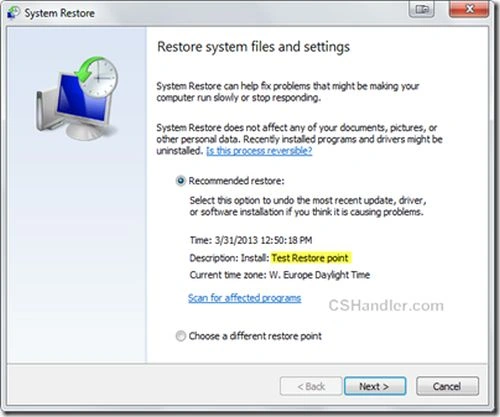 Similarly, you can also write code to restore the Windows system to a previously created Restore Point.
Now to help you with the Namespaces and Class search for a particular action on Windows the entire documentation is available in detail in MSDN.
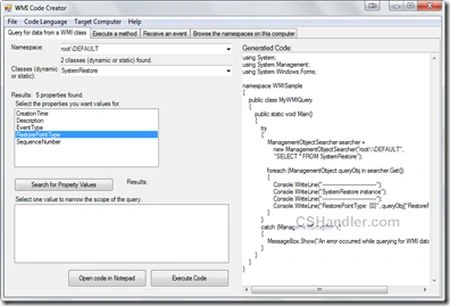
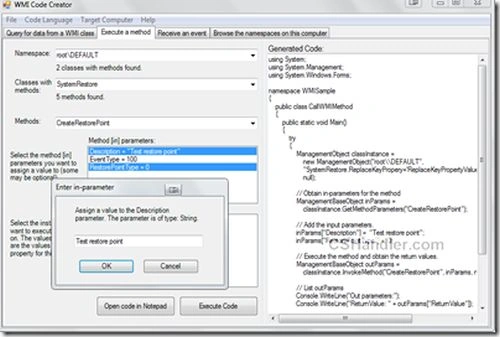
Don't worry, to ease the process of finding the namespace, class, and method, and properties info Microsoft has created a tool. This tool can also generate code for you for a particular action. Download the WMI code generator. This tool can generate WMI programs in various languages like C#, VisualBasic, VB script, etc. There's an option available in Menu items "Code Language"; choose your favorite one.
Here are a few snapshots from the tool:
Similarly, you can also write code to restore the Windows system to a previously created Restore Point.
Now to help you with the Namespaces and Class search for a particular action on Windows the entire documentation is available in detail in MSDN.
Don't worry, to ease the process of finding the namespace, class, and method, and properties info Microsoft has created a tool. This tool can also generate code for you for a particular action. Download the WMI code generator. This tool can generate WMI programs in various languages like C#, VisualBasic, VB script, etc. There's an option available in Menu items "Code Language"; choose your favorite one.
Here are a few snapshots from the tool:
 Things to keep in mind before you start playing:
- using System;
- using System.ComponentModel;
- using System.Management;
- using System.Windows.Forms;
- namespace WMISample
- {
- public class CallWMIMethod
- {
- public static void Main()
- {
- try
- {
- ManagementClass classInstance =
- new ManagementClass("root\\DEFAULT",
- "SystemRestore", null);
- // Obtain in-parameters for the method
- ManagementBaseObject inParams =
- classInstance.GetMethodParameters("CreateRestorePoint");
- // Add the input parameters.
- inParams["Description"] = "Test Restore point";
- inParams["EventType"] = 100; // 100 -BeginSystemChange value
- inParams["RestorePointType"] = 0; // 0 - Application install restore point type
- // Execute the method and obtain the return values.
- ManagementBaseObject outParams =
- classInstance.InvokeMethod("CreateRestorePoint", inParams, null);
- // Custom code to throw the Win32 exception for information related to the error code
- int success = Convert.ToInt32(outParams["ReturnValue"]);
- if (success != 0)
- {
- throw new Win32Exception(success);
- }
- // List outParams
- Console.WriteLine("Out parameters:");
- Console.WriteLine("ReturnValue: " + outParams["ReturnValue"]);
- }
- catch (ManagementException err)
- {
- MessageBox.Show("An error occurred while trying to execute the WMI method: " + err.Message);
- }
- }
- }
- }
- First before running any code against your machine, "Make sure you know what you're doing". I will not be responsible if you break your machine by changing unnecessary settings.
- This is not guaranteed that the code generated from this tool will run on all machines of Windows. It might run on a few machines but you might need to put some tweaks to run the code on a different version of the Windows operating systems.
Please leave a comment/suggestion if you have read this until this point.
Amit ChoudharyPosted Jun 18, 2013, 2:05 PM
The answer is "Yes"
saddam EscapPosted May 24, 2013, 9:16 AM
Thanke you Amit Choudhary it is great artical to understand WMI and how to use it ,but , I have question .... Can I use WMI to manage computer device like disable USB and net adapter etc