
When developing enterprise ASP.NET applications it is common to require the input of dates. The two solutions provided by .NET and Visual Studio out of the box; using a textbox with validation and using a calendar control, are both flawed. A textbox leaves too much scope for the user to make a mistake with data entry. Should the 15th of January be written '15/1/06', '15/01/06', '15/01/2006', or '1/15/06'? Some users need to have a calendar to allow them to pick the correct date without regard to formatting.
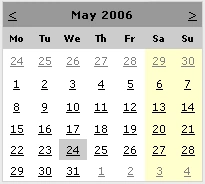
The ASP.NET calendar control
However, for power users this can become much to slow, and the calendar control consumes too much precious screen realestate. The power user is capable of learing the acceptable date formats and would prefer to be able to enter the date in a textbox. This is also good for data entry, where the user does not want to have to leave the keyboard to use the mouse to pick a date.
What is needed is a custom control to combine the best of both worlds. It must allow power users to type a date in a textbox, and it must allow other users to select a date using a calendar control. Most importantly, it should seemlessly allow users to employ a combination of these two approaches.
The Solution
After a brief search of the internet failed to reveal an adequte control I created the Eclipse Web Solutions DatePicker. The default view of the control features a textbox and a button. The textbox can be used for direct date entry, or the button can be clicked to use a calendar for date selection.

DatePicker in textbox mode
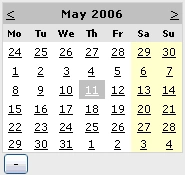
DatePicker in calendar mode
Implementation
The Eclipse Web Solutions DatePicker is implemented as an ASP.NET custom control and compiled with .NET 2.0. You can download the compiled DLL, or the complete source code, from the Eclipse Web Solutions downloads page. The design of the component is shown in the following diagram:
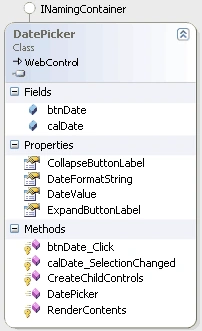
DatePicker class diagram
Usage
To use the Eclipse Web Solutions DatePicker control with Visual Studio 2005 follow these instructions:
- Create your web project
- Add a reference to EclipseWebSolutions.CustomControls.dll. If you wish to debug the controls code use the debug version, else use the release version.
- Right-click the background of the Visual Studio toolbox and click 'Choose Items...'
- Click the browse button and find the EclipseWebSolutions.CustomControls.dll that you previously added a reference to.
- Find the DatePicker in the toolbox and drag it onto a web page.
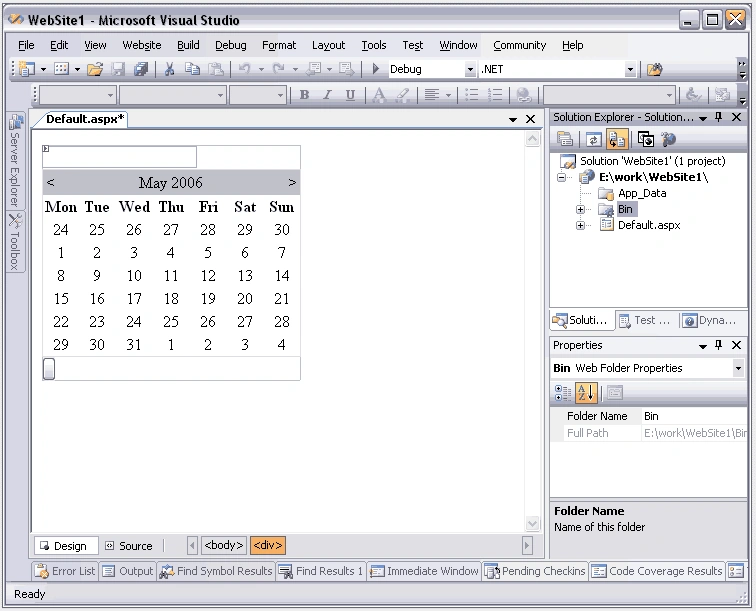
The DatePicker control at design time
- Select the DatePicker and set any properties that you wish to vary. The CollapseButtonLabel and ExpandButtonLabel properties change the button labels from the default '-' and '+'. The DateFormatString property changes the date format string that is used to display the date in the textbox from the default 'dd/MM/yy'.
- If you wish to change any properties of the textbox, calendar or button controls you can do so in the code behing by accessing the controls public properties.
- In you application access the value of the DatePicker through its DateValue property. If the DateValue == DateTime.MinValue then no date has been selected or an invalid date string was typed into the textbox.
- Run your program!
Kapil GuptaPosted Apr 24, 2014, 1:53 AM
how to get days difference from two date which is taken from datepicker control.........
Tonya FoustPosted Feb 9, 2011, 1:09 PM
I haven't pulled down the code yet to look through it, so forgive me if that answers my questions. I am also looking for the ability to highlight days within the calendar that contain data based on the date. For instance, if 09/02/11 (February 9, 2011) had data - I'd want that day on the calendar pop-up to be highlighted. I haven't been able to find anything on how to do that effectively. Anyway, thanks again for this resource.
kartikPosted Mar 9, 2009, 1:29 AM
I cannot retrieve the dates into the control's text box from database table,however the dates selected gets inserted to the table in backend .PLease provide solution for this I tried with all its properties provide ex If Not IsDBNull(row("Week Of")) Then DPlastupdatedweek.DateValue = CType(row("Week Of"), Date) End If
Amy ChowPosted Nov 8, 2008, 10:14 AM
Hi, the datepicker seems cannot work well. 1. I have choosen a date from the calender, for example, 05/11/08 (dd/mm/yy). 2. I clicked the "+" to display the calender, the calender cannot display the date correctly. It displayed it as 11th of May instead of 5th of November. Thanks
geo lamPosted Sep 24, 2008, 9:33 PM
Hi, I am using this control but I cannot find the way to set the dateformat. And there is no DateFormatString property. How can I set the date format??
Ang XuePosted Jun 10, 2007, 5:34 AM
hi, i cant seem to get the control to work! nothing happens to the textbox when i click on the dates.. help..
Liam McLennanPosted Dec 21, 2006, 11:04 PM
I have made significant updates to this control, including built-in validation, AJAX support and displaying the calendar on a higher layer. You can get the improved control at http://www.eclipsewebsolutions.com.au/Default.aspx?tabid=56.
sanjay.gaurPosted Aug 5, 2006, 3:19 AM
dear sir, the control is really very nice and it serves all my purpose except only one.Suppose i put the control in the table then when we press the + button then it disturbs the position of other control that are put in that table.Plz help me. Thanks....
Mahesh ChandPosted May 24, 2006, 1:23 PM
Keep up the good work.