

In today's web application development world, AngularJS is one of the most common and famous JS based frameworks. AngularJS has been very popular from the beginning for any kind of single page application development or any other web application. A few months ago, Google (AngularJS framework maintainers) released the new version of AngularJS i.e. AngularJS 2.0. Developers like us are eagerly awaiting the release of this final version of AngularJS.
Now, in this article and also in the coming sequential articles, I will discuss briefly about AngularJS 2. Before starting development in Angular JS, we first need to understand what is new in AngularJS 2.0 and what are new benefits of it.
What is Angular ?
The most common question before starting AngularJS i.e. what is AngularJS? In common word, AngularJS is
- A MVC Structured Framework
- A Single Page Application Framework
- A Client Side Templating
- A Language where written code can be easily tested by unit testing
Now the above key features of Angularjs contain main concepts of innovations of angularjs. The main idea of angularjs is the separation between html manipulation and javascript logic in the web pages, so that html page and javascript logic can be developed simultaneously. It always give us faster productivity from a developer point of view. Also angularjs provides us a structured javascript framework which can perform unit testing easily.
Why Angular JS 2.0 ?
Now before going to start the development in angular js 2.0, we first need to know why Google developed a new version of angualrjs which is basically entirely different in structural concept or coding concept from its previous versions i.e. angular 1.x. The main reasons are -
- AngularJS 1.x is not so powerful in respect to the mobile application development. The new version of angularjs is totally focused on mobile development. Google takes care of some new things like performance, load time in respect of the mobile development.
- The earlier version of AngularJS is the modular based framework. Whereas in AngularJS 2.0 several modules have been removed resulting in better performance. Actually AngularJS 2.0 is a component based framework. In the current framework, controllers and $scope have been removed. This two main building blocks of earlier versions have been replaced by components and directives.
- Angular2 targets the ECMAScript6 or ES6 and all the new versions of browsers so that applications developed by using this framework can be operated any browser of any device. In the previous versions of the ECMAScript, everything is defined as prototype. But in ES6 version, class can be defined as javascript objects. Also in ES6, we can implement inheritance of class objects just like OOPS.
- Angular 2.0 is basically based on TypeScript which is actually an extension of ECMAScript6.0. Basically Typescript is from Microsoft which means that in the near future AngularJS 2.0 will also be popular to the .NET domain users or developers. Normally Typescript files are compiled in the javascript files.
Different Between Angular 1.x and Angular 2.0
Angular 1.x Angular 2.0 Structured MVC Framework Component Based Framework Separation of HTML and Business Logic in Javascript It contains the same concept with more modular pattern. It support typescript Performance wise it is much faster.
Below is the main key differences between Angular JS 1.x and Angular 2.0.
So in the above discussion, it is clear that for developing angular js 2.0 application or code, we need to write code in the Typescript language. So before going to write down the code, I will discuss about some basic ideas of Type Script. Actually Typescript is a superset of javascript. It means typescript is such a language which contains all the features of javscript including some extra new features which help us write down the code in a very easy way. The main features of Typescript are as below –
- It is a strongly type language
- It supports modules and classes
- It supports Template string
- It supports interfaces
- It supports generics
Some Sample Annotation of TypeScripts
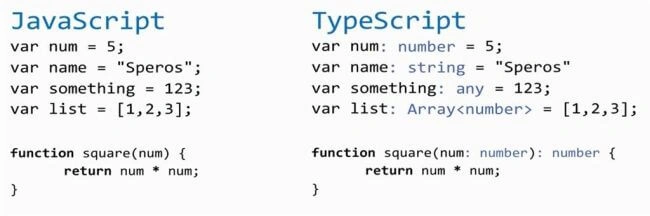
Now, we are going to develop our first program in AngularJs2. For this, we first need to install NodeJS in our computer. The latest version of NodeJS can be downloaded from the this URL.
Now open the Visual Studio 2015 and do the following steps.
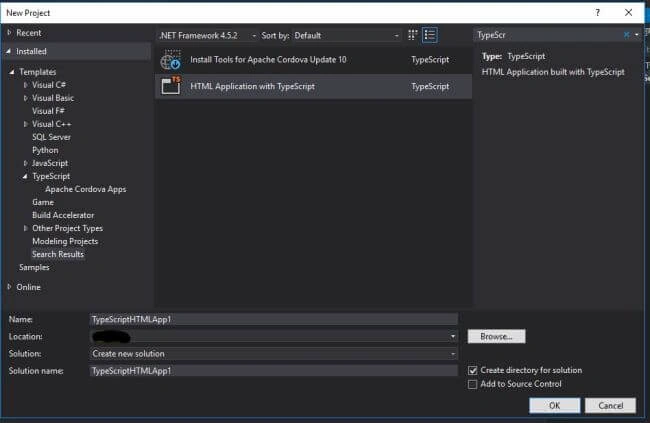
Click on File -> New -> Projects and in the New Project window, Search TypeScript Project as mentioned in the below image.
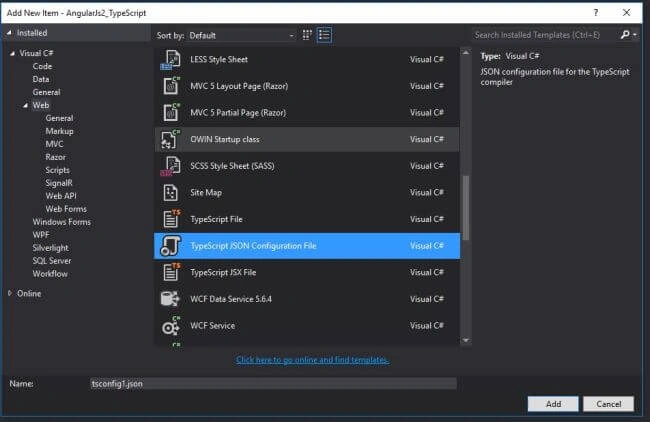
Click on Project -> Add File and Select file Type TypeScript JSON Configuration File and then add the below code within the file -
- {
- "compilerOptions": {
- "target": "es5",
- "module": "commonjs",
- "moduleResolution": "node",
- "sourceMap": true,
- "emitDecoratorMetadata": true,
- "experimentalDecorators": true,
- "removeComments": false,
- "noImplicitAny": false
- }
- }
- {
- "name": "AngularJs2_TypeScript",
- "version": "1.0.0",
- "scripts": {
- "start": "tsc && concurrently \"tsc -w\" \"lite-server\" ",
- "lite": "lite-server",
- "postinstall": "typings install",
- "tsc": "tsc",
- "tsc:w": "tsc -w",
- "typings": "typings"
- },
- "licenses": [
- {
- "type": "MIT",
- "url": "https://github.com/angular/angular.io/blob/master/LICENSE"
- }
- ],
- "dependencies": {
- "@angular/common": "~2.1.0",
- "@angular/compiler": "~2.1.0",
- "@angular/core": "~2.1.0",
- "@angular/forms": "~2.1.0",
- "@angular/http": "~2.1.0",
- "@angular/platform-browser": "~2.1.0",
- "@angular/platform-browser-dynamic": "~2.1.0",
- "@angular/router": "~3.1.0",
- "@angular/upgrade": "~2.1.0",
- "angular-in-memory-web-api": "~0.1.5",
- "bootstrap": "^3.3.7",
- "core-js": "^2.4.1",
- "reflect-metadata": "^0.1.8",
- "rxjs": "5.0.0-beta.12",
- "systemjs": "0.19.39",
- "zone.js": "^0.6.25"
- },
- "devDependencies": {
- "concurrently": "^3.0.0",
- "lite-server": "^2.2.2",
- "typescript": "^2.0.3",
- "typings":"^1.4.0"
- }
- }
- /**
- * System configuration for Angular samples
- * Adjust as necessary for your application needs.
- */
- (function (global) {
- System.config({
- paths: {
- // paths serve as alias
- 'npm:': '../node_modules/'
- },
- // map tells the System loader where to look for things
- map: {
- // our output js is within the src folder mention folder name if all js file located in a particular file
- app: '.',
- // angular bundles
- '@angular/core': 'npm:@angular/core/bundles/core.umd.js',
- '@angular/common': 'npm:@angular/common/bundles/common.umd.js',
- '@angular/compiler': 'npm:@angular/compiler/bundles/compiler.umd.js',
- '@angular/platform-browser': 'npm:@angular/platform-browser/bundles/platform-browser.umd.js',
- '@angular/platform-browser-dynamic': 'npm:@angular/platform-browser-dynamic/bundles/platform-browser-dynamic.umd.js',
- '@angular/http': 'npm:@angular/http/bundles/http.umd.js',
- '@angular/router': 'npm:@angular/router/bundles/router.umd.js',
- '@angular/forms': 'npm:@angular/forms/bundles/forms.umd.js',
- // other libraries
- 'rxjs': 'npm:rxjs',
- 'angular-in-memory-web-api': 'npm:angular-in-memory-web-api',
- },
- // packages tells the System loader how to load when no filename and/or no extension
- packages: {
- app: {
- main: './main.js',
- defaultExtension: 'js'
- },
- rxjs: {
- defaultExtension: 'js'
- },
- 'angular-in-memory-web-api': {
- main: './index.js',
- defaultExtension: 'js'
- }
- }
- });
- })(this);
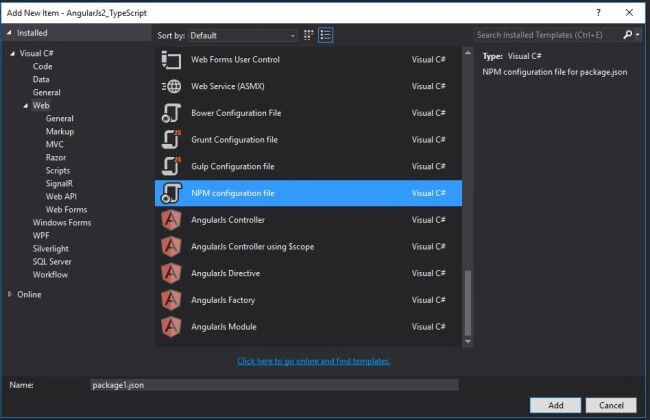
- Now open the package.json file location in command prompt and execute the below command to load the required modules and supported files which are mentioned in the package.json file.
npm start
Now add a TypeScript File named main.ts and the below code.
- import { platformBrowserDynamic } from '@angular/platform-browser-dynamic';
- import { AppModule } from './app.module';
- const platform = platformBrowserDynamic();
- platform.bootstrapModule(AppModule);
- import { NgModule } from '@angular/core';
- import { BrowserModule } from '@angular/platform-browser';
- import { FirstProgComponent } from './src/app.component.firstprog';
- @NgModule({
- imports: [BrowserModule],
- declarations: [FirstProgComponent],
- bootstrap: [FirstProgComponent]
- })
- export class AppModule { }
- import { Component } from '@angular/core';
- @Component({
- selector: 'my-app',
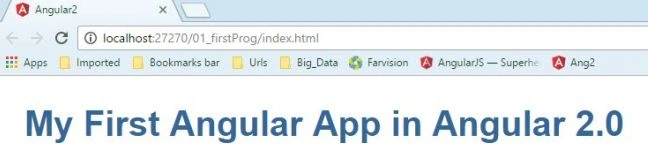
- template: '<h1>My First Angular App in Angular 2.0</h1><br>Debasis Saha'
- })
- export class FirstProgComponent { }
- <!DOCTYPE html>
- <html>
- <head>
- <title>Angular2</title>
- <meta charset="UTF-8">
- <meta name="viewport" content="width=device-width, initial-scale=1">
- <link rel="stylesheet" href="../styles.css">
- <!-- Polyfill(s) for older browsers -->
- <script src="../node_modules/core-js/client/shim.min.js"></script>
- <script src="../node_modules/zone.js/dist/zone.js"></script>
- <script src="../node_modules/reflect-metadata/Reflect.js"></script>
- <script src="../node_modules/systemjs/dist/system.src.js"></script>
- <script src="../systemjs.config.js"></script>
- <script>
- System.import('app').catch(function(err){ console.error(err); });
- </script>
- </head>
- <body>
- <my-app>Loading...</my-app>
-
- </body>
- </html>
Rahul ChoudharyPosted Jun 2, 2018, 1:56 AM
Dada please tell us what are the things that we should write in package.json, tsconfig and systemjs.config.
Subhendu GhoshPosted Sep 22, 2017, 5:46 AM
Very nice and very simple to understand and implement. thanks Debasis.
Saravanan VPosted May 5, 2017, 3:52 PM
Nicely Explained..!
Ravi KandelPosted Mar 8, 2017, 8:40 AM
Awesome Thanks for sharing
Gracie RoselliPosted Feb 9, 2017, 3:01 AM
Angular cli... http://tutorialsdojo.com/angular/environment-setup/angular-cli-installation/
suraj azadPosted Jan 17, 2017, 2:58 PM
Use angular cli to create the starting setup.. refer...https://cli.angular.io/
Thiruppathi RPosted Jan 8, 2017, 1:23 AM
Nice introduction for angularjs 2.0...
nis desPosted Jan 4, 2017, 4:17 PM
I am getting error while building error TS2307: Build:Cannot find module './AngularApp/app.component.firstprog'. Can you please help?.
Mustafa AlkanPosted Dec 21, 2016, 4:10 AM
I cant find module './src/app.component.firstprog'. Can you help me please? src directory couldnt been created. I installed npm and started, node_modules files were created but not app.component.firstprog failed.
Bhavik PatelPosted Dec 16, 2016, 9:35 PM
Easy to understand! nicely explained! great job.
Jasbeer SinghPosted Dec 16, 2016, 3:33 AM
Hi Debasis, Best one to start with for angular js.
Pramod ThakurPosted Dec 9, 2016, 12:44 AM
Nice article.. Thanks for sharing..
Debendra DashPosted Dec 4, 2016, 1:41 PM
Great article sir.....................
vaibhav jainPosted Dec 4, 2016, 12:38 PM
My [email protected]
vaibhav jainPosted Dec 4, 2016, 12:37 PM
Nice post sir, How can i get update for your all upcoming post....
RakeshPosted Dec 3, 2016, 12:55 PM
Good Article Share. ..........................
Satish Kumar VadlavalliPosted Nov 28, 2016, 4:56 AM
Add all your blog links in this, if you can
Satish Kumar VadlavalliPosted Nov 28, 2016, 4:55 AM
Nice share, I checked most of your blogs on Angular,
Asma KhalidPosted Nov 25, 2016, 5:52 AM
Nice article, thanks for sharing.
Satyaki ChakrabortyPosted Nov 25, 2016, 4:01 AM
Thanks Debasis da , now my concept has cleared.
Ahmed KhateebPosted Nov 24, 2016, 12:00 AM
Seems neat! TypeScript catching all my attention!