

A calendar is an important part of improving user visibility for the announced holidays or for meeting schedule display. Displaying the calendar on a full page makes the user visibility more interactive.
Today, I shall be demonstrating Full Calendar jQuery Plugin integration with ASP.NET MVC5. Full Calendar jQuery Plugin is simple to use and provides a variety of options for customization for a better user interactivity.
Prerequisites
Following are some prerequisites before you proceed further in this tutorial,
- Knowledge of ASP.NET MVC5.
- Knowledge of jQuery
- Knowledge of HTML.
- Knowledge of JavaScript.
- Knowledge of AJAX.
- Knowledge of CSS.
- Knowledge of Bootstrap.
- Knowledge of C# programming.
- Knowledge of C# LINQ.
You can download the complete source code of this tutorial or follow the step by step discussion below. The sample code is developed in Microsoft Visual Studio 2015 Enterprise. I am using 2017 public holidays for Pakistan as announced by the Pakistan Government.
Let's begin now.Step 1
Create a new MVC5 web application project and name it as "MVC5FullCalandarPlugin".
Step 2
Open "Views\Shared\_Layout.cshtml" file and replace the code with the following.
- <!DOCTYPE html>
- <html>
- <head>
- <meta charset="utf-8" />
- <meta name="viewport" content="width=device-width, initial-scale=1.0">
- <title>@ViewBag.Title</title>
- @Styles.Render("~/Content/css")
- @Scripts.Render("~/bundles/modernizr")
- <!-- Font Awesome -->
- <link rel="stylesheet" href="https://maxcdn.bootstrapcdn.com/font-awesome/4.4.0/css/font-awesome.min.css" />
- <!-- qTip -->
- <link rel="stylesheet" href="//cdnjs.cloudflare.com/ajax/libs/qtip2/3.0.3/jquery.qtip.min.css" />
- <!-- Full Calendar -->
- <link rel="stylesheet" href="//cdnjs.cloudflare.com/ajax/libs/fullcalendar/2.9.1/fullcalendar.min.css" />
- <link rel="stylesheet" href="//cdnjs.cloudflare.com/ajax/libs/fullcalendar/2.9.1/fullcalendar.print.css" media="print" />
- @* Custom *@
- @Styles.Render("~/Content/css/custom-style")
- </head>
- <body>
- <div class="navbar navbar-inverse navbar-fixed-top">
- <div class="container">
- <div class="navbar-header">
- <button type="button" class="navbar-toggle" data-toggle="collapse" data-target=".navbar-collapse">
- <span class="icon-bar"></span>
- <span class="icon-bar"></span>
- <span class="icon-bar"></span>
- </button>
- </div>
- </div>
- </div>
- <div class="container body-content">
- @RenderBody()
- <hr />
- <footer>
- <center>
- <p><strong>Copyright © @DateTime.Now.Year - <a href="http://www.asmak9.com/">Asma's Blog</a>.</strong> All rights reserved.</p>
- </center>
- </footer>
- </div>
- @Scripts.Render("~/bundles/jquery")
- @Scripts.Render("~/bundles/bootstrap")
- <!-- Include moment-->
- <script type="text/javascript" src="//cdn.jsdelivr.net/momentjs/latest/moment.min.js"></script>
- <!-- qTip -->
- <script type="text/javascript" src="//cdnjs.cloudflare.com/ajax/libs/qtip2/3.0.3/jquery.qtip.min.js"></script>
- <!-- Full Calendar -->
- <script type="text/javascript" src="//cdnjs.cloudflare.com/ajax/libs/fullcalendar/2.9.1/fullcalendar.min.js"></script>
- @Scripts.Render("~/bundles/Script-calendar")
- @RenderSection("scripts", required: false)
- </body>
- </html>
In the above code, I have simply created a basic layout structure of this web project and I have also added a reference to the Full Calendar jQuery Plugin.
Step 3
Create a new "Models\HomeViewModels.cs" file and replace the code with the following.
- using System.Collections.Generic;
- using System.ComponentModel.DataAnnotations;
- namespace MVC5FullCalandarPlugin.Models
- {
- public class PublicHoliday
- {
- public int Sr { get; set; }
- public string Title { get; set; }
- public string Desc { get; set; }
- public string Start_Date { get; set; }
- public string End_Date { get; set; }
- }
- }
In the above code, I have simply created our View Model which will map the data from a text file into main memory as object.
Step 4
Now, create "Controllers\HomeController.cs" file and replace the code with the following.
- using MVC5FullCalandarPlugin.Models;
- using System;
- using System.Collections.Generic;
- using System.IO;
- using System.Linq;
- using System.Reflection;
- using System.Web;
- using System.Web.Mvc;
- namespace MVC5FullCalandarPlugin.Controllers
- {
- public class HomeController : Controller
- {
- #region Index method
- /// <summary>
- /// GET: Home/Index method.
- /// </summary>
- /// <returns>Returns - index view page</returns>
- public ActionResult Index()
- {
- // Info.
- return this.View();
- }
- #endregion
- #region Get Calendar data method.
- /// <summary>
- /// GET: /Home/GetCalendarData
- /// </summary>
- /// <returns>Return data</returns>
- public ActionResult GetCalendarData()
- {
- // Initialization.
- JsonResult result = new JsonResult();
- try
- {
- // Loading.
- List<PublicHoliday> data = this.LoadData();
- // Processing.
- result = this.Json(data, JsonRequestBehavior.AllowGet);
- }
- catch (Exception ex)
- {
- // Info
- Console.Write(ex);
- }
- // Return info.
- return result;
- }
- #endregion
- #region Helpers
- #region Load Data
- /// <summary>
- /// Load data method.
- /// </summary>
- /// <returns>Returns - Data</returns>
- private List<PublicHoliday> LoadData()
- {
- // Initialization.
- List<PublicHoliday> lst = new List<PublicHoliday>();
- try
- {
- // Initialization.
- string line = string.Empty;
- string srcFilePath = "Content/files/PublicHoliday.txt";
- var rootPath = Path.GetDirectoryName(Assembly.GetExecutingAssembly().CodeBase);
- var fullPath = Path.Combine(rootPath, srcFilePath);
- string filePath = new Uri(fullPath).LocalPath;
- StreamReader sr = new StreamReader(new FileStream(filePath, FileMode.Open, FileAccess.Read));
- // Read file.
- while ((line = sr.ReadLine()) != null)
- {
- // Initialization.
- PublicHoliday infoObj = new PublicHoliday();
- string[] info = line.Split(',');
- // Setting.
- infoObj.Sr = Convert.ToInt32(info[0].ToString());
- infoObj.Title = info[1].ToString();
- infoObj.Desc = info[2].ToString();
- infoObj.Start_Date = info[3].ToString();
- infoObj.End_Date = info[4].ToString();
- // Adding.
- lst.Add(infoObj);
- }
- // Closing.
- sr.Dispose();
- sr.Close();
- }
- catch (Exception ex)
- {
- // info.
- Console.Write(ex);
- }
- // info.
- return lst;
- }
- #endregion
- #endregion
- }
- }
In the above code, I have created a simple index() action method along with a helper method LoadData() for data loading from a text file and finally, the GetCalendarData() action method which will be called by Full Calendar jQuery Plugin via AJAX call method in order to map the data on the calendar.
Step 5
Create a new "Scripts\script-custom-calendar.js" script file and place the following code in it.
- $(document).ready(function ()
- {
- $('#calendar').fullCalendar({
- header:
- {
- left: 'prev,next today',
- center: 'title',
- right: 'month,agendaWeek,agendaDay'
- },
- buttonText: {
- today: 'today',
- month: 'month',
- week: 'week',
- day: 'day'
- },
- events: function (start, end, timezone, callback)
- {
- $.ajax({
- url: '/Home/GetCalendarData',
- type: "GET",
- dataType: "JSON",
- success: function (result)
- {
- var events = [];
- $.each(result, function (i, data)
- {
- events.push(
- {
- title: data.Title,
- description: data.Desc,
- start: moment(data.Start_Date).format('YYYY-MM-DD'),
- end: moment(data.End_Date).format('YYYY-MM-DD'),
- backgroundColor: "#9501fc",
- borderColor: "#fc0101"
- });
- });
- callback(events);
- }
- });
- },
- eventRender: function (event, element)
- {
- element.qtip(
- {
- content: event.description
- });
- },
- editable: false
- });
- });
Let's break down the code chunk by chunk. Inside the fullCalendar(...) method, firstly, the header properties are being set, i.e., where will the calendar top buttons be aligned. Also, the alignment of the calendar title is being set along with the button text of the calendar header.
- header:
- {
- left: 'prev,next today',
- center: 'title',
- right: 'month,agendaWeek,agendaDay'
- },
- buttonText: {
- today: 'today',
- month: 'month',
- week: 'week',
- day: 'day'
- },
Then, I call the GetCalendarData() server-side method via AJAX call and after successfully receiving the data, I simply set the default calendar options. I set an extra property "description", which I will be using as the tooltip on the calendar when someone hovers the mouse over the displayed event. i.e.
- events: function (start, end, timezone, callback)
- {
- $.ajax({
- url: '/Home/GetCalendarData',
- type: "GET",
- dataType: "JSON",
- success: function (result)
- {
- var events = [];
- $.each(result, function (i, data)
- {
- events.push(
- {
- title: data.Title,
- description: data.Desc,
- start: moment(data.Start_Date).format('YYYY-MM-DD'),
- end: moment(data.End_Date).format('YYYY-MM-DD'),
- backgroundColor: "#9501fc",
- borderColor: "#fc0101"
- });
- });
- callback(events);
- }
- });
- },
Now, to render my tooltip description per calendar holiday event, I will be adding eventRender(...) property and inside that property, I will be calling qTip jQuery plugin in order to assign the tooltip description to each calendar holiday event.
- eventRender: function (event, element)
- {
- element.qtip(
- {
- content: event.description
- });
- },
Step 6
Create "Views\Home\_CalendarPartial.cshtml" & "Views\Home\Index.cshtml" files and place following code snippets respectively in those files.
Views\Home\_CalendarPartial.cshtml
- <div class="row">
- <div class="col-xs-9 col-xs-push-2">
- <div class="box box-primary">
- <div class="box-body no-padding">
- <!-- THE CALENDAR -->
- <div id="calendar"></div>
- </div><!-- /.box-body -->
- </div><!-- /. box -->
- </div><!-- /.col -->
- </div>
View\Home\Index.cshtml
- @{
- ViewBag.Title = "ASP.NET MVC5 - Full Calendar JQuery Plugin";
- }
- <div class="row">
- <div class="panel-heading">
- <div class="col-md-8 custom-heading3">
- <h3>
- <i class="fa fa-calendar"></i>
- <span>ASP.NET MVC5 - Full Calendar JQuery Plugin</span>
- </h3>
- </div>
- </div>
- </div>
- <div class="row">
- <section class="col-md-12 col-md-push-0">
- @Html.Partial("_CalendarPartial")
- </section>
- </div>
In the above code, I have simply created the View code for the page which will display the calendar. I have divided the page into two parts for better manageability.
Step 7
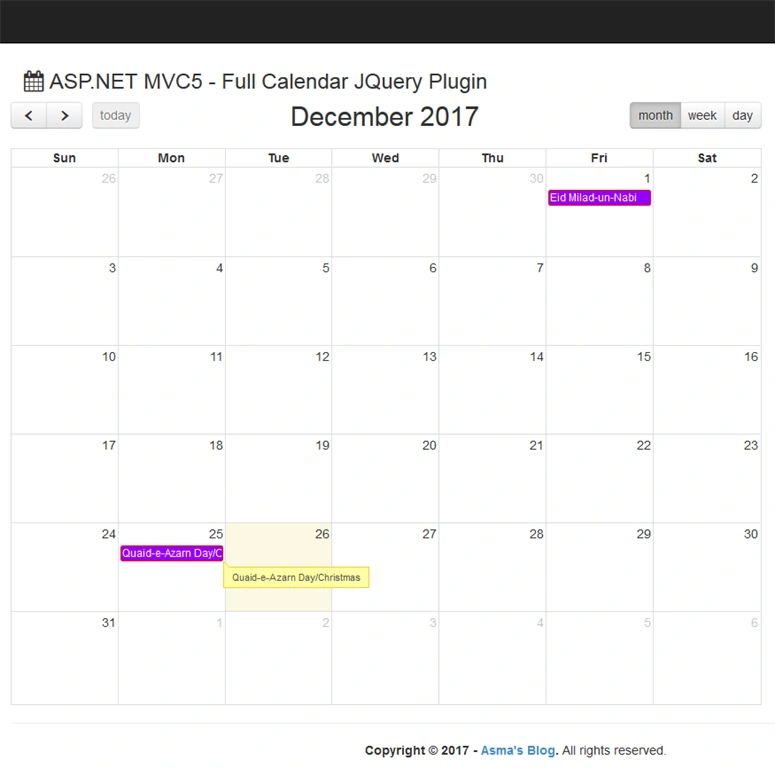
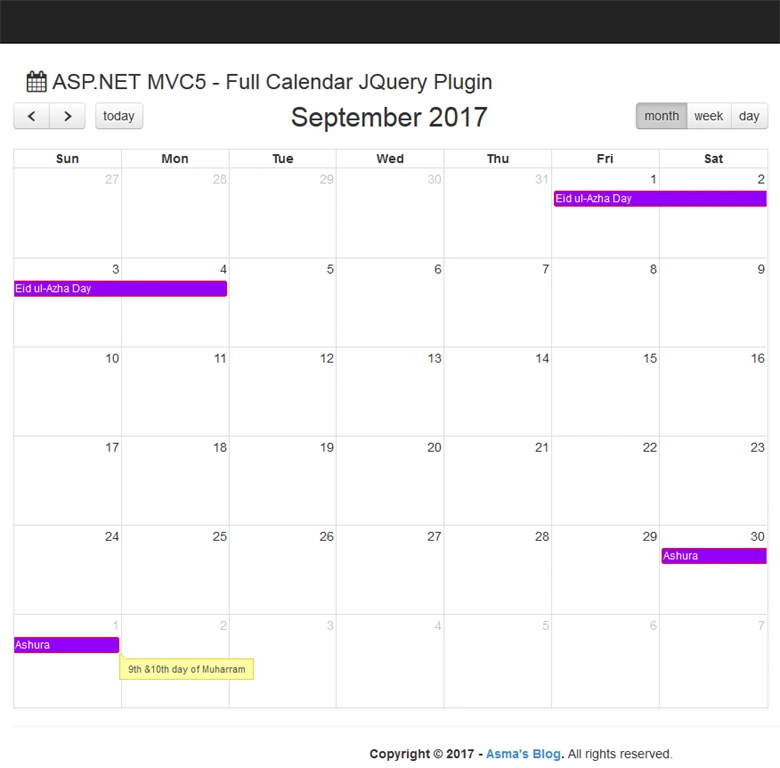
Execute the project and you will be able to see the following output.
Conclusion
In this article, you learned how to use Full Calendar jQuery Plugin basic settings and integrated the plugin into ASP.NET MVC 5 project. We learned how to pass the data to the front view through AJAX call and represent your data on a full page calendar.
Cami Samper MezaPosted Sep 16, 2021, 9:50 PM
Hi, i dont know if i did something wrong but the calendar just shows the holidays, but i cand add some new event.. am i right? where can i find an article for that..??
Mauro CandidoPosted Jul 31, 2021, 2:03 PM
Singh, is not working !
Alexandre DelgadoPosted Jul 27, 2021, 8:53 AM
Hello, thank you for that solution. I was wondering if is it possible to change the edit event form for a customized version with more input fields.
Stu DoveyPosted Oct 1, 2020, 7:25 AM
Hi, great article I am getting the follow error: Uncaught TypeError: Cannot read property 'event' of undefined: https://jsfiddle.net/studovey/jvrwfzea/20/
Dastagir BhuraPosted Aug 24, 2020, 8:00 AM
I need appointment calendar in asp.net core with sql databse and with total number of appointment each day. Can please help for that.
sarath ChandraPosted Jun 29, 2020, 8:28 AM
I want to display start time in week view and day view is it possible, can you help?
Riski LinardiPosted Jun 6, 2020, 10:04 AM
Thank you for making this!! Super useful. Will you be posting the one with CRUD soon?
rahimPosted May 30, 2020, 5:20 AM
Nice article.....
Tejashri JadhavPosted Apr 30, 2020, 12:23 AM
Please provide the crud operation on calendar events in mvc with latest calendar version i.e. 4.0.0
ansh randhawaPosted Feb 25, 2020, 12:21 AM
Hello, can you tell me which function displays the monthly calendar after hitting left and right arrow button. i am trying to get data from different monthly tables
Asma KhalidPosted Feb 20, 2020, 5:39 AM
You need to configure the plugin otherwise use div hiding to hide the next/previous buttons
sarath ChandraPosted Feb 20, 2020, 1:10 AM
Is it possible to kept Month Names with buttons instead of previous and Next buttons?
Suraj WellalaPosted Sep 28, 2019, 11:55 PM
Its perfectly working with the text file. But there is a problem when loading from database. After adding a new holiday it does not show in the calendar until a manual browser refresh. Please advice. Thanks.
Usman JalilPosted Aug 8, 2019, 8:30 AM
Do you have same example in Web Forms
khaled husseinPosted Apr 25, 2019, 6:20 PM
I wanna read from FullCalender the all events and then save them in database , i used some thing like that ($('.calendar').fullCalendar().event()) and not working ,can you help ?
Anslemo PelcastrePosted Feb 6, 2019, 4:34 PM
Hi, this example is similar in net Core?.
Claudio Ramos de SouzaPosted Sep 26, 2018, 1:01 PM
Hi, I did all steps, but in the end, the page was blank (index). Could you help me, please?
Rajesh KumarPosted Aug 6, 2018, 6:51 AM
Nice article......................
Farhan AhmedPosted Jul 24, 2018, 5:00 AM
Like it............
pepePosted Apr 13, 2018, 3:31 PM
Excellent contribution !!!!
Atiq Ur Rehman BhuttaPosted Jan 8, 2018, 12:45 PM
Good work :) keep it up, Thanks for sharing
Yogesh VedpathakPosted Dec 27, 2017, 11:21 PM
Awesome article ...