

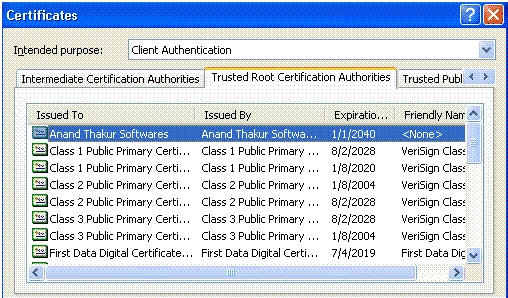
With upcoming usage of Internet, distributing the software over the Internet is very common now. Assemblies/Components are deployed across wide network. If you the software company and want to distribute code through Internet, you can build an assembly and sign that assembly with digital certificate. Digital certificate provide the information about software publisher, consumer of the software can verify the identity of the software publisher. Security administrator can grant the permission to particular publisher in order to the run assemblies signed by that publisher.
In the commercial environment, we would obtain a certificate form a company such as varisign. The benefit of purchasing a certificate from the supplier rather than creating your own is that they provide high level of trust in authentication. For the testing purpose .Net provides you command line utilities to create and test digital certificates. This gives the picture how we can use digital certificates with .net application
Create Certificate - MakeCert.exe
MakeCert generates X.509 certificates for testing purposes only. It creates a public and private key pair for digital signatures and stores it in a certificate file. This tool also associates the key pair with a specified publisher's name and creates an X.509 certificate that binds a user-specified name to the public part of the key pair.
Open Visual Studio command prompt and type following command as shown in following figure
This command creates a test certificate and writes it to AnandThakur.cer.
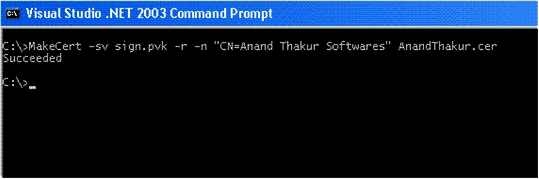
- -sv - Specifies the subject's .pvk private key file. The file is created if none exists.
- -r - Creates a self-signed certificate.
- -n - Specifies the subject's certificate name. This name must conform to the X.500 standard.
Create Software Publisher Certificate - Cert2spc.exe
The Software Publisher Certificate Test tool creates a Software Publisher's Certificate (SPC) from X.509 certificates. Cert2spc.exe is for test purposes only.
To Create Software Publisher Certificate, type following command in Visual Studio command prompt and as shown in following figure
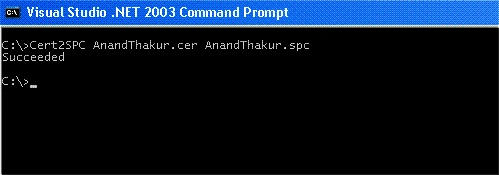
Signing code with software publisher certificate - SignCode.exe
The File Signing tool signs a portable executable (PE) file (.dll or .exe file) with an Authenticode digital signature. You can sign either an assembly or an individual file contained in a multi file assembly. If you are distributing an assembly, you should sign the assembly rather than the individual files
To run the File Signing tool, type SignCode.exe in VS command prompt. It will launch a wizard.
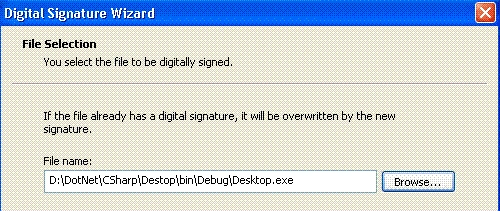
Enter the name of the .exe/.dll file you want to sign with certificates and click on next. In next screen select custom and press next. In signature certificate screen, click on "Select from file" and select .spc file(in this case AnandThakur.spc) you have created using Cert2spc.exe.
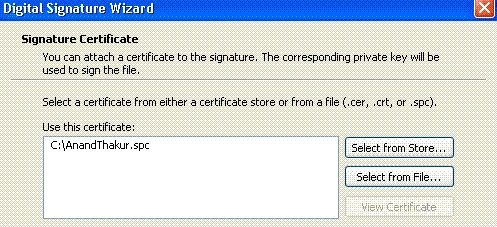
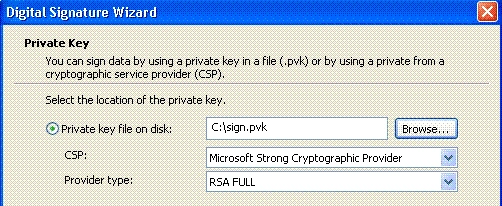
In private key screen, select "private key on disk" and enter the path to private key created earlier using MakeCert.exe (in this sign.pvk), In next screen choose Sha1 and click next.

Vithal WadjePosted Jan 1, 2013, 3:43 AM
gud
Sachin BhardwajPosted Oct 3, 2012, 11:58 AM
thank you very nice article what is X.509 certificates?
Matteo SlavieroPosted Sep 19, 2009, 5:10 AM
To keep things simple you can generate an X509 authenticode certificate using X509Builder Web Application at http://www.we-coffee.com/x509builder.aspx
Price BrattinPosted Aug 20, 2007, 2:28 PM
Great article! You filled in the information that VS2005 documentation neglected to include.
Price BrattinPosted Aug 20, 2007, 2:28 PM
Great article! You filled in the information that VS2005 documentation neglected to include.
Vijayalakshmi M SPosted May 18, 2007, 5:35 AM
How to get the digitally signed document from asp.net 2.o and SQL server 2000 through the crystal report genearted pdf format