

For everyone of us who wakes and codes everyday somewhere in this world, we often find ourselves pretty attached to the programming language we love most. All of us feel that point of idiosyncrasy when we try to break our boundaries and try to learn something new since this field is always expanding and evolving like a universe on steroids.
For those who still are newbies and are trying to find ways to understand how a programming language works, what could be better than trying to make one of your own? :) This post is essentially a small proof of concept where we will go for a small nice fun looking esoteric programming language.
Before we jump into the very tidbits inside, allow me to explain what we will do here. We will write a small programming language that is parsed and lexed by ANTLR, transpiles to C#, and the transpiled code is fed into Roslyn C# Script API.
If the aforementioned words are looking too wordy for you, let me clear it right up for you. Like every language we use to talk every day, programming language comes with a grammar itself. It should be clear as a daylight to you if you have written a single line of code in your life. Every programming language follows a pretty defined structure and a dancing parade of words following that. So, since we are creating one, the first thing we need is that grammar for our language. Instead of doing it from scratch, our tool of choice is ANTLR, which stands for “Another Tool for Language Recognition”. ANTLR will help us to define the grammar, generate the lexer and parser for it and we will eventually be able to reuse those components to transpile our code to C#. Remember ANTLR do support for javascript, java, python too. So, if you want to have your lexer and parser defined in those languages, please don’t refrain yourself from using this.
- derp a = 20 :) # Initialization
- # basic if-else
- a > 2 ???
- yep ->
- a = 5 :)
- kbye
- dump a :)
derp to initialize a variable.
- grammar Profane;
- compilationUnit: statement* EOF;
- statement:
- printstmt
- | assignstmt
- | ifstmt
- | setstmt;
- printstmt : 'dump' expr? SMILEY;
- assignstmt : 'derp' ID ASSIGN expr SMILEY;
- setstmt : ID ASSIGN expr SMILEY;
- ifstmt :
- conditionExpr '???'
- 'yep ->'
- statement*
- 'kbye';
- conditionExpr: expr relop expr;
- expr: term | opExpression;
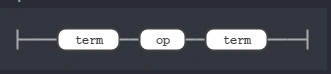
- opExpression: term op term;
- op: PLUS | ASSIGN | MINUS;
- relop: EQUAL | NOTEQUAL | GT | LT | GTEQ | LTEQ;
- term: ID | number | STRING;
- number: NUMBER;
- // Keywords
- ID: [a-zA-Z_] [a-zA-Z0-9_]*;
- SMILEY: ':)';
- WS: [ \n\t\r]+ -> skip;
- PLUS :'+';
- EQUAL : '====';
- ASSIGN : '=';
- NOTEQUAL: '!!==';
- MINUS : '-';
- GT : '>';
- LT : '<';
- GTEQ : '>=';
- LTEQ : '>=';
- fragment INT: [0-9]+;
- NUMBER: INT ('.'(INT)?)?;
- STRING: '"' (~('\n' | '"'))* '"';
- java -jar antlr-4.7-complete.jar -Dlanguage=CSharp Profane.g4
- derp some = 10 :)
- dynamic some = 10;
- public override void EnterAssignstmt([NotNull] ProfaneParser.AssignstmtContext context)
- {
- string target = context.ID().GetText();
- dynamic value = this.ResolveExpression(context.expr());
- this.Output += "dynamic " + target + " = " + value + ";\n";
- }
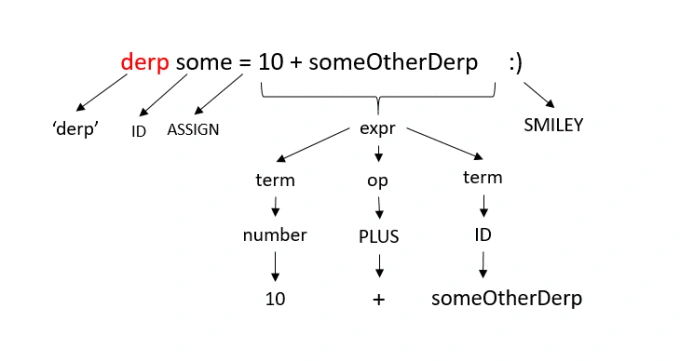
Here expr is another rule. Which looks like,
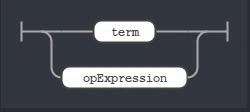
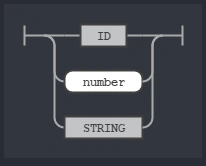
That means that term can also be a valid value for rule expr. Since expr is either term or opExpression. The opExpression on the other hand is a tad complex one. This is an example where you can reuse multiple rules to create a complex rule.
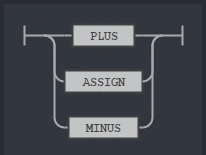
The op rule defines an OR relationship between PLUS, MINUS and ASSIGN which stands respectively for '+', '-' and '='. That means this rule says we can write things like,
- derp some = 10 + 2 + someOtherDerp :)
- private dynamic ResolveExpression(ProfaneParser.ExprContext exprContext)
- {
- var opExpression = exprContext.opExpression();
- if (opExpression != null)
- {
- return ResolveOpExpression(opExpression);
- }
- else
- {
- return ResolveTerm(exprContext.term());
- }
- }
- private dynamic ResolveOpExpression(ProfaneParser.OpExpressionContext plusContext)
- {
- var leftTerm = plusContext.term().First();
- var rightTerm = plusContext.term().Last();
- var left = ResolveTerm(leftTerm);
- var right = ResolveTerm(rightTerm);
- return left + plusContext.op().GetText() + right;
- }
- private dynamic ResolveTerm(ProfaneParser.TermContext termContext)
- {
- if (termContext.number() != null)
- {
- return termContext.number().GetText();
- }
- else if (termContext.ID() != null)
- {
- return termContext.ID().GetText();
- }
- else if (termContext.STRING() != null)
- {
- Regex regex = new Regex("/\\$\\{([^\\}]+)\\}/g");
- var contextText = termContext.GetText();
- var replacedString = regex.Replace(contextText, "$1");
- return replacedString;
- }
- else return default(dynamic);
- }
Executing C# as a script using Roslyn
Now that we have our C# code to be executed, we will use another tool called Roslyn. It is a compiler tool for .net that gives you rich set of features regarding code analysis and compilation. We will specifically be using the C# scripting api.
- public class ProfaneTranspiler
- {
- private ProfaneListener listener;
- private static readonly MetadataReference[] References =
- {
- MetadataReference.CreateFromFile(typeof(object).GetTypeInfo().Assembly.Location),
- MetadataReference.CreateFromFile(typeof(RuntimeBinderException).GetTypeInfo().Assembly.Location),
- MetadataReference.CreateFromFile(typeof(System.Runtime.CompilerServices.DynamicAttribute).GetTypeInfo().Assembly.Location),
- MetadataReference.CreateFromFile(typeof(ExpressionType).GetTypeInfo().Assembly.Location),
- MetadataReference.CreateFromFile(Assembly.Load(new AssemblyName("mscorlib")).Location),
- MetadataReference.CreateFromFile(Assembly.Load(new AssemblyName("System.Runtime")).Location)
- };
- public ProfaneTranspiler()
- {
- this.listener = new ProfaneListener();
- }
- public ProfaneParser.CompilationUnitContext GenerateAST(string input)
- {
- var inputStream = new AntlrInputStream(input);
- var lexer = new ProfaneLexer(inputStream);
- var tokens = new CommonTokenStream(lexer);
- var parser = new ProfaneParser(tokens);
- parser.ErrorHandler = new BailErrorStrategy();
- return parser.compilationUnit();
- }
- public string GenerateTranspiledCode(string inputText)
- {
- var astree = this.GenerateAST(inputText);
- ParseTreeWalker.Default.Walk(listener, astree);
- return listener.Output;
- }
- public async Task<TranspileResult> RunAsync(string code)
- {
- var result = new TranspileResult();
- if (string.IsNullOrEmpty(code))
- return result;
- Stopwatch watch = new Stopwatch();
- watch.Start();
- try
- {
- ScriptOptions scriptOptions = ScriptOptions.Default;
- scriptOptions = scriptOptions.AddReferences(References);
- scriptOptions = scriptOptions.AddImports("System");
- var resultCode = this.GenerateTranspiledCode(code);
- if (resultCode == null)
- {
- watch.Stop();
- result.TimeElapsed = watch.Elapsed.ToString();
- return result;
- }
- var outputStrBuilder = new StringBuilder();
- using (var writer = new StringWriter(outputStrBuilder))
- {
- Console.SetOut(writer);
- var scriptState = await CSharpScript.RunAsync(resultCode, scriptOptions);
- result.output = outputStrBuilder.ToString();
- }
- }
- catch (Exception ex)
- {
- result.output = ex.Message;
- }
- finally
- {
- watch.Stop();
- result.TimeElapsed = watch.Elapsed.ToString();
- }
- return result;
- }
- }
I uploaded the full sample code in github here.The source code is also attached here with this article. You need to build and run the Profane project which is a console app. It will host a small web api in port 5000. If you POST your code to the endpoint as plain text in the POST body, you will get back the output of your code. Postman can be a nice client to do so.
Hope this was fun. Knowing the internals of your daily programming language essentially boosts up the confidence while you write it. So make your own esoteric language if you have time. It's always fun to make them.
Join the conversation! Your thoughts help the community grow.