

In this article we are going to see how to create a custom deferred grid in MVC using Web API and AngularJS. We will be creating a custom UI for the grid, and using web API and AngularJS $http services we will fetch the data from the database. Normally we use ADO.NET Entity data model as the model class when we work with a Web API, right?
You can always download the source code here:
Background
We have so many plugins available to show the data in a grid format, don't we? if you want to know few of them, you can find them here. Now what if you need to show the data in a grid format without using any additional plugins? What if you need to load the data to that grid dynamically, that is whenever user scrolls the grid? If you could not find the answer for these questions, here in this post I am going to share an option. I hope you will enjoy reading.
Create a MVC application
Click File, New, Project and then select MVC application. Before going to start the coding part, make sure that AngularJS is installed. You can see all the items mentioned above from NuGet. Right click on your project name and select Manage NuGet packages.
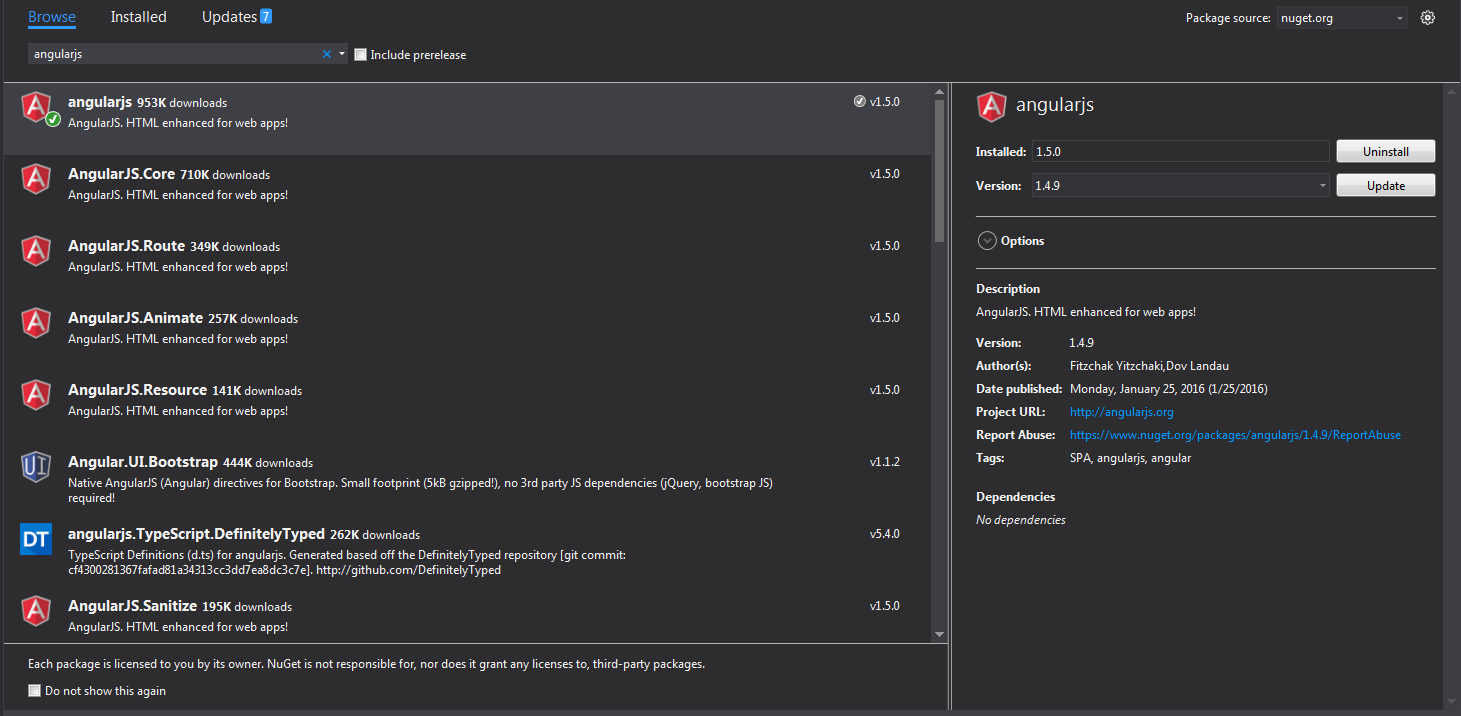
AngularJS NuGet Package Visual Studio
Once you have installed, please make sure that all the items are loaded in your scripts folder.
Using the code
I hope everything is set now, then it is time to start our coding. First we will create a controller action and a view. Below is the code snippet of our controller.
- using System;
- using System.Collections.Generic;
- using System.Linq;
- using System.Web;
- using System.Web.Mvc;
- namespace Custom_Deffered_Grid_Using_MVC_Web_API_And_Angular_JS.Controllers
- {
- public class DefaultController: Controller
- {
- // GET: Default
- public ActionResult Index()
- {
- return View();
- }
- }
- }
- @{
- ViewBag.Title = "Index";
- }
- <h2>Index</h2>
- <link href="~/Content/angular-material.css" rel="stylesheet" />
- <script src="~/scripts/angular.min.js"></script>
- <script src="~/scripts/angular-route.min.js"></script>
- <script src="~/scripts/angular-aria.min.js"></script>
- <script src="~/scripts/angular-animate.min.js"></script>
- <script src="~/scripts/angular-messages.min.js"></script>
- <script src="~/scripts/angular-material.js"></script>
- <script src="~/scripts/svg-assets-cache.js"></script>
- <script src="~/scripts/Default/Default.js"></script>
Below is my Web API controller.
- using System;
- using System.Collections.Generic;
- using System.Linq;
- using System.Net;
- using System.Net.Http;
- using System.Web.Http;
- using Custom_Deffered_Grid_Using_MVC_Web_API_And_Angular_JS.Models;
- namespace Custom_Deffered_Grid_Using_MVC_Web_API_And_Angular_JS.Controllers
- {
- public class DataAPIController : ApiController
- {
- DataModel dm = new DataModel();
- public string getData(int id)
- {
- var d = dm.fetchData(id);
- return d;
- }
- }
- }
- DataModel dm = new DataModel();
- using System;
- using System.Collections.Generic;
- using System.Linq;
- using System.Web;
- using System.Data;
- using System.Data.Sql;
- using System.Data.SqlClient;
- using System.Configuration;
- namespace Custom_Deffered_Grid_Using_MVC_Web_API_And_Angular_JS.Models
- {
- public class DataModel
- {
- public string fetchData(int pageOffset)
- {
- string connection = ConfigurationManager.ConnectionStrings["TrialsDBEntities"].ConnectionString;
- using (SqlConnection cn = new SqlConnection(connection))
- {
- SqlCommand cmd = new SqlCommand("usp_Get_SalesOrderDetailPage", cn);
- cmd.Parameters.Add("@pageoffset", SqlDbType.Int).Value = pageOffset;
- cmd.CommandType = CommandType.StoredProcedure;
- try
- {
- DataTable dt = new DataTable();
- SqlDataAdapter da = new SqlDataAdapter(cmd);
- cn.Open();
- da.Fill(dt);
- return GetJson(dt);
- }
- catch (Exception)
- {
- throw;
- }
- }
- }
- }
- }
- using System.Data;
- using System.Data.Sql;
- using System.Data.SqlClient;
- using System.Configuration;
Another thing to be notified here is we are passing that DataTable to a function called GetJson. So you must have the definition for that too.
- public string GetJson(DataTable dt)
- {
- try
- {
- if (dt == null)
- {
- throw new ArgumentNullException("dt");
- }
- System.Web.Script.Serialization.JavaScriptSerializer serializer = new System.Web.Script.Serialization.JavaScriptSerializer();
- List<Dictionary<string, object>> rows = new List<Dictionary<string, object>>();
- Dictionary<string, object> row = null;
- foreach (DataRow dr in dt.Rows)
- {
- row = new Dictionary<string, object>();
- foreach (DataColumn col in dt.Columns)
- {
- row.Add(col.ColumnName.Trim(), dr[col]);
- }
- rows.Add(row);
- }
- return serializer.Serialize(rows);
- }
- catch (Exception)
- {
- throw;
- }
- }
Create a database
The following query can be used to create a database in your SQL Server.
- USE [master]
- GO
- /****** Object: Database [TrialsDB] Script Date: 25-Feb-16 12:34:32 PM ******/
- CREATE DATABASE [TrialsDB]
- CONTAINMENT = NONE
- ON PRIMARY
- ( NAME = N'TrialsDB', FILENAME = N'C:\Program Files\Microsoft SQL Server\MSSQL11.MSSQLSERVER\MSSQL\DATA\TrialsDB.mdf' , SIZE = 3072KB , MAXSIZE = UNLIMITED, FILEGROWTH = 1024KB )
- LOG ON
- ( NAME = N'TrialsDB_log', FILENAME = N'C:\Program Files\Microsoft SQL Server\MSSQL11.MSSQLSERVER\MSSQL\DATA\TrialsDB_log.ldf' , SIZE = 1024KB , MAXSIZE = 2048GB , FILEGROWTH = 10%)
- GO
- ALTER DATABASE [TrialsDB] SET COMPATIBILITY_LEVEL = 110
- GO
- IF (1 = FULLTEXTSERVICEPROPERTY('IsFullTextInstalled'))
- begin
- EXEC [TrialsDB].[dbo].[sp_fulltext_database] @action = 'enable'
- end
- GO
- ALTER DATABASE [TrialsDB] SET ANSI_NULL_DEFAULT OFF
- GO
- ALTER DATABASE [TrialsDB] SET ANSI_NULLS OFF
- GO
- ALTER DATABASE [TrialsDB] SET ANSI_PADDING OFF
- GO
- ALTER DATABASE [TrialsDB] SET ANSI_WARNINGS OFF
- GO
- ALTER DATABASE [TrialsDB] SET ARITHABORT OFF
- GO
- ALTER DATABASE [TrialsDB] SET AUTO_CLOSE OFF
- GO
- ALTER DATABASE [TrialsDB] SET AUTO_CREATE_STATISTICS ON
- GO
- ALTER DATABASE [TrialsDB] SET AUTO_SHRINK OFF
- GO
- ALTER DATABASE [TrialsDB] SET AUTO_UPDATE_STATISTICS ON
- GO
- ALTER DATABASE [TrialsDB] SET CURSOR_CLOSE_ON_COMMIT OFF
- GO
- ALTER DATABASE [TrialsDB] SET CURSOR_DEFAULT GLOBAL
- GO
- ALTER DATABASE [TrialsDB] SET CONCAT_NULL_YIELDS_NULL OFF
- GO
- ALTER DATABASE [TrialsDB] SET NUMERIC_ROUNDABORT OFF
- GO
- ALTER DATABASE [TrialsDB] SET QUOTED_IDENTIFIER OFF
- GO
- ALTER DATABASE [TrialsDB] SET RECURSIVE_TRIGGERS OFF
- GO
- ALTER DATABASE [TrialsDB] SET DISABLE_BROKER
- GO
- ALTER DATABASE [TrialsDB] SET AUTO_UPDATE_STATISTICS_ASYNC OFF
- GO
- ALTER DATABASE [TrialsDB] SET DATE_CORRELATION_OPTIMIZATION OFF
- GO
- ALTER DATABASE [TrialsDB] SET TRUSTWORTHY OFF
- GO
- ALTER DATABASE [TrialsDB] SET ALLOW_SNAPSHOT_ISOLATION OFF
- GO
- ALTER DATABASE [TrialsDB] SET PARAMETERIZATION SIMPLE
- GO
- ALTER DATABASE [TrialsDB] SET READ_COMMITTED_SNAPSHOT OFF
- GO
- ALTER DATABASE [TrialsDB] SET HONOR_BROKER_PRIORITY OFF
- GO
- ALTER DATABASE [TrialsDB] SET RECOVERY FULL
- GO
- ALTER DATABASE [TrialsDB] SET MULTI_USER
- GO
- ALTER DATABASE [TrialsDB] SET PAGE_VERIFY CHECKSUM
- GO
- ALTER DATABASE [TrialsDB] SET DB_CHAINING OFF
- GO
- ALTER DATABASE [TrialsDB] SET FILESTREAM( NON_TRANSACTED_ACCESS = OFF )
- GO
- ALTER DATABASE [TrialsDB] SET TARGET_RECOVERY_TIME = 0 SECONDS
- GO
- ALTER DATABASE [TrialsDB] SET READ_WRITE
- GO
Now we will create a table.
Create table in database
Below is the query to create table in database.
- USE [TrialsDB]
- GO
- /****** Object: Table [dbo].[SalesOrderDetail] Script Date: 25-Feb-16 12:35:45 PM ******/
- SET ANSI_NULLS ON
- GO
- SET QUOTED_IDENTIFIER ON
- GO
- CREATE TABLE [dbo].[SalesOrderDetail](
- [SalesOrderID] [int] NOT NULL,
- [SalesOrderDetailID] [int] IDENTITY(1,1) NOT NULL,
- [CarrierTrackingNumber] [nvarchar](25) NULL,
- [OrderQty] [smallint] NOT NULL,
- [ProductID] [int] NOT NULL,
- [SpecialOfferID] [int] NOT NULL,
- [UnitPrice] [money] NOT NULL,
- [UnitPriceDiscount] [money] NOT NULL,
- [LineTotal] AS (isnull(([UnitPrice]*((1.0)-[UnitPriceDiscount]))*[OrderQty],(0.0))),
- [rowguid] [uniqueidentifier] ROWGUIDCOL NOT NULL,
- [ModifiedDate] [datetime] NOT NULL,
- CONSTRAINT [PK_SalesOrderDetail_SalesOrderID_SalesOrderDetailID] PRIMARY KEY CLUSTERED
- (
- [SalesOrderID] ASC,
- [SalesOrderDetailID] ASC
- )WITH (PAD_INDEX = OFF, STATISTICS_NORECOMPUTE = OFF, IGNORE_DUP_KEY = OFF, ALLOW_ROW_LOCKS = ON, ALLOW_PAGE_LOCKS = ON) ON [PRIMARY]
- ) ON [PRIMARY]
- GO
Can we insert some data to the table now?
Insert data to table
To insert the data, I will attach a database script file along with the download file, you can either run that or insert some data using the following query. By the way if you would like to know how to generate scripts with data in SQL Server, you can check here.
- USE [TrialsDB]
- GO
- INSERT INTO [dbo].[SalesOrderDetail]
- ([SalesOrderID]
- ,[CarrierTrackingNumber]
- ,[OrderQty]
- ,[ProductID]
- ,[SpecialOfferID]
- ,[UnitPrice]
- ,[UnitPriceDiscount]
- ,[rowguid]
- ,[ModifiedDate])
- VALUES
- (<SalesOrderID, int,>
- ,<CarrierTrackingNumber, nvarchar(25),>
- ,<OrderQty, smallint,>
- ,<ProductID, int,>
- ,<SpecialOfferID, int,>
- ,<UnitPrice, money,>
- ,<UnitPriceDiscount, money,>
- ,<rowguid, uniqueidentifier,>
- ,<ModifiedDate, datetime,>)
- GO
Along with this, we can create a new stored procedure which will fetch the data. The following is the query to create the stored procedure.
- USE [TrialsDB]
- GO
- /****** Object: StoredProcedure [dbo].[usp_Get_SalesOrderDetailPage] Script Date: 25-Feb-16 12:53:07 PM ******/
- SET ANSI_NULLS ON
- GO
- SET QUOTED_IDENTIFIER ON
- GO
- -- =============================================
- -- Author: <Author,Sibeesh Venu>
- -- Create date: <Create Date, 18-Feb-2016>
- -- Description: <Description,To fetch SalesOrderDetail Page Wise>
- -- =============================================
- ALTER PROCEDURE [dbo].[usp_Get_SalesOrderDetailPage] @pageOffset int=0 AS BEGIN -- SET NOCOUNT ON added to prevent extra result sets from
- -- interfering with SELECT statements.
- SET NOCOUNT ON;
- WITH CTE_Sales(SlNo, SalesOrderID,SalesOrderDetailID,CarrierTrackingNumber,OrderQty,ProductID,UnitPrice,ModifiedDate) AS
- ( SELECT ROW_NUMBER() over (
- ORDER BY ModifiedDate DESC) AS SlNo,
- SalesOrderID,
- SalesOrderDetailID,
- CarrierTrackingNumber,
- OrderQty,
- ProductID,
- UnitPrice,
- ModifiedDate
- FROM dbo.SalesOrderDetail)
- SELECT *
- FROM CTE_Sales
- WHERE SlNo>=@pageOffset
- AND SlNo<@pageOffset+10 END
- --[usp_Get_SalesOrderDetailPage] 4
- @{
- ViewBag.Title = "Index";
- }
- <h2>Index</h2>
- <link href="~/Content/angular-material.css" rel="stylesheet" />
- <style>
- .virtualRepeatdemoDeferredLoading #vertical-container {
- padding: 10px;
- border: 1px solid #ccc;
- border-radius: 5px;
- box-shadow: 1px 10px 10px 1px #ccc;
- background-color: #fff;
- width: 40%;
- height: 390px;
- margin: 20px;
- }
- .virtualRepeatdemoDeferredLoading .repeated-item {
- border-bottom: 1px solid #ddd;
- box-sizing: border-box;
- height: 40px;
- padding: 10px;
- border: 1px solid #ccc;
- border-radius: 5px;
- box-shadow: 1px 10px 10px 1px #ccc;
- background-color: #fff;
- width: 90%;
- height: 120px;
- margin: 20px;
- color: #aaa;
- font-size: 12px;
- line-height: 20px;
- }
- .virtualRepeatdemoDeferredLoading md-content {
- margin: 16px;
- }
- .virtualRepeatdemoDeferredLoading md-virtual-repeat-container {
- border: solid 1px grey;
- }
- .virtualRepeatdemoDeferredLoading .md-virtual-repeat-container .md-virtual-repeat-offsetter div {
- padding-left: 16px;
- }
- #introduction {
- border-bottom: 1px solid #ddd;
- box-sizing: border-box;
- height: 40px;
- padding: 10px;
- border: 1px solid #ccc;
- border-radius: 5px;
- box-shadow: 1px 10px 10px 1px #ccc;
- background-color: #fff;
- width: 98%;
- height: 70px;
- color: #aaa;
- font-size: 12px;
- line-height: 25px;
- }
- </style>
- <div ng-controller="AppCtrl as ctrl" ng-cloak="" class="virtualRepeatdemoDeferredLoading" ng-app="MyApp">
- <md-content layout="column">
- <div id="introduction">
- <p>
- Please scroll the Grid to load the data from database. This is a simple demo of deffered or virtual data loading in Angular JS.
- We created this application MVC with Web API to fetch the data. I hope you enjoyed the demo. Please visit again <img src="http://sibeeshpassion.com/wp-includes/images/smilies/simple-smile.png" alt=":)" class="wp-smiley" style="height: 1em; max-height: 1em;">
- </p>
- </div>
- <md-virtual-repeat-container id="vertical-container">
- <div md-virtual-repeat="item in ctrl.dynamicItems" md-on-demand="" class="repeated-item" flex="">
- <div> <b>SlNo:</b> {{item.SlNo}}, <b>SalesOrderID:</b> {{item.SalesOrderID}}</div>
- <div> <b>SalesOrderDetailID:</b> {{item.SalesOrderDetailID}}, <b>CarrierTrackingNumber:</b> {{item.CarrierTrackingNumber}}</div>
- <div> <b>OrderQty:</b> {{item.OrderQty}}, <b>ProductID:</b> {{item.ProductID}}</div>
- <div> <b>UnitPrice:</b> {{item.UnitPrice}}</div>
- </div>
- </md-virtual-repeat-container>
- </md-content>
- </div>
- <script src="~/scripts/angular.min.js"></script>
- <script src="~/scripts/angular-route.min.js"></script>
- <script src="~/scripts/angular-aria.min.js"></script>
- <script src="~/scripts/angular-animate.min.js"></script>
- <script src="~/scripts/angular-messages.min.js"></script>
- <script src="~/scripts/angular-material.js"></script>
- <script src="~/scripts/svg-assets-cache.js"></script>
- <script src="~/scripts/Default/Default.js"></script>
As you can see from the above code, our AngularJS controller is ng-controller=”AppCtrl as ctrl” and the AngularJS app is ng-app=”MyApp”. We use md-virtual-repeat as a repeater control, so that it can be used to loop through the object item in ctrl.dynamicItems. Now it is time to create our AngularJS scripts. Shall we?
We can create our Angular App and Controller as follows.
- (function () {
- 'use strict';
- angular
- .module('MyApp', ['ngMaterial', 'ngMessages', 'material.svgAssetsCache'])
- .controller('AppCtrl', function ($http, $timeout) {
- });
- })();
- var DynamicItems = function () {
- this.loadedPages = {};
- this.numItems = 0;
- this.PAGE_SIZE = 10;
- this.fetchNumItems_();
- };
Now we will create a function to calculate the length of the records.
- DynamicItems.prototype.getLength = function () {
- return this.numItems;
- };
- DynamicItems.prototype.fetchNumItems_ = function () {
- $timeout(angular.noop, 300).then(angular.bind(this, function () {
- this.numItems = 1000;
- }));
- };
Below is the function to get the item by index.
- DynamicItems.prototype.getItemAtIndex = function (index) {
- var pageNumber = Math.floor(index / this.PAGE_SIZE);
- var page = this.loadedPages[pageNumber];
- if (page)
- {
- return page[index % this.PAGE_SIZE];
- } else if (page !== null)
- {
- this.fetchPage_(pageNumber);
- }
- };
- DynamicItems.prototype.fetchPage_ = function (pageNumber) {
- this.loadedPages[pageNumber] = null;
- $timeout(angular.noop, 300).then(angular.bind(this, function () {
- var thisObj = this;
- this.loadedPages[pageNumber] = [];
- var pageOffset = pageNumber * this.PAGE_SIZE;
- var myData;
- var url = '';
- url = 'api/DataAPI/' + pageOffset;
- $http({
- method: 'GET',
- url: url,
- }).then(function successCallback(response) {
- // this callback will be called asynchronously
- // when the response is available
- myData = JSON.parse(response.data);
- pushLoadPages(thisObj, myData)
- }, function errorCallback(response) {
- console.log('Oops! Something went wrong while fetching the data. Status Code: ' + response.status + ' Status statusText: ' + response.statusText);
- // called asynchronously if an error occurs
- // or server returns response with an error status.
- });
- }));
- };
As you can see call to our Web API ( url = ‘api/DataAPI/’ + pageOffset;) from $http service, the callback functionSuccessCallback will get the data from database as a response. Once we get the response, we will pass the data to a function pushLoadPages to push the data items to the loadedPages. Cool right? Below is the code snippets for that function.
- function pushLoadPages(thisObj, servData)
- {
- if (servData != undefined)
- {
- for (var i = 0; i < servData.length; i++)
- {
- thisObj.loadedPages[pageNumber].push(servData[i]);
- }
- }
- }
AngularJS Complete Code
- (function () {
- 'use strict';
- angular
- .module('MyApp', ['ngMaterial', 'ngMessages', 'material.svgAssetsCache'])
- .controller('AppCtrl', function ($http, $timeout) {
- var DynamicItems = function () {
- this.loadedPages = {};
- this.numItems = 0;
- this.PAGE_SIZE = 10;
- this.fetchNumItems_();
- };
- DynamicItems.prototype.getItemAtIndex = function (index) {
- var pageNumber = Math.floor(index / this.PAGE_SIZE);
- var page = this.loadedPages[pageNumber];
- if (page) {
- return page[index % this.PAGE_SIZE];
- } else if (page !== null) {
- this.fetchPage_(pageNumber);
- }
- };
- DynamicItems.prototype.getLength = function () {
- return this.numItems;
- };
- DynamicItems.prototype.fetchPage_ = function (pageNumber) {
- this.loadedPages[pageNumber] = null;
- $timeout(angular.noop, 300).then(angular.bind(this, function () {
- var thisObj = this;
- this.loadedPages[pageNumber] = [];
- var pageOffset = pageNumber * this.PAGE_SIZE;
- var myData;
- var url = '';
- url = 'api/DataAPI/' + pageOffset;
- $http({
- method: 'GET',
- url: url,
- }).then(function successCallback(response) {
- // this callback will be called asynchronously
- // when the response is available
- myData = JSON.parse(response.data);
- pushLoadPages(thisObj, myData)
- }, function errorCallback(response) {
- console.log('Oops! Something went wrong while fetching the data. Status Code: ' + response.status + ' Status statusText: ' + response.statusText);
- // called asynchronously if an error occurs
- // or server returns response with an error status.
- });
- function pushLoadPages(thisObj, servData) {
- if (servData != undefined) {
- for (var i = 0; i < servData.length; i++) {
- thisObj.loadedPages[pageNumber].push(servData[i]);
- }
- }
- }
- }));
- };
- DynamicItems.prototype.fetchNumItems_ = function () {
- $timeout(angular.noop, 300).then(angular.bind(this, function () {
- this.numItems = 1000;
- }));
- };
- this.dynamicItems = new DynamicItems();
- });
- })();
Output

Custom Deferred Grid Using MVC Web API And AngularJS Output
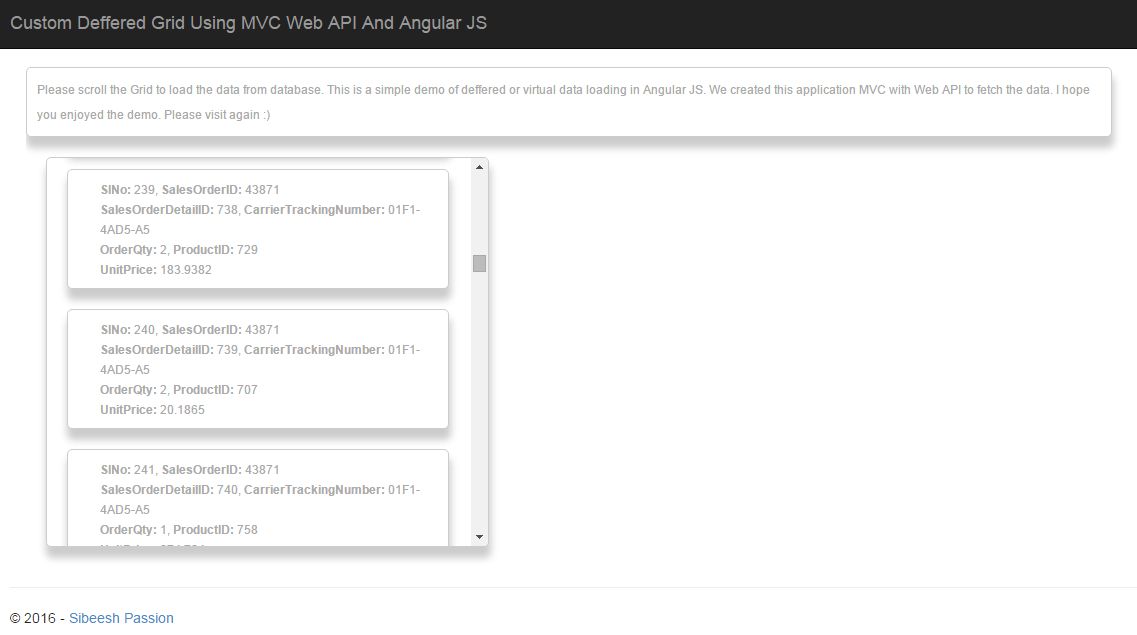
Custom Deferred Grid Using MVC Web API And AngularJS Deferred Output
Have a happy coding.
Reference
Conclusion
Did I miss anything that you may think is needed? Did you try Web API yet? Have you ever wanted to do this requirement? Did you find this post useful? I hope you liked this article. Please share with me your valuable suggestions and feedback.
Your turn. What do you think?
A blog isn’t a blog without comments, but do try to stay on topic. If you have a question unrelated to this post, you’re better off posting it on C# Corner, Code Project, Stack Overflow, ASP.NET Forum instead of commenting here. Tweet or email me a link to your question there and I’ll definitely try to help if I can.
Ravi KandelPosted Jul 14, 2016, 11:59 AM
Thanks for sharing.
Sibeesh VenuPosted Feb 29, 2016, 2:04 AM
Raja T Thanks much
Sibeesh VenuPosted Feb 29, 2016, 2:04 AM
Gowtham K Thanks much
Raja TPosted Feb 29, 2016, 1:59 AM
Nice, Thanks for sharing
Gowtham KPosted Feb 28, 2016, 12:34 PM
Good One
Sibeesh VenuPosted Feb 28, 2016, 12:21 AM
Debendra Dash Thanks a lot
Sibeesh VenuPosted Feb 28, 2016, 12:21 AM
Vignesh Mani Thanks a lot
Sibeesh VenuPosted Feb 28, 2016, 12:21 AM
Asfend Yar Thanks a lot
Debendra DashPosted Feb 27, 2016, 11:01 PM
good one..........
Vignesh ManiPosted Feb 27, 2016, 2:49 PM
Nice
Asfend YarPosted Feb 27, 2016, 12:21 PM
Nice share
Sibeesh VenuPosted Feb 27, 2016, 9:57 AM
Ankur Mistry Thanks much
Sibeesh VenuPosted Feb 27, 2016, 9:57 AM
Debasis Saha Thanks much
Ankur MistryPosted Feb 27, 2016, 6:40 AM
very nice, thanks for sharing
Debasis SahaPosted Feb 27, 2016, 1:13 AM
Nice one..