

Here, I’ve merely thought to write my thoughts about hands-on Angular. This is my first article which tells you how to get your hands dirty with AngularJS & ASP.NET WEBAPI and SQL Server BookMySeat Application Tutorials.
This is the technology stack for this BookMySeat library application, as shown below:
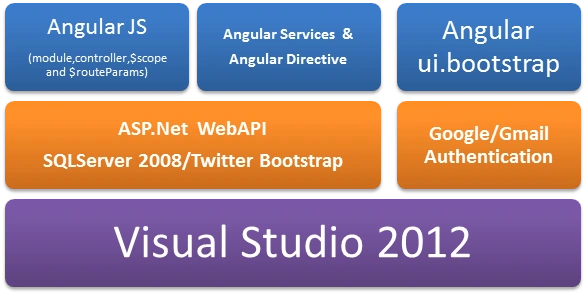
In the first article, I shared the technology and other brief information about components used. In this article, will look into WebApi creation and route to configure that.
This is an initial look at the WebAPI controller defined in Solution Explorer as depicted below:
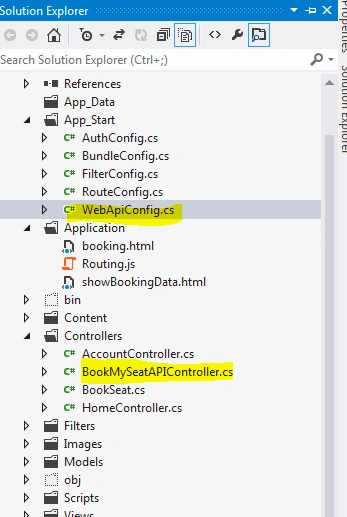
If you open this file, you will have around 6 methods which have generic names to perform the operations and easy to understand.These WebAPI methods are given below:


The complete code for all APIs is given below.
- public class BookMySeatAPIController : ApiController
- {
- //
- // GET: /BookMySeatAPI/
- SqlConnection objConnection = new SqlConnection();
- public void SqlConnection()
- {
- objConnection.Dispose();
- objConnection.ConnectionString = "server=.;database=BookMySeat;uid=sa;pwd=Tpg@1234;";
- objConnection.Open();
- }
- [HttpGet]
- public int[] GetSeatCount([FromUri] int slot)
- {
- try
- {
- SqlConnection();
- SqlCommand SqlCommand = new SqlCommand("sp_GetMySeat", objConnection);
- SqlCommand.CommandType = CommandType.StoredProcedure;
- SqlCommand.Parameters.AddWithValue("@timeslotid", slot);
- SqlDataAdapter da = new SqlDataAdapter(SqlCommand);
- da.SelectCommand = SqlCommand;
- DataSet ds = new DataSet();
- da.Fill(ds);
- int[] result = new int[ds.Tables[0].Rows.Count];
- for (int i = 0; i < ds.Tables[0].Rows.Count; i++)
- {
- result[i] = Convert.ToInt16(ds.Tables[0].Rows[i][0].ToString());
- }
- return result;
- }
- finally
- {
- objConnection.Close();
- objConnection.Dispose();
- }
- }
- [HttpPost]
- [ActionName("SeatBook")]
- public int[] PostBookSeat(BookSeat objBookSeat)
- {
- try
- {
- SqlConnection();
- SqlCommand SqlCommand = new SqlCommand("sp_BookMySeat", objConnection);
- SqlCommand.CommandType = CommandType.StoredProcedure;
- SqlCommand.Parameters.AddWithValue("@UserName", objBookSeat.UserName);
- SqlCommand.Parameters.AddWithValue("@TimeSlot", objBookSeat.TimeSlot);
- SqlCommand.Parameters.AddWithValue("@SeatNo", objBookSeat.SeatNo);
- SqlDataAdapter da = new SqlDataAdapter(SqlCommand);
- da.SelectCommand = SqlCommand;
- DataSet ds = new DataSet();
- da.Fill(ds);
- int[] result = new int[ds.Tables[0].Rows.Count];
- for (int i = 0; i < ds.Tables[0].Rows.Count; i++)
- {
- result[i] = Convert.ToInt16(ds.Tables[0].Rows[i][0].ToString());
- }
- return result;
- }
- finally
- {
- objConnection.Close();
- objConnection.Dispose();
- }
- }
- [HttpPost]
- [ActionName("ValidateUser")]
- public string ValidateUser(ValidateUser objValidateUser)
- {
- try
- {
- SqlConnection();
- SqlCommand SqlCommand = new SqlCommand("ValidateUser", objConnection);
- SqlCommand.CommandType = CommandType.StoredProcedure;
- SqlCommand.Parameters.AddWithValue("@UserName", objValidateUser.UserName);
- SqlDataAdapter da = new SqlDataAdapter(SqlCommand);
- da.SelectCommand = SqlCommand;
- DataSet ds = new DataSet();
- da.Fill(ds);
- return ds.Tables[0].Rows[0][0].ToString();
- }
- finally
- {
- objConnection.Close();
- objConnection.Dispose();
- }
- }
- [HttpPost]
- [ActionName("SeatDetail")]
- public string GetSeatDetail(GetSeatDetail objGetSeatDetail)
- {
- try
- {
- SqlConnection();
- SqlCommand SqlCommand = new SqlCommand("sp_GetSeatDetail", objConnection);
- SqlCommand.CommandType = CommandType.StoredProcedure;
- // SqlCommand.Parameters.AddWithValue("@UserName", objBookSeat.UserName);
- SqlCommand.Parameters.AddWithValue("@TimeSlot", objGetSeatDetail.TimeSlot);
- SqlCommand.Parameters.AddWithValue("@SeatNo", objGetSeatDetail.SeatNo);
- SqlDataAdapter da = new SqlDataAdapter(SqlCommand);
- da.SelectCommand = SqlCommand;
- DataSet ds = new DataSet();
- da.Fill(ds);
- return ds.Tables[0].Rows[0][0].ToString();
- }
- finally
- {
- objConnection.Close();
- objConnection.Dispose();
- }
- }
- [HttpPost]
- [ActionName("DeleteSeat")]
- public string DeleteSeat(DeleteSeat objDeleteSeat)
- {
- try
- {
- SqlConnection();
- SqlCommand SqlCommand = new SqlCommand("sp_DeleteSeat", objConnection);
- SqlCommand.CommandType = CommandType.StoredProcedure;
- // SqlCommand.Parameters.AddWithValue("@UserName", objBookSeat.UserName);
- SqlCommand.Parameters.AddWithValue("@SeatNo", objDeleteSeat.SeatNo);
- SqlCommand.Parameters.AddWithValue("@SlotNo", objDeleteSeat.TimeSlot);
- SqlDataAdapter da = new SqlDataAdapter(SqlCommand);
- da.SelectCommand = SqlCommand;
- DataSet ds = new DataSet();
- da.Fill(ds);
- return ds.Tables[0].Rows[0][0].ToString();
- }
- finally
- {
- objConnection.Close();
- objConnection.Dispose();
- }
- }
- [HttpGet]
- public List<ShowBookSeat> ShowBookSeat()
- {
- try
- {
- SqlConnection();
- List<ShowBookSeat> list = new List<ShowBookSeat>();
- SqlCommand SqlCommand = new SqlCommand("sp_ShowBookDetail", objConnection);
- SqlCommand.CommandType = CommandType.StoredProcedure;
- // SqlCommand.Parameters.AddWithValue("@UserName", objBookSeat.UserName);
- //SqlCommand.Parameters.AddWithValue("@UserName", objDeleteSeat.SeatNo);
- //SqlCommand.Parameters.AddWithValue("@SlotNo", objDeleteSeat.TimeSlot);
- SqlDataAdapter da = new SqlDataAdapter(SqlCommand);
- da.SelectCommand = SqlCommand;
- DataSet ds = new DataSet();
- da.Fill(ds);
- for (int i = 0; i < ds.Tables[0].Rows.Count; i++)
- {
- ShowBookSeat ShowBookSeat = new ShowBookSeat();
- ShowBookSeat.UserName = (ds.Tables[0].Rows[i]["username"]).ToString();
- ShowBookSeat.Date =Convert.ToDateTime(ds.Tables[0].Rows[i]["currentday"]);
- ShowBookSeat.TimeSlot = Convert.ToInt32(ds.Tables[0].Rows[i]["timeslot"]);
- ShowBookSeat.SeatNo = Convert.ToInt32(ds.Tables[0].Rows[i]["seatno"]);
- list.Add(ShowBookSeat);
- }
- return list;
- }
- finally
- {
- objConnection.Close();
- objConnection.Dispose();
- }
- }
- }
- public static class WebApiConfig
- {
- public static void Register(HttpConfiguration config)
- {
- config.Routes.MapHttpRoute(
- name: "DefaultApi",
- routeTemplate: "api/{controller}/{id}",
- defaults: new { id = RouteParameter.Optional }
- );
- config.Routes.MapHttpRoute(
- name: "seatbook",
- routeTemplate: "api/seat/{controller}/{action}/{id}",
- defaults: new { id = RouteParameter.Optional }
- );
- config.Routes.MapHttpRoute(
- name: "seatDetail",
- routeTemplate: "api/seatdetail/{controller}/{action}/{id}",
- defaults: new { id = RouteParameter.Optional }
- );
- config.Routes.MapHttpRoute(
- name: "ValidateUser",
- routeTemplate: "api/ValidateUser/{controller}/{action}/{id}",
- defaults: new { id = RouteParameter.Optional }
- );
- config.Routes.MapHttpRoute(
- name: "DeleteSeat",
- routeTemplate: "api/DeleteSeat/{controller}/{action}/{id}",
- defaults: new { id = RouteParameter.Optional }
- );
- }
- }
Join the conversation! Your thoughts help the community grow.