

As you all know the connection string is the pillar of our data. I mean, without a connection string you just can’t create an application which does some database actions like retrieving the data, creating the data, etc. We all know that the connection string is placed in the file called web config. If anyone needs to get the database information of your application, the first place he/she may look at will be the web config file. Am I right? It is always recommended to encrypt the connection string of your application because the data we have there is highly sensitive. It must be secured. Here I am going to show you a demo of how we can do that. You can do the same thing in your Web API project, MVC project, Asp.Net 5 project, or any kind of templates you works with. I hope you will like this.
Background
I used to secure my config file if I am the who starts the project. Here you will get to know how easy the procedure is to encrypt the connection string. There is only a few steps to be followed. I will explain those.
Agenda
The following is the agenda we are going to follow.
- Create an empty project, it can be any template (ASP.NET 5, Web API, MVC…)
- Add a connection string
- Encrypt the connection string
- Decrypt the connection string
Perquisites
- Visual Studio
- SQL Server
Create an empty project
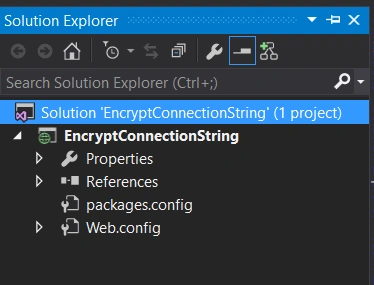
To create an empty project, go to File->New->New Project->Name the project->Select Empty->Click OK. Hope you get a solution as follows.
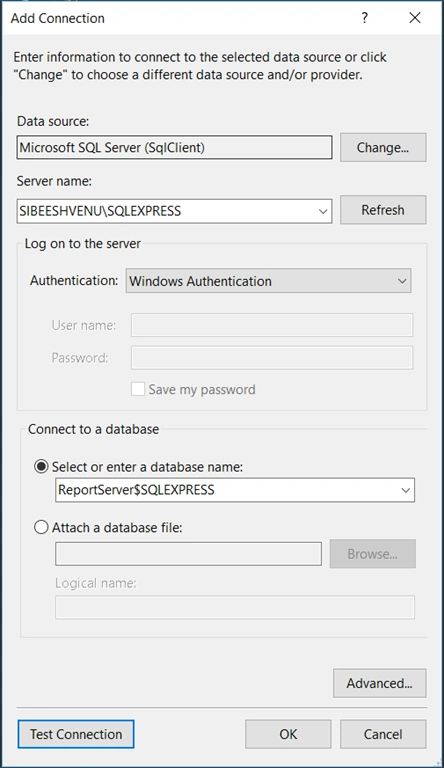
Now We will connect to a database. To connect, please click on the connect icon in your server explorer window and connect you Local/Server database.
Add a connection string
Now it is time to add our connection string, hope you got your data source of the database we already connected. The connection string property must be placed under configuration tag in your web config file. Here is mine.
- <connectionStrings>
- <add name="myConnection" connectionString="Data Source=SIBEESHVENU\SQLEXPRESS;Initial Catalog=ReportServer$SQLEXPRESS;Integrated Security=True" />
- </connectionStrings>
Now we will create a web page and in the page load event we will fetch this connection string and write it as a response.
- using System;
- using System.Collections.Generic;
- using System.Linq;
- using System.Web;
- using System.Web.UI;
- using System.Web.UI.WebControls;
- namespace EncryptConnectionString
- {
- public partial class Default: System.Web.UI.Page
- {
- protected void Page_Load(object sender, EventArgs e)
- {
- if (!IsPostBack)
- {
- try
- {
- string myCon = System.Configuration.ConfigurationManager.ConnectionStrings["myConnection"].ConnectionString;
- if (myCon != null)
- {
- Response.Write("My connection string is :" + myCon);
- }
- }
- catch (Exception)
- {
- throw;
- }
- }
- }
- }
- }
Please run your page, you will see your connection string in your page.

Connection string response
Encrypt connection string
To start the process, you must open your command window with the admin privilege. Then type the following command.
- cd C:\Windows\Microsoft.NET\Framework\v4.0.30319
This command will narrate you to the framework version folder given. Now right click on your project and click open folder in file explorer and then copy the location. For me it is F:\Visual Studio\EncryptConnectionString\EncryptConnectionString. Now please go back to your command prompt and type the command as follows.
- ASPNET_REGIIS -PEF "connectionStrings" "F:\Visual Studio\EncryptConnectionString\EncryptConnectionString"
Once you click the enter. You will get the output as follows.
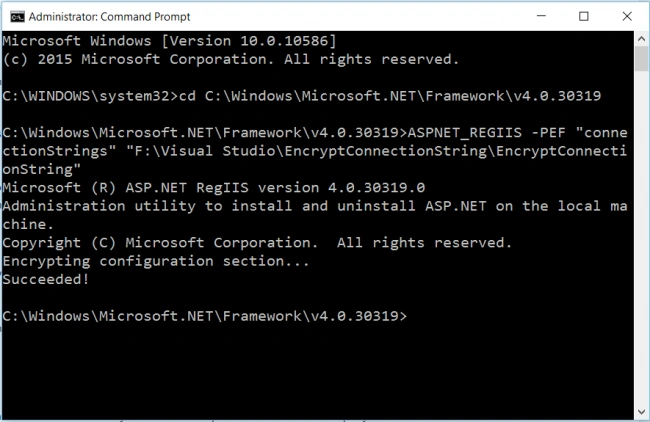
Please be noted that the text connectionStrings is case sensitive. If you don’t give it as it is, you will get an error as follows.
- C:\Windows\Microsoft.NET\Framework\v4.0.30319>ASPNET_REGIIS -PEF "connectionstrings" "F:\Visual Studio\EncryptConnectionString\EncryptConnectionString"
- Microsoft (R) ASP.NET RegIIS version 4.0.30319.0
- Administration utility to install and uninstall ASP.NET on the local machine.
- Copyright (C) Microsoft Corporation. All rights reserved.
- Encrypting configuration section...
- The configuration section 'connectionstrings' was not found.
- Failed!
So please be careful while you type the commands. Now I am going back to our application and see the config file. Shall we? You can see the connection string is encrypted as follows.
- <connectionStrings configProtectionProvider="RsaProtectedConfigurationProvider">
- <EncryptedData Type="http://www.w3.org/2001/04/xmlenc#Element" xmlns="http://www.w3.org/2001/04/xmlenc#">
- <EncryptionMethod Algorithm="http://www.w3.org/2001/04/xmlenc#tripledes-cbc" />
- <KeyInfo xmlns="http://www.w3.org/2000/09/xmldsig#">
- <EncryptedKey xmlns="http://www.w3.org/2001/04/xmlenc#">
- <EncryptionMethod Algorithm="http://www.w3.org/2001/04/xmlenc#rsa-1_5" />
- <KeyInfo xmlns="http://www.w3.org/2000/09/xmldsig#">
- <KeyName>Rsa Key</KeyName>
- </KeyInfo>
- <CipherData>
- <CipherValue>B4B3oZrbpQsYM7Eaq5smukqDj9XUYUCwygBYRG1iasN4ll5W4wAKVCIFCRfvOJGoIXzgqpyjAI30IKf5pnZ/xWqmo3p/wGfOKdMrzd041dt9llLGbxFpLJs0Nkm583PJ1FppXLAy7FOD0YoBVhG/PBtBgLjTQqcXRNbVcgufzuArlv/EH+7lzSNRclXSTMOPMtISF65hPI9ICj9qLx7RBGhVZ6uFZVFteyyuRd2i3D2r7wJfr6KflFkakdxp1OWE2JK4Ldb8kZSwAy3bNaI/qaV9EgIWt9wM6RZO/IrI3kI/bX8JuvirPw3j/+TLDB3MoIgKjSbLpR3GYTm9csPu8g==</CipherValue>
- </CipherData>
- </EncryptedKey>
- </KeyInfo>
- <CipherData>
- <CipherValue>0n1Y6ScSNZDR4x1sXfK05w9h+pp2OrAEQFQsoAUP5Y/hPsfpJS/7jv21PbPlkYmdCzycM4PGGb0+fuffR3RuL1x0tn7rfyUdA9llTfkyRQKwS9xOmkMsVFXgQDr8P4aXGef1fZPE2gjhcjm/JQToLwsfQZK1gNr4d6cIPFNqKD6wt24F7fuySJPX3OgLb8wXfQMd7ij+JcZzNlnyNHbq/DIjxSpPOnMrC52t06Jj8F8+MsSud9GcijcFB2UhvLVXQwyZ51nEj6Tf36Zbca8bgw==</CipherValue>
- </CipherData>
- </EncryptedData>
- </connectionStrings>
Decrypt connection string
You can always decrypt the connection string if you want, to decrypt you just need follows the commands as follows in the command prompt.
- cd C:\WINDOWS\Microsoft.NET\Framework\v4.0.30319
Once after you did you the above command you can execute the preceding one.
- ASPNET_REGIIS -PDF "connectionStrings" "F:\Visual Studio\EncryptConnectionString\EncryptConnectionString"
If the command is correct, you can get an output as follows.
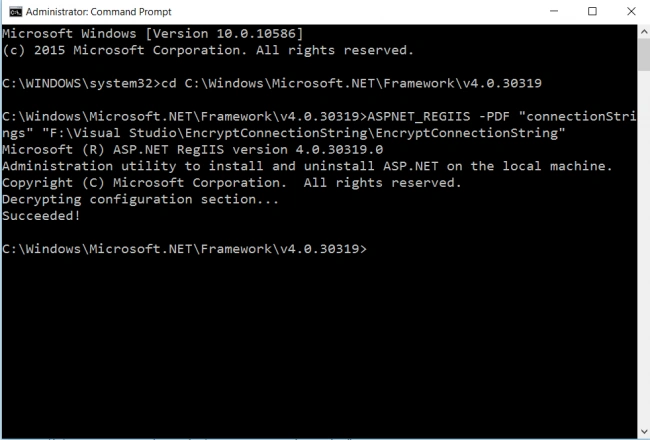
Now if you check your Web config again, you can see the connection string has got encrypted. Have a happy coding!.
Conclusion
Did I miss anything that you may think is needed? Did you find this post useful? I hope you liked this article. Please share with me your valuable suggestions and feedback.
Your turn. What do you think?
A blog isn’t a blog without comments, but do try to stay on topic. If you have a question unrelated to this post, you’re better off posting it on C# Corner, Code Project, Stack Overflow, Asp.Net Forum instead of commenting here. Tweet or email me a link to your question there and I’ll definitely try to help if I can.
Please see this article in my blog here
Shubham SidnalePosted Jan 10, 2025, 2:06 PM
I used this as one of my applications.
Tomas tPosted Sep 6, 2023, 1:25 PM
What if some one get the config file, can he run the decrypt command from any computer with iis and decrypt the file?
dip sPosted May 4, 2023, 4:52 AM
Thank you.. Very nice article. I want to use it in our web API application. When I will try to login into our application then do we need to again decrypt it because to check user credentials we have to connect to database which will require database connectivity. Thank you.
Jeff LyonPosted Apr 10, 2022, 3:26 PM
Do you know if this works for Windows Server 2012?
Joseph ShowPosted Apr 21, 2021, 1:59 PM
I followed these instructions, and ran my app in LocalHost. It worked just fine. But then I promoted my code to my DEV environment which happens to be on GoDaddy. Now I'm getting the following error: "Failed to decrypt using provider 'RsaProtectedConfigurationProvider'. Error message from the provider: Error occurred while decoding OAEP padding." I'm not sure why this is happening, and I'd appreciate any thoughts you might have.
Ajay SinghPosted Feb 1, 2021, 4:55 AM
Thank you so much
Mark MillerPosted Jan 25, 2021, 4:06 PM
Hi Sibeesh Venu. I am wondering if after the connection string is encrypted are the keys are then passed as plain text to a file calling the configuration setting, or are they passed encrypted?
Akash SainiPosted Mar 12, 2020, 7:55 AM
How to Encrypt And Decrypt Connection String In ASP.NET CORE 2.2 ?
Priyanka K SPosted Sep 5, 2019, 5:48 AM
When i try to publish getting this error. The 'ProjectName-Web.config Connection String' argument cannot be null or empty.
pradeep kPosted Dec 10, 2018, 11:42 PM
Using the above is giving me "The RSA key container could not be opened" error and interestingly the error is not fixed. At times it runs smoothly but at times start giving RSA error.
Nikolay KlimchukPosted Oct 10, 2018, 9:26 AM
Can you encrypt and decrypt on different machines?
Nilesh RautPosted Jun 12, 2018, 10:49 PM
Helpful article.
Sibeesh VenuPosted Oct 22, 2016, 12:19 AM
Manav Pandya Thanks
Sibeesh VenuPosted Oct 22, 2016, 12:19 AM
Delpin Susai Raj Thanks
Manav PandyaPosted Oct 21, 2016, 12:43 PM
Great post sir ...
Delpin Susai RajPosted Aug 28, 2016, 4:06 AM
Good article
Sibeesh VenuPosted May 17, 2016, 11:11 AM
Kuppurasu Nagaraj Thanks
Sibeesh VenuPosted May 17, 2016, 11:10 AM
Suthish Nair Thanks much for your feedback Sir, I will definitely look in to those possible ways. Once I am done with my R&D, I will update this article.
Kuppurasu NagarajPosted May 17, 2016, 11:01 AM
Nice sharing..
Suthish NairPosted May 17, 2016, 10:55 AM
This is the simplest and easiest way available. But most of the clients now days wont accept this approach. We should have more secure keys, pass phrases etc to do encryption decryption.
Sibeesh VenuPosted May 17, 2016, 1:26 AM
Bhavik Patel Thanks a lot
Sibeesh VenuPosted May 17, 2016, 1:26 AM
Pradeep Sahoo Thanks a lot
Sibeesh VenuPosted May 17, 2016, 1:26 AM
Sonu Chaudhary Thanks a lot
Sibeesh VenuPosted May 17, 2016, 1:26 AM
Debasis Saha Thanks a lot
Sibeesh VenuPosted May 17, 2016, 1:26 AM
Neeraj Kumar Thanks a lot
Bhavik PatelPosted May 17, 2016, 12:34 AM
nicely explained
Pradeep SahooPosted May 16, 2016, 11:26 PM
Nice share
Sonu ChaudharyPosted May 16, 2016, 3:21 PM
good one...
Debasis SahaPosted May 16, 2016, 1:51 PM
Nice One..
Neeraj KumarPosted May 16, 2016, 1:18 PM
Nice Article
Sibeesh VenuPosted May 16, 2016, 10:17 AM
Prasanna M Thanks
Sibeesh VenuPosted May 16, 2016, 10:17 AM
Pankaj Kumar Choudhary I have not added that Implementation in this article. May be later, I will include that.
Sibeesh VenuPosted May 16, 2016, 10:16 AM
Pankaj Kumar Choudhary Thanks, You can rename your app.config file to Web.config and follow this procedure. Or you can use SectionInformation.ProtectSection in your c# code. You may need to create a function which will take your app config file. Once you get the file, you can find the connection string and encrypt.
Sibeesh VenuPosted May 16, 2016, 10:10 AM
Rajeev Punhani As I mentioned in the article, you can access it as ConfigurationManager.ConnectionStrings["myConnection"].ConnectionString;
Prasanna MuraliPosted May 16, 2016, 9:54 AM
Nice one...
Pankaj Kumar ChoudharyPosted May 16, 2016, 9:18 AM
Nice Article Sir.. I have one question that how to encrypt connection string if connection string is placed in AppSetting.. Id there same process to encrypt the key or something different.........
Rajeev PunhaniPosted May 16, 2016, 8:26 AM
Nice article but one question where is the connection string name and how to access it in code .Any changes we need to do in code?
Vipul MalhotraPosted May 16, 2016, 8:07 AM
nice