

In this article, we are going to cover “how to install and setup ng-bootstrap in our Angular 5 apps.”
What is ng-bootstrap?
ng-bootstrap is an open-source repository that provides a couple of native Angular widgets which are built using Bootstrap 4 CSS. As you know Bootstrap is one of the most popular CSS frameworks which is used to build stylish and modern applications, which has HTML, CSS and JavaScript libraries. In order to use Bootstrap frameworks in the Angular app, earlier we would have had to use bootstrap CSS as well as its JavaScript files, but “ng-bootstrap” gives us the best approach to use without any JS file in our Angular applications.
“ng-bootstrap” provides a module that can be load in our Angular apps which provides us native Angular components and widgets that we can use in the same way as we use other Angular provided components or our custom components.
No 3rd Party libraries required
Since “ng-bootstrap” itself a module that encapsulates all of the Bootstrap functionality so there is no need to use any other 3rd party library into our Angular app. As a result, there is no dependency even on jQuery or on Bootstrap’s JavaScript library. Only dependencies are
- Angular 4 and above
- Bootstrap 4.0.0 (CSS file only, Bootstrap.js and Bootstrap.min.js are not required)
Browser Support with “ng-bootstrap” module
It supports all of the browsers that has the same intersection of browsers supported by both Angular 4+ and Bootstrap 4.0.0 CSS only like,
- Chrome (latest)
- Firefox (latest)
- Edge (13+)
- IE (10+)
- iOS (7+)
- Android (5.0 +)
- Safari (7+) and newer etc.
Installing ng-bootstrap Module
Now we will see “How to install ng-bootstrap module to be used in Angular apps?” so that we could use the bootstrap components provided by “ng-bootstrap”.
Since we have Angular 5 app created by Angular CLI and using code editor as VS code, we will setup ng-bootstrap in the same application.
There are two steps to use “ng-bootstrap” in an Angular app,
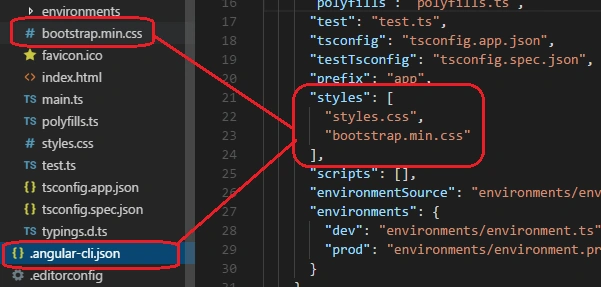
- First, download Bootstrap CSS library from its official website here and copy the bootstrap.min.css file and paste in into your Angular app (under src) folder and include it in styles array of Angular-cli.json of app like below,
- Second, install the Bootstrap module using npm command. Open VS code terminal window or you can use windows command prompt and type below command and install,
npm install –save @ng-bootstrap/ng-bootstrap
To verify if the ng-bootstrap module is installed on your machine, go to package.json file of your app and check Bootstrap module is there like below,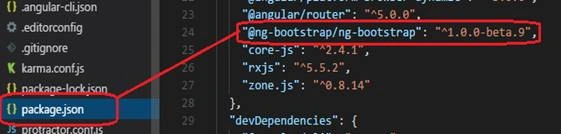
Setting up an Angular 5 application using “ng-bootstrap”
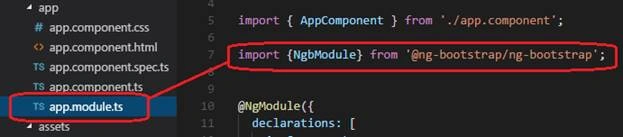
Now we have to move to next step. Open app.module.ts file under app folder of your Angular 5 application and import the NgbModule coming from Ng-bootstrap.
After that, add the “forRoot” method calling to your app module imports array like below,
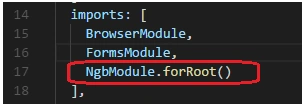
Since it’s our root module of our Angular app, we are calling “forRoot” method of NgbModule and doing this our NgbModule and it's all directives available to our entire application.
Note
In order to setup ng-bootstrap to our other modules rather than root module, we need not call “forRoot” method. We just include NgbModule in imports array and leaving off the call to the forRoot.
Now we are completely set up to use ng-bootstrap components and widgets in our angular 5 application.
Summary
In this article, we covered the following topics,
- What is “ng-bootstrap” and what are the dependencies in order to use it in Angular 5 app?
- How to install “ng-bootstrap” module and setup it in Angular 5 app?
In next article, we’ll cover how to use “ng-bootstrap” components & directives in our Angular 5 app.
Write in the comment box in case you need any help or you have any questions or concerns. Have a good day!
sweety valechhaPosted Apr 10, 2018, 4:52 AM
Hey, I followed the above steps. But all the functionalities are not working properly. Like i am getting console errors for using Modal. Error: TypeError: _co.open is not a function.