

In my previous articles on Microsoft Bot Framework, we have seen bot creation and its integration with QnA maker service, LUIS, and SharePoint authentication. In these bot apps, we have used Dialogs for managing messages between a bot and a user. In this article, we will discuss FormFlow which will help us to manage guided conversations.
Highlights of the article
- Create form fields, attributes for fields.
- Build a form and initiate a conversation, form close or exception handling.
You can pull code from GitHub.
Prerequisite
- Be ready with bot framework dev environment – refer Quick start - Development Of Chat Bot Using Microsoft Bot Framework - For Beginners
We can manage guided conversations by chaining the dialogs. In this case, we need to create and manage the dialogs. Developing a bot app with same functionality using FormFlow will take much fewer development efforts (but with less flexibility). We can also use a combination of Dialogs and FormFlow as per need.
Let’s take an example of bot using which, the user will register for New Year’s Eve in local restro-bar. I am going to use the same solution which we created in article Quick start - Development Of Chat Bot Using Microsoft Bot Framework - For Beginners
I have added a new folder named Forms and two class files named as PartyRegistrationForm.cs and PartyRegistrationController.cs.
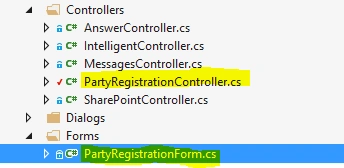
Property added to PartyRegistrationForm class will be considered as a field on a form. Field types supported by FormFlow are Integral (sbyte, byte, short, ushort, int, uint, long, ulong), Floating point (float, double), String, DateTime, Enumeration, List of enumerations. We are going to add each type of field in our form. I have also added attributes for properties of the class to update behavior while form rendering.
| Property | Type |
| Name | String |
| Gender | Enumeration |
| ArrivalTime | DateTime |
| TotalAttendees | Integral |
| CuisinesPreferences | List of enumerations |
| ComplementoryDrink | Enumerations |
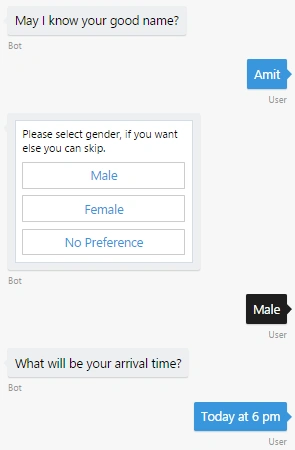
- [Prompt("May I know your good name?")]
- public string Name; // type: String
Prompt attribute will prompt user with the mentioned text and user input will be saved as property value.
- [Optional]
- [Template(TemplateUsage.EnumSelectOne, "Please select gender, if you want else you can skip. {||}", ChoiceStyle = ChoiceStyleOptions.Buttons)]
- public GenderOpts? Gender; // type: Enumeration
We have marked Gender property as non-mandatory using Optional attribute. Template attribute will help us to render gender options as buttons as I have specified ChoiceStyle. We can also provide prompt as parameter. {||} will be used to display available values for this property in prompt.
- [Prompt("What will be your arrival time?")]
- public DateTime ArrivalTime; // type: DateTime
- [Numeric(1, 6)]
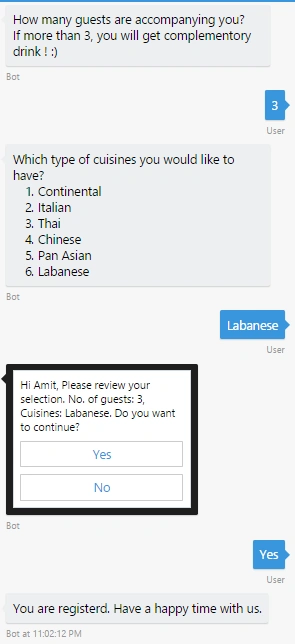
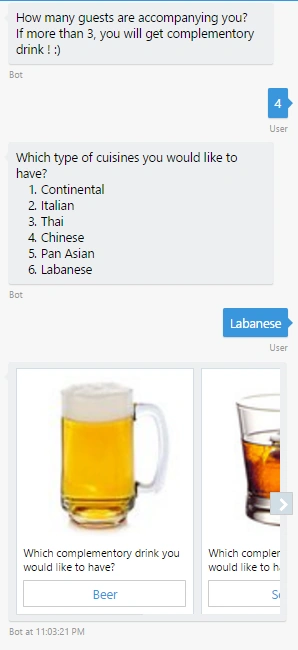
- [Prompt("How many guests are accompanying you?<br>If more than 3, you will get complementory drink ! :)")]
- public Int16 TotalAttendees; // type: Integral
We have added Numeric attribute to restrict value for this property between 1 and 6. If user provides value other than these values it will prompt user with invalid input.
- [Prompt("Which type of cuisines you would like to have? {||}")]
- public List<CuisinesOpts> CuisinesPreferences; // type: List of enumerations
Prompt attribute will prompt user the mentioned text and {||} is used to display possible values for this property.
- [Template(TemplateUsage.EnumSelectOne, "Which complementory drink you would like to have? {||}", ChoiceStyle = ChoiceStyleOptions.Carousel)]
- public ComplementoryDrinkOpts? ComplementoryDrink; // type: Enumeration
I mentioned ChoiceStyle as Carousel, it will help to render possible values as carousel, which will enhance the user experience.
We have completed specifying the fields for a registration form.
- public static IForm<PartyRegistrationForm> BuildForm()
- {
- return new FormBuilder<PartyRegistrationForm>()
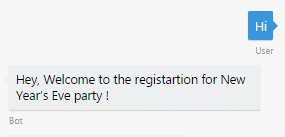
- .Message("Hey, Welcome to the registration for New Year's Eve party !")
- .Field(nameof(Name))
- .Field(nameof(Gender))
- .Field(nameof(ArrivalTime))
- .Field(nameof(TotalAttendees))
- .Field(nameof(CuisinesPreferences))
- .Field(new FieldReflector<PartyRegistrationForm>(nameof(ComplementoryDrink))
- .SetType(null)
- .SetActive(state => state.TotalAttendees > 3)
- .SetDefine(async (state, field) =>
- {
- field
- .AddDescription(ComplementoryDrinkOpts.Beer, Convert.ToString(ComplementoryDrinkOpts.Beer), "<<image path>>")
- .AddTerms(ComplementoryDrinkOpts.Beer, Convert.ToString(ComplementoryDrinkOpts.Beer))
- .AddDescription(ComplementoryDrinkOpts.Scotch, Convert.ToString(ComplementoryDrinkOpts.Scotch), "<<image path>>")
- .AddTerms(ComplementoryDrinkOpts.Scotch, Convert.ToString(ComplementoryDrinkOpts.Scotch))
- .AddDescription(ComplementoryDrinkOpts.Mojito, Convert.ToString(ComplementoryDrinkOpts.Mojito), "<<image path>>")
- .AddTerms(ComplementoryDrinkOpts.Mojito, Convert.ToString(ComplementoryDrinkOpts.Mojito));
- return true;
- }))
- .Confirm(async (state) =>
- {
- return new PromptAttribute("Hi {Name}, Please review your selection. No. of guests: {TotalAttendees}, Cuisines: {CuisinesPreferences}. Do you want to continue? {||}");
- })
- .Build();
- }
- public async Task<HttpResponseMessage> Post([FromBody]Activity activity)
- {
- if (activity.Type == ActivityTypes.Message)
- {
- await Conversation.SendAsync(activity, MakeForm);
- }
- else
- {
- HandleSystemMessage(activity);
- }
- var response = Request.CreateResponse(HttpStatusCode.OK);
- return response;
- }
- internal static IDialog<PartyRegistrationForm> MakeForm()
- {
- return Chain.From(() => FormDialog.FromForm(PartyRegistrationForm.BuildForm)).Do(async (context, registration) =>
- {
- try
- {
- var completed = await registration;
- await context.PostAsync("You are registerd. Have a happy time with us.");
- }
- catch (FormCanceledException<PartyRegistrationForm> e)
- {
- string reply = null == e.InnerException ? $"Hey, you quit the registration. Dont miss out the party!" : "Sorry, Could not register you. Please try again.";
- await context.PostAsync(reply);
- }
- });
- }
Jobin JosephPosted Aug 9, 2018, 3:16 AM
Thank for the tutorial, do you have any tutorial to intgrate chat bot with sharepoint online as web part ? I have gone through the one for sharepoint authentication one but doesn't seem to be helping my cause .
Kishore KumarPosted Apr 13, 2018, 12:28 AM
Thanks for the tutorial