

Windows 10 UWP Community toolkit is a collection of a helper class, custom controls and Application Services. The hamburger menu control provides an easy way to implement (hamburger menu) side-bar menu, which we can show or hide, using a hamburger button by clicking the icon and it opens up a side menu. We can use menu specific text only or images with the text.
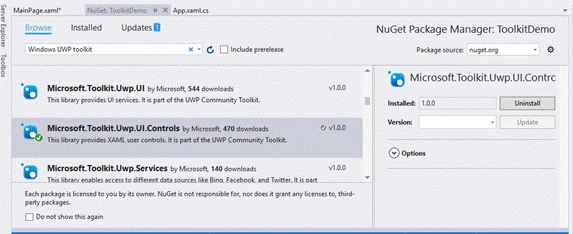
Create a new Windows 10 UWP project or open your existing project. Right click on your project and select Manage NuGet Packages. Search for Microsoft.Toolkit.UWP.UI.Controls and install it, as shown below-
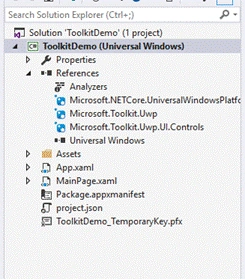
This will add Microsoft.Toolkit.Uwp.UI.Controls.dll in 'References' of your project, as shown below-
Add the toolkit reference in your XAML pages, using the code, given below-
XAML
xmlns:UWPToolkit="using:Microsoft.Toolkit.Uwp.UI.Controls"
Now, open your XAML page and write the code, given below-
- <Page.Resources>
- <DataTemplate x:Name="HamburDefaultTemplate">
- <Grid Width="240" Height="48">
- <Grid.ColumnDefinitions>
- <ColumnDefinition Width="48" />
- <ColumnDefinition /> </Grid.ColumnDefinitions>
- <SymbolIcon Grid.Column="0" Symbol="{Binding Icon}" Foreground="White" />
- <TextBlock Grid.Column="1" Text="{Binding Name}" FontSize="16" VerticalAlignment="Center" Foreground="White" /> </Grid>
- </DataTemplate>
- </Page.Resources>
- <Grid Background="{ThemeResource ApplicationPageBackgroundThemeBrush}">
- <UWPToolkit:HamburgerMenu x:Name="hamburgerMenuControl" PaneBackground="Black" Foreground="White" ItemClick="OnMenuItemClick" ItemTemplate="{StaticResource HamburDefaultTemplate}" OptionsItemClick="OnMenuItemClick">
- <Frame x:Name="contentFrame" /> </UWPToolkit:HamburgerMenu>
- </Grid>
- public MainPage()
- {
- this.InitializeComponent();
- var items = new List < MenuItem > ();
- items.Add(new MenuItem() {
- Icon = Symbol.Accept, Name = "Suresh M"
- });
- items.Add(new MenuItem() {
- Icon = Symbol.OutlineStar, Name = "Microsoft MVP"
- });
- items.Add(new MenuItem() {
- Icon = Symbol.OutlineStar, Name = "C# Corner MVP"
- });
- hamburgerMenuControl.ItemsSource = items;
- }
- public class MenuItem {
- public Symbol Icon {
- get;
- set;
- }
- public string Name {
- get;
- set;
- }
- }
- private void OnMenuItemClick(object sender, ItemClickEventArgs e) {
- //process selected menu item
- }
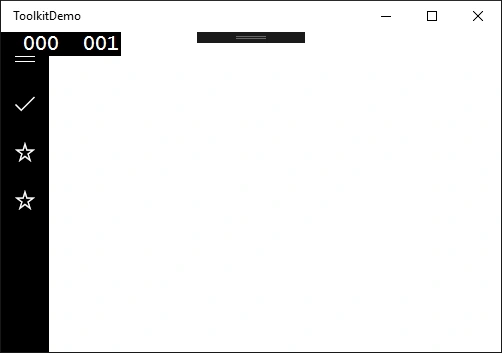
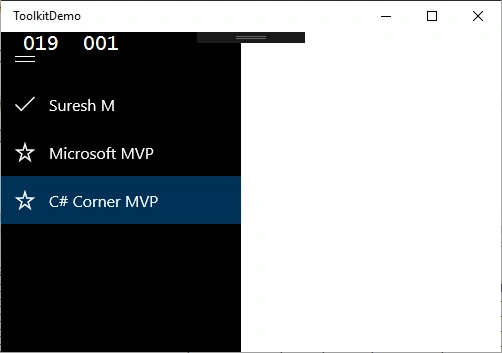
For more details on developing Windows 10 UWP App, refer to my e-book, whose link is given below-
Delpin Susai RajPosted Aug 30, 2016, 3:33 AM
Nice