

Introduction
In this article, you will learn how to integrate SharePoint applications data into node applications with app authentication approach.
Scenario
The scenario is similar to the previous part, but only the authentication technique changes. In my previous article, I have explained about integrating the SharePoint data into Node.JS applications by hard-coding the user credentials though that is not the right approach.
For authentication, same node packages will be used. Let us deeply look into the step by step approach for accomplishing the tasks.
How it works
Register the app on the SharePoint portal. App can be registered from AppRegNew.aspx page. Navigate to the registration page, and fill in the required details. The below snapshot shows the same.
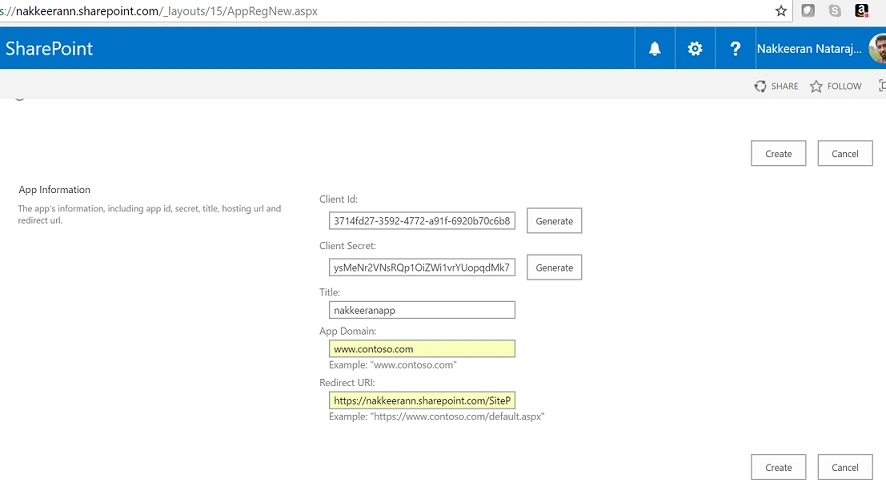
Generate the client ID and client secret, and fill in the required details and click on "Create" to create the app. Once done, copy and keep the ID and secret values for later use.
To lookat the created app and provide the necessary permissions, navigate to http://siteurl/_layouts/15/AppInv.aspx page. Paste the client id and look up the details.
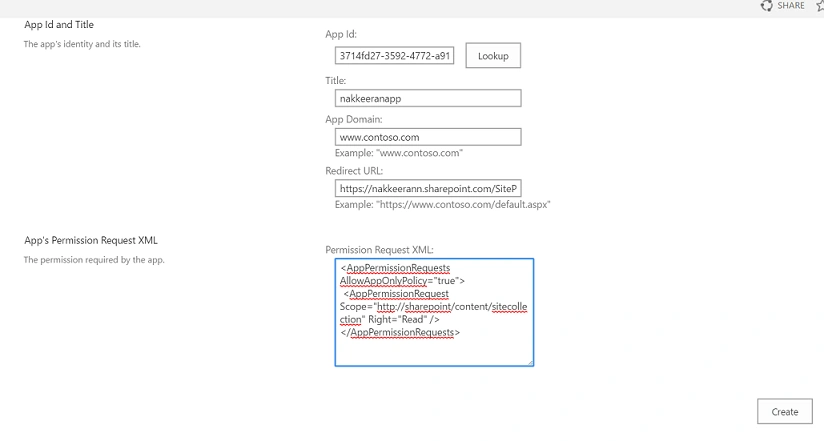
Paste the necessary app manifest xml file for providing permissions. Click on create. The following code snippet shows the read permissions for site collection.
- <AppPermissionRequests AllowAppOnlyPolicy="true">
- <AppPermissionRequest Scope="http://sharepoint/content/sitecollection" Right="Write" />
- </AppPermissionRequests>
The write permission level is given to site collection for accessing the data. The scope and write values can be changed for business needs.
- var http = require('http');
- var spauth = require('node-sp-auth');
- var requestprom = require('request-promise');
- // Site and User Creds
- var url = 'https://nakkeerann.sharepoint.com';
- var clientId = "3714fd27-3592-4772-a91f-6920b70c6b8e";
- var clientSecret = "**************************************";
- var server = http.createServer(function(request, response) {
- // Authenticate with hardcoded credentials - Get Access Token
- spauth.getAuth(url, {
- clientId:clientId,
- clientSecret:clientSecret
- })
- .then(function(options){
- // Access Token will be available on the options.headers variable
- var headers = options.headers;
- headers['Accept'] = 'application/json;odata=verbose';
- // Pull the SharePoint list items
- requestprom.get({
- url: url+"/_api/web/lists/getByTitle('customlist1')/items?$select=Title",
- headers: headers,
- json: true
- }).then(function(listresponse){
- var items = listresponse.d.results;
- var responseJSON = [];
- // process
- // Print / Send back the data
- response.end(JSON.stringify(listresponse));
- });
- });
- });
- var port = process.env.PORT || 1337;
- server.listen(port);
Deploy/ Run
Test the application by running node index.js command in the command prompt. Open the browser and test it with localhost URL and port number specified 1337. (http://localhost:1337)

Summary
Thus, you have learned about accessing the SharePoint data from NodeJS application with access token using app only policy permissions.
Tmg anjaanPosted Mar 22, 2021, 6:57 AM
Unhandled rejection StatusCodeError: 401 - {"error":"invalid_request","error_description":"Token type is not allowed."} at new StatusCodeError (/Users/Anjan/Desktop/delete/node_modules/request-promise-core/lib/errors.js:32:15) at Request.plumbing.callback (/Users/Anjan/Desktop/delete/node_modules/request-promise-core/lib/plumbing.js:104:33) at Request.RP$callback [as _callback] (/Users/Anjan/Desktop/delete/node_modules/request-promise-core/lib/plumbing.js:46:31) at Request.self.callback (/Users/Anjan/Desktop/delete/node_modules/request/request.js:185:22) at Request.emit (events.js:315:20) at Request.EventEmitter.emit (domain.js:483:12) at Request.<anonymous> (/Users/Anjan/Desktop/delete/node_modules/request/request.js:1154:10) at Request.emit (events.js:315:20) at Request.EventEmitter.emit (domain.js:483:12) at IncomingMessage.<anonymous> (/Users/Anjan/Desktop/delete/node_modules/request/request.js:1076:12) at Object.onceWrapper (events.js:421:28) at IncomingMessage.emit (events.js:327:22) at IncomingMessage.EventEmitter.emit (domain.js:483:12) at endReadableNT (_stream_readable.js:1220:12) at processTicksAndRejections (internal/process/task_queues.js:84:21)
Kameron BergetPosted Jul 29, 2017, 10:25 AM
Using this method, is it possible to download a file from SharePoint? I am trying to host some assets in SharePoint that are to be used on a public website. Most everything is list data which is easy to get via rest but I also need to download some files as well. These files are updated monthly so I am going to let node check for new files and download them to the server when new ones show up. These files are public files. we are just using SP to make it easier to manage.