

ASP.NET core is a significant redesign of ASP.NET. ASP.NET core is an open-source, cross-platform framework for developing cloud-based Applications like Web Applications IoT Applications, and the mobile backend Application. It runs on both frameworks; .NET core and full .NET framework. We can develop and run the ASP.NET core Application on multiple (cross) platforms such as Windows, Mac OS, and Linux.
There are a number of changes to the ASP.net core framework. ASP.NET Core is not based on "System.Web.dll". The "System.Web.dll" works only with the Windows platform to take certain advantages of Windows features. The removal of "System.Web.dll" makes ASP.NET Core distant from ASP.NET Web Forms. It is based on many small and distinct parts. The advantages of smaller apps are reduced servicing, improved performance, and security. Visual Studio 2015 is downloading or importing dependency packages by using NPN, Bower, Grunt, and Gulp.
Following are some improvements in ASP.NET Core.
- HTTP request pipeline is now lightweight and modular.
- Built-in dependency injection support.
- Ready to integrate to modern client-side frameworks and development Workflow.
- Open source and community-focused.
- Build and run cross-platform ASP.NET apps.
- Cloud-ready environment (based on configuration).
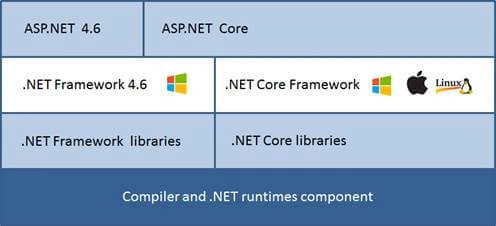
The new ASP.NET Core framework will have backward compatibility and be able to run on ASP.NET 4.6 libraries. Currently, Microsoft uses "CORE" terminology and discontinues the old numbering system. We can install .NET Framework 4.6 and .NET Core on the same machine. Core has its own core libraries.
.NET Core has core CLR and lightweight .NET runtime, which provides some services, like memory management and garbage collection.
.NET Core is a lightweight and cross-platform version of the .NET framework. It contains a subset of class libraries from the full NET framework and it is designed to work with multiple platforms. The .NET core does not contain any libraries, which depend on Windows platforms like System. Windows, System.Drawing etc.
.NET core is designed with both a core framework and a full framework. It also runs on Roslyn and builds are completely dynamic.
ASP.NET Project Structure
.NET Core adds new concepts to the project structure and it has replaced some legacy elements, found in the previous versions of ASP.NET projects. ASP.NET core runs with the essential components, required to start the Server and serve simple pages. We can add more components to the project, as per the requirement. ASP.NET Core contains a built-in IoC (inversion of control) Container, which is used to configure the dependencies. When we create an ASP.NET Core project using VS 2015, it looks, as shown below.
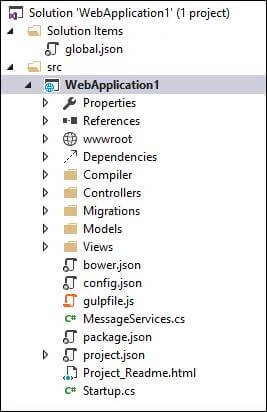
As shown in the above image, the new structure includes a "Solution Items" folder and this folder contains a file called "global.json" and our Web project is created within the "src" folder within the solution.
The solution contains the following files/folders.
- global.json: This file is present at the root level directory of the Application and contains solution-level settings. Generally, it contains the name of the project and the SDK version. The settings under this file are used for all the projects, under the solution.
- wwwroot: This folder contains the static assets like JavaScript, CSS, and images, required by the project.
- Dependencies: In this tab, we can add or remove Project Dependencies.
- project.json: This is the replacement of Web.config and package.config file. It is in JSON format. This file contains information like the version of the .NET Core framework, Compilation options, framework details, dependencies, and script for installing front-end dependencies, using NPM, bower, or other package managers.
- bower.json and package.json: The bower.json file contains a list of bower dependencies and the package.json file contains a list of NPM dependencies to be used in the project. By default, these files are not visible in the project.
- gulpfile.js: This file contains a set of gulp tasks to combine, minify, and copy the front-end files and dependencies, and the tasks are executed, using a command line. We can also configure to run this command during the build process.
- appsettings.json: This file contains the Application level settings like a database connection string and other custom Application settings. This file is read by the Application in startup.cs file.
- Startup.cs: This is a starting point of the ASP.NET Core Application. This is very similar to the OWIN Katana project. This file has a static void main method, which is a starting point of the Application. Generally, this static method is used to load the middleware services, configure abstract, etc.
- References: This folder details the Server-side references for the project. This is very similar to the previous version of ASP.NET.
Support for Dynamic Compilation
Roslyn (the new compiler) supports a dynamic compilation. It enables us to change the code of the controller, classes, views, etc. The runtime and the compiler will automatically build the Application. The dynamic compilation enables us to run the Application, using Ctrl + F5 make a change to the file, save it, and refresh, and the application's new changes are immediately in effect. The dynamic compilation feature works with Visual Studio as well as any code editor.
Open source
.NET Core is now open source and many components have already been made available on GitHub. This includes the Roslyn compiler, ASP.NET, and Core CLR.
Conclusion
There are many changes introduced in the ASP.NET Core. With this release, it is possible to work outside Visual Studio. We can also download the dependency, using NPN, Bower, Grunt, and Gulp. The Application developed with older framework versions (4.5.2 or previous) works with full .NET runtime (these will not run on core CLR).
Vivek KumarPosted Aug 10, 2016, 4:10 AM
Nicely explained. Thank you...
Ramesh PalaniappanPosted Aug 9, 2016, 9:24 AM
Good Article :)
Vignesh ManiPosted Aug 9, 2016, 8:37 AM
Nice one
Bhavik PatelPosted Aug 9, 2016, 1:32 AM
Nicely explained
Manas MohapatraPosted Aug 8, 2016, 1:55 PM
What is the difference between appsettings.json and project.json in terms of storing connection string..As per appsettings.json we can set database connection, secondly project.json is replacement of web.config where we usually store connection string..Another question in ASP.NET core we will not have web.config file??
Bikesh SrivastavaPosted Aug 8, 2016, 12:38 PM
Its very helpful for all developer