

This is the third article in ReactJS – Zero to Hero Series. I will recommend reading the first two articles (link given below), before going through this article.
In this article, we will see what is JSX and its features. We will also see how to Render Elements in React.
JSX is an external, domain-specific language that is optimized for generating XML-like documents. For a React application, JSX will typically be used to generate HTML, but it also supports custom React components and SVG.
- We can embed any JavaScript expression in JSX by wrapping it in curly braces.
- JSX is a language, which works like a JavaScript extension hence the name JSX.
- JSX does optimization while compiling the code to JavaScript. The generated code runs quicker than a similar code written in JavaScript
- As compared to JavaScript, JSX is statically typed and type safe. The quality of applications is better when built using JSX since errors are caught early and quickly.
- JSX provides object-oriented features similar to Java or C++, which is very different from primitive prototypal inheritance approach defined by JavaScript.
A very simple JSX expression is shown below. The statement is neither a string nor HTML.
- const element = <h1>Hello, world!</h1>;
JSX Attribute Expressions (Specifying Attributes with JSX)
To supply props to a React component, we specify attributes on the JSX element. Consider the below JSX expression.

- Hello is the JSX element name and the corresponding React element.
- now is the JSX attribute that will populate the now prop on the React component.
- The value assigned to the new attribute is a JSX attribute expression. The expression inside the curly braces can be any valid JavaScript expression.
When the component is rendered, the JavaScript expression will be evaluated and supplied as the value for the new prop on the Hello component. JSX attributes can also be given a literal string by using quotes instead of curly braces.
- const element = <div tabIndex="0"></div>;
Child Expressions (Specifying Children with JSX)
JSX is hierarchical, so any valid JSX expression may be a child of any other JSX expression. We can have many JSX expressions, or elements, within a single JSX component. That is, a JSX expression can have multiple direct children.
Within components, you can reference JSX child elements via the special property – this.props.children
- const element = (
- <div>
- <h1>Hello!</h1>
- <h2>Good to see you here.</h2>
- </div>
- );
JSX Represents Objects
The JavaScript compiler in React compiles React calls to React.createElement() calls. So, the below two code snippets are identical.
- const element = (
- <h1 className="greeting">
- Hello, world!
- </h1>
- );
- const element = React.createElement(
- 'h1',
- {className: 'greeting'},
- 'Hello, world!'
- );
HTML Attributes
- HTML attributes cannot use JavaScript reserved words. For E.g. – To render class attribute, use className in React.
- The style attribute is treated specially by React. Instead of assigning a string, it expects that a JavaScript object with camelCased.
Note the double curly braces in below image.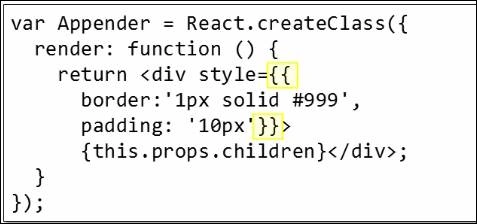
The two curly braces are because the outer curly braces delimit the JSX expression as usual and the inner curly braces delimit the JavaScript object literal.
Another way of writing the above code is to extract the objects literal definition into a variable.
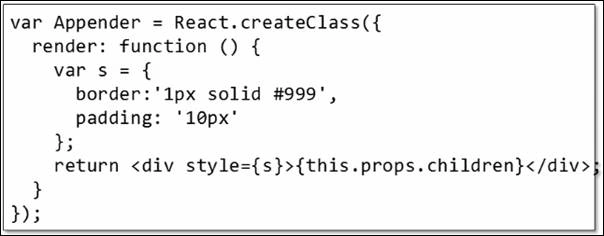
This makes it easier to see where the style object literal is defined and how it is assigned to the style attribute.
Rendering Elements
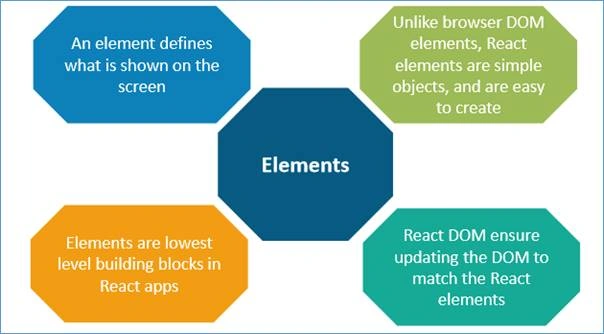
- Elements are the smallest building blocks of React apps.
- An element describes what you want to see on the screen.
Consider the below ticking clock example.
- function tick() {
- const element = (
- <div>
- <h1>Hello, world!</h1>
- <h2>It is {new Date().toLocaleTimeString()}.</h2>
- </div>
- );
- ReactDOM.render(
- element,
- document.getElementById('impl')
- );
- }
- setInterval(tick, 1000);
In the above example, the application calls “ReactDOM.render()” every second from a “setInterval” callback. React DOM compares the element and its children to the earlier one and applies the DOM updates based on the requirement to bring the DOM to the required state.
Summary
In this article, we saw the introduction to JSX, its features, and the way of rendering elements in React.
Hamid KhanPosted Sep 29, 2017, 9:37 AM
Nice.............................................