
Hello Friends,
I have seen over the internet that there are many articles of simple jqGrid. In this article, I've tried to show you the use of jqGrid's functionality (eg. searching, sorting, paging, filtering, checkboxes, etc) and its states after a postback request. First question is what is jqgrid?
What is JqGrid?
- JqGrid is Stylish and Featured Tabular data presentation control.
- JqGrid is a JavaScript control for representing and manipulating tabular data on the web.
- JqGrid is Ajax Enabled.
- JqGrid Can be integrated with any of the server-side technologies like ASP, JavaServelets, JSP, PHP etc.
- JqGrid was developed by Tony Tomov at Trirand Inc.
- JqGrid is very simple to integrate with ASP.NET.
You can download all the scripts and style sheet file from this link https://github.com/jqwidgets/jQWidgets/tree/master/jqwidgets
or you can find the jqwidget folder from attached demo project also.
I have used simple static data in this demo, but you can use data from the database here. You can see the project structure as given below.
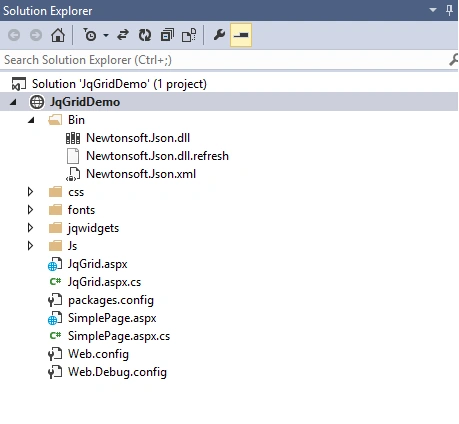
Image1
Image1
The following is the test data function of "SimplePage.aspx.cs" page.
- [WebMethod]
- public static string GetProductsList()
- {
- List<ResponseMessage> respmsg = new List<ResponseMessage>();
- respmsg.Add(new ResponseMessage { ProID = 1,ID = 1, Name = "Product1", SKU = "sku1", Price = 100, vendorname = "Nike", Active = true });
- respmsg.Add(new ResponseMessage { ProID = 2,ID = 2, Name = "Product2", SKU = "sku2", Price = 100, vendorname = "Nike", Active = false });
- respmsg.Add(new ResponseMessage { ProID = 3,ID = 3, Name = "Product3", SKU = "sku3", Price = 100, vendorname = "Nike", Active = true });
- respmsg.Add(new ResponseMessage { ProID = 4, ID = 4, Name = "Product4", SKU = "sku4", Price = 100, vendorname = "Nike", Active = true });
- respmsg.Add(new ResponseMessage { ProID = 5, ID = 5, Name = "Product5", SKU = "sku5", Price = 100, vendorname = "Nike", Active = true });
- respmsg.Add(new ResponseMessage { ProID = 6, ID = 6, Name = "Product6", SKU = "sku6", Price = 100, vendorname = "Nike", Active = false });
- respmsg.Add(new ResponseMessage { ProID = 7, ID = 7, Name = "Product7", SKU = "sku7", Price = 100, vendorname = "Nike", Active = false });
- respmsg.Add(new ResponseMessage { ProID = 8, ID = 8, Name = "Product8", SKU = "sku8", Price = 100, vendorname = "Nike", Active = true });
- respmsg.Add(new ResponseMessage { ProID = 9, ID = 9, Name = "Product9", SKU = "sku9", Price = 100, vendorname = "Nike", Active = true });
- respmsg.Add(new ResponseMessage { ProID = 10, ID = 10, Name = "Product10", SKU = "sku10", Price = 100, vendorname = "Nike", Active = true });
- respmsg.Add(new ResponseMessage { ProID = 11, ID = 11, Name = "Product11", SKU = "sku11", Price = 100, vendorname = "Nike", Active = true });
- respmsg.Add(new ResponseMessage { ProID = 12, ID = 12, Name = "Product12", SKU = "sku12", Price = 100, vendorname = "Nike", Active = true });
- respmsg.Add(new ResponseMessage { ProID = 13, ID = 13, Name = "Product13", SKU = "sku13", Price = 100, vendorname = "Nike", Active = true });
- respmsg.Add(new ResponseMessage { ProID = 14, ID = 14, Name = "Product14", SKU = "sku14", Price = 100, vendorname = "Nike", Active = true });
- respmsg.Add(new ResponseMessage { ProID = 15, ID = 15, Name = "Product15", SKU = "sku15", Price = 100, vendorname = "Nike", Active = true });
- respmsg.Add(new ResponseMessage { ProID = 16, ID = 16, Name = "Product16", SKU = "sku16", Price = 100, vendorname = "Nike", Active = true });
- respmsg.Add(new ResponseMessage { ProID = 17, ID = 17, Name = "Product17", SKU = "sku17", Price = 100, vendorname = "Nike", Active = false });
- respmsg.Add(new ResponseMessage { ProID = 18, ID = 18, Name = "Product18", SKU = "sku18", Price = 100, vendorname = "Nike", Active = true });
- respmsg.Add(new ResponseMessage { ProID = 19, ID = 19, Name = "Product19", SKU = "sku19", Price = 100, vendorname = "Nike", Active = false });
- respmsg.Add(new ResponseMessage { ProID = 20, ID = 20, Name = "Product20", SKU = "sku20", Price = 100, vendorname = "Nike", Active = false });
- respmsg.Add(new ResponseMessage { ProID = 21, ID = 21, Name = "Product21", SKU = "sku21", Price = 100, vendorname = "Nike", Active = false });
- return Newtonsoft.Json.JsonConvert.SerializeObject(respmsg);
- }
- public class ResponseMessage
- {
- public int ProID { get; set; }
- public int ID { get; set; }
- public string Name { get; set; }
- public string SKU { get; set; }
- public float Price { get; set; }
- public string vendorname { get; set; }
- public bool Active { get; set; }
- }
The following is jqGrid.aspx code.
- <%@ Page Language="C#" AutoEventWireup="true" CodeFile="JqGrid.aspx.cs" Inherits="JqGrid" %>
- <!DOCTYPE html>
- <html xmlns="http://www.w3.org/1999/xhtml">
- <head runat="server">
- <title>JQGrid Demo - Searching, Sorting, Filtering, Paging, Checkbox Selection, etc</title>
- <link href="css/jqx.base.css" rel="stylesheet" />
- <script src="Js/jquery-3.2.1.min.js"></script>
- <link href="css/custom.css" rel="stylesheet" />
- <link href="css/font-awesome.min.css" rel="stylesheet" />
- <meta http-equiv="Content-Type" content="text/html; charset=utf-8" />
- <script type="text/javascript">
- $(document).ready(function () {
- $.ajax({
- type: "POST",
- url: "SimplePage.aspx/GetProductsList",
- contentType: "application/json; charset=utf-8",
- dataType: "json",
- data: "",
- async: false,
- success: function (data) {
- var obj = data.d;
- var source =
- {
- datafields: [
- { name: 'ID', type: 'int' },
- { name: 'ProID', type: 'int' },
- { name: 'Name', type: 'string' },
- { name: 'SKU', type: 'string' },
- { name: 'Price', type: 'float' },
- { name: 'vendorname', type: 'string' },
- { name: 'Active', type: 'bool' },
- ],
- id: 'ID',
- datatype: "json",
- localdata: obj
- };
- var dataList = new $.jqx.dataAdapter(source, { contentType: 'application/json; charset=utf-8' });
- var viewStatus = function (rownumber, columnname, value) {
- if (value == false) {
- var cc = '<i class="fa fa-2x fa-thumbs-down text-danger"></i>'
- }
- else {
- var cc = '<i class="fa fa-2x fa-thumbs-up text-success"></i>'
- }
- return '<div style="position: relative; left: 50%; top: 50%; transform: translate(-50%,-50%); display: inline-block;">' + cc + '</div>';
- }
- var viewAction = function (rownumber, columnname, value) {
- return '<div style="position: relative; left: 50%; top: 50%; transform: translate(-50%,-50%); display: inline-block; text-align: center;"><a href="javascript:void(0)" title="" onclick="EditProduct(' + value + ')" class="btn btn-success btn-sm"><i class="fa fa-edit"></i> Edit Product</a></div>';
- }
- $("#grid").jqxGrid(
- {
- width: '60%',
- height: 365,
- altrows: true,
- source: dataList,
- pageable: true,
- pagesize: 5,
- pagesizeoptions: ["5", "10", "15"],
- autoheight: true,
- autorowheight: true,
- columnsheight: 70,
- selectionmode: 'checkbox',
- showfilterrow: true,
- filterable: true,
- sortable: true,
- ready: function () { },
- columns: [
- { text: 'ID', datafield: 'ID', width: '8%', align: 'center' },
- { text: 'Product Name', datafield: 'Name', width: '25%', align: 'left' },
- { text: 'SKU', datafield: 'SKU', width: '15%' },
- { text: 'Vendor Name', datafield: 'vendorname', width: '16%', align: 'center' },
- { text: 'Price', datafield: 'Price', width: '11%', align: 'center', cellsalign: 'right', cellsformat: 'c2' },
- { text: 'Status', datafield: 'Active', width: '8%', cellsrenderer: viewStatus, align: 'center', filtertype: 'bool', sortable: false },
- { text: 'Actions', datafield: 'ProID', width: '14%', cellsrenderer: viewAction, align: 'center', filterable: false, sortable: false, }
- ]
- });
- //=================================
- if ('<%=Session["sessionTextBox"] %>' != null || '<%=Session["sessionCheckbox"] %>' != null || '<%=Session["sessionPageNumber"] %>' != null || '<%=Session["sessionPageRowCount"] %>' != null || '<%=Session["sessionColumnSorting"] %>' != null) {
- textboxValue = '<%=Session["sessionTextBox"] %>';
- gridCheckboxOption = '<%=Session["sessionCheckbox"] %>';
- gridPageNumber = '<%=Session["sessionPageNumber"] %>';
- gridPageRowCount = '<%=Session["sessionPageRowCount"] %>';
- gridColumnSorting = '<%=Session["sessionColumnSorting"] %>';
- $.ajax(
- {
- type: "POST",
- url: "JqGrid.aspx/DestroySession",
- contentType: "application/json; charset=utf-8",
- data: "",
- dataType: "json",
- async: false,
- cache: "false",
- success: function (data) {
- }, Error: function (x, e) {
- alert("Error in Delete");
- }
- });
- }
- //paging row counts
- if (gridPageRowCount > 5) {
- $($('#grid').find('div[id="gridpagerlistgrid"]')[0]).val(gridPageRowCount);
- }
- //Column Header Sorting
- var allgridsortingvalues;
- if (gridColumnSorting.includes('ascending') || gridColumnSorting.includes('descending')) {
- gridColumnSorting = gridColumnSorting.replace(/none/gi, 'undefined');
- allgridsortingvalues = gridColumnSorting.split('|');
- }
- else {
- gridColumnSorting = gridColumnSorting.replace(/none/gi, 'undefined');
- allgridsortingvalues = gridColumnSorting.split('|');
- }
- var allsortingtext = $('#grid').find('div[role^="columnheader"]');
- var tcontrolsorting = null;
- if (allgridsortingvalues.length > 1) {
- for (var i = 1; i < allsortingtext.length; i++) {
- if (allgridsortingvalues[i].toString() != 'undefined') {
- while ($(allsortingtext[i]).attr('aria-sort') != allgridsortingvalues[i].toString()) {
- $('#grid').trigger('reloadGrid');
- $(allsortingtext[i]).attr('aria-sort', allgridsortingvalues[i].toString());
- tcontrolsorting = allsortingtext[i];
- $(tcontrolsorting).trigger('click');
- }
- break;
- }
- }
- }
- //Textboxes
- var allgridvalues = textboxValue.split('|');
- var alltext = $('#grid').find('input[id^="jqxWidget"]');
- var tcontrol = null;
- var checkBool = false;
- if (allgridvalues.length > 1) {
- for (var i = 0; i < alltext.length; i++) {
- if (allgridvalues[i].toString() != "") {
- $(alltext[i]).val(allgridvalues[i].toString());
- tcontrol = alltext[i];
- checkBool = true;
- }
- }
- if (checkBool == true) {
- $(tcontrol).trigger('keydown');
- }
- }
- //paging
- if (gridPageNumber > 1) {
- while ($($('#grid').find('input[class="jqx-input jqx-widget-content jqx-grid-pager-input jqx-rc-all"]')[0]).val() != gridPageNumber) {
- $('#grid').trigger('reloadGrid');
- $($('#grid').find('input[class="jqx-input jqx-widget-content jqx-grid-pager-input jqx-rc-all"]')[0]).val(gridPageNumber);
- $($('#grid').find('input[class="jqx-input jqx-widget-content jqx-grid-pager-input jqx-rc-all"]')[0]).trigger('change');
- }
- }
- //Checkboxes
- var allgridcheckboxvalues = gridCheckboxOption.split('|');
- if ((allgridcheckboxvalues.length) > 1) {
- var allcheckboxtext = $('#grid').find('div[class^="jqx-checkbox-default"]');
- var tcontrol1 = null;
- var tcontrol2 = null;
- var tcontrol3 = null;
- var ckhAllBool = true;
- for (var i = 0; i < allcheckboxtext.length; i++) {
- if (i == 0 && allgridcheckboxvalues[i].toString() != "") {
- tcontrol1 = allcheckboxtext[i];
- $(tcontrol1).find('span').attr('class', allgridcheckboxvalues[i].toString());
- if (allgridcheckboxvalues[i].toString() == "jqx-checkbox-check-checked") {
- ckhAllBool = false;
- }
- }
- else if (i == 1 && allgridcheckboxvalues[i].toString() != "") {
- tcontrol2 = allcheckboxtext[i];
- while ($(allcheckboxtext[i]).find('span').attr('class') != allgridcheckboxvalues[i].toString().replace('jqxcheckboxcheckindeterminate---', '').toString().trim().replace('jqxcheckboxcheckchecked---', '').toString().trim()) {
- $('#grid').trigger('reloadGrid');
- $(allcheckboxtext[i]).find('span').attr('class', allgridcheckboxvalues[i].toString());
- $(allcheckboxtext[i]).trigger('mousedown');
- }
- }
- else {
- if (ckhAllBool == true) {
- tcontrol3 = allcheckboxtext[i];
- $(tcontrol3).find('span').attr('class', allgridcheckboxvalues[i].toString());
- }
- else {
- tcontrol3 = allcheckboxtext[i];
- $(tcontrol3).find('span').attr('class', 'jqx-checkbox-check-checked');
- }
- }
- }
- if (tcontrol1 != null) {
- $(tcontrol1).trigger('keydown');
- }
- if (tcontrol3 != null) {
- $(tcontrol3).trigger('keydown');
- }
- }
- //=================================
- }
- });
- });
- var textboxValue = "";
- var gridCheckboxOption = "";
- var gridPageNumber = "";
- var gridPageRowCount = "";
- var gridColumnSorting = "";
- function EditProduct(val) {
- //pagenumber
- var strPageNumber = $($('#grid').find('input[class="jqx-input jqx-widget-content jqx-grid-pager-input jqx-rc-all"]')[0]).val();
- //pagenumber
- //pageRowCount
- var strPageRowCount = $($('#grid').find('div[id="gridpagerlistgrid"]')[0]).val();
- //pageRowCount
- //Column Header Sorting
- var allColumnSortHeader = $('#grid').find('div[role^="columnheader"]');
- for (var i = 0; i < allColumnSortHeader.length; i++) {
- if (i == 0) {
- gridColumnSorting = $(allColumnSortHeader[i]).attr('aria-sort') + "|";
- }
- else {
- gridColumnSorting = gridColumnSorting + $(allColumnSortHeader[i]).attr('aria-sort') + "|";
- }
- }
- //Column Header Sorting
- //Column textboxes
- var alltext = $('#grid').find('input[id^="jqxWidget"]');
- for (var i = 0; i < alltext.length; i++) {
- if (i == 0) {
- textboxValue = $(alltext[i]).val();
- }
- else {
- textboxValue = textboxValue + "|" + $(alltext[i]).val();
- }
- }
- //Column textboxes
- //Column checkboxes
- var alltext = $('#grid').find('div[class^="jqx-checkbox-default"]');
- var tcontrol = null;
- var tcontrol1 = null;
- for (var i = 0; i < alltext.length; i++) {
- if (i == 0 && alltext[i] != null) {
- tcontrol = alltext[i];
- gridCheckboxOption = $(tcontrol).find('span').attr("class");
- }
- //====For checkbox of STATUS column in grid
- else if (i == 1 && alltext[i] != null) {
- tcontrol1 = alltext[i];
- gridCheckboxOption = gridCheckboxOption + "|" + $(tcontrol1).find('span').attr("class");
- }
- //====For checkbox of STATUS column in grid
- else {
- tcontrol = alltext[i];
- gridCheckboxOption = gridCheckboxOption + "|" + $(tcontrol).find('span').attr("class");
- }
- }
- //Column checkboxes
- textboxValue = textboxValue.replace(/'/g, "%27").replace(/&/g, "%26").replace(/\//, "%2F").replace(/\?/g, "%3F");
- $.ajax(
- {
- type: "POST",
- url: "JqGrid.aspx/SetSearchReminderSessions",
- contentType: "application/json; charset=utf-8",
- data: "{ textboxValue:'" + textboxValue + "', gridCheckboxOption:'" + gridCheckboxOption + "', strPageNumber: '" + strPageNumber + "', strPageRowCount:'" + strPageRowCount + "', gridColumnSorting:'" + gridColumnSorting + "' }",
- dataType: "json",
- async: false,
- cache: "false",
- success: function (data) {
- if (data.d == "0") {
- window.location = "/SimplePage.aspx?Id=" + val;
- }
- }
- });
- }
- function Clearfilter() {
- $('#grid').jqxGrid('clearselection');
- $("#grid").jqxGrid('clearfilters');
- var allcheckboxtext = $('#grid').find('div[class^="jqx-checkbox-default"]');
- for (var i = 0; i < allcheckboxtext.length; i++) {
- $(allcheckboxtext[i]).find('span').attr('class', '-');
- }
- }
- </script>
- </head>
- <body>
- <form id="form1" runat="server">
- <div class="content">
- <div class="page-content">
- <div class="page-header position-relative">
- <h1>JQGrid Demo</h1>
- </div>
- </div>
- <div class="row">
- <div id="grid"></div>
- </div>
- </div>
- </form>
- <script type="text/javascript" src="Js/jqxcore.js"></script>
- <script type="text/javascript" src="Js/jqxdata.js"></script>
- <script type="text/javascript" src="Js/jqxbuttons.js"></script>
- <script type="text/javascript" src="Js/jqxscrollbar.js"></script>
- <script type="text/javascript" src="Js/jqxmenu.js"></script>
- <script type="text/javascript" src="Js/jqxgrid.js"></script>
- <script type="text/javascript" src="Js/jqxgrid.pager.js"></script>
- <script type="text/javascript" src="Js/jqxgrid.selection.js"></script>
- <script type="text/javascript" src="Js/jqxgrid.filter.js"></script>
- <script type="text/javascript" src="Js/jqxgrid.sort.js"></script>
- <script type="text/javascript" src="Js/jqxlistbox.js"></script>
- <script type="text/javascript" src="Js/jqxwindow.js"></script>
- <script type="text/javascript" src="Js/jqxdropdownlist.js"></script>
- <script type="text/javascript" src="Js/jqxcheckbox.js"></script>
- </body>
- </html>
- using System;
- using System.Collections.Generic;
- using System.Linq;
- using System.Web;
- using System.Web.Services;
- using System.Web.UI;
- using System.Web.UI.WebControls;
- public partial class JqGrid : System.Web.UI.Page
- {
- protected void Page_Load(object sender, EventArgs e)
- {
- }
- [WebMethod]
- public static string SetSearchReminderSessions(string textboxValue, string gridCheckboxOption, string strPageNumber, string strPageRowCount, string gridColumnSorting)
- {
- HttpContext.Current.Session["sessionTextBox"] = System.Web.HttpContext.Current.Server.UrlDecode(textboxValue).Replace("'", @"\'");
- HttpContext.Current.Session["sessionCheckbox"] = gridCheckboxOption;
- HttpContext.Current.Session["sessionPageNumber"] = strPageNumber;
- HttpContext.Current.Session["sessionPageRowCount"] = strPageRowCount;
- HttpContext.Current.Session["sessionColumnSorting"] = gridColumnSorting;
- return "0";
- }
- [WebMethod]
- public static string DestroySession()
- {
- HttpContext.Current.Session["sessionTextBox"] = null;
- HttpContext.Current.Session["sessionCheckbox"] = null;
- HttpContext.Current.Session["sessionPageNumber"] = null;
- HttpContext.Current.Session["sessionPageRowCount"] = null;
- HttpContext.Current.Session["sessionColumnSorting"] = null;
- return "0";
- }
- }
CHECKBOX
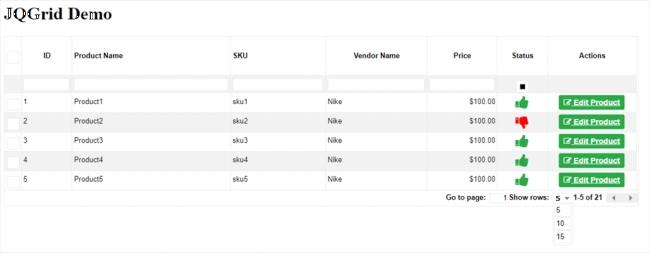
Image2
Now, I am going step by step to show you the function. Select all or specific product checkboxes as shown in the below screen and after that, click "EDIT PRODUCT" button which will call the post request.
Image2
Now, I am going step by step to show you the function. Select all or specific product checkboxes as shown in the below screen and after that, click "EDIT PRODUCT" button which will call the post request.
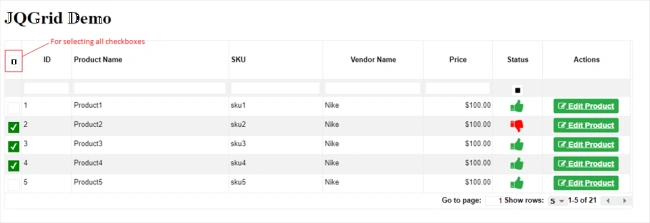
Image3
Here, after calling the Edit button of any selected product, you move to another page. You can do everything as per your project's requirement, but after coming back again, you need to maintain all the states of controls as they are. Because, once there are many records in jqGrid, it is very frustrating for the user to search and find all the selected products again.

Image4
So, I will show you after coming back that the state of controls is saved as it is.
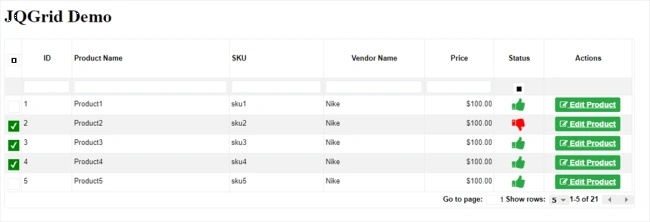
Image5
SEARCHING
Now, in the same way as the above checkbox functionality, you can use searching, filtering, sorting and paging functionality. I will show you just images of it. You can run the demo and experience it for yourself.
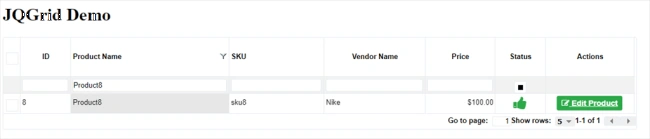
Image6
Filtering/Sorting
Here, you can see there are 3 types of sorting given by jqGrid -
1) Ascending
2) Descending
3) No sort.
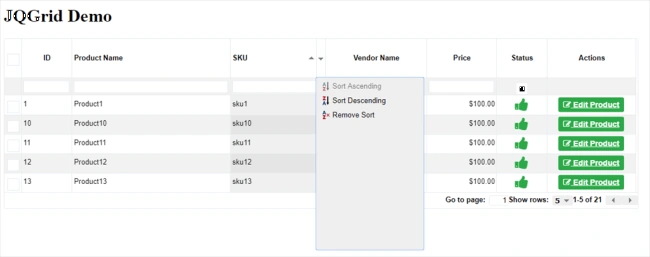
Image7
Status Filtering(ACTIVE)
Here, you can see that if you want to get products which are in an active status, then you can do the following.
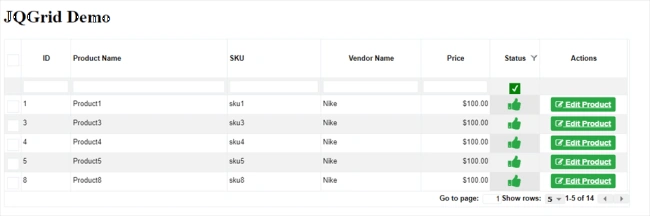
Image8
Status Filtering(IN-ACTIVE)
Here, you can see that if you want to get products which are in inactive status than, you can do this.
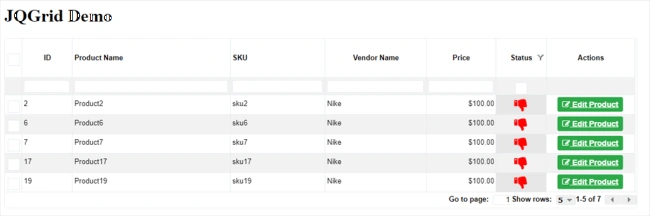
Image9
Paging
Here, you can see that you can move to the third page with the use of paging functionality.
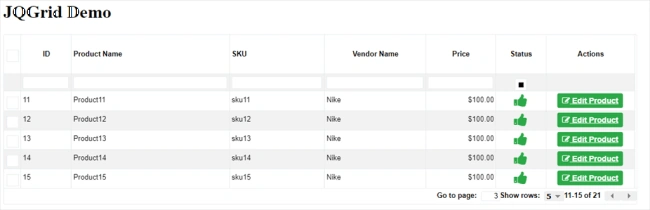
Image10
Another Important thing to find while you are using jqGrid is that you need to find the event/trigger of the controls. So, I will show you a simple solution, which is to just use developer tool and click on the control for which you want to find the event. Now, go to event listener of that control and you will find event/trigger from there, as shown below.
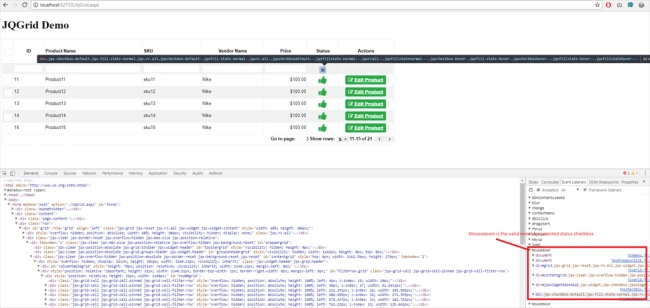
Image11
I hope you will like this article and may use it for your projects. Suggestions are welcome.
Thanks in advance!
B PatelPosted Feb 26, 2018, 10:47 PM
Very good article..explain in very details....not found anywhere so depth article.was looking for solution and found here ...thanks for sharing
Bhavesh JadavPosted Feb 26, 2018, 10:25 PM
Great article...........
Naresh SinghalPosted Feb 26, 2018, 10:16 PM
Nicely Explained with example....helped it.........Thanks for sharing Prakash Chasiya
Bhavesh JadavPosted Feb 26, 2018, 10:16 PM
It's very good article with awesome design using JqGrid. Thanks to share.
Bikash SahuPosted Feb 26, 2018, 10:11 PM
Well done! Nice article sir.
Sumit ChaudharyPosted Feb 26, 2018, 10:08 PM
Very well explained.
Manav PandyaPosted Feb 26, 2018, 11:33 AM
Well beginning sir , keep it up by posting such stuff , Thanks
Hiten PandyaPosted Feb 26, 2018, 10:45 AM
Thank you for sharing Prakash sir....
Dharmraj ThakurPosted Feb 26, 2018, 10:45 AM
Well done....... @Prakash Chasiya