

How it Works
Let’s take a quick look at how the work is going to be done.
- Generate a customized token by each HTTP request.
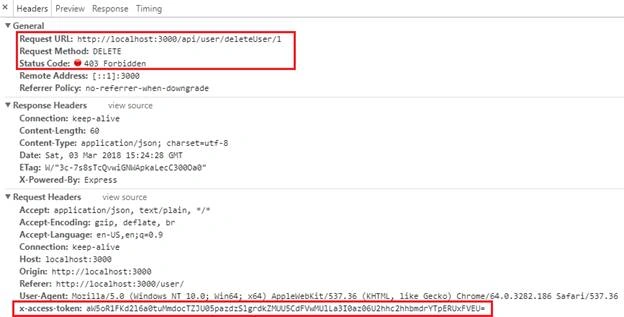
- Pass it through request header (x-access-token)
- Server extracts the token from each request
- Verify the custom token by regenerating in server
- If token matches, then system checks the user permissions from the database
- Otherwise, the system will respond with a status code of 403/404
Prerequisites
It’s highly recommended that you review these previous posts.
- Startup NodeJS - http://www.c-sharpcorner.com/article/how-to-start-with-node-js
- Package Manager NodeJS - http://www.c-sharpcorner.com/article/node-js-package-manager-vs2017
- Basic Templating - http://www.c-sharpcorner.com/article/basic-templating-using-node-js-and-express
- Learn MEAN Stack - http://www.c-sharpcorner.com/article/learn-about-mean-stack
Let’s get started
Previously we have created User table in the database; now, we need to create another table named ”UserAuthorization/Authorization”.
- CREATE TABLE [dbo].[Authorization](
- [Id] [int] NOT NULL,
- [UserId] [nvarchar](50) NULL,
- [CanView] [bit] NULL,
- [CanPost] [bit] NULL,
- [CanPut] [bit] NULL,
- [CanDelete] [bit] NULL,
- CONSTRAINT [PK_Authorization] PRIMARY KEY CLUSTERED
- (
- [Id] ASC
- )WITH (PAD_INDEX = OFF, STATISTICS_NORECOMPUTE = OFF, IGNORE_DUP_KEY = OFF, ALLOW_ROW_LOCKS = ON, ALLOW_PAGE_LOCKS = ON) ON [PRIMARY]
- ) ON [PRIMARY]
- GO
Add a new Stored Procedure to validate the user action.
- CREATE PROCEDURE [dbo].[UserAuthorization]
- @Userid NVarchar(250),
- @Methodtype NVarchar(250)
- AS
- BEGIN
- -- SET NOCOUNT ON added to prevent extra result sets from
- -- interfering with SELECT statements.
- SET NOCOUNT ON;
- -- Insert statements for procedure here
- SELECT CASE WHEN result = 1 THEN 'true' ELSE 'false' END AS result FROM
- (
- SELECT CASE
- WHEN @Methodtype = 'GET' THEN [CanView]
- WHEN @Methodtype = 'POST' THEN [CanPost]
- WHEN @Methodtype = 'PUT' THEN [CanPut]
- WHEN @Methodtype = 'DELETE' THEN [CanDelete]
- ELSE 0
- END AS result
- FROM [dbo].[Authorization] WHERE [UserId] = @Userid
- )AUTH
- END
- --EXEC UserAuthorization 'Shashangka', 'GET'
- GO
We are done with the database work. We are going to start from our previous sample of the application. Download it from GitHub, then open the application using Visual Studio 2017. In our application, we need to modify both client-side and server-side. First, we are going to modify in client-side.
Client-Side
Let’s get started with the client-side first. Here we are going to generate the token based on several hash processes with HMAC SHA256 & Base64 encoding.
Here, HMAC is for Hash Message Authentication Code & SHA256 is the hash function.
Get more: https://en.wikipedia.org/wiki/HMAC
Token Generation
We need to add these two libraries to our layout page to enable the hash/encoding process.
- <script src="/javascripts/hmac-sha256.js"></script>
- <script src="/javascripts/enc-base64-min.js"></script>
The below function is generating the token in client-side which is passed through each HTTP request header.
- function generateSecurityToken(actionType, loggedUser) {
- var model = {
- username: loggedUser,
- key: actionType,
- userAgent: navigator.userAgent.replace(/ \.NET.+;/, '')
- };
- var message = [model.username, model.userAgent].join(':');
- var hash = CryptoJS.HmacSHA256(message, model.key);
- var token = CryptoJS.enc.Base64.stringify(hash);
- var tokenId = [model.username, model.key].join(':');
- var tokenGenerated = CryptoJS.enc.Utf8.parse([token, tokenId].join(':'));
- return CryptoJS.enc.Base64.stringify(tokenGenerated);
- };
Create a .js file in public/javascripts folder with the name of “authorization.js”, copy the code snippet then paste it.
Code Explanation
From token generation function, we can see the hash is generated by cryptographic hash function
var hash = CryptoJS.HmacSHA256(message, model.key);
Here, the first argument is the message to hash & the second one is the secret key to authenticate the message.
Get more: https://code.google.com/archive/p/crypto-js
Finally, the token is encoded by Base64 encoding type.
Layout.html
Now call the “authorization.js” file to layout page like below.
- <!--Token Generation-->
- <script src="/javascripts/hmac-sha256.js"></script>
- <script src="/javascripts/enc-base64-min.js"></script>
- <script src="/javascripts/authorization.js"></script>
AngularJS Controller
Let’s modify our existing “UserController” to add the token in request header with each HTTP method.
For GET Method
headers: { 'x-access-token': generateSecurityToken('GET', $scope.loggedUser)}
For POST Method
headers: { 'x-access-token': generateSecurityToken('POST', $scope.loggedUser)}
For PUT Method
headers: { 'x-access-token': generateSecurityToken('PUT', $scope.loggedUser)}
For DELETE Method
headers: { 'x-access-token': generateSecurityToken('DELETE', $scope.loggedUser) }
Finally, the UserController
- templatingApp.controller('UserController', ['$scope', '$http', function ($scope, $http) {
- $scope.title = "All User";
- $scope.loggedUser = 'Shashangka';//Change Username according to the database
- $scope.ListUser = null;
- $scope.userModel = {};
- $scope.userModel.Id = 0;
- getallData();
- //******=========Get All User=========******
- function getallData() {
- $http({
- method: 'GET',
- url: '/api/user/getAll/',
- headers: { 'x-access-token': generateSecurityToken('GET', $scope.loggedUser) }
- }).then(function (response) {
- $scope.ListUser = response.data;
- }, function (error) {
- showNotif(error.data.message);
- console.log(error);
- });
- };
- //******=========Get Single User=========******
- $scope.getUser = function (user) {
- $http({
- method: 'GET',
- url: '/api/user/getUser/' + parseInt(user.Id),
- headers: { 'x-access-token': generateSecurityToken('GET', $scope.loggedUser) }
- }).then(function (response) {
- $scope.userModel = response.data[0];
- //console.log($scope.userModel);
- }, function (error) {
- showNotif(error.data.message);
- console.log(error);
- });
- };
- //******=========Save User=========******
- $scope.saveUser = function () {
- $http({
- method: 'POST',
- url: '/api/user/setUser/',
- data: $scope.userModel,
- headers: { 'x-access-token': generateSecurityToken('POST', $scope.loggedUser) }
- }).then(function (response) {
- showNotif("Data Saved")
- $scope.reset();
- getallData();
- }, function (error) {
- showNotif(error.data.message);
- console.log(error);
- });
- };
- //******=========Update User=========******
- $scope.updateUser = function () {
- $http({
- method: 'PUT',
- url: '/api/user/putUser/',
- data: $scope.userModel,
- headers: { 'x-access-token': generateSecurityToken('PUT', $scope.loggedUser) }
- }).then(function (response) {
- showNotif("Data Updated")
- $scope.reset();
- getallData();
- }, function (error) {
- showNotif(error.data.message);
- console.log(error);
- });
- };
- //******=========Delete User=========******
- $scope.deleteUser = function (user) {
- var IsConf = confirm('You are about to delete ' + user.Name + '. Are you sure?');
- if (IsConf) {
- $http({
- method: 'DELETE',
- url: '/api/user/deleteUser/' + parseInt(user.Id),
- headers: { 'x-access-token': generateSecurityToken('DELETE', $scope.loggedUser) }
- }).then(function (response) {
- showNotif("Data Deleted")
- $scope.reset();
- getallData();
- }, function (error) {
- showNotif(error.data.message);
- console.log(error);
- });
- }
- };
- //******=========Login User=========******
- $scope.loginUser = function () {
- $http({
- method: 'POST',
- url: '/api/user/login/',
- data: $scope.userModel
- }).then(function (response) {
- $scope.reset();
- }, function (error) {
- console.log(error);
- });
- };
- //******=========Clear Form=========******
- $scope.reset = function () {
- var msg = "Form Cleared";
- $scope.userModel = {};
- $scope.userModel.Id = 0;
- showNotif(msg)
- };
- }]);


Sagar Pandurang KapPosted Mar 5, 2018, 3:15 AM
Great article.Keep sharing.....
imran osmanzaiPosted Mar 5, 2018, 1:27 AM
Thanks Nice Description.