
Introduction
Router is an important concept and part of Angular 4 for the navigation between different component's View. It loads the different components, or in AngularJS concept, you can say different partial pages based on the requested router. It is also useful to pass the data from one component to different components. AngularJS has also the same type of concept with the use of $state.go() for navigation and transfer of the data.
Router Navigate
It is used to navigate and pass the data from one component to another component. It is required to import like below for the use of router.
- import { Router } from '@angular/router';
- constructor(private nutanixervice: NutanixService, private router:Router) {
- this.curPage = 1;
- this.pageSize = 10;
- }
Create a folder project structure for your learning project, like below.
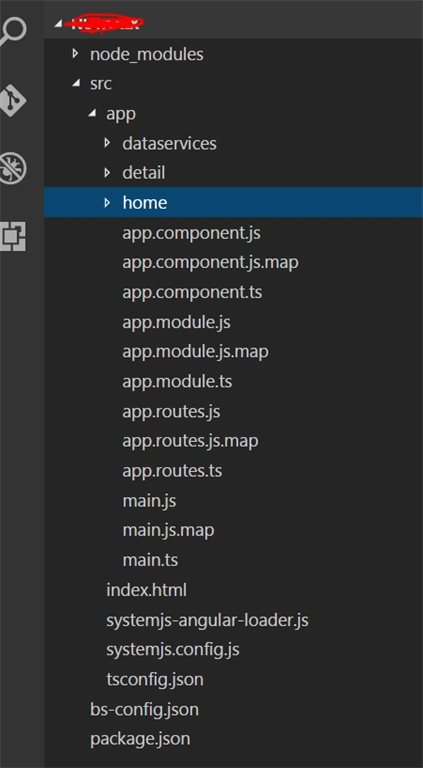
Here, some .js files are auto-generated JavaScript files. You need to concentrate on .ts files. In the above root structure, I have created two separate components - home and details. I will explain the navigation between these two components.
Component "home"
Create three different files one by one like below,
home-list.component.ts
All home related logics are defined into this component.
- import { Component, OnInit } from '@angular/core';
- import { NutanixService } from '../dataservices/nutanix.service';
- import { Observable } from 'rxjs/Observable';
- import { Router } from '@angular/router';
- @Component({
- templateUrl: './app/home/home.html'
- })
- export class HomeListComponent implements OnInit{
- nutaNixGitHubData: any;
- curPage : number;
- pageSize : number;
- private selectedObj : any;
- private ValueId : number = 1;
- private selectedName: 'java';
- technologies = [
- { id: 1, name: "java" },
- { id: 2, name: "python" },
- { id: 3, name: "javaScript" },
- { id: 4, name: "php" },
- { id: 5, name: "ruby" }
- ];
- constructor(private nutanixervice: NutanixService, private router:Router) {
- this.curPage = 1;
- this.pageSize = 10;
- }
- ngOnInit() {
- this.getNutanixRepo();
- }
- currentPageClick() {
- this.curPage = this.curPage+1;
- this.getNutanixRepo();
- }
- prevPageClick() {
- this.curPage = this.curPage-1;
- this.getNutanixRepo();
- }
- getNutanixRepo() {
- this.nutanixervice.getNutanixGitHubData(this.selectedName, String(this.curPage)).subscribe(
- (data)=>{
- this.nutaNixGitHubData = data.items;
- console.log(this.nutaNixGitHubData);
- });
- }
- numberOfPages(){
- return 10;
- };
- private selectedValueObj(id: any) {
- this.ValueId = (id.srcElement || id.target).value;
- for (let i = 0; i < this.technologies.length; i++) {
- if (this.technologies[i].id == this.ValueId) {
- this.selectedObj = this.technologies[i];
- this.selectedName = this.selectedObj.name;
- this.getNutanixRepo();
- }
- }
- }
- showDetails(id: any){
- console.log(id);
- this.router.navigate(['/detail', {'id': id}]);
- };
- }
So, I have written one method like below.
- showDetails(id: any){
- console.log(id);
- this.router.navigate(['/detail', {'id': id}]);
- };
home.html
Binding and UI of home component will display on home.html file.
- <div>
- <span>Please Select Technology:</span> <select [(ngModel)]="ValueId" (change)="selectedValueObj($event)">
- <option *ngFor="let Value of technologies" [value]="Value.id" >
- {{Value.name}}</option></select>
- </div>
- <h3>List of Source Code Repository</h3>
- <div class="row">
- <div class="col-md-6" *ngFor="let nutanixData of nutaNixGitHubData" (click) ="showDetails(nutanixData.owner.login)">
- <div class="panel">
- <div class="panel-body panelbody">
- <div class="col-md-3"> <img src="{{nutanixData.owner.avatar_url}}"
- alt="avatar" height="200" width="180"></div>
- <div class="col-md-6">
- <div> <span>ID: {{nutanixData.id}}</span> </div>
- <div> <span>Name: {{nutanixData.name}}</span> </div>
- <div> <span>Full name: {{nutanixData.full_name}}</span> </div>
- <div> <span>Owner Login: {{nutanixData.owner.login}}</span> </div>
- <div> <span>Owner ID: {{nutanixData.owner.id}}</span> </div>
- <div> <span>Url: <a href="{{nutanixData.owner.url}}">{{nutanixData.owner.url}}</a></span> </div>
- <div> <span>Type: {{nutanixData.owner.type}}</span> </div>
- <div> <span>Size: {{nutanixData.size}}</span> </div>
- <div> <span>No. of Forks: {{nutanixData.forks}}</span> </div>
- </div>
- </div>
- </div>
- </div>
- </div>
- t;div style="text-align: center; margin-bottom: 10px;" *ngIf="nutaNixGitHubData">
- <button [disabled] ="curPage == 1" (click)="prevPageClick()">PREV</button>
- <span>Page {{curPage}} of {{ numberOfPages() }}</span>
- <button [disabled] = "curPage >= 9" (click) ="currentPageClick()">NEXT</button>
- lt;/div>
- <div class="col-md-6" *ngFor="let nutanixData of nutaNixGitHubData" (click) ="showDetails(nutanixData.owner.login)">
This is the routing strategy file for "home" component.
- import { Routes } from '@angular/router';
- import { HomeListComponent } from './home-list.component';
- export const homeRoutes: Routes = [
- { path: 'home', component: HomeListComponent }
- ];
Now, I will move to another component.
Component "detail"
Another component, i.e., "detail" is navigated through "home" component. Create three different files one by one, like below.
detail.component.ts
The detail.component.ts is just another component. It renders when it is being navigated through home components.
- import { Component, OnInit } from '@angular/core';
- import { ActivatedRoute } from '@angular/router';
- import { NutanixService } from '../dataservices/nutanix.service';
- import { Observable } from 'rxjs/Observable;
- @Component({
- templateUrl: './app/detail/repodetail.html'
- })
- export class DetailComponent implements OnInit {
- private selectRepoOwner;
- nutaNixOwnerData: any;
- gitHubOwnerFollowers: any;
- constructor(private route: ActivatedRoute, private nutanixervice: NutanixService) {}
- ngOnInit() {
- this.sub = this.route.params.subscribe(params => {
- this.selectRepoOwner = params['id'];
- this.getNutOwneranixRepo();
- this.getGitOwnerFollowers();
- });
- }
- getNutOwneranixRepo() {
- this.nutanixervice.getNutanixGitHubOwnerData(this.selectRepoOwner).subscribe(
- (data)=>{
- this.nutaNixOwnerData = data.items[0];
- console.log(this.nutaNixOwnerData);
- });
- }
- getGitOwnerFollowers() {
- this.nutanixervice.getGitHubOwnerFollowers(this.selectRepoOwner).subscribe(
- (data)=>{
- this.gitHubOwnerFollowers = data;
- console.log(this.gitHubOwnerFollowers);
- });
- }
- }
- import { ActivatedRoute } from '@angular/router';
Also, I have passed this route into this component's constructor like below.
- constructor(private route: ActivatedRoute) {}
So OnInit, this detail component will call the below method.
- ngOnInit() {
- this.sub = this.route.params.subscribe(params => {
- this.selectRepoOwner = params['id'];
- });
- }
repodetail.html
This file is just the UI part of detail component.
detail.routes.ts
This file contains the routing strategy logic of detail component.
- import { Routes } from '@angular/router';
- import { DetailComponent } from './detail.component';
- export const detailRoutes: Routes = [
- { path: 'detail', component: DetailComponent }
- ];
app.component.ts
This file contains the app level component routing links. Refer the below code for more details.
- import { Component, OnInit} from '@angular/core';
- @Component({
- selector: 'my-app',
- template: `
- <div class="row">
- <h1 Style=margin-left:10px;>Nutanix - TechScan</h1>
- </div>
- <div>
- <nav>
- <a class="mdl-navigation__link" [routerLink]="['/']">Home</a>
- </nav>
- <hr>
- </div>
- <div>
- <router-outlet></router-outlet>
- </div>
- `,
- })
- // App Component class
- export class AppComponent{
- }
[routerLink] is used to define the routing path.
app.routes.ts
This file contains app level routing strategy logic. It contains app level routing configuration detail.
- import { ModuleWithProviders } from '@angular/core';
- import { Routes, RouterModule } from '@angular/router';
- import { homeRoutes } from './home/home.routes';
- import { detailRoutes } from './detail/detail.routes';
- // Route Configuration
- export const routes: Routes = [
- {
- path: '',
- redirectTo: '/home',
- pathMatch: 'full'
- },
- ...homeRoutes,
- ...detailRoutes
- ];
- export const routing: ModuleWithProviders = RouterModule.forRoot(routes);
app.module.ts
This is the application level module file. It contains all the components, services, application level route details.
- import { NgModule } from '@angular/core';
- import { BrowserModule } from '@angular/platform-browser';
- import { FormsModule } from '@angular/forms';
- import { HttpModule, JsonpModule } from '@angular/http';
- import { AppComponent } from './app.component';
- import { HomeListComponent } from './home/home-list.component';
- import { DetailComponent } from './detail/detail.component';
- import { routing } from './app.routes';
- import {NutanixService} from '../app/dataservices/nutanix.service';
- @NgModule({
- imports: [
- BrowserModule,
- FormsModule,
- HttpModule,
- JsonpModule,
- routing
- ],
- declarations: [
- AppComponent,
- HomeListComponent,
- DetailComponent
- ],
- providers: [
- NutanixService
- ],
- bootstrap: [ AppComponent ]
- })
- export class AppModule {
- }
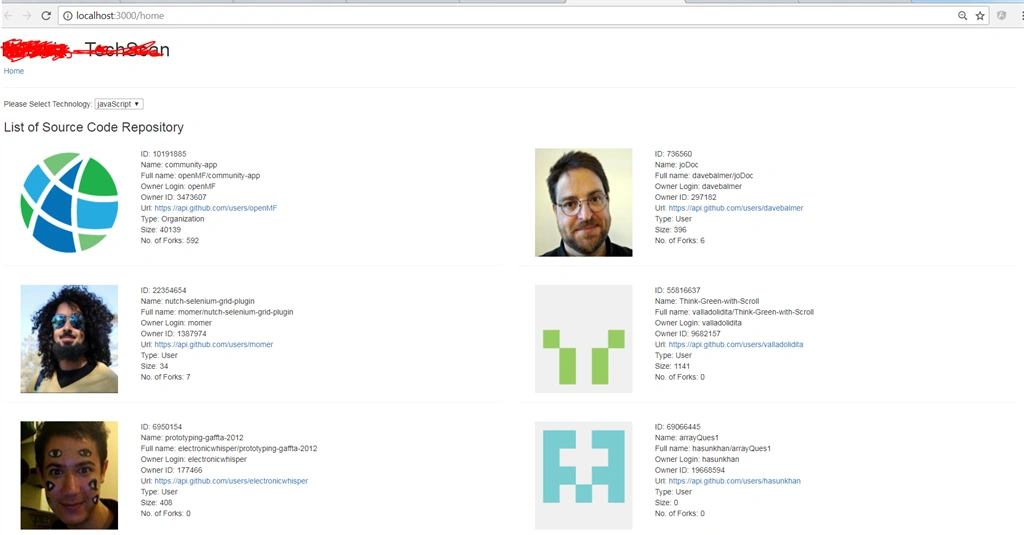
This is the "home" component. If the user clicks on any item, then it navigates to the "detail" component.
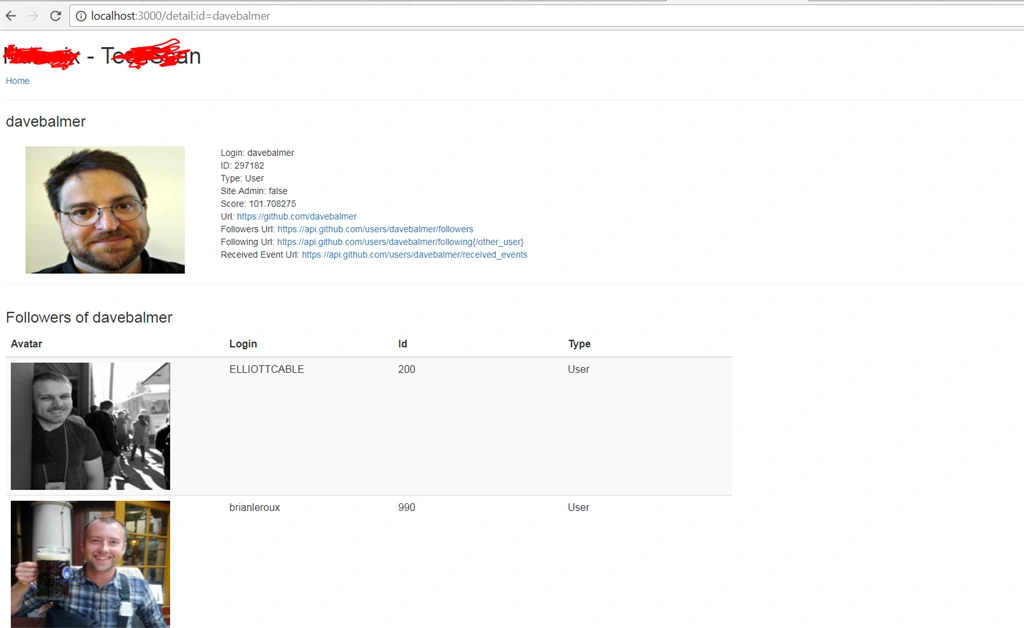
This is the "detail" component. It receives the "user data" from "home" component, navigates, and shows the related detail of the user.
I have attached the zipped project. You can download, unzip, and see the code.
Step to Execute the App
- Install and integrate Node.js
- Internet should be available
- Go to the root folder of the project -> e.g. D:\myapp\
- Open the command prompt for this path.
- Type command: npm start
- Application will launch in the browser.
Conclusion
Angular 4 routing is a very powerful concept. It provides an easy and very robust mechanism to navigate and transfer the data from one component to another component.
Join the conversation! Your thoughts help the community grow.