

Introduction:
Generally, we are going with PUTTY to operate the UNIX secure shell. Based on the putty configuration we can give hostname, Port Number, user name, and password to connect and operate the UNIX command secure shell.
Example
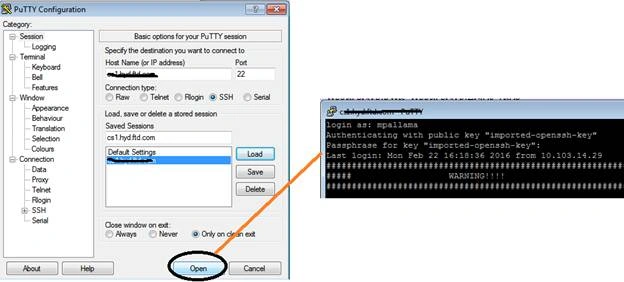
But it is not needed always, sometimes you may give an API interface to your application to operate Unix Secure shell. In this article I will demonstrate how to connect and interact a UNIX secure shell from native C# .NET application.
Before starting you must know about secure shell and its uses. I recommended reading the following:
- SSH is used to post file to UNIX SFTP (Secure File Transfer Protocol)
- SSH is a channel and it acts as a client to UNIX Server.
- SSH is a replacement thing for TELNET and unsecured Remote Shell.
- SSH allows Session Management
- SSH enabled Cryptography so that PUBLIC and PRIVATE key authentication supports.
- SSH provides Client login and execute UNIX commands
- SSH is one of the Message Passing Interface (MPI).
- SSH is a protocol and server.
- SSH can enable from mobile.
Conceptual View:
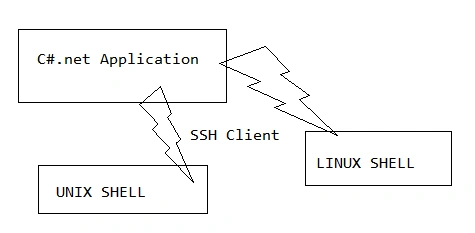
So, you can operate UNIX Commands from your C# .NET applications with SSH Client.
How to Develop SSH Client?
The following nugget packages will help you to establish a connection between Shells to C# .NET (Windows)
PM > Install-Package SSH.Client
Or
PM> Install-Package SSH.NET -Version 2013.4.7
How to enable SSH?
IConnectionInfoInternal, IConnectionInfo used to enable SSH process. ConnectionInfo class accomplishes all connection policies. The following code helps you to get a basic connection.
- ConnectionInfoconnInfo = newConnectionInfo("HOSTNAME", postnumber, "username",
- newAuthenticationMethod[]
- {
- newPasswordAuthenticationMethod("username", "password"),
- });
The following series of steps explains about RSA SSH Connection. I will show you the process with a GUI pattern and later you can verify it with C# coding. See the below screen to get fair idea:

Wrong passphrase identified if you entered any wrong one,


The following code helps you to do the above process programmatically.
- public ConnectionInfoCreateConnection()
- {
- const string PrivateKeyFilePath = @ "D:\SSH-RSA";
- ConnectionInfo connection;
- ConnectionInfoconnInfo = new ConnectionInfo("HostName", portNumber, "username",
- new AuthenticationMethod[] {
- new PasswordAuthenticationMethod("Username", "password"),
- new PrivateKeyAuthenticationMethod("username", newPrivateKeyFile[]
- {
- new PrivateKeyFile(PrivateKeyFilePath, "passphrase")
- }),
- });
- return connInfo;
- }
- static void Main(string[] args)
- {
- try
- {
- using(varssh = newSshClient(newProgram().CreateConnection()))
- {
- ssh.Connect();
- var command = ssh.CreateCommand("uptime");
- var result = command.Execute();
- Console.WriteLine("yup ! UNIX Commands Executed from C#.net Application");
- Console.WriteLine("Response came form UNIX Shell" + result);
- ssh.Disconnect();
- }
- } catch (Exception ex)
- {
- Console.WriteLine(ex.Message.ToString());
- }
- Console.Read();
- }

Find the complete source code from my MSDN Samples.
References
Shubham KumarPosted Feb 26, 2016, 5:41 AM
nice
Sibeesh VenuPosted Feb 25, 2016, 12:43 AM
Nice Share
Raja TPosted Feb 24, 2016, 11:03 PM
Good.Thanks for sharing
Humayun Kabir MamunPosted Feb 24, 2016, 10:59 PM
Nice...
Mohammed IbrahimPosted Feb 24, 2016, 3:56 PM
nice