

Introduction
- Cosmos DB allows you to store a huge amount of data
- To query this huge data may impact the performance
- Partitioning allows you to group data in partitions and provides better performance.
Partition Key
- Partition key is the JSON property (or path) within your documents that can be used by Cosmos DB to distribute data among multiple partitions
- Partition key decides the placement of documents
- All the documents belonging to the same partition value of partition key are group together into a logical shared partition
- Once you set the partition key, you cannot change it
- It's a best practice to have a partition key with many distinct values (hundreds to thousands at a minimum).
- For example, let's say that you're storing JSON data about employees and your partition key is "department." Then all documents with the value of "department" equal to "engineering" will be stored in the same partition. Similarly, all documents with "department" of "marketing" will be stored in the same partition.
Partition
- Azure Cosmos DB stores data in a number of physical partitions
- Collection is a logical container of physical partitions
- Every partition in Azure Cosmos DB has a fixed amount of SSD-backed storage associated with it and is replicated for high availability.
- Partition management is fully managed by Azure Cosmos DB. So no need to write any code.
- Each partition hosts one or more Partition Keys
How Does Partition Work?
- By default Azure creates one default partition
- While inserting a new document, Azure Cosmos DB hashes the partition key value and uses the hashed result to determine which partition to store the item in.
- Once the size of partition reached to the threshold, Azure created another physical partition and moves big size logical partition to newly created partition
- The developer can provide a partition key while performing CRUD operations to optimize query performance.
- Data belonging to the same value of partition key always logically grouped together and stored in the particular physical partition.
How to Choose the Right Partition Key?
- Choosing a partition key purely depends on the structure of data
- It is important to choose a partition key property that has a number of distinct values
- An ideal partition key is one that appears frequently as a filter in your queries and has sufficient cardinality to ensure your solution is scalable.
- If the chosen partition key doesn't have many distinct values then all queries will get fired to a single partition which may slow down performance.
- If you are working on a multi-tenant application, then choosing TenantId as a partition key is a good choice.
- If you are creating an application for families, then zipping the code as partition key is a good choice
How to create Partitioned Collection
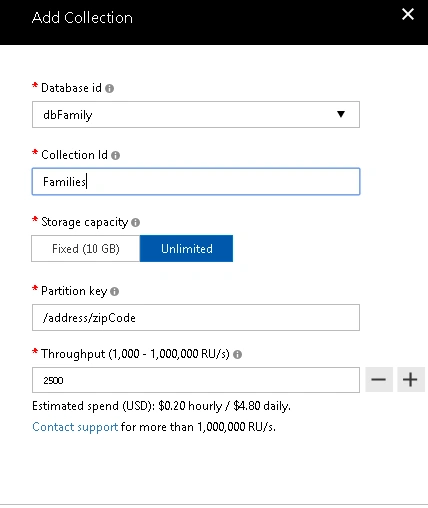
- Login to Azure Portal
- Go to Cosmos DB account
- Select storage capacity as Unlimited (Partitioning is not allowed for fixed storage)
- Give partition key value or path (e.g. /address/zipcode)
- Select throughput
- Click Ok
Monitor Partitioned Data
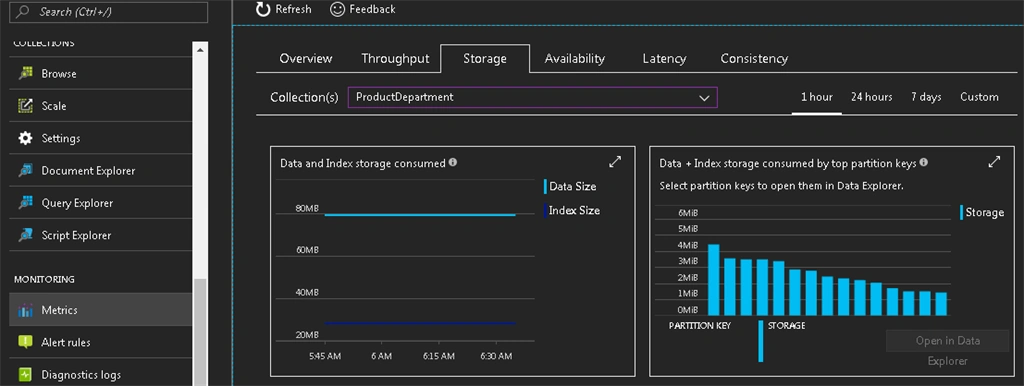
You can monitor how data is partitioned across partitions
- Login to Azure Portal
- Go to Cosmos DB account
- Click on Metrics Option
- Select Storage tag
- Select Collection name for which you want to view data
Yogesh KhurpePosted Feb 8, 2021, 2:23 PM
Nice Article.!!
Abhijit DPosted Jun 21, 2020, 1:51 AM
Have created 5 containers out of Two are with same PartitionKey - possible? Given partition key is same for two different Containers then get belongs to same Physical Partition?
Abhijit DPosted Jun 21, 2020, 1:51 AM
As Multiple containers can belongs to same Physical Partition, l=is vice a versa true? i.e. Can Two Or More Physical Partitions belongs to same container?
Garet JaxPosted Jun 19, 2020, 9:50 AM
Hi Mangesh, I am working on creating records in my db where I have set my Partition Key to a property on my document which I named PartitionKey. When I call CreateItemAsync<T>() method one of the optional parameters is new PartitionKey. Would I set that the the value of the PartitionKey property on the document I'm about to write or the path to the PartitionKey ("/PartitionKey")?
ravi ShankarPosted Jun 3, 2020, 1:50 AM
Hi Mangesh, I have added partition or shard key in mongodb documents. but hw to create partition key or shard key in collection azure cosmosdb.
ravi ShankarPosted Jun 3, 2020, 1:48 AM
Hi Mangesh,
Harish HebbarPosted Jun 1, 2020, 1:06 PM
Hi Mangesh, Nice article. I am facing issue with duplicate records in cosmos db having partitionkey defined based on multple fields+Randomgenerator however id column is unique for same record. ideally for the same data/message , partitionkey & id are getting unique values storing duplicate data
Ravikumar GPosted May 19, 2020, 1:37 AM
Sweet an Short
Darth InfinityPosted Aug 28, 2019, 2:17 PM
Is it possible to create a combined partition key by the value of two of the document fields?
Leszek KocPosted Apr 8, 2019, 4:16 AM
> By default Azure creates one default partition > While inserting a new document, Azure Cosmos DB hashes the partition key value and uses the hashed result to determine which partition to store the item in. ?? Does it mean it will create new partition when I insert two documents with different partition keys?
Akshay PatelPosted Jan 1, 2018, 7:17 AM
Hello Mangesh, In your article you mentioned 'Once size of partition reached to threshold, Azure created another physical partition and moves big size logical partition to newly created partition', can you please mention if any specific configuration is required to get this. As in my scenario, some guid is the partition key and once that partition size goes upto 10 GB, it stops writing in that partition and also didn't find any new partition created by azure. Please guide me this regard. Thank you.
Sagar Pandurang KapPosted Dec 19, 2017, 12:04 AM
Good explaination..