

I am here to continue the series related to .NET interview preparation. Today, we will discuss the common questions related to the sorted collections and present the answers in an easy way.
Link to previous posts,
- Preparing For .NET Interviews: Framework - Part One
- Preparing For .NET Interviews: Basic Types - Part Two
- Preparing For .NET Interviews: Parameters - Part Three
- Preparing For .NET Interviews: Operators - Part Four
- Preparing For .NET Interviews: Equality - Part Five
- Preparing For .NET Interviews: OOPs - Part Six
- Preparing For .NET Interviews: Abstract Class & Interface - Part Seven
- Preparing For .NET Interviews: Preparing For .NET Interviews: Traditional And Generic Collections - Part Eight
So let’s take questions one by one,
1. What are sorted collections in .NET?
The sorted collections are the collections used to provide the built-in sorting capability. Following are the sorted collections available in .NET.
- SortedList
- SortedDictionary
- SortedSet
2. What are the similarities and the differences between Sorted Dictionary and Sorted List? Also, provide the uses scenarios.
Both SortedDictionary and SortedList are used in the cases when sorting is required to happen automatically based on the keys. However, they have some differences in the uses and performance as follows.
- SortedDictionary(K, V) generic class is a binary search tree with O(log n) retrieval. On the other side, SortedList (K, V) generic class uses binary search over the sorted array and it too has O (log n) retrieval.
- For unsorted data, SortedDictionary has faster addition and removal i.e. O(log n)than SortedList O (n).
- For already sorted data, SortedList is faster i.e. O (1) than SortedDictionaryO(log n).
- SortedDictionary can only be accessed, using a key whereas SortedList can be retrieved both by key and an index.
- SortedList uses less memory than SortedDictionary.
To summarize, SortedDictionary<K, V> should be used, when-
- More inserts and delete operations are required.
- Data is not ordered.
- Key access is enough and index access is not required.
- Memory is not a bottleneck
Sotted List<K, V> should be used, when-
- More lookups, fewer inserts, and delete operations are required.
- Data is already sorted (if not all, mostly it is sorted)
- Index access is required.
- Memory is an overhead.
3. How to use generic SortedList. Explain with example.
Generic SortedList is similar to the list with the difference that it automatically keeps the data sorted by the keys.
Let’s understand SortedList by a simple example.
- SortedList<int, string>mySortedList = newSortedList<int, string>();
- mySortedList.Add(102, "Prakash");
- mySortedList.Add(101, "Aradhana");
- mySortedList.Add(104, "Beeda");
- mySortedList.Add(103, "Satna");
- mySortedList.Add(105, "Amarpatan");
- //Get the index by passing key
- intfirstKey = mySortedList.Keys.First();
- intfirstIndex = mySortedList.IndexOfKey(firstKey);
- Console.WriteLine("Index of key {0} is: {1}", firstKey, firstIndex);
- //Get the value by passing the index
- Console.WriteLine("Value of index {0} is: {1}", firstIndex, mySortedList.Values[firstIndex]);
- //Get the value by key as default indexer is implemented using key
- Console.WriteLine("Value of key {0} is: {1}", firstKey, mySortedList[firstKey]);
- Console.WriteLine("\nPrinting the SortedList:");
- foreach (varkvpinmySortedList)
- {
- Console.WriteLine("Key = {0}, Value = {1}", kvp.Key, kvp.Value);
- }
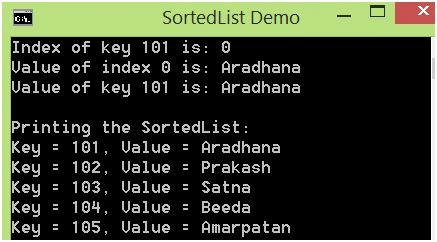
- SortedDictionary < int, string > myDict = newSortedDictionary < int, string > ();
- myDict.Add(102, "Prakash");
- myDict.Add(101, "Aradhana");
- myDict.Add(104, "Beeda");
- myDict.Add(103, "Satna");
- myDict.Add(105, "Amarpatan");
-
- //Get the index by passing key
-
- intfirstKey = myDict.Keys.First();
- //intfirstIndex = myDict.IndexOfKey(firstKey); //Error as SortedDictionary can't be accessed by index
- //Get the value by key as default indexer is implemented using key
- Console.WriteLine("Value of key {0} is: {1}", firstKey, myDict[firstKey]);
- Console.WriteLine("\nPrinting the SortedDictionary:");
- foreach(varkvpinmyDict)
- {
- Console.WriteLine("Key = {0}, Value = {1}", kvp.Key, kvp.Value);
- }
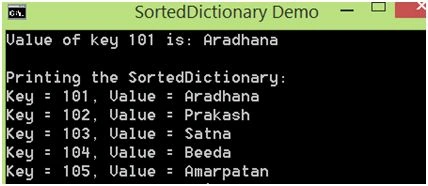
- SortedSet < string > mySet = newSortedSet < string > ();
- mySet.Add("Prakash");
- mySet.Add("Aradhana");
- mySet.Add("Beeda");
- mySet.Add("Satna");
- mySet.Add("Prakash");
- mySet.Add("Beeda");
- mySet.Add("Amarpatan");
- Console.WriteLine("Printing the SortedSet:");
- foreach(var value inmySet)
- {
- Console.WriteLine(value);
- }
- mySet.Remove("Prakash");
- Console.WriteLine("\nPrinting the SortedSet After Removing an element:");
- foreach(var value inmySet)
- {
- Console.WriteLine(value);
- }
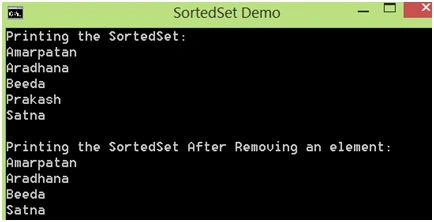
- SortedSet removes the duplicate values, even if we manually add them (Prakash and Beeda added twice, but in the output, they are appearing only once).
- Sorting is done automatically after adding values.
- Sorting is maintained for the remaining values after removing an existing element.
You can also download the attached demo project (SortedCollectionsDemo.zip) to go through the source code used in the article.
Prakash TripathiPosted Jun 12, 2016, 2:41 AM
Thnx Vignesh.
Vignesh ManiPosted Jun 11, 2016, 4:40 PM
nice one
Prakash TripathiPosted Jun 10, 2016, 1:01 PM
Thnx Rakesh.
RakeshPosted Jun 10, 2016, 12:41 PM
Good one
Prakash TripathiPosted Jun 10, 2016, 3:08 AM
Thnx Arvind.
Arvind SinghPosted Jun 10, 2016, 2:44 AM
good series..
Prakash TripathiPosted Jun 10, 2016, 2:04 AM
Thnx Raja.
RajaPosted Jun 10, 2016, 12:35 AM
Nice One...
Prakash TripathiPosted Jun 10, 2016, 12:18 AM
Thnx Debasis.
Debasis SahaPosted Jun 10, 2016, 12:17 AM
Good one..
Prakash TripathiPosted Jun 10, 2016, 12:02 AM
Thnx Santha.
Santhakumar MunuswamyPosted Jun 9, 2016, 11:59 PM
Thank you for sharing