

What is Apache Cordova?
Apache Cordova is a platform that is used for building mobile apps using HTML, CSS, and JS. We can think of Cordova as a container for connecting our web app with native mobile functionalities. Web applications cannot use native mobile functionalities by default. This is where Cordova comes in. It offers a bridge for connection between web apps and mobile devices.
By using Cordova we can make hybrid mobile apps that can use the camera, geolocation, file system, and other native mobile functions. Apache Cordova is an Open Source project, that aims at letting mobile developers build applications for all major mobile platforms using HTML5 technologies.
Apache Cordova is available for the following platforms: iOS, Android, Blackberry, Windows Phone, Palm WebOS, Bada, and Symbian.
Who will use Apache Cordova?
- The User interface for Apache Cordova applications is created using HTML, CSS, and JavaScript. It's a free, open-source framework for building cross-platform native applications using HTML5.
- It's a write-once, run-anywhere solution specifically designed for mobile.
- Those who know HTML, know they can easily develop Cross-platform Mobile Apps.
- Apache Cordova is very simple to create and use. It doesn't require deep technical knowledge or programming skills. So Students or Mobile App development beginners can very easily develop their apps through Apache Cordova.
When do we use Apache Cordova?
Use Apache Cordova if you are,
- a mobile developer who wants to extend an application across more than one platform, without having to re-implement it with each platform's language and tool set.
- a web developer who wants to deploy a web app that's packaged for distribution in various app store portals.
- a mobile developer interested in mixing native application components with a WebView (special browser window) that can access device-level APIs, or if you want to develop a plugin interface between native and WebView components.
- learning about HTML, CSS, and JavaScript we can use Apache Cordova. We can develop the cross-platform App using Apache Cordova
- a beginner or have fewer programming skills for App development, we can use Apache Cordova. We can easily build the App.
Why do we use Apache Cordova?
Apache Cordova’s architecture is extendable, and built around a plugin model. Anyone can create their own additional functionality for Cordova and publish it as a plugin. There are several components to a Cordova application.
The following diagram shows a high-level view of the Cordova Application Architecture.
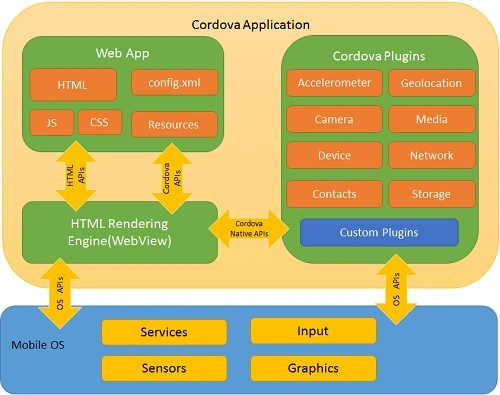
Cordova Features
- Command Line Interface (Cordova CLI): This is a tool that can be used for starting projects, building processes for different platforms, installing plugins, and lots of other useful things that make the development process easier.
- Cordova Core Components: Cordova offers a set of core components that every mobile application needs. These components will be used for creating the base of the app so we can spend more time implementing our own logic.
- Cordova Plugins: Cordova offers API that will be used for implementing native mobile functions to our JavaScript app.
Cordova Advantages
- Cordova offers one platform for building hybrid mobile apps so we can develop one app that will be used on different mobile platforms including IOS, Android, Windows Phone, Amazon, Blackberry, Firefox OS, Ubuntu, and Tizen.
- It is faster to develop hybrid apps than native apps so Cordova can save a lot of development time
- Since we are using JavaScript when working with Cordova, we don't need to learn platform-specific programming languages.
- There are huge amounts of community add-ons that can be used with Cordova. Lots of libraries and frameworks are optimized for working with it.
Limitations
- Hybrid apps are slower than native ones so it is not optimal to use Cordova for large apps that require lots of data and functionality.
- Cross-browser compatibility can create lots of issues. Most of the time we are building apps for different platforms so the testing and optimizing can take a lot of time since we need to cover a large number of devices and operating systems.
- Some plugins have compatibility issues with different devices and platforms. There are also some native APIs that aren't yet supported by Cordova.
Developer Requirements
- Any HTML &JS Editor
- Platform SDK - Android SDK(for Android), XCode(for IOS), Visual Studio

- Platform Emulator (usually provide along with SDK)
- Browser – Firefox, Chrome.
- Visual Studio 2015
- Visual Studio Tools for Apache Cordova.
How do I install Apache Cordova?
Use the Visual Studio Tools for Apache Cordova to build apps that run on iOS, Android, and Windows devices.
To use these tools, choose the Apache Cordova feature when you install Visual Studio. If you've installed Visual Studio already, you can always add the feature later. You'll need a computer that runs Windows 8, Windows 8.1, Windows 10, or Windows Server 2012 R2.
You need the following things.
Method 1. Choose the Apache Cordova feature when you install Visual Studio
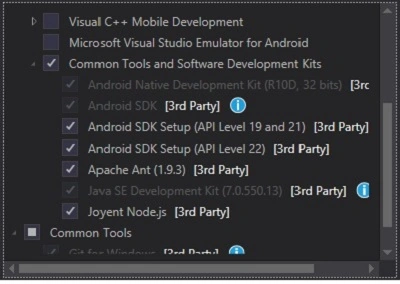
- In the Visual Studio installer, choose the Custom option, and then select the HTML/JavaScript (Apache Cordova) feature.
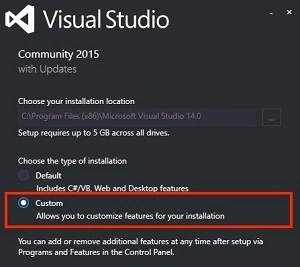
Method 2. Add the Apache Cordova feature after you install Visual Studio, If you've already installed Visual Studio, just modify it to include the tools.
- Open Control Panel -> Programs and Features, choose the Visual Studio 2015 item and then choose the Change button.
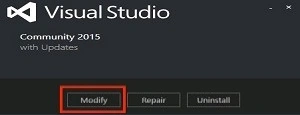
- In the setup wizard for Visual Studio, choose the Modify button.
- In the list of optional features to install, select the HTML/JavaScript (Apache Cordova) checkbox, choose the Next button, and then choose the Update button.
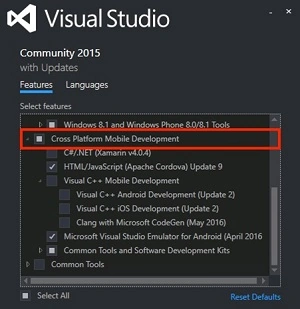
- Visual Studio installs all of the third-party components that you need to build your app.
How do we build Apache Cordova Apps?
You can start building Mobile using Apache Cordova.
Now let's get started with the following steps.
Step 1. Create a Project.
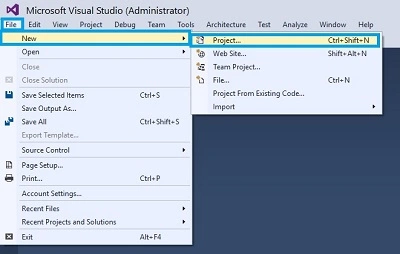
Open Visual Studio 2015 and Click File -> New -> Project Option for New Apache Cordova App.
Step 2. Giving the Project Name.
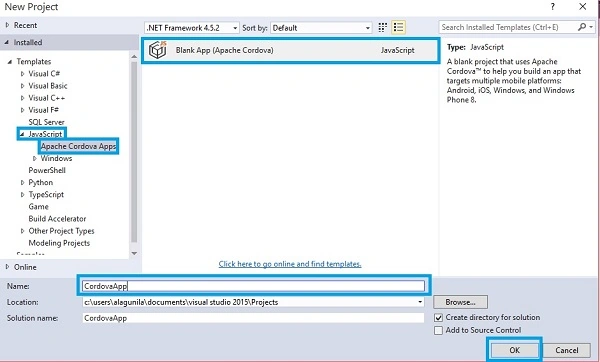
Then, a New Project Window will open, there you can select an Installed -> Template -> Java Script -> Apache Cordova Apps -> Blank App (Apache Cordova).
Type Project Name CordovaApp and click the OK button
Step 3. Solution Bar.
After we create the project, our solution should resemble the following.
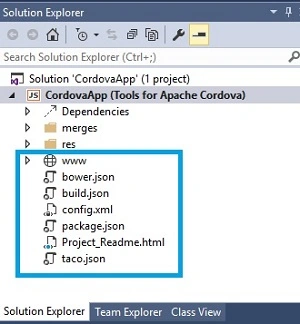
This table gives the basic idea of how we might use each one.
| File | Why is it in your project? |
| bower.json | This file manages the Bower package dependencies of our app. |
| build.json | This file contains parameters that Visual Studio uses to build a signed Android package. |
| config.xml | Contains the settings of our app. |
| taco.json | Defines which version of the Cordova CLI Visual Studio is used to build the project. |
Step 4. Run the Application.
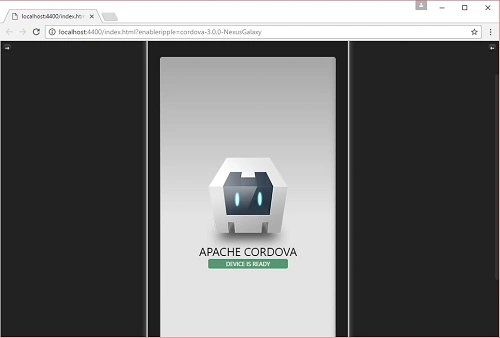
Now we are ready to run our Project, So Click the Ripple – Nexus (Galaxy) to run the Application. (Apache Ripple is a free mobile simulator).

Output 1. Run on Nexus Galaxy.
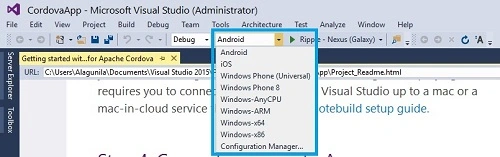
Output 2. Android.
We can also run our app in Android, iOS, and Windows device emulators. To see them all, choose any platform from the platform list on the Standard toolbar.
Conclusion
I hope you understand how to create an Apache Cordova App using Visual Studio and run it.
Harish PaudelPosted Aug 25, 2020, 7:01 AM
How to generate apk
Mehul PrajapatiPosted Feb 3, 2018, 1:20 AM
Hi, Alagunila. I have issue in cordova app development using visual studio 2015 and framework7. so i need your help.http://www.c-sharpcorner.com/forums/unicode-text-issue-with-html-sub-pages-in-cordova
Former memberPosted Dec 5, 2016, 4:05 AM
I want to learn mobile apps development using VS IDE . so please give me few relevant link which guide me or help me to start mobile apps development with apache cordova and ionic.
Kaushik DhameliyaPosted Nov 25, 2016, 1:28 AM
Request One Article for Build application and live reload application
Selva GanapathyPosted Nov 4, 2016, 2:34 AM
Good one....................
Thennarasu NPosted Nov 2, 2016, 4:27 AM
Nice article
Hussain PatelPosted Nov 1, 2016, 11:43 PM
Nice article